
POLVCDG BDAMX-1FMC82
POLVCDG Bone Conduction Headphones User Manual
Model: BDAMX-1FMC82
Introduction
Thank you for choosing POLVCDG Bone Conduction Headphones. These open-ear headphones are designed to provide high-quality audio while maintaining environmental awareness, making them ideal for sports, workouts, hiking, and cycling. This manual will guide you through the setup, operation, and maintenance of your new headphones.
What's in the Box
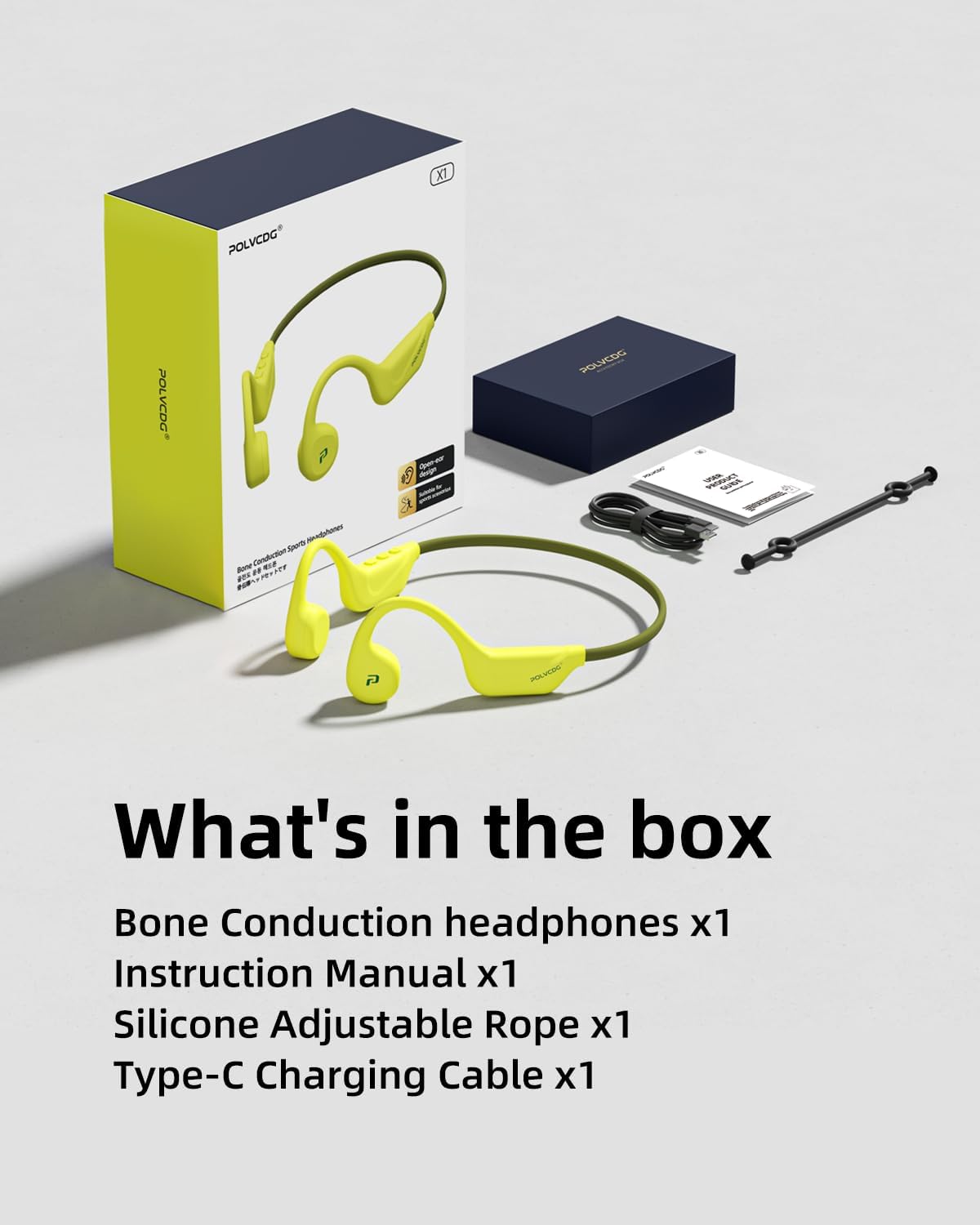
The package includes:
- Bone Conduction Headset x1
- Charging Cable x1 (Type-C)
- Adjustable Elastic Band x1
- User Manual x1
Setup Guide
1. Charging the Headphones
Before first use, fully charge your headphones. Locate the Type-C charging port on the headphones. Connect the provided Type-C charging cable to the port and the other end to a USB power source. A full charge takes approximately 2 hours and provides up to 10 hours of use.

Figure 1: Type-C Charging Port
2. Powering On/Off
To power on, press and hold the power button (located on the right side module) until the LED indicator lights up. To power off, press and hold the power button again until the LED indicator turns off.
3. Bluetooth Pairing
- Ensure the headphones are powered off.
- Press and hold the power button for approximately 5-7 seconds until the LED indicator flashes red and blue alternately, indicating pairing mode.
- On your device (smartphone, tablet, etc.), enable Bluetooth and search for available devices.
- Select "POLVCDG BDAMX-1FMC82" (or similar name) from the list.
- Once connected, the LED indicator will turn solid blue.
The headphones support connection to two devices simultaneously. After pairing with the first device, disable Bluetooth on that device, then pair with the second device. Re-enable Bluetooth on the first device, and the headphones should connect to both.
Operating Instructions
Wearing the Headphones
Place the headphones with the transducers resting on your cheekbones, just in front of your ears. The band should wrap around the back of your head. Adjust for a comfortable and secure fit. The flexible titanium frame adapts to various head shapes.

Figure 2: Proper Wearing Position
Button Functions
| Button/Action | Function |
|---|---|
| Power Button (Long Press) | Power On/Off, Enter Pairing Mode |
| Volume Up (+) | Increase Volume |
| Volume Down (-) | Decrease Volume |
| Multi-function Button (Single Press) | Play/Pause Music, Answer/End Call |
| Multi-function Button (Double Press) | Next Track |
| Multi-function Button (Triple Press) | Previous Track |
| Multi-function Button (Long Press) | Activate Voice Assistant |
Call Functions
The built-in microphone with ENC call noise reduction ensures clear communication. Use the multi-function button to manage calls as described in the table above.
Maintenance and Care
- Cleaning: Wipe the headphones with a soft, damp cloth. Do not use harsh chemicals or abrasive materials.
- Water Resistance: These headphones are IPX6 waterproof, meaning they are resistant to sweat and rain. They are not suitable for swimming or submersion in water. Ensure the charging port cover is securely closed before exposure to moisture.
- Storage: Store the headphones in a cool, dry place away from direct sunlight and extreme temperatures.
- Battery Care: To prolong battery life, avoid fully discharging the headphones frequently. Charge them regularly, even if not in use for extended periods.

Figure 3: IPX6 Water Resistance
Troubleshooting
| Problem | Possible Cause | Solution |
|---|---|---|
| Headphones won't turn on. | Low battery. | Charge the headphones fully. |
| Cannot pair with device. | Headphones not in pairing mode; Bluetooth off on device; device too far. | Ensure headphones are in pairing mode (flashing red/blue). Turn on Bluetooth on your device. Move headphones closer to the device. |
| No sound or low volume. | Volume too low; headphones not connected; audio source issue. | Increase volume on both headphones and device. Re-pair headphones. Check audio source on your device. |
| Sound quality is poor. | Improper fit; interference. | Adjust the position of the transducers on your cheekbones. Move away from sources of strong electromagnetic interference. |
Specifications
- Model Name: BDAMX-1MN82 (Note: Item model number is BDAMX-1FMC82)
- Connectivity Technology: Wireless (Bluetooth 5.4)
- Ear Placement: Open Ear
- Form Factor: Over Ear
- Noise Control: Environmental Noise Cancellation (ENC)
- Water Resistance Level: IPX6 (Water Repellent)
- Battery Life: Up to 10 hours
- Charging Time: Approximately 2 hours
- Charging Port: Type-C
- Material: Plastic, Rubber
- Item Weight: 6.7 ounces
- Product Dimensions: 5.27 x 2.32 x 6.1 inches
- Frequency Response: 20 KHz
- Sensitivity: 90 dB
- Impedance: 8 Ohm
Warranty and Support
For any issues or inquiries, our customer support team is committed to assisting you within 12 hours. Please refer to the contact information provided in your product packaging or visit the official POLVCDG website for support.
This product comes with a standard manufacturer's warranty. Please retain your proof of purchase for warranty claims.
Visit the POLVCDG Store for more information and products.
Important Notes
- These headphones do not support memory card playback.
- Not suitable for swimming or prolonged underwater use.
Related documentsBDAMX-1FMC82


Ask a question about this manual
Ask about setup, troubleshooting, compatibility, parts, safety, or missing instructions. Manuals+ will review the question and use this page’s manual context to help answer it.