
Welcome
Thank you for choosing the Marsail Electric Standing Desk with Drawers. This manual provides essential information for the safe assembly, operation, and maintenance of your new desk. Please read it thoroughly before use and retain it for future reference.
Important Safety Information
- Weight Limit: Do not exceed the maximum weight capacity of 154 lbs (70 kg) on the desk surface.
- Stability: Ensure the desk is placed on a level surface and is stable before use.
- Anti-Drop Edge: Utilize the anti-drop edge feature to prevent items from falling off the desk during height adjustments.
- Children and Pets: Keep children and pets away from the desk during operation to prevent injury.
- Power Cord: Ensure the power cord is not pinched or damaged. Do not operate the desk with a damaged cord or plug.
- Liquid Spills: Avoid spilling liquids on the control panel or motor components.
- Maintenance: Refer to the maintenance section for proper cleaning and care.
Package Contents
Please verify that all components are present before beginning assembly. If any parts are missing or damaged, contact customer support.
- Desktop Surface (with integrated drawers and monitor stand)
- Desk Legs (2)
- Foot Pads (2)
- Control Panel
- Power Adapter and Cable
- Assembly Hardware (screws, bolts, etc.)
- Assembly Tools (if included, otherwise hand tools are required)
- User Manual (this document)
Assembly Instructions
Assembly typically requires approximately 1.5 hours for one person. It is recommended to have a clear, spacious area for assembly.
Step 1: Prepare the Desktop
Carefully unbox the desktop surface. Place it upside down on a soft, clean surface to prevent scratches.
Step 2: Attach the Desk Legs
Align the desk legs with the pre-drilled holes on the underside of the desktop. Secure them using the provided screws and tools. Ensure all connections are tight and stable.
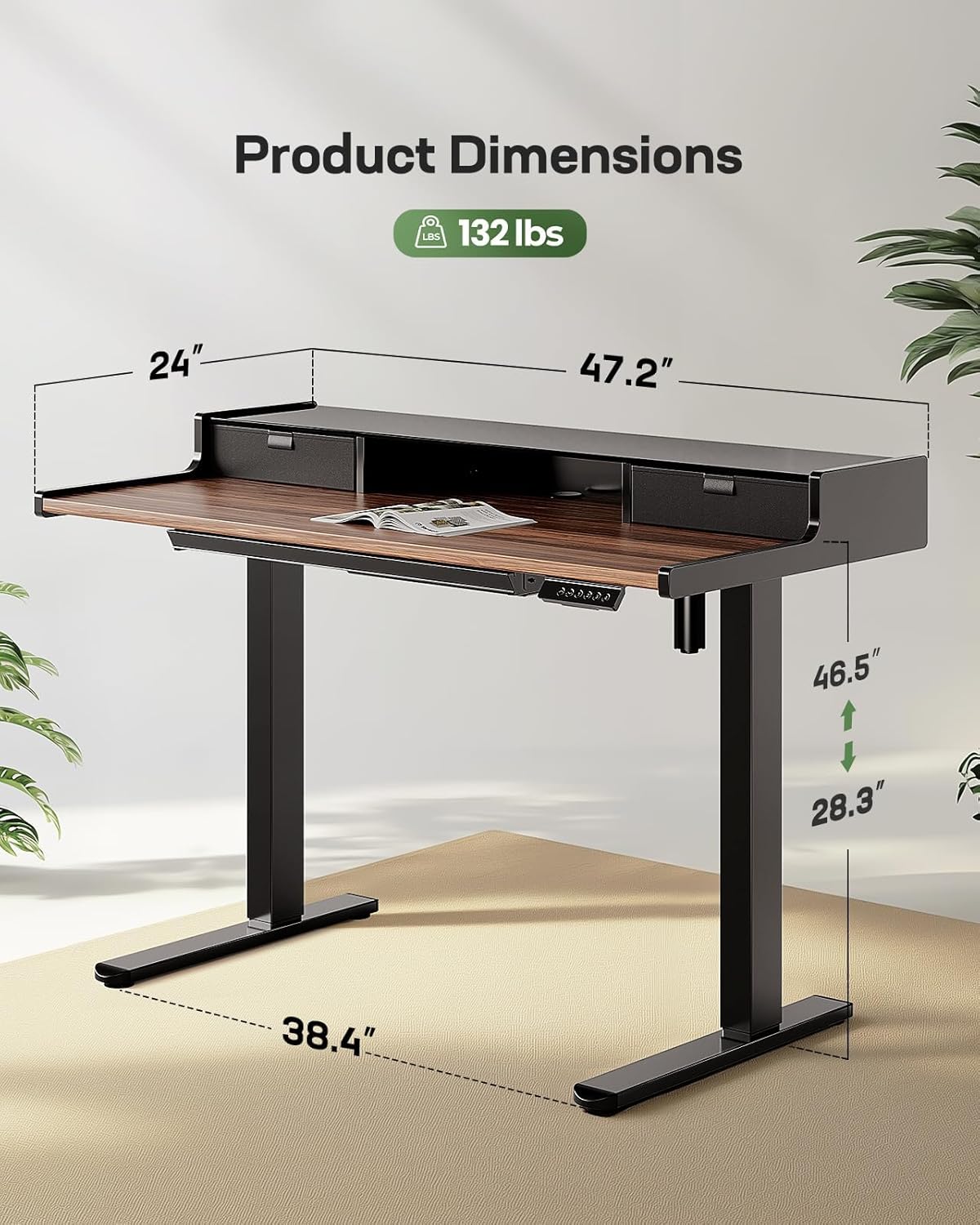
Image: Product Dimensions. This diagram illustrates the overall dimensions of the desk, including its adjustable height range and desktop measurements, which are crucial for assembly and placement.
Step 3: Install the Control Panel
Mount the control panel to the designated area on the front edge of the desk, typically on the right side. Connect the motor cables and power cable to the control panel as indicated in the detailed assembly guide (not provided in this summary).
Step 4: Cable Management
Organize and secure all cables using the provided cable ties or management clips to prevent tangling and ensure safe operation.
Step 5: Final Placement
Carefully flip the desk upright and place it in its desired location. Ensure there is sufficient clearance around the desk for height adjustments.
Operating Instructions
Height Adjustment
The Marsail Electric Standing Desk allows for smooth height adjustments between 28.3 inches (72 cm) and 46.5 inches (118 cm).
- Manual Adjustment: Use the up and down arrow buttons on the control panel to raise or lower the desk to your desired height.
- Preset Heights: The desk features 4 programmable memory preset buttons.
- Adjust the desk to your preferred height using the arrow buttons.
- Press and hold one of the numbered preset buttons (1, 2, 3, or 4) until the display flashes or beeps, indicating the height has been saved.
- To recall a saved height, simply press the corresponding numbered button. The desk will automatically move to that position.

Image: Height Adjustment Range. This image demonstrates the full range of height adjustment for the desk, from its lowest sitting position to its highest standing position.

Image: Control Panel. A detailed view of the desk's control panel, highlighting the buttons for manual height adjustment and the four programmable memory presets.
Drawer Usage
The desk is equipped with two upper drawers and one lower 4-zone drawer for organized storage.
- Upper Drawers: Ideal for smaller items like pens, notebooks, or personal accessories.
- Lower 4-Zone Drawer: Designed with compartments to help organize larger items such as laptops, tablets, and other office supplies.
- Ensure drawers are fully closed before adjusting desk height to prevent items from shifting or falling.
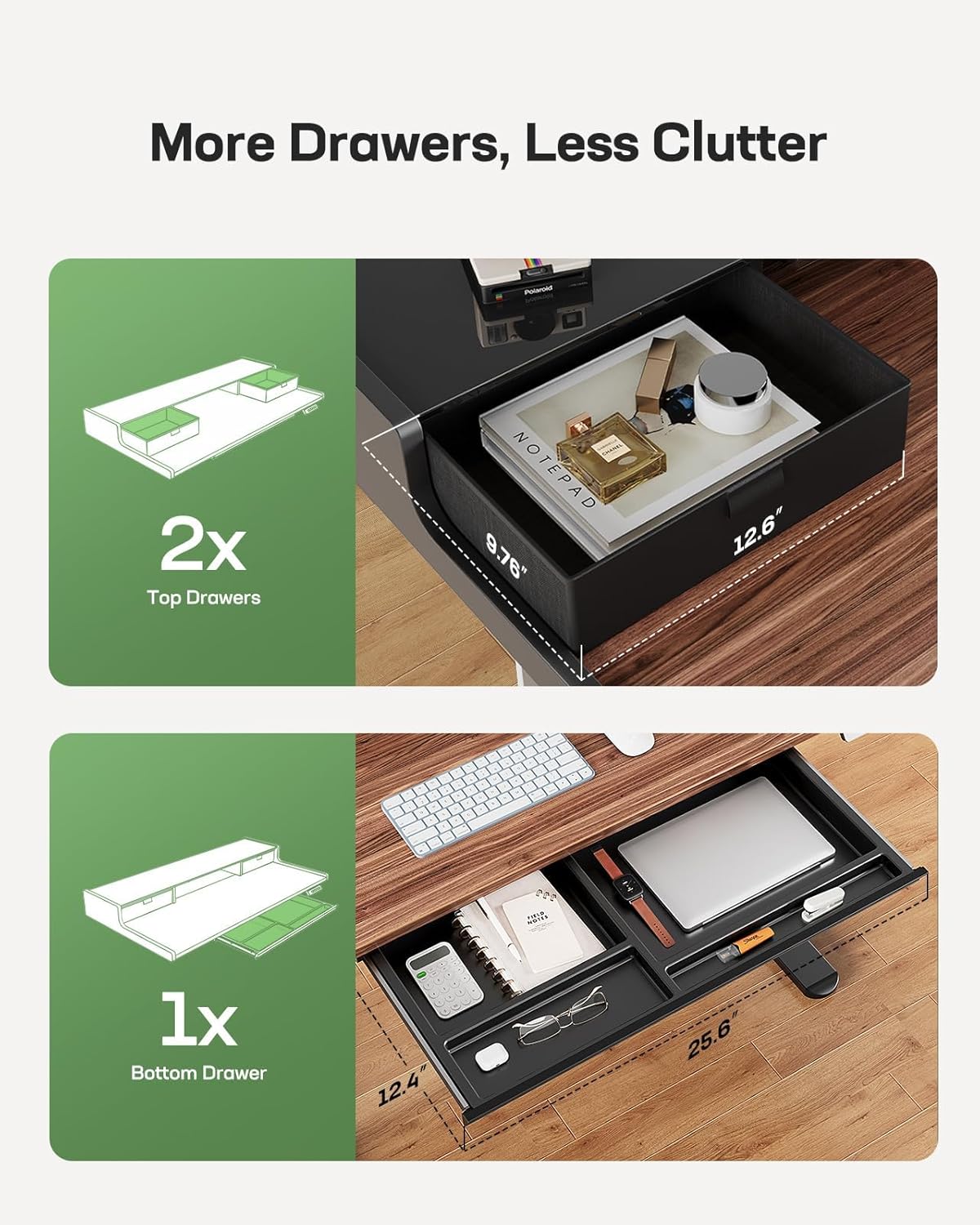
Image: Drawer Configuration. This illustration details the storage options, showing the two upper drawers and the larger, compartmentalized lower drawer, along with their respective dimensions.

Image: Organized Lower Drawer. A close-up view demonstrating the practical organization of the lower 4-zone drawer, showcasing how different items can be stored efficiently.
Monitor Stand
The integrated glass monitor stand elevates your screen by 5.2 inches, promoting better posture and reducing neck and eye strain. The tempered glass surface is scratch-resistant and easy to clean.
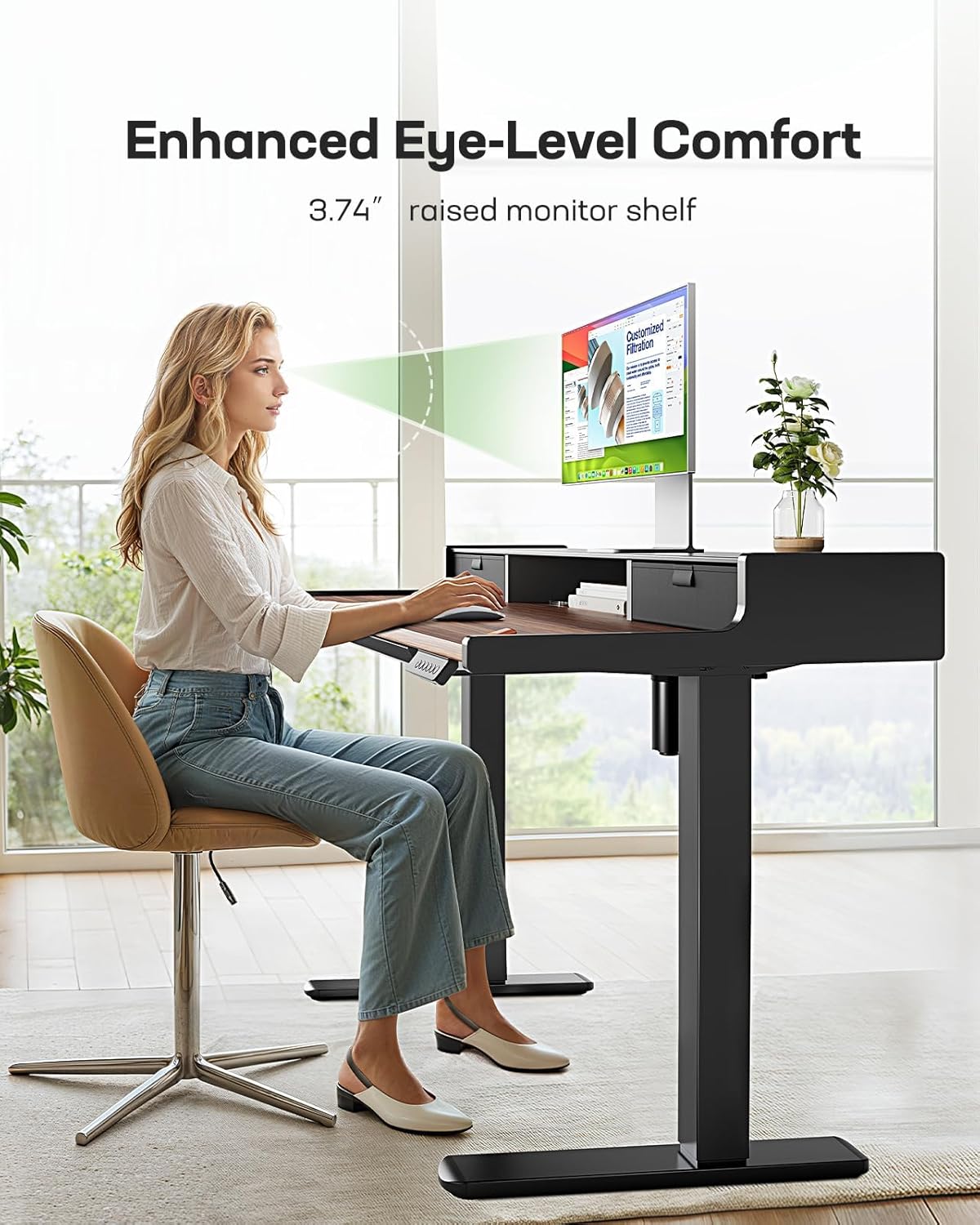
Image: Enhanced Eye-Level Comfort. This image illustrates the ergonomic benefit of the integrated monitor stand, showing how it helps maintain proper posture and reduces strain.

Image: Sturdy Tempered Glass. A detailed view of the monitor stand's tempered glass surface, emphasizing its durability and ease of maintenance.
Maintenance
- Cleaning: Wipe the desk surfaces with a damp cloth for general cleaning. For a thorough clean, follow with a dry cloth. Avoid abrasive cleaners or harsh chemicals that may damage the finish.
- Inspection: Periodically check all screws and connections to ensure they remain tight. Retighten if necessary.
- Motor Care: Keep the motor and electrical components free from dust and moisture. Do not attempt to lubricate or disassemble the motor.
Troubleshooting
- Desk Not Moving:
- Check if the power cable is securely plugged into both the desk and the wall outlet.
- Ensure there are no obstructions preventing the desk from moving.
- If the control panel display shows an error code, refer to the full product manual (if available) or contact customer support.
- Uneven Height Adjustment:
- Ensure the desk is on a level surface.
- Check that all leg connections are securely tightened.
- Noise During Operation:
- A slight motor sound is normal during adjustment. Excessive or unusual noise may indicate an issue. Check for loose components or obstructions.
Product Specifications
| Brand | Marsail |
| Model Number | MSESD55WN-US-1 |
| Product Dimensions (D x W x H) | 23.62"D x 47.24"W x 28.35"H |
| Adjustable Height Range | 28.3" - 46.5" |
| Maximum Weight Capacity | 154 lbs (70 kg) |
| Number of Drawers | 3 (2 upper, 1 lower 4-zone) |
| Monitor Stand Elevation | 5.2" |
| Material | Wood (top), Metal (base), Tempered Glass (monitor stand) |
| Lifting Mechanism | Electric |
| Preset Heights | 4 |
| Product Weight | 63.3 lbs |
| Color | Black Walnut Brown |
Warranty Information
The Marsail Electric Standing Desk comes with a Limited Warranty. The manufacturer provides a 3-year warranty on parts. Please retain your proof of purchase for warranty claims. For specific terms and conditions, refer to the warranty card included with your product or contact Marsail customer support.
Customer Support
If you have any questions, require assistance with assembly, or encounter any issues with your Marsail Electric Standing Desk, please contact our customer support team. For the most up-to-date contact information, please visit the official Marsail website or refer to your purchase documentation.
We are committed to providing excellent service and support for your product.


