
GNCC GC3-2P
GNCC GC3-2P 1080P Indoor Security Camera Instruction Manual
Model: GC3-2P
Introduction
The GNCC GC3-2P Indoor Security Camera provides reliable home monitoring with 1080P Full HD video, motion detection, two-way audio, and night vision capabilities. Designed for easy installation and integration with smart home systems, this camera helps you keep an eye on your home, pets, or loved ones. It connects exclusively to 2.4GHz Wi-Fi networks and offers flexible storage options including local microSD card storage and optional cloud services.
What's in the Box
Upon unboxing your GNCC GC3-2P Indoor Security Camera, you should find the following components:
- GNCC GC3 Indoor Camera Unit
- Power Cable (2m)
- Power Adapter
- Wall Mounting Kit (screws, anchors, adhesive)
- User Manual
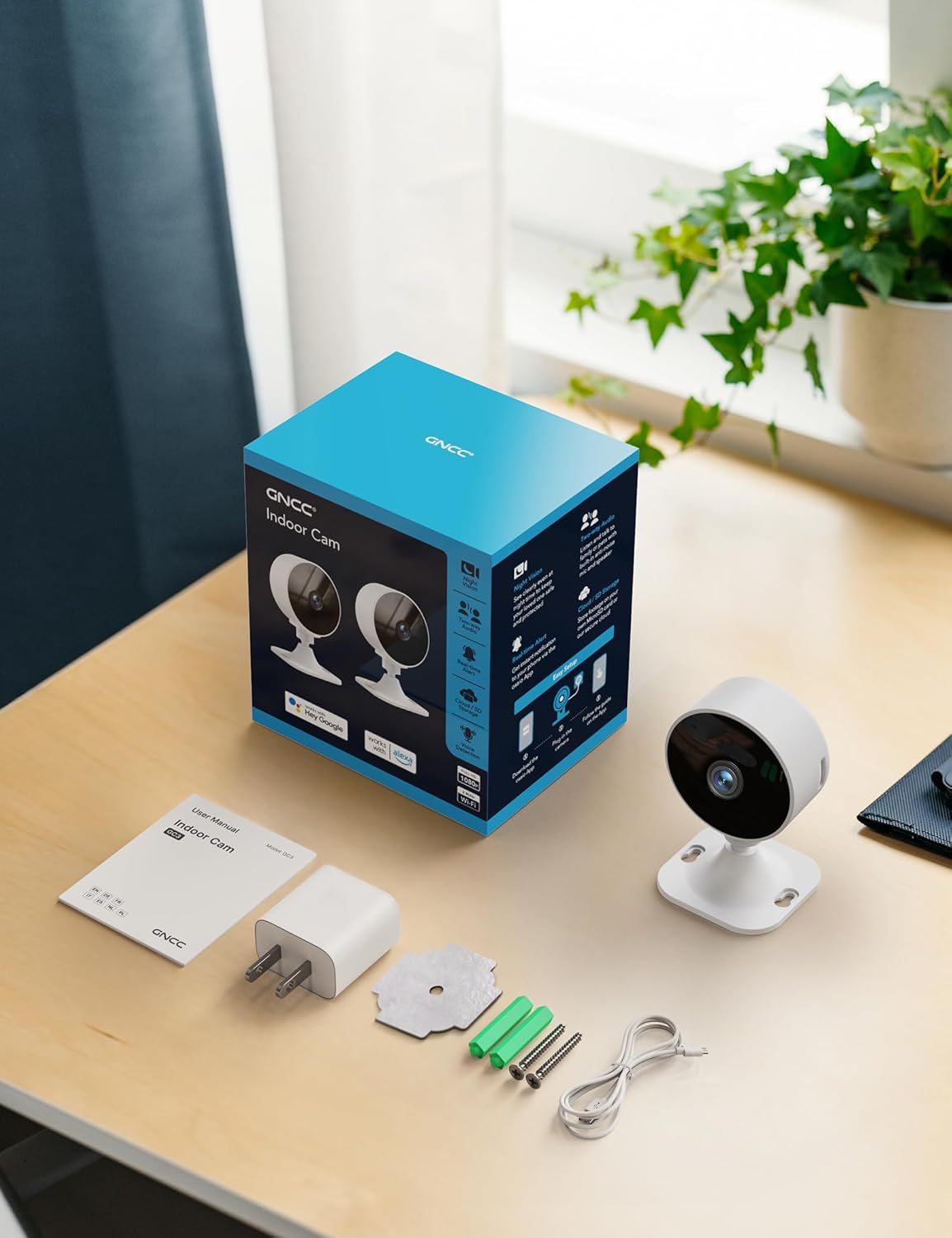
Image: All components included in the GNCC GC3-2P Indoor Security Camera package.
Product Overview
The GNCC GC3-2P camera is a compact and versatile indoor security solution. It features a 1080P Full HD lens for clear video, infrared night vision for monitoring in low-light conditions, and a built-in microphone and speaker for two-way audio communication. The camera's base allows for flexible manual rotation to adjust the viewing angle. It supports both local microSD card storage (up to 128GB, not included) and cloud storage options.

Image: Overview of the GNCC Indoor Camera's main features.
Key Features:
- 1080P Full HD Video: Captures clear and detailed footage.
- 2.4GHz Wi-Fi Connectivity: Connects to your home network for remote access. (Note: 5GHz Wi-Fi is not supported.)
- Infrared Night Vision: Provides clear black-and-white images in darkness up to 15 meters.
- Motion & Sound Detection: Sends real-time alerts to your smartphone.
- Two-Way Audio: Allows for listening and speaking through the camera.
- Flexible Storage: Supports microSD card (up to 128GB) and optional cloud storage.
- Manual Rotation: Easily adjust the camera angle by hand.
- Smart Integration: Compatible with Alexa-enabled devices.

Image: Clear Night Vision for Peaceful Nights.

Image: Two-Way Audio Lets You Speak in Real Time.
Setup Instructions
Follow these steps to set up your GNCC GC3-2P Indoor Security Camera:
- Power On: Connect the provided 2m power cord to the camera's USB-C port and plug the power adapter into a wall outlet. The camera will power on and a red indicator light will flash, indicating it's ready for connection.
- Download the App: Download the "OsaiO" app from the Google Play Store or Apple App Store. You can scan the QR code provided on the product packaging for quick access.
- Create/Log In: Open the OsaiO app and create a new account or log in if you already have one.
- Add Device: In the app, tap the '+' icon to add a new device. Follow the on-screen instructions to select your camera model.
- Connect to Wi-Fi: Ensure your smartphone is connected to a 2.4GHz Wi-Fi network. The camera only supports 2.4GHz Wi-Fi. If your router combines 2.4GHz and 5GHz, ensure your phone is on the 2.4GHz band during setup. Bring the camera close to the router for optimal initial connection. Enter your Wi-Fi password into the app.
- Scan QR Code: The app will generate a QR code. Hold your camera up to your phone screen to scan the QR code. You will hear a confirmation sound from the camera once it successfully scans.
- Completion: Once connected, the camera's indicator light will turn solid white. You can then name your device and begin monitoring.
- Mounting (Optional): The camera can be placed on any flat surface. For wall or ceiling mounting, use the provided mounting kit (screws, anchors, or adhesive) to secure the base, then attach the camera. The camera head can be manually rotated to achieve the desired viewing angle.

Image: App-guided setup process for the GNCC Indoor Camera.
Operating Instructions
Live View and Monitoring:
Once your camera is set up and connected, open the OsaiO app to access the live feed. You can view real-time video from anywhere with an internet connection.

Image: Real-time monitoring remote live view on a smartphone.
Motion and Sound Detection:
The camera is equipped with AI-powered motion and sound detection. When activity is detected, you will receive instant notifications on your smartphone via the OsaiO app. You can customize alert sensitivity and schedules within the app settings.

Image: Motion & Sound Detection with AI-Powered Alerts.
Two-Way Audio:
Use the two-way audio feature to communicate with people or pets in the camera's vicinity. Tap the microphone icon in the live view to speak, and ensure your phone's volume is up to hear responses. Remember to remove any protective film from the camera's microphone and allow microphone access in the app.
Storage Options and Playback:
The camera supports two storage methods:
- MicroSD Card: Insert a microSD card (up to 128GB, not included) into the designated slot on the camera for local storage of recordings.
- Cloud Storage: An optional subscription service is available for cloud storage, providing convenient backup and access to your recordings.
To view recorded footage, navigate to the playback section in the OsaiO app. You can browse events by date and time.

Image: Playback Ready with SD Card or Cloud Backup options.
Smart Home Integration (Alexa):
The GNCC GC3-2P camera is compatible with Amazon Alexa. To integrate:
- Open the Alexa app and log in.
- Tap "More" in the lower right corner, then choose "Skills & Games."
- Tap the search icon and search for "OsaiO."
- Tap "OSAIo" and click "ENABLE TO USE."
- Sign in to your OsaiO account.
- Tap "Authorize" and then "Close."
- Tap "Cancel" and return to the home page.
You can now use voice commands like "Alexa, show the office camera" to view the live feed on compatible Alexa devices.
Video: Instructions on how to connect the GNCC camera to Alexa for voice control.
Privacy Mode and Sharing:
- Privacy Mode: Activate privacy mode in the app to turn off the camera with a single tap, ensuring no recordings or sharing occur.
- Family Sharing: Share camera access with up to 3 family members through the app, allowing multiple users to monitor the feed.

Image: Advanced operating features including privacy and sharing.
Maintenance
- Cleaning: Gently wipe the camera lens and body with a soft, dry cloth. Avoid using harsh chemicals or abrasive materials.
- Firmware Updates: Regularly check the OsaiO app for available firmware updates to ensure your camera has the latest features and security enhancements.
- Placement: Ensure the camera is placed in a stable location, away from direct sunlight, heat sources, and moisture.
Troubleshooting
- Camera Not Connecting to Wi-Fi:
- Ensure your Wi-Fi network is 2.4GHz. The camera does not support 5GHz.
- Verify the Wi-Fi password is entered correctly in the app.
- Place the camera closer to your Wi-Fi router during setup.
- Reset the camera using the reset button on the back and try the setup process again.
- No Motion/Sound Alerts:
- Check the app's settings to ensure motion and sound detection are enabled.
- Adjust the sensitivity levels for detection in the app.
- Verify that app notifications are enabled on your smartphone.
- Poor Two-Way Audio Quality:
- Remove any protective film from the camera's microphone.
- Ensure the OsaiO app has microphone access permissions on your phone.
- Increase your phone's volume.
- Check for any obstructions near the camera's microphone or speaker.
- Video Playback Issues:
- Ensure a microSD card is properly inserted and formatted, or that your cloud storage subscription is active.
- Check your internet connection stability for cloud playback.
Specifications
| Feature | Specification |
|---|---|
| Model Name | GC3-2P |
| Indoor/Outdoor Usage | Indoor |
| Video Capture Resolution | 1080p |
| Connectivity Protocol | Wi-Fi (2.4GHz Only) |
| Connectivity Technology | Wired |
| Power Source | Corded Electric |
| Night Vision Range | 15 Meters |
| Storage Options | MicroSD (up to 128GB), Cloud Storage (optional subscription) |
| Controller Type | Amazon Alexa |
| Mounting Type | Tabletop Mount |
| Item Dimensions (L x W x H) | 2.56 x 2.76 x 3.54 inches |
| Item Weight | 5.4 ounces |
| Color | White |
Warranty and Support
The GNCC GC3-2P Indoor Security Camera comes with a 12-month warranty from the manufacturer, Kalado. For technical support, troubleshooting assistance, or warranty claims, please refer to the contact information provided in your product packaging or visit the official GNCC website.
Manufacturer: Kalado
Email: ic.support@gncchome.com
Related documentsGC3-2P


Ask a question about this manual
Ask about setup, troubleshooting, compatibility, parts, safety, or missing instructions. Manuals+ will review the question and use this page’s manual context to help answer it.