1. Important Safety Information
Please read all instructions carefully before using your GarveeTech Portable Air Conditioner. Keep this manual for future reference.
- Ensure the unit is placed on a stable, level surface to prevent tipping.
- Do not operate the unit with a damaged cord or plug. If the power cord is damaged, it must be replaced by the manufacturer or a qualified service agent.
- Do not block air inlets or outlets. Maintain at least 20 cm (8 inches) clearance from walls and other objects.
- Always unplug the unit before cleaning or performing any maintenance.
- Do not use the unit in wet areas such as bathrooms or laundries.
- This appliance is not intended for use by persons (including children) with reduced physical, sensory or mental capabilities, or lack of experience and knowledge, unless they have been given supervision or instruction concerning use of the appliance by a person responsible for their safety.
- Children should be supervised to ensure that they do not play with the appliance.
- The unit contains R32 refrigerant. Servicing should only be performed by authorized personnel.
2. Product Overview
The GarveeTech 14,000 BTU Portable Air Conditioner is a versatile 3-in-1 unit designed for cooling, dehumidifying, and fan-only operation in spaces up to 750 sq.ft.
Key Features:
- Powerful Cooling: 14,000 BTU (ASHRAE) for rapid cooling of 550-750 sq.ft. areas (61°F-88°F) with 400m³/h airflow.
- 3-in-1 Functionality: Air Conditioner, 3-Speed Fan, and Dehumidifier (removes 90 pt/day moisture).
- Ultra-Quiet Operation: Normal mode: 53 dB; Sleep mode: <50 dB.
- Flexible Drainage & Mobility: Manual/continuous drainage options. Equipped with heavy-duty 360° wheels and side handles for easy relocation.
- Intuitive Control System: Top LED touch panel and a 26 ft remote control. Features a 24-hour timer.
- Easy Maintenance: Removable and washable filter.
- Comprehensive Safety: Includes frost protection, overflow alarm, auto defrost, and a 3-minute compressor delay.
Product Components:
The package includes the portable air conditioner unit, a remote control, a window kit (slide bar, slide bar connector, exhaust pipe joint), and an exhaust hose.
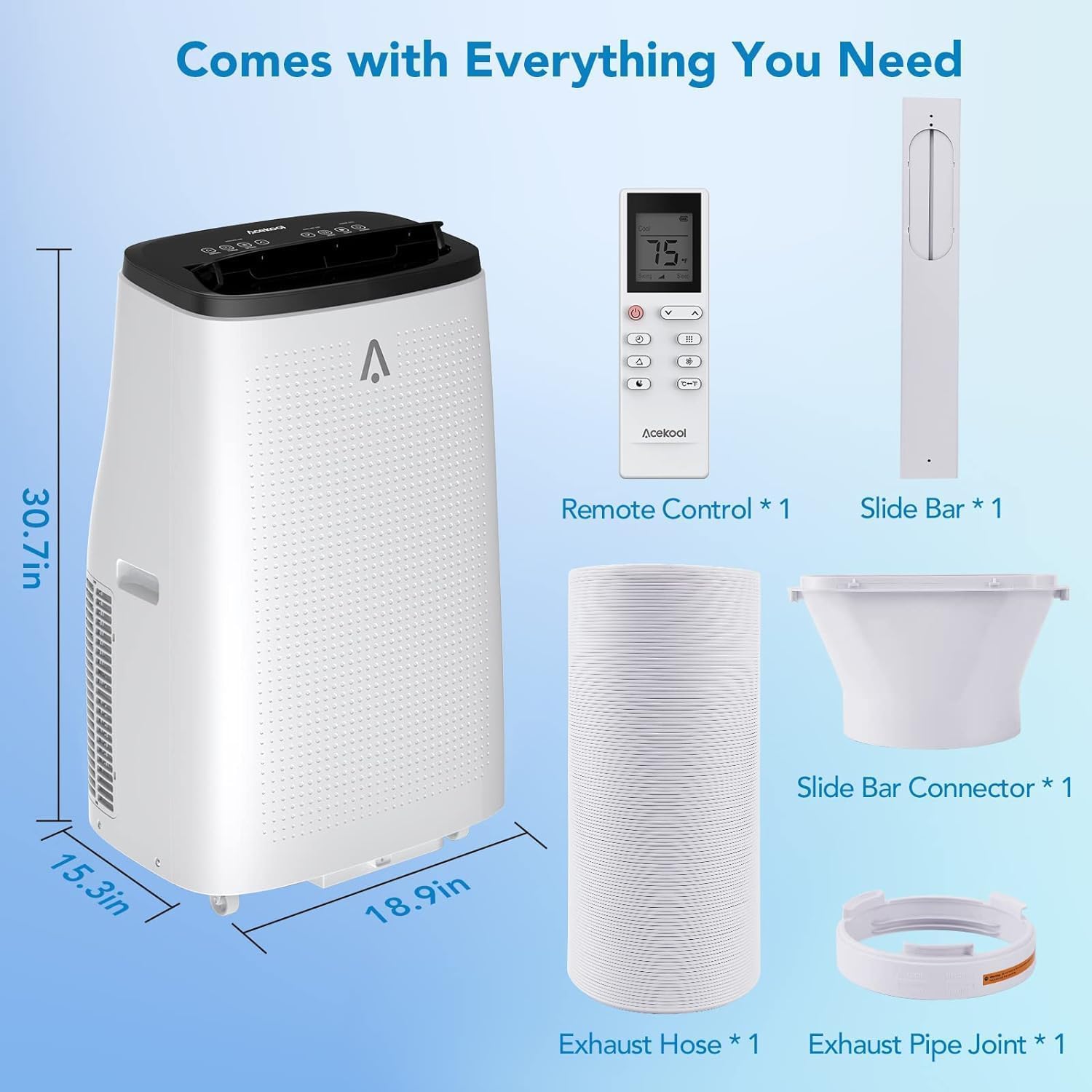
Figure 2.1: Included Components
Cooling Performance:

Figure 2.2: Cooling Coverage for Large Rooms
Dehumidification:

Figure 2.3: Automatic Dehumidify Technology
3. Setup and Installation
Proper installation is crucial for efficient operation. This unit includes a window kit for vertical or horizontal sliding windows.
Window Kit Installation:
- Assemble the window slide bar to fit your window opening.
- Stretch the exhaust hose (5.9 inches diameter) to its desired length.
- Connect the hose connector to one end of the exhaust hose by rotating it counter-clockwise.
- Attach the hose connector to the exhaust air outlet of the AC unit.
- Insert the exhaust hose adapter into the assembled window kit.
- Secure the window kit in your window frame, ensuring a tight seal to prevent air leakage.
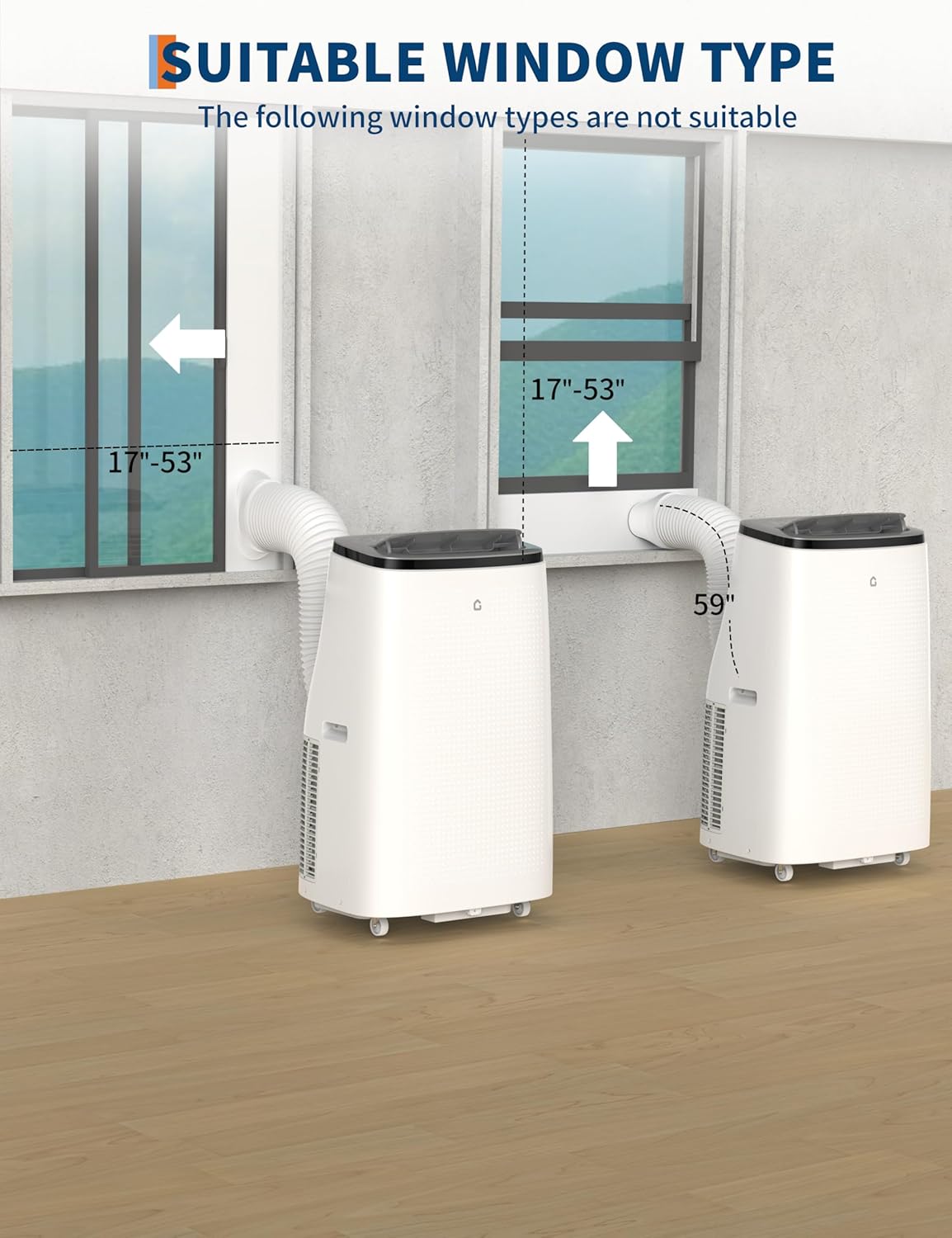
Figure 3.1: Suitable Window Types
Installation Video Tutorial:
Video 3.1: Installation Kit Tutorial for Portable Air Conditioners. This video demonstrates the step-by-step process of installing the window kit and exhaust hose for the portable air conditioner.
4. Operating Instructions
Your GarveeTech Portable Air Conditioner can be controlled via the LED touch panel on the unit or the included remote control.
Control Panel and Remote:

Figure 4.1: LED Touch Panel and Remote Control
Operating Modes:
- Cool Mode: Provides powerful cooling. Adjust temperature between 61°F and 88°F.
- Fan Mode: Circulates air without cooling. Choose from 3 fan speeds (High, Medium, Low).
- Dehumidifier Mode: Removes excess moisture from the air.
- Sleep Mode: Operates quietly (below 50 dB) for comfortable nighttime use. The unit will automatically adjust temperature and fan speed to maintain a comfortable sleeping environment.
Timer Function:
Set the 24-hour timer to automatically turn the unit on or off at your desired time.
General Operation Video:
Video 4.1: 14,000 BTU Cooling Power for 750 sq.ft Rooms, Multi-function. This video demonstrates the unit's cooling capabilities, remote control usage, LED display, and features like sleep mode and filter cleaning.
5. Maintenance
Regular maintenance ensures optimal performance and longevity of your air conditioner.
Filter Cleaning:
The unit features a removable and washable air filter. It is recommended to clean the filter every two weeks to maintain air quality and cooling efficiency.
- Turn off and unplug the air conditioner.
- Locate the air filter on the back of the unit.
- Gently pull out the filter.
- Wash the filter under running water with a mild detergent.
- Allow the filter to air dry completely before reinserting it into the unit.
Drainage:
The unit offers both manual and continuous drainage options for humid environments. Refer to the specific instructions in the full manual for connecting a drain hose for continuous drainage.
6. Troubleshooting
If you encounter issues with your air conditioner, refer to the following common problems and solutions:
| Problem | Possible Cause | Solution |
|---|---|---|
| Unit does not turn on | No power, power cord unplugged, circuit breaker tripped. | Check power connection, reset circuit breaker. |
| Unit not cooling effectively | Dirty air filter, blocked air vents, room too large, windows/doors open, exhaust hose not properly installed. | Clean air filter, clear vents, ensure room size is within capacity, close windows/doors, check exhaust hose installation. |
| Water leakage | Drain plug not properly sealed, internal water tank full (in dehumidifier mode). | Ensure drain plug is secure. If tank is full, empty it or connect continuous drainage. |
| Unit is noisy | Unit not on a level surface, internal components vibrating. | Place unit on a flat, stable surface. If noise persists, contact customer support. |
| Error codes displayed | Specific internal fault. | Refer to the full manual for specific error code meanings and solutions. If unresolved, contact customer support. |
For more detailed troubleshooting or issues not listed here, please contact GarveeTech customer support.
7. Specifications
| Feature | Specification |
|---|---|
| Model Number | 14K-6H5J-HY |
| Cooling Power | 14,000 BTU (ASHRAE) |
| Coverage Area | Up to 750 Sq.Ft |
| Functions | Cool, Dehumidifier, Fan |
| Dehumidification Capacity | 90 Pints/day |
| Airflow | 400m³/h |
| Noise Level (Normal) | 53 Decibels |
| Noise Level (Sleep Mode) | <50 Decibels |
| Refrigerant | R32 |
| Voltage | 115 Volts |
| Product Dimensions | 13"D x 13"W x 35"H |
| Item Weight | 81.8 pounds |
| Manufacturer | Dongguan JHS Electrical Co., Ltd. |
8. Warranty and Support
Your GarveeTech Portable Air Conditioner comes with a Lifetime Warranty.
For any installation issues, operational questions, or warranty claims, please contact GarveeTech customer service. Our support team is available to assist you.
You can find contact information on the official GarveeTech website or through your purchase platform.


