1. Important Safety Information
Please read all instructions carefully before using this monitor. Keep this manual for future reference.
- Do not expose the monitor to rain or moisture to prevent fire or shock hazards.
- Do not open the monitor casing. There are no user-serviceable parts inside. Refer all servicing to qualified service personnel.
- Place the monitor on a stable, flat surface to prevent it from falling.
- Ensure proper ventilation around the monitor. Do not block ventilation openings.
- Use only the power adapter supplied with the monitor.
- Disconnect the power plug from the outlet if the monitor will not be used for an extended period.
2. Package Contents
Verify that all items are present in your package:
- CRUA 34-inch Gaming Monitor
- DP Cable
- Monitor Base and Support
- User Manual (this document)
- Power Adapter
3. Setup Instructions
3.1 Assembling the Stand
- Carefully remove the monitor from its packaging, keeping it protected on a soft surface.
- Attach the monitor support arm to the monitor panel.
- Secure the base to the support arm using the provided screws.
- Place the assembled monitor on a stable desk.
3.2 Connecting Your Monitor
The monitor features multiple input ports for versatile connectivity.

Image: Rear panel connectivity options.
- HDMI Connection: Connect one end of an HDMI cable (not included) to your computer's HDMI output and the other end to one of the monitor's HDMI 2.0 ports.
- DisplayPort (DP) Connection: Connect one end of the supplied DP cable to your computer's DP output and the other end to one of the monitor's DP 1.4 ports.
- Audio Output: For external speakers or headphones, connect a 3.5mm audio cable (not included) from your audio device to the monitor's 3.5mm Audio Out port. Note: This monitor does not have built-in speakers.
- Power Connection: Connect the power adapter to the monitor's DC input port, then plug the adapter into a power outlet.
3.3 Wall Mounting
This monitor supports VESA wall mounting (100mm x 100mm) for flexible installation.

Image: VESA mount compatibility.
- Remove the stand from the monitor.
- Attach a VESA-compatible wall mount bracket (not included) to the monitor using appropriate screws.
- Follow the instructions provided with your wall mount for secure installation.
4. Operating Instructions
4.1 Power On/Off
Press the power button located on the monitor to turn it on or off. The power indicator light will illuminate when the monitor is on.
4.2 On-Screen Display (OSD) Menu
Use the control buttons (typically located on the back or bottom of the monitor) to navigate and adjust settings in the OSD menu. Common settings include:
- Picture Settings: Brightness, Contrast, Sharpness, Color Temperature.
- Input Source: Select between HDMI and DisplayPort inputs.
- Display Settings: Aspect Ratio, Overdrive.
- Audio Settings: Volume for the 3.5mm audio output.
- Game Settings: FreeSync, Crosshair, Response Time.
4.3 Optimizing Display Performance
This monitor offers advanced features for an enhanced viewing experience:
- 120Hz Refresh Rate: For smooth visuals, especially in fast-paced content. Ensure your graphics card and system settings are configured to output at 120Hz.
- AMD FreeSync: Activate FreeSync in the OSD menu and your graphics card control panel to synchronize the monitor's refresh rate with your GPU's frame rate, reducing screen tearing and stuttering.
- WQHD (3440x1440P) Resolution: Provides sharp detail and expanded workspace.
- IPS Panel with Wide Color Gamut: Enjoy accurate colors with 130% sRGB and 98% DCI-P3 coverage.
- Blue Light Filter: Enable this feature in the OSD menu to reduce eye strain during long viewing sessions.

Image: Visual representation of 120Hz refresh rate and AMD FreeSync benefits.
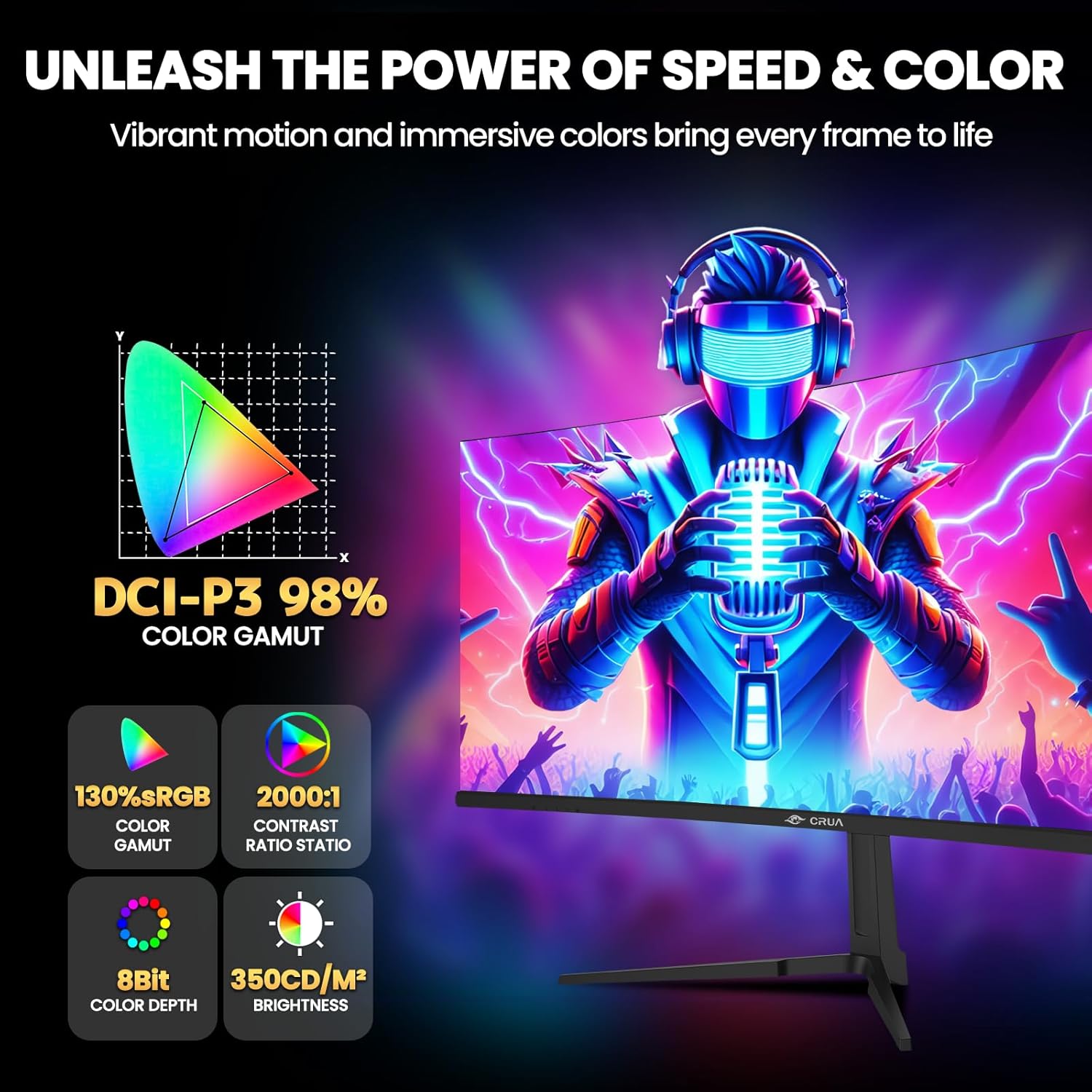
Image: Key display specifications for color and brightness.
5. Maintenance
Proper maintenance ensures the longevity and optimal performance of your monitor.
- Cleaning the Screen: Gently wipe the screen with a soft, lint-free cloth. For stubborn marks, dampen the cloth slightly with water or a non-ammonia, non-alcohol based screen cleaner. Do not spray cleaner directly onto the screen.
- Cleaning the Casing: Use a soft, dry cloth to wipe the monitor casing. Avoid using abrasive cleaners or solvents.
- Ventilation: Ensure the ventilation openings on the monitor are clear of dust and obstructions to prevent overheating.
- Power Off: Always turn off and unplug the monitor before cleaning or when not in use for extended periods.
6. Troubleshooting
If you encounter issues with your monitor, refer to the following common solutions:
| Problem | Possible Cause | Solution |
|---|---|---|
| No image on screen | No power; Incorrect input source; Loose video cable | Check power connection; Select correct input source via OSD; Ensure video cable is securely connected. |
| Image is blurry or distorted | Incorrect resolution; Graphics driver issue | Set display resolution to 3440x1440P; Update graphics drivers. |
| Screen flickering | Refresh rate mismatch; Cable issue; FreeSync not enabled/compatible | Ensure 120Hz refresh rate is set; Try a different video cable; Enable AMD FreeSync if your GPU supports it. |
| No audio from 3.5mm port | External speakers/headphones not connected; Volume too low; Audio source issue | Check external audio device connection; Adjust volume in OSD and computer; Verify audio output from source device. |
7. Specifications
Detailed technical specifications for the CRUA 34-inch Curved Gaming Monitor (CR340E):
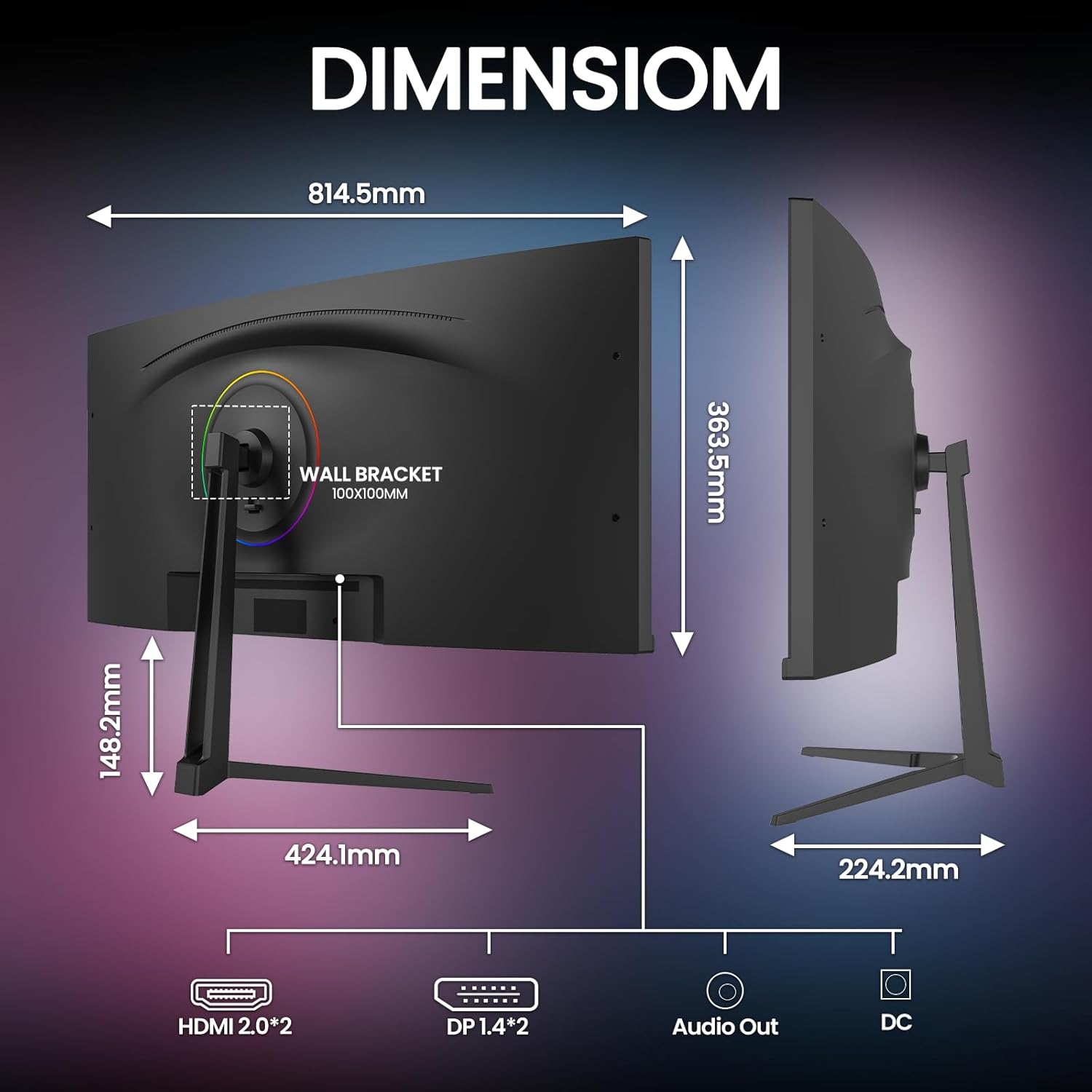
Image: Monitor dimensions.
- Model Number: CR340E
- Screen Size: 34 Inches
- Panel Type: IPS
- Curvature: 1900R
- Resolution: 3440 x 1440 Pixels (WQHD Ultra Wide 1440p)
- Aspect Ratio: 21:9
- Refresh Rate: 120Hz
- Brightness: 350 cd/m²
- Contrast Ratio: 2000:1
- Color Gamut: 130% sRGB, 98% DCI-P3
- Connectivity: 2 x HDMI 2.0, 2 x DisplayPort 1.4, 1 x 3.5mm Audio Out, 1 x DC Power Input
- Wall Mount Compatibility: VESA 100mm x 100mm
- Product Dimensions (with stand): Approximately 1 x 32 x 14 inches (W x H x D)
- Item Weight: 18 pounds
8. Warranty and Support
CRUA is committed to providing high-quality computer monitors and premium services.
- Warranty: This product is covered by a manufacturer's warranty. Please refer to the warranty card included in your package or contact CRUA customer service for specific details regarding warranty duration and terms.
- Customer Support: If you have any questions, require technical assistance, or experience any issues with your CRUA monitor, please contact our customer support team. We are available to serve you and resolve your concerns.
- Contact Information: For support, please visit the official CRUA website or refer to the contact details provided in your product documentation.


