1. Introduction
This manual provides detailed instructions for the installation, operation, and maintenance of the Real HD SW8-25G-MGV2 8-Port 2.5G Managed Ethernet Network Switch. This device is designed to enhance network performance with high-speed connectivity and advanced management features.
The Real HD SW8-25G-MGV2 features eight 2.5 Gigabit RJ45 ports and one 10 Gigabit SFP+ port, offering flexible and high-bandwidth connections for various network devices. Its managed capabilities allow for optimized network control and security.
2. Product Overview

Figure 2.1: Front view of the Real HD SW8-25G-MGV2 switch, showing 8 RJ45 ports and 1 SFP+ port.
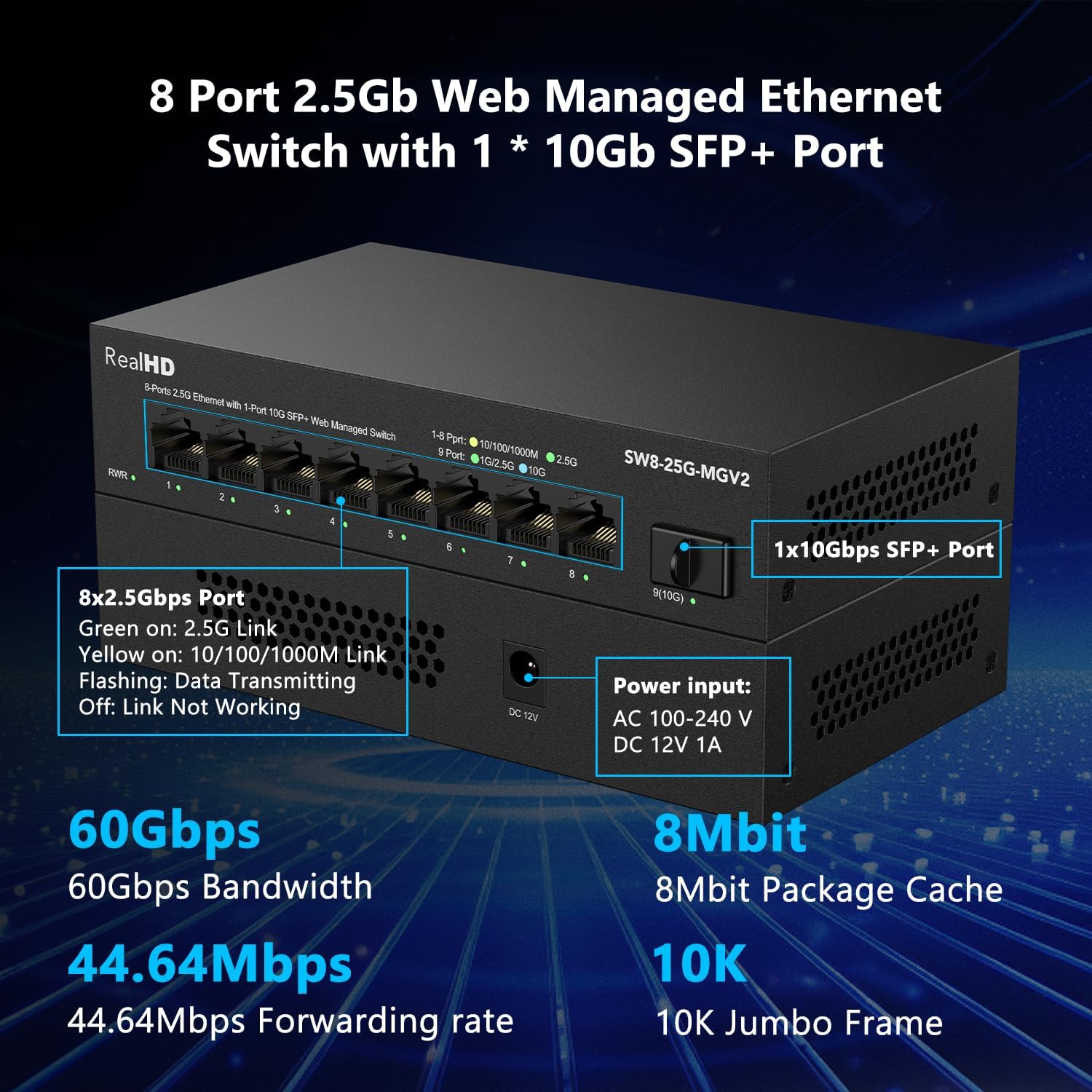
Figure 2.2: Detailed view of the switch ports, indicating 8x2.5Gbps RJ45 ports and 1x10Gbps SFP+ port, along with the DC 12V 1A power input.
The SW8-25G-MGV2 switch is equipped with:
- 8x 2.5G RJ45 Ports: These ports support 10/100/1000Mbps and 2.5Gbps speeds, automatically detecting the connected device's speed. Green LED indicates 2.5G link, Yellow LED indicates 10/100/1000M link, and flashing indicates data transmission.
- 1x 10G SFP+ Port: This port supports 1G, 2.5G, 5G, and 10G speeds for high-bandwidth uplinks or connections to other high-speed devices.
- Power Input: DC 12V 1A.
- LED Indicators: RWR (Run/Working) indicator, Link/Act LEDs for each port.

Figure 2.3: Illustration of 2.5G network speed benefits and recommended cable types (CAT6, CAT6a, CAT7) for optimal performance.
For achieving 2.5Gbps network speeds, it is recommended to use CAT6 or higher level pure copper Ethernet cables. Ensure all connected network products, including network cards, support 2.5Gbps to realize full network speed. Otherwise, the network speed will be limited by the slowest component.
3. Key Features
- 2.5G Super-Fast Connectivity: Eight 2.5G RJ45 ports and one 10G SFP+ port provide high-speed data transfer for demanding applications.
- Smart Web Managed Switch: Offers a web-based interface for secure setup and access, supporting configurations such as VLAN, QoS, security, multicast, and MAC address table management.
- Included 10Gb SFP+ to RJ45 Copper Module: Supports 10GB/5GB/2.5GB data rates with CAT6A/CAT7 cables, enabling transmission distances up to 262 feet (80 meters). Note: This module is not compatible with specific brands including HP, Dell, H3C, Aruba, Arista, Intel, Juniper, Brocade, Alcatel.
- Sturdy and Quiet Design: Features a compact, fanless metal housing with 4KV lightning protection, ensuring quiet operation and good heat dissipation in various environments (-20 to 50℃).
- Wide Application Compatibility: Compatible with a range of Ethernet devices including 4K Video systems, Laptops with 2.5G Ethernet Adapters, WiFi 6 Routers/APs, 2.5G Gaming PCs, and 2.5G NAS systems.

Figure 3.1: Overview of basic management features including VLAN, QoS, Jumbo Frame, Static Aggregation, LACP, Loop prevention, and Spanning Tree Setting. Default IP: 192.168.2.1, Username: admin, Password: admin.

Figure 3.2: Examples of devices that benefit from 2.5G performance, such as 4K Video, Laptops with 2.5G Ethernet Adapters, WiFi 6 Routers/APs, 2.5G Gaming PCs, and 2.5G NAS.

Figure 3.3: Illustration of the 10Gb SFP+ module providing super-fast wired performance up to 262 feet (80 meters) for devices like WiFi 6 APs, Workstations, Gaming Computers, and 8K Video systems.
4. Package Contents
Please verify the contents of your package. If any items are missing or damaged, contact your vendor.
- Real HD SW8-25G-MGV2 8-Port 2.5G Managed Ethernet Network Switch
- 10Gb SFP+ to RJ45 Copper Module
- Power Adapter (DC 12V 1A)
- User Manual (this document)
5. Specifications
| Feature | Description |
|---|---|
| Model | SW8-25G-MGV2 |
| RJ45 Ports | 8x 2.5G (10/100/1000/2500Mbps) |
| SFP+ Ports | 1x 10G (1G/2.5G/5G/10G) |
| Bandwidth | 60Gbps |
| Forwarding Rate | 44.64Mpps |
| Jumbo Frame | 10K |
| Packet Cache | 8Mbit |
| Power Input | DC 12V 1A |
| Operating Temperature | -20 to 50℃ |
| Housing | Fanless Metal |
| Lightning Protection | 4KV |
6. Setup Guide
Follow these steps to set up your Real HD SW8-25G-MGV2 switch:
- Unpack the Switch: Carefully remove the switch and all accessories from the packaging.
- Placement: Place the switch on a stable, flat surface or mount it in a suitable location. Ensure adequate ventilation around the device.
- Connect Power: Connect the provided power adapter to the DC 12V 1A power input port on the switch and then plug the adapter into a power outlet. The RWR LED indicator should light up.
- Connect Network Devices:
- For 2.5G RJ45 Ports: Connect your computers, servers, NAS, WiFi 6 APs, or other network devices to any of the 8 RJ45 ports using CAT6 or higher Ethernet cables. The corresponding Link/Act LED will illuminate to indicate a successful connection and activity.
- For 10G SFP+ Port: Insert the included 10Gb SFP+ to RJ45 copper module into the SFP+ port. Then, connect a CAT6A/CAT7 Ethernet cable from the module to your 10G-capable device (e.g., server, another switch, or network card).
- Verify Connections: Check the Link/Act LEDs on the switch for each connected port. A solid green or yellow light indicates a successful link, and flashing indicates data transmission.
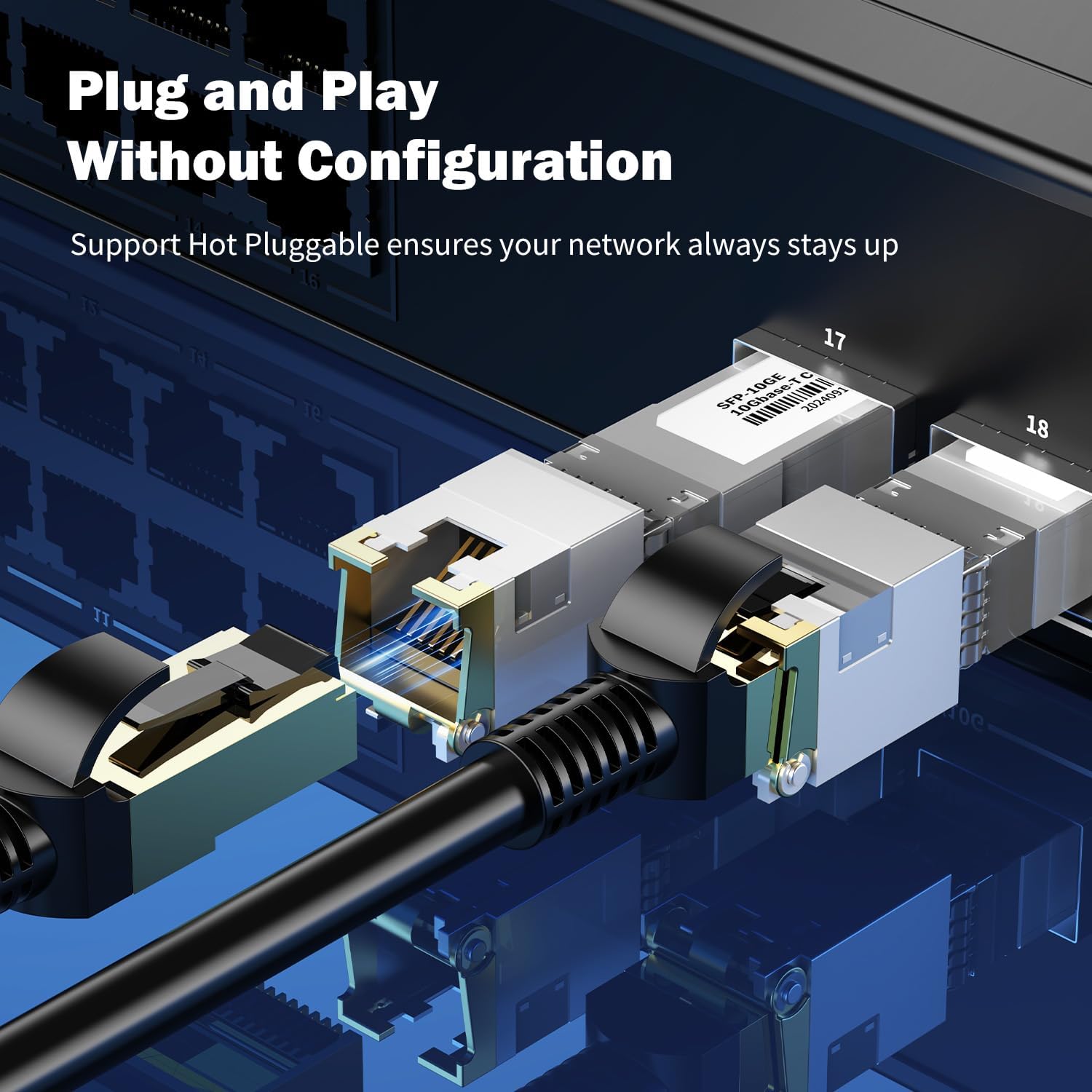
Figure 6.1: Illustration of connecting an SFP+ module and an Ethernet cable, highlighting the plug-and-play nature for basic network connectivity.
7. Operating Instructions (Web Management)
The Real HD SW8-25G-MGV2 is a managed switch, allowing for advanced configuration via a web-based interface.
- Initial Access:
- Ensure your computer is connected to the switch via an Ethernet cable.
- Set your computer's IP address to be in the same subnet as the switch's default IP. The default IP address of the switch is 192.168.2.1. For example, you can set your computer's IP to 192.168.2.10 with a subnet mask of 255.255.255.0.
- Open a web browser (e.g., Chrome, Firefox) and enter the default IP address
http://192.168.2.1in the address bar. - When prompted, enter the default login credentials:
Username:admin
Password:admin
- Configuration Options: Once logged in, you can access various management features:
- VLAN (Virtual Local Area Network): Configure VLANs to segment your network for improved security and performance.
- QoS (Quality of Service): Prioritize network traffic for critical applications (e.g., VoIP, video streaming) to ensure smooth operation.
- Security: Manage MAC address filtering, port security, and other security settings.
- Multicast: Configure IGMP Snooping for efficient multicast traffic management.
- MAC Address Table: View and manage the MAC address table.
- Link Aggregation (LACP/Static): Combine multiple physical links into a single logical link for increased bandwidth and redundancy. For Static Link Aggregation with NAS, select "Balance XOR".
- Spanning Tree Protocol (STP): Prevent network loops and provide path redundancy.
- Change Default Credentials: For security purposes, it is highly recommended to change the default username and password immediately after the first login.
Refer to the switch's web interface documentation for detailed instructions on each specific configuration option.
8. Maintenance
To ensure optimal performance and longevity of your Real HD SW8-25G-MGV2 switch, follow these maintenance guidelines:
- Cleaning: Use a soft, dry cloth to clean the exterior of the switch. Do not use liquid or aerosol cleaners.
- Ventilation: Ensure that the switch's ventilation openings are not blocked. Although fanless, proper airflow helps dissipate heat.
- Environment: Operate the switch within the specified temperature range (-20 to 50℃) and avoid excessive humidity.
- Cable Management: Keep network cables organized and free from kinks or excessive bending to prevent signal degradation.
- Firmware Updates: Periodically check the manufacturer's website for any available firmware updates to ensure the switch has the latest features and security patches.
9. Troubleshooting
If you encounter issues with your Real HD SW8-25G-MGV2 switch, refer to the following common problems and solutions:
- No Power:
- Ensure the power adapter is securely connected to the switch and a working power outlet.
- Verify the power outlet is functional.
- Check if the RWR LED is illuminated.
- No Link/Activity on a Port:
- Check if the Ethernet cable is securely connected at both ends (switch and device).
- Try a different Ethernet cable.
- Ensure the connected device is powered on and its network interface is enabled.
- For SFP+ port, ensure the module is correctly inserted and compatible.
- Slow Network Speed:
- Verify that all devices in the network path (network cards, cables, routers) support 2.5G or 10G speeds. The network will operate at the speed of the slowest component.
- Use CAT6 or higher Ethernet cables for 2.5G connections, and CAT6A/CAT7 for 10G connections.
- Check for network congestion or excessive traffic.
- Cannot Access Web Management Interface:
- Ensure your computer's IP address is in the same subnet as the switch (default 192.168.2.1).
- Verify you are using the correct default IP address (192.168.2.1) and credentials (admin/admin).
- Clear your browser's cache or try a different browser.
- If the IP address was changed and forgotten, a factory reset might be necessary (refer to advanced documentation or support).
- 10Gb SFP+ Module Compatibility:
- Remember that the included 10Gb SFP+ to RJ45 module is not compatible with specific brands including HP, Dell, H3C, Aruba, Arista, Intel, Juniper, Brocade, Alcatel. Ensure your connected equipment is not from these brands if experiencing issues with the SFP+ port.
10. Application Scenarios
The Real HD SW8-25G-MGV2 switch is suitable for various high-speed networking environments:

Figure 10.1: Examples of environments where the 2.5G switch can be utilized, including Small and Home Offices, Home Entertainment setups, Workstations requiring instant data transfer, and Online Gaming.
- Small and Home Offices: Provides high-speed connectivity for multiple workstations, servers, and network storage devices.
- Home Entertainment: Supports bandwidth-intensive applications like 4K/8K video streaming and media servers.
- Workstations: Enables fast data transfer for professional workstations handling large files or complex computations.
- Online Gaming: Offers low-latency, high-bandwidth connections for a smooth gaming experience.
11. Safety Information
- Do not expose the device to water or excessive humidity.
- Do not open the device casing. Refer all servicing to qualified personnel.
- Use only the provided power adapter. Using an incorrect adapter may damage the device and void the warranty.
- Ensure proper grounding for all connected electrical equipment.
- Keep the device away from heat sources and direct sunlight.
12. Warranty and Support
Real HD products are designed for reliability and performance. This product comes with a standard manufacturer's warranty. For specific warranty terms, duration, and support inquiries, please refer to the warranty card included with your product or visit the official Real HD website.
For technical assistance, troubleshooting, or further information, please contact Real HD customer support through the channels provided on our official website.


