1. Introduction
This manual provides detailed instructions for the operation and maintenance of your Fafeicy Digital Altimeter Barometer. This multifunctional device is designed for outdoor enthusiasts, offering essential environmental data at your fingertips.
Key Features:
- Multifunctional Tool: Integrates altimeter, barometer, compass (azimuth), clock, thermometer, and weather forecast functions.
- Backlight Display: Ultra-bright backlight ensures clear readability of LCD display in various lighting conditions.
- Durable Construction: Features a robust ABS casing for wear resistance and protection of internal components.
- Portable Design: Equipped with a special hook for easy attachment and portability during outdoor activities.
- User-Friendly Interface: Operated via responsive buttons for convenient and intuitive use.
2. Package Contents
Please verify that all items listed below are included in your package:
- 1 x Fafeicy Digital Altimeter Barometer
- 1 x Instruction Manual
Note: A CR2032 button cell battery is required for operation and is not included in the package.
3. Product Overview
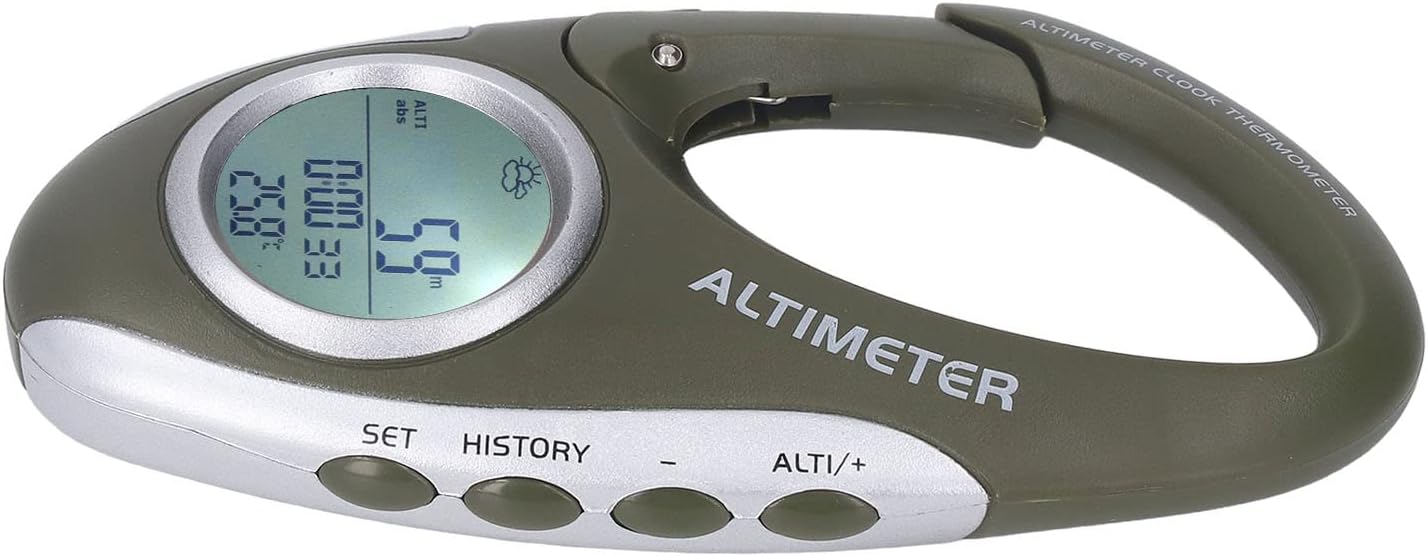
The Fafeicy Digital Altimeter Barometer features a compact, carabiner-style design for easy attachment to gear. The device integrates an LCD screen for displaying various data and several control buttons for navigation and settings.

Component Identification:
- LCD Display: Shows altitude, barometric pressure, temperature, time, and weather forecast.
- Carabiner Clip: For attaching the device to backpacks, belts, or other gear.
- "SET" Button: Used to enter settings mode and confirm selections.
- "HISTORY" Button: Used to view historical data records.
- "-" Button: Used to decrease values or navigate menu options.
- "ALTI/+" Button: Used to switch between altimeter/barometer modes, increase values, or navigate menu options.
4. Setup
4.1 Battery Installation
- Locate the battery compartment cover on the back of the device.
- Use a small screwdriver or coin to open the battery compartment.
- Insert one CR2032 button cell battery, ensuring the positive (+) side faces upwards.
- Replace the battery compartment cover and secure it.
The device should power on automatically after battery installation. If not, press and hold the SET button for a few seconds.
4.2 Initial Settings (Time, Units)
Upon first use or after battery replacement, you may need to set the time and preferred units (e.g., meters/feet for altitude, Celsius/Fahrenheit for temperature).
- Press and hold the SET button to enter settings mode.
- Use the ALTI/+ and - buttons to adjust values or navigate through options.
- Press SET to confirm each setting and move to the next.
- Exit settings mode by pressing SET repeatedly until the normal display appears, or wait for automatic exit.
4.3 Altimeter Calibration
For accurate altitude readings, it is recommended to calibrate the altimeter at a known altitude (e.g., from a map or sign).
- Enter altimeter calibration mode (refer to specific instructions in the device's display menu, usually accessed via the SET button).
- Adjust the displayed altitude to match the known reference altitude using the ALTI/+ and - buttons.
- Confirm the setting.
5. Operating Instructions
5.1 Switching Modes
Press the ALTI/+ button briefly to cycle through different display modes: Altimeter, Barometer, Clock/Thermometer, and Weather Forecast.
5.2 Altimeter Function
In Altimeter mode, the device displays your current altitude. Altitude is calculated based on atmospheric pressure changes. Regular calibration is recommended for accuracy, especially when significant weather changes occur or when moving between different pressure zones.

5.3 Barometer Function
In Barometer mode, the device displays the current atmospheric pressure. Monitoring pressure trends can help predict weather changes.
5.4 Thermometer Function
The device displays the ambient temperature. Ensure the device is not exposed to direct sunlight or body heat for accurate readings.
5.5 Clock Function
The integrated clock displays the current time. Set the time as described in the "Initial Settings" section.
5.6 Weather Forecast
The device provides a basic weather forecast based on barometric pressure trends, indicated by an icon on the display. This is a prediction and should not replace official weather reports.
5.7 History Data
Press the HISTORY button to view recorded data, such as maximum/minimum altitude or pressure over a period. Refer to the on-screen prompts for navigation within the history logs.
6. Maintenance
- Cleaning: Wipe the device with a soft, damp cloth. Do not use abrasive cleaners or solvents.
- Battery Replacement: Replace the CR2032 battery when the low battery indicator appears on the display or when the device fails to power on. Follow the battery installation steps in Section 4.1.
- Storage: Store the device in a cool, dry place away from direct sunlight and extreme temperatures. If storing for extended periods, remove the battery to prevent leakage.
- Water Resistance: The device is designed for outdoor use but may not be fully waterproof. Avoid submerging it in water.
7. Troubleshooting
| Problem | Possible Cause | Solution |
|---|---|---|
| Device does not power on. | Dead or incorrectly installed battery. | Check battery orientation. Replace with a new CR2032 battery. |
| Inaccurate altitude/pressure readings. | Needs calibration; significant weather change. | Calibrate the altimeter at a known altitude. Allow time for the barometer to adjust to new conditions. |
| Display is dim or unreadable. | Low battery; backlight off. | Replace battery. Check if backlight function is enabled (usually a short press of a specific button, refer to device for exact control). |
| Buttons are unresponsive. | Device frozen; low battery. | Remove and reinsert the battery to reset the device. Replace battery if low. |
8. Specifications
| Item Type | Digital Altimeter Barometer |
| Material | ABS |
| Battery | 1 x CR2032 button cell (not included) |
| Dimensions (approx.) | 14 x 6 x 3 cm |
| Weight (approx.) | 51 g |
| Manufacturer | Fafeicy |
| ASIN | B0FD2X7LMN |
| Date First Available | 23 August 2025 |
9. Warranty and Support
Specific warranty information for the Fafeicy Digital Altimeter Barometer is not provided in the product details. For warranty claims or technical support, please refer to the retailer or the official Fafeicy website for contact information.