
1. Introduction
Thank you for choosing the talomen Studio Monitor Headphones W550X. These professional over-ear wired headphones are designed for critical audio monitoring, recording, mixing, streaming, broadcasting, and podcasting. Featuring high-fidelity sound, a detachable cardioid dynamic boom microphone, and a comfortable design, the W550X provides reliable performance for various media production and communication needs. This manual provides essential information for setup, operation, maintenance, and troubleshooting to ensure optimal performance and longevity of your headphones.
2. What's in the Box
Upon unboxing your talomen W550X Studio Monitor Headphones, please verify that all the following items are included:
- 1 x W550X Studio Monitor Headphones
- 1 x Detachable Cardioid Microphone
- 1 x Coiled Audio Cable (with 6.35mm adapter)
- 1 x Headphone Mic Y Splitter Cable (for separate audio/mic ports)
- 1 x Protective Portable Case
- 1 x Replaceable Leather Earmuffs
- 1 x User's Manual

Image: All components included in the talomen W550X package, neatly arranged. This includes the headphones, a detachable microphone, various audio cables, a protective carrying case, and an extra set of leather earmuffs.

Image: A detailed view of the talomen W550X Studio Monitor Headphones and its accessories, including the coiled audio cable, Y-splitter, detachable microphone, and extra earmuffs, all presented on a wooden surface.
3. Setup
3.1 Attaching the Microphone
The W550X headphones feature a detachable cardioid dynamic boom microphone. To attach the microphone, align the 3.5mm jack of the microphone with the input port located on the left earcup of the headphones. Insert the jack firmly and twist clockwise to secure it in place. This locking mechanism ensures a stable connection during use.

Image: A close-up of the detachable microphone cable, highlighting its connection point to the headphone. The image also shows a computer's audio ports, indicating how the Y-splitter cable can be used for separate microphone and headphone inputs.
3.2 Connecting to Devices
The W550X offers versatile connectivity options:
- Standard 3.5mm Jack: Use the coiled audio cable directly for devices with a combined 3.5mm audio/microphone port (e.g., smartphones, laptops, gaming consoles like PS4/PS5).
- 6.35mm Adapter: Attach the included 6.35mm adapter to the coiled audio cable for professional audio equipment such as studio mixers, amplifiers, and music instruments.
- Y-Splitter Cable: For desktop computers or other devices with separate 3.5mm ports for headphones and microphones, connect the coiled audio cable (with or without the detachable microphone) to the female end of the Y-splitter, then plug the two male ends into the corresponding audio and microphone jacks on your device.
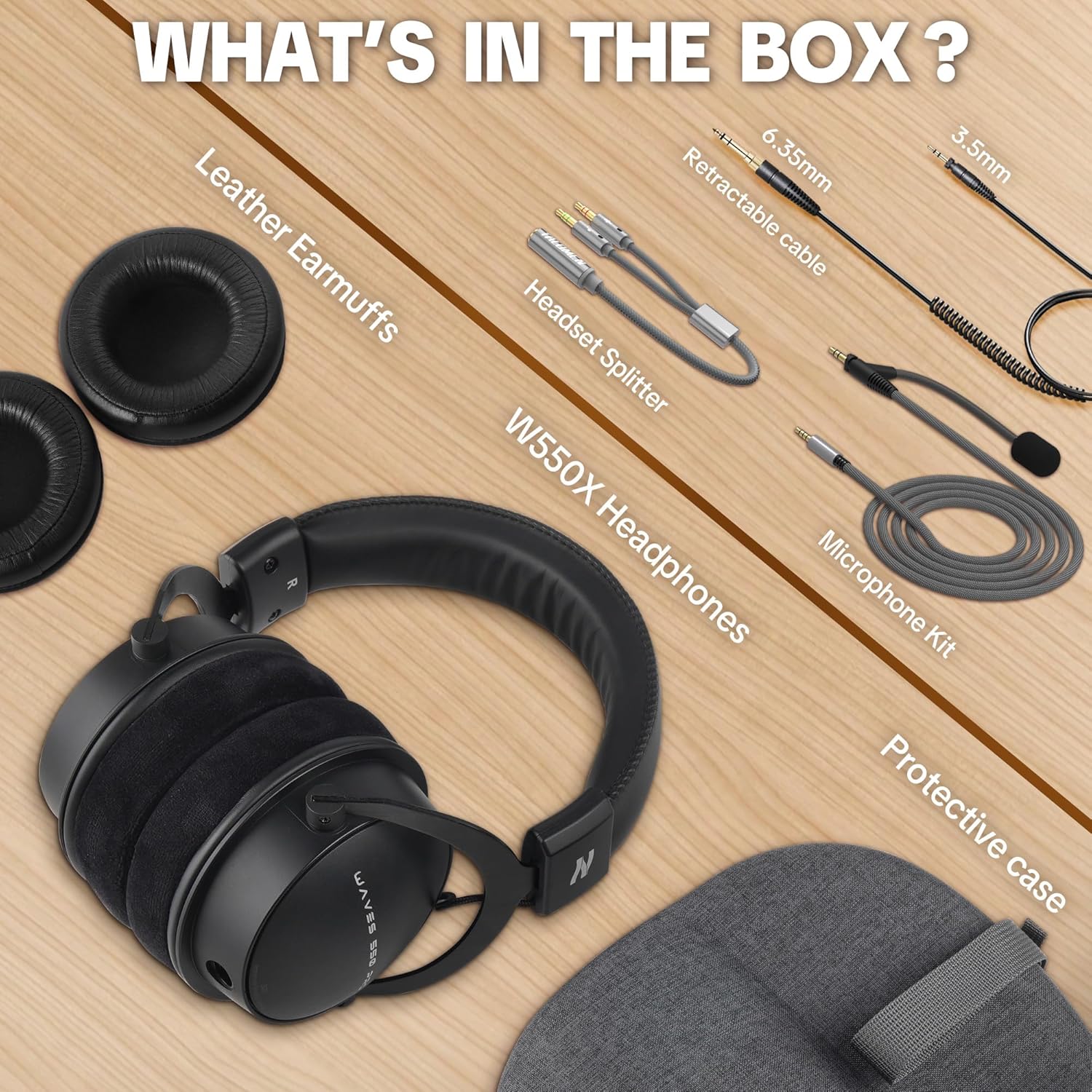
Image: A visual guide illustrating the three primary connection methods for the talomen W550X headphones: direct 3.5mm jack for mobile devices, 6.35mm converter for studio equipment, and a headset splitter for computers with separate audio and microphone inputs.
3.3 Adjusting the Headband and Earmuffs
For optimal comfort and sound isolation, adjust the headband to fit your head size. The earcups can swivel to conform to your ears. The headphones come with pre-installed velour earmuffs for breathability and comfort during long sessions. If you prefer enhanced sound isolation, you can swap them with the included leather earmuffs.
To Replace Earmuffs:
- Gently pull the existing earmuff away from the earcup, working your way around the perimeter until it detaches.
- Align the skirt of the new earmuff with the groove on the earcup, starting from the top notch.
- Carefully work the skirt around the earcup's perimeter, ensuring it is fully seated and secure.

Image: A visual comparison of the two types of earmuffs provided with the talomen W550X headphones: soft velour for breathability and leather for enhanced sound isolation, demonstrating their interchangeability.
4. Operating Instructions
4.1 Audio Monitoring
The talomen W550X headphones are engineered for high-fidelity studio sound, delivering accurate audio reproduction with clear highs, balanced mids, and deep bass. The 50mm neodymium iron boron drivers provide a wide frequency response of 20 Hz to 40,000 Hz, capturing subtle nuances for critical listening, mixing, and tracking. The closed-back design minimizes background noise, ensuring a neutral listening environment.

Image: A man wearing talomen W550X headphones in a studio, emphasizing the "Top-Notch Impulse Response" and "Powerful 50mm Dynamic Driver System" for critical music and sound monitoring.

Image: A man playing an acoustic guitar while wearing talomen W550X headphones, with text highlighting the "Noise Isolation Design" for clean and distraction-free recordings.
4.2 Microphone Usage
The detachable cardioid dynamic boom microphone is designed to reduce background noise and capture your voice with clarity. This makes it ideal for podcasting, streaming, broadcasting, and online communication. Position the microphone close to your mouth for the best voice pickup.

Image: A man wearing talomen W550X headphones and speaking into a studio microphone, illustrating "Professional Voice Monitoring" for clear podcasting, vlogging, or streaming.

Image: A woman wearing talomen W550X headphones with the detachable microphone attached, engaged in gaming, emphasizing "Clear Communication" for sharp and distortion-free team chats.
4.3 Media Control
The headphones feature inline media controls for convenient management of audio playback and calls. Refer to the specific controls on your audio cable for functions such as play/pause, track skipping, and volume adjustment.
5. Maintenance
- Cleaning: Use a soft, dry cloth to clean the headphones and earmuffs. For deeper cleaning of earmuffs, refer to the material-specific cleaning instructions.
- Storage: When not in use, store the headphones in the provided protective portable case to prevent dust accumulation and physical damage.
- Cable Care: Avoid sharp bends or excessive pulling on the cables to prevent internal damage.
- Earmuff Replacement: Replace earmuffs if they show signs of wear and tear to maintain comfort and acoustic performance.

Image: The talomen W550X headphones neatly folded and stored inside their durable protective case, emphasizing portability and protection.
6. Troubleshooting
| Problem | Possible Cause | Solution |
|---|---|---|
| No sound from headphones. | Incorrect connection, low volume, device issue. | Ensure cables are fully plugged in. Check device volume. Test with another device. |
| Microphone not working. | Microphone not attached correctly, incorrect port, software settings. | Ensure microphone is securely attached and twisted to lock. Use Y-splitter for separate ports. Check device's audio input settings. |
| Sound distortion or poor quality. | Damaged cable, incorrect audio source, high volume. | Try a different cable. Ensure audio source is high quality. Reduce volume to prevent clipping. |
| Headphones are uncomfortable. | Improper fit, wrong earmuff type. | Adjust headband and earcup swivel. Try swapping to the other set of earmuffs (velour for breathability, leather for isolation). |
7. Specifications
| Feature | Detail |
|---|---|
| Brand | talomen |
| Model Number | W550X |
| Color | Black |
| Ear Placement | Over Ear |
| Earpiece Shape | Closed-Back |
| Connectivity Technology | Wired |
| Headphone Jack | 3.5mm, 6.35mm Jack |
| Audio Driver Type | Dynamic Driver |
| Audio Driver Size | 50 Millimeters |
| Frequency Response | 20 Hz - 40,000 Hz |
| Impedance | 32 Ohms |
| Sensitivity | 95 dB |
| Noise Control | Sound Isolation |
| Microphone Type | Detachable Cardioid Dynamic Boom Mic |
| Material | Leather, Metal, Plastic |
| Item Weight | 1 Kilograms |
8. Warranty and Support
The talomen W550X Studio Monitor Headphones come with a One Year Warranty. For warranty claims, product support, or any inquiries, please refer to the contact information provided in your VIP membership and warranty activation card or visit the official talomen website.
Video: An unboxing and review video of the talomen W550X headphones, demonstrating the contents of the box, build quality, and various features. This video is provided by a seller and offers a comprehensive overview of the product.