
1. Introduction
Welcome to the Tuni E2 Espresso Machine user manual. This guide provides essential information for the safe and efficient operation, maintenance, and troubleshooting of your new espresso machine. Please read this manual thoroughly before first use and keep it for future reference.
Important Safety Information
- Always ensure the machine is unplugged before cleaning or maintenance.
- Do not immerse the machine, cord, or plug in water or other liquids.
- Keep the appliance out of reach of children.
- Use only purified or distilled water to prevent mineral buildup and ensure optimal coffee taste.
- Exercise caution when operating the steam wand as hot steam can cause burns.
2. Product Overview
The Tuni E2 Espresso Machine is designed to deliver professional-quality espresso with ease. Its dual boiler system allows for immediate milk frothing after espresso extraction, enhancing efficiency. The PID NTC temperature control ensures precise brewing temperatures for optimal flavor.
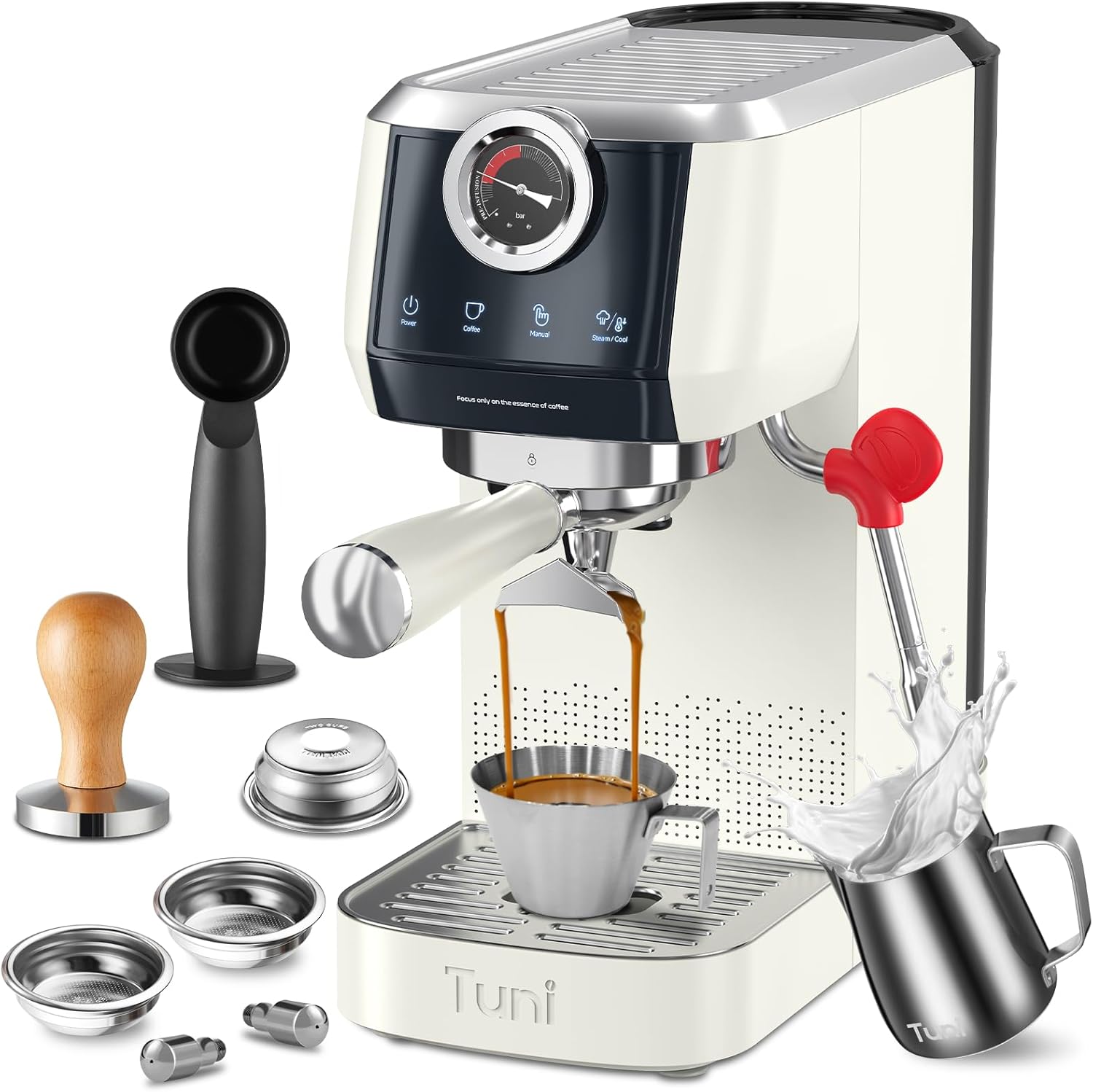
Figure 2.1: Tuni E2 Espresso Machine with included accessories.
Included Components
- Espresso Machine x1
- 58mm Stainless Steel Double Spouted Portafilter x1
- Double Shot Basket (Dual Wall, Pressurized) x1
- Single Shot Basket (Single Wall, Non-Pressurized) x1
- Stainless Steel Powder Tamper x1
- 350ml Milk Pitcher x1
- Spoon Tamper x1
- Stainless Steel Steam Nozzles x2 (1-hole and 2-hole)
- User Manual x1
3. Setup
3.1 Unpacking and Initial Cleaning
Carefully remove all components from the packaging. Wash the water tank, portafilter, filter baskets, and milk pitcher with warm, soapy water. Rinse thoroughly and dry.
3.2 Filling the Water Tank

Figure 3.1: The removable 44oz water tank is located at the back of the machine for easy refilling.
- Remove the water tank from the back of the machine.
- Fill the tank with purified or distilled water up to the MAX line.
- Place the water tank back into its position, ensuring it is securely seated.
3.3 Powering On and Preheating
Plug the machine into a grounded power outlet. Press the 'Power' button. The indicator lights for 'Coffee', 'Manual', and 'Steam/Cool' will flash, indicating the machine is preheating. Once the lights become solid, the machine is ready for use.
Video 3.1: This video demonstrates how to power on the machine and set the brewing temperature. It shows the initial preheating process and how to navigate the temperature settings.
4. Operating Instructions
4.1 Grinding Coffee
For optimal espresso, use freshly ground coffee. The Tuni E2 is designed for fine espresso grind. If using a Tuni G1 grinder, adjust the grind setting to 'Espresso' range (typically 1-12) for best results.
Video 4.1: This video demonstrates the Tuni G1 Coffee Grinder in action, showing how to grind coffee beans for espresso.
4.2 Preparing the Portafilter
- Select the appropriate filter basket (single or double shot) and place it into the 58mm portafilter.
- Dose the freshly ground coffee into the filter basket. For a single shot, use 12-13g; for a double shot, use 17-18g.
- Use the included tamper to press the coffee grounds evenly and firmly. Ensure the surface is level.

Figure 4.2: The 58mm portafilter filled with coffee grounds, ready for tamping.

Figure 4.3: Firmly tamping the coffee grounds to create an even puck for optimal extraction.
4.3 Brewing Espresso
- Attach the prepared portafilter to the brew head of the machine, twisting it firmly to lock it in place.
- Place your espresso cup(s) on the drip tray directly under the portafilter spouts.
- Press the 'Coffee' button for an automatic double shot. For manual control, press the 'Manual' button to start and press again to stop when the desired volume is reached.
- Monitor the visual pressure gauge during extraction. The needle should ideally be in the red zone for optimal pressure (9-12 bar).

Figure 4.4: Espresso being extracted into a cup, showing the rich crema.
Video 4.2: This video provides an overview of the Tuni E2 58mm Espresso Machine, highlighting its commercial-grade features and extraction process.
4.4 Adjustable Volume and Temperature
The Tuni E2 allows customization of brew volume and temperature settings.
- Adjustable Volume: Use the 'Manual' button to control the espresso volume. Press once to start, press again to stop. The maximum customizable volume is 220ml.
- Adjustable Temperature: The machine features PID + NTC Dual Intelligent Temperature Control with Low, Medium (Optimal), and High temperature modes. Refer to the detailed instructions in the video for setting specific temperatures.

Figure 4.5: The touch control panel allows for easy adjustment of coffee volume, including customized volume (max 220ml) and double shot options.

Figure 4.6: The PID + NTC system provides precise temperature control with Low, Medium, and High temperature modes.
4.5 Milk Frothing
The dual boiler system allows for immediate milk frothing after espresso extraction without waiting.
- Fill the included 350ml milk pitcher with cold milk (whole milk is recommended for best results).
- Press the 'Steam/Cool' button. The light will turn blue when the steam function is ready.
- Submerge the steam wand tip just below the surface of the milk. Open the steam valve by rotating the knob.
- Steam the milk until it reaches the desired temperature and texture. Close the steam valve and remove the pitcher.
- Wipe the steam wand immediately with a damp cloth to prevent milk residue buildup.

Figure 4.7: The 360-degree powerful steam wand creates creamy, silky smooth microfoam milk.
Video 4.3: This video demonstrates how to use the steam wand for frothing milk, including the initial release of hot water before steaming.
5. Maintenance
5.1 Daily Cleaning
- Drip Tray: The removable drip tray has a full indicator. Empty and clean daily to prevent overflow and maintain hygiene.
- Portafilter and Filter Baskets: After each use, remove the portafilter, discard the coffee puck, and rinse the portafilter and basket under running water.
- Steam Wand: Immediately after frothing milk, wipe the steam wand with a damp cloth to remove any milk residue. Briefly open the steam valve to clear any internal milk buildup.

Figure 5.1: The removable drip tray is easy to clean and features a red indicator that pops up when full.
5.2 Descaling
Regular descaling is crucial to maintain machine performance and extend its lifespan. The frequency depends on water hardness and usage. Refer to the full user manual for detailed descaling instructions using a suitable descaling solution.
6. Troubleshooting
6.1 Pressure Gauge Interpretation
The built-in visual pressure gauge helps you monitor the extraction process in real-time. Aim for the needle to be in the red zone (9-12 bar) for an ideal espresso shot.

Figure 6.1: Guide to interpreting the pressure gauge for ideal, under, and over extraction.
6.2 Common Issues and Solutions
- No coffee dispenses: Check water tank level, ensure portafilter is correctly inserted, check for blockages.
- Weak espresso/too fast extraction: Coffee grind might be too coarse, not enough coffee in the basket, or insufficient tamping.
- Bitter espresso/too slow extraction: Coffee grind might be too fine, too much coffee in the basket, or over-tamping.
- No steam from wand: Ensure the machine is fully preheated for steam mode, check for blockages in the steam nozzle.
7. Specifications
| Brand | Tuni |
| Model Name | E2 Espresso Machine |
| Product Dimensions | 12"D x 12"W x 8.79"H |
| Item Weight | 14 pounds |
| Power Source | AC adapter |
| Voltage | 120 Volts |
| Operation Mode | Semi-Automatic |
| Pump Pressure | 20 Bar (ULKA Pump) |
| Water Tank Capacity | 44oz |
| Special Feature | Cup Warmer, PID NTC Temp Control, Dual Boiler |
8. Warranty and Support
The Tuni E2 Espresso Machine comes with a manufacturer's warranty. Please refer to the product packaging or the official Tuni website for specific warranty terms and conditions. For technical support, troubleshooting assistance, or parts replacement, please contact Tuni customer service through the contact information provided on the product packaging or their official website.