1. Introduction
The QUANSHENG TK-11 (8) is a high-power 10W amateur walkie-talkie designed for versatile communication. It supports full-band reception and multi-band transmission, offering a wide range of practical functions suitable for amateur radio enthusiasts, outdoor activities, and hiking. This manual provides detailed instructions for setting up, operating, and maintaining your device.
2. Package Contents
Please verify that all items listed below are included in your package:
- 1 x TK-11 (8) Radio Body
- 1 x 7.4V 3000mAh Li-ion Battery Pack
- 1 x Multi-band RX/TX Antenna
- 1 x T-Shape Antenna
- 1 x Belt Clip
- 1 x User Manual (English)
- 1 x Desktop Charger
- 1 x Hand Strap
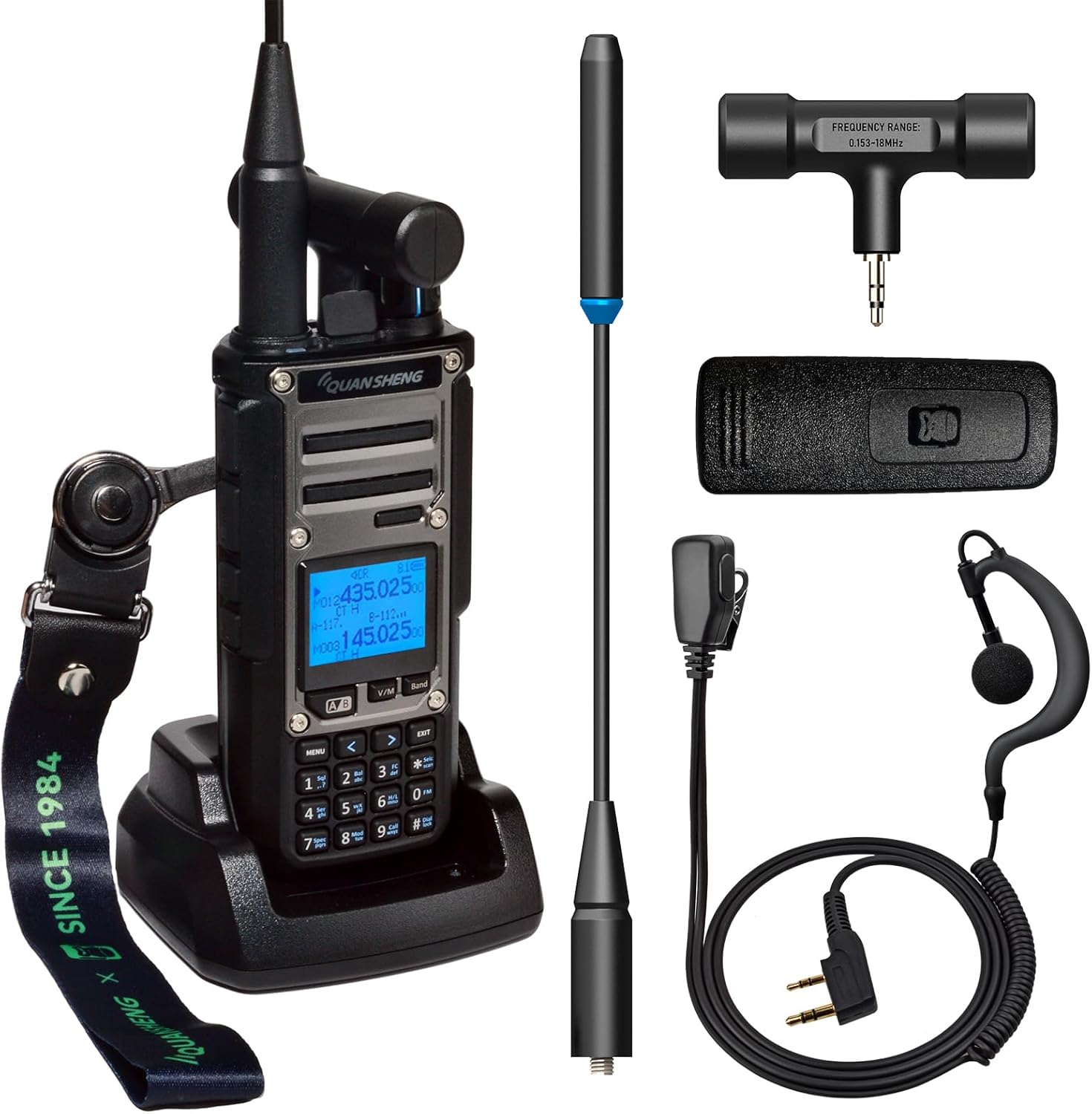
Image 2.1: QUANSHENG TK-11 (8) Walkie Talkie with all included accessories, including the radio body, two antennas, battery, charger, belt clip, and hand strap.
3. Product Overview
3.1 Key Features
- 10W High Power Amateur Walkie Talkie
- Full-band Reception and Multi-band Transmission
- VHF/UHF (144-146MHz/430-440MHz)
- Support for AM/SSB/FM Reception
- Dual Reception Capability
- Integrated Spectrum Analyzer
- NOAA Weather Alert Functionality (10 NOAA channels)
- 999 Channel Capacity
- 32 FM Radio Storage Channels
- 10-Group Scrambler
- 5 Tone Select Call
- Customizable Boot Image (PNG/JPG/BMP) and Call End Tone (WAV/MP3)
- Magic Voice Function with 5 voice variations
- Universal/Smart Code Breaking (Detect CTCSS/DCS, Crack non-standard CTCSS/DCS, Self-learning)
- IP54 Protection

Image 3.1: Overview of the QUANSHENG TK-11 (8) Portable Multi-Band Transceiver, detailing its dual receiving, wide receiving and transmitting bands, AM/SSB/FM support, Magic Voice, Universal/Smart Code Breaking, 10W High Power, Spectrum Analyzer, and NOAA features.
3.2 Component Identification

Image 3.2: A detailed diagram illustrating the various components of the QUANSHENG TK-11 (8) radio, including the top flashlight, T-shape antenna interface, knob, Headset/Data Jack, LCD Display, Function/Number keyboard, Dual PTT, radio body material, 3000mAh battery, IP54 rating, dual antenna, Type-C/Base Charging, Voice Loud & Clear, and Jacklight.
4. Setup
4.1 Battery Installation
The TK-11 (8) uses a 7.4V 3000mAh Li-ion battery pack. To install the battery, align it with the battery compartment on the back of the radio and slide it into place until it clicks securely. Ensure the battery is fully charged before first use.
4.2 Antenna Installation
The radio comes with two antennas: a Multi-band RX/TX Antenna and a T-Shape Antenna. Screw the desired antenna clockwise onto the antenna connector at the top of the radio until it is finger-tight. Do not overtighten.
4.3 Charging
Place the radio into the provided desktop charger. Ensure the charging contacts on the radio align with those on the charger. The charging indicator light will show the charging status. The battery can also be charged via a Type-C port directly on the battery pack.
5. Operating Instructions
5.1 Power On/Off and Volume Control
To power on the radio, rotate the top knob clockwise. Continue rotating to adjust the volume. Rotate counter-clockwise until a click is heard to power off the device.
5.2 Frequency Bands and Modes
The TK-11 (8) supports a wide range of frequencies and modulation modes:
- VHF/UHF: 144-146MHz / 430-440MHz for standard amateur radio communication.
- Main Antenna: 50MHz / 144MHz / 430MHz.
- T-Shape Antenna: 0.153MHz-18MHz (for middle wave and entry-level short wave reception).
- Reception Modes: AM, SSB, FM.
- Dual Reception: The radio supports simultaneous reception on two different frequencies.

Image 5.1: The QUANSHENG TK-11 (8) displaying its capability for real AM/SSB/FM reception and the NOAA weather alert function.
5.3 Channel Management
The device supports up to 999 channels. Refer to the on-screen menu for channel programming and selection. It also features 32 storage channels for FM radio.
5.4 NOAA Weather Alert
The TK-11 (8) can receive NOAA weather alerts, providing timely weather warnings. It supports 10 NOAA weather station channels. Activate this feature to stay informed about local weather conditions.
5.5 Magic Voice Function
The Magic Voice feature offers 5 voice variations, allowing for playful communication. Access this function through the radio's menu to select your preferred voice effect.
5.6 Spectrum Analyzer
The integrated spectrum analyzer provides a visual representation of frequency activity, similar to a dedicated spectrum analyzer. This tool can be useful for identifying active frequencies and analyzing signal strength.
5.7 Customization
Personalize your radio experience:
- Boot Image: Customize the startup image using PNG, JPG, or BMP format.
- Call End Tone: Set a personalized call end tone using WAV or MP3 format.

Image 5.2: The QUANSHENG TK-11 (8) showcasing its Magic Voice function with 'Infantlike' and 'Alien Voice' options, along with the ability to customize the power-on image (PNG/JPG/BMP) and call end tone (WAV/MP3).
5.8 Scrambler and Tone Select Call
Utilize the 10-group scrambler for enhanced privacy in communications. The 5 Tone Select Call feature allows for specific signaling.
5.9 Universal/Smart Code Breaking
This feature supports three code breaking modes:
- Normal Mode: Detects CTCSS/DCS.
- Master Mode: Cracks non-standard CTCSS/DCS.
- Self-learning Mode: Cracks non-standard variable-frequency DCS.
6. Antenna Instructions
The QUANSHENG TK-11 (8) comes with two types of antennas, each optimized for different frequency ranges:
- T-Shape Antenna: Primarily for FM radio receiving bands.
- Band F1: 0.153-1.799MHz (Best for middle wave reception).
- Band F2: 1.8-17.799MHz (For entry-level short wave experience).
- Main Antenna (Multi-band RX/TX): For 50MHz, 144MHz, and 430MHz bands.

Image 6.1: Visual guide for the standard T-Shape Antenna and Main Antenna, detailing their respective frequency ranges and optimal uses for the QUANSHENG TK-11 (8).
7. Short Wave Operation
For short wave enthusiasts, the TK-11 (8) offers specific receiving and transmitting capabilities. Note that short wave receiving performance varies with antenna type, performance, weather, and environmental conditions.
- Short Wave Antenna (Option 1):
- Band F3: Short Wave receiving band 18-32MHz.
- Short Wave transmitting band 25-29.8MHz.
- Short Wave Antenna (Option 2):
- Band F2: Short Wave receiving band 1.8-17.799MHz.
The antenna image provided is for reference only; short wave users may choose different types and performance antennas based on their specific needs.

Image 7.1: Illustration detailing short wave antenna options and their corresponding receiving and transmitting bands for the QUANSHENG TK-11 (8).
8. Maintenance
To ensure the longevity and optimal performance of your QUANSHENG TK-11 (8) Walkie Talkie, follow these maintenance guidelines:
- Cleaning: Use a soft, damp cloth to clean the radio's exterior. Avoid using harsh chemicals or abrasive cleaners.
- Battery Care: Store the battery in a cool, dry place when not in use. Avoid fully discharging the battery frequently to prolong its lifespan.
- Storage: When storing the radio for extended periods, remove the battery and store the device in a dry, dust-free environment.
- Antenna Care: Ensure antennas are securely attached but not overtightened. Avoid bending or stressing the antennas.
9. Troubleshooting
If you encounter issues with your QUANSHENG TK-11 (8), consider the following common troubleshooting steps:
- No Power: Check if the battery is properly installed and charged. Ensure the power/volume knob is rotated clockwise.
- No Reception/Transmission: Verify that the antenna is correctly attached. Check the selected frequency and channel settings. Ensure you are within range of other radios or repeaters.
- Poor Audio Quality: Adjust the volume. Check the microphone and speaker for obstructions. Ensure the headset/data jack is clean if using an external accessory.
- Display Issues: If the display is blank or unreadable, try restarting the radio. Ensure the battery has sufficient charge.
- Radio Not Charging: Ensure the desktop charger is properly connected to power and the radio is correctly seated in the charger. Check the Type-C cable if charging directly.
If problems persist, please contact customer support.
10. Specifications
| Feature | Specification |
|---|---|
| Brand | QUANSHENG |
| Model | TK-11 (8) |
| Power Output | 10W |
| Frequency Bands | VHF/UHF (144-146MHz/430-440MHz), Multi-band RX/TX Antenna (50MHz/144MHz/430MHz), T-Shape Antenna (0.153MHz-18MHz) |
| Battery | 7.4V 3000mAh Li-ion (Included) |
| Number of Channels | 999 |
| FM Radio Stores | 32 |
| Voltage | 7.2 Volts (DC) |
| Item Weight | 800 g |
| Dimensions | 22.6 x 21.6 x 8.9 cm |
| Ingress Protection | IP54 |
11. Support
The default language of this user manual is English. If you require the user manual in a different language or need further assistance, please contact our customer support team. For specific inquiries regarding product functionality or troubleshooting not covered in this manual, our support staff is available to help.