
1. Introduction
Thank you for choosing the OWON HSA2320, a versatile 3-in-1 portable test instrument. This device integrates a spectrum analyzer, a digital oscilloscope, and a digital multimeter into a single compact unit, designed for efficiency and portability in various electrical testing and measurement applications.
1.1 Key Features
- Spectrum Analyzer: Frequency range 9 kHz to 3 GHz, 100 Hz resolution bandwidth.
- Digital Oscilloscope: 200 MHz bandwidth, 1 GSa/s real-time sample rate, 8K record length, 10,000 wfrms/s waveform refresh rate.
- Digital Multimeter: 4 1/2 digits, measures voltage, current, resistance, capacitance, diode, and continuity.
- Display: Clear 3.5-inch LCD screen.
- Connectivity: Standard USB Type-C interface for PC communication and data transfer.
- Portability: Compact design (96 x 198 x 38 mm) and lightweight (0.6 kg), battery or adapter powered.
1.2 Package Contents
Please check the package for the following items:
- OWON HSA2320 Main Unit
- Oscilloscope Probe
- Multimeter Test Leads
- USB Type-C Cable
- Power Adapter
- User Manual (this document)
2. Safety Information
Read the following safety precautions carefully to avoid injury and prevent damage to this product or any products connected to it. Use this product only as specified. Failure to observe these precautions could result in serious injury or death.
- Ground the Product: This product is grounded through the grounding conductor of the power cord. To avoid electric shock, the grounding conductor must be connected to earth ground.
- Connect and Disconnect Properly: Connect the power cord to the product before connecting the power cord to the power outlet. Disconnect the power cord from the power outlet before disconnecting it from the product.
- Observe All Terminal Ratings: To avoid fire or shock hazard, observe all ratings and markings on the product. Refer to the product manual for more information about ratings before making connections to the product.
- Do Not Operate in Wet/Damp Conditions: Do not operate the product in wet or damp conditions.
- Do Not Operate in Explosive Atmosphere: Do not operate the product in an explosive atmosphere.
- Keep Product Surfaces Clean and Dry: Keep the input and output terminals, probes, and test leads clean and dry.
- Use Proper Fuse: Use only the fuse type and rating specified for this product.
- Do Not Operate with Suspected Failures: If you suspect damage to the product, have it inspected by qualified service personnel.
3. Product Overview
3.1 Front Panel
The front panel features the LCD display, function buttons, and navigation controls.
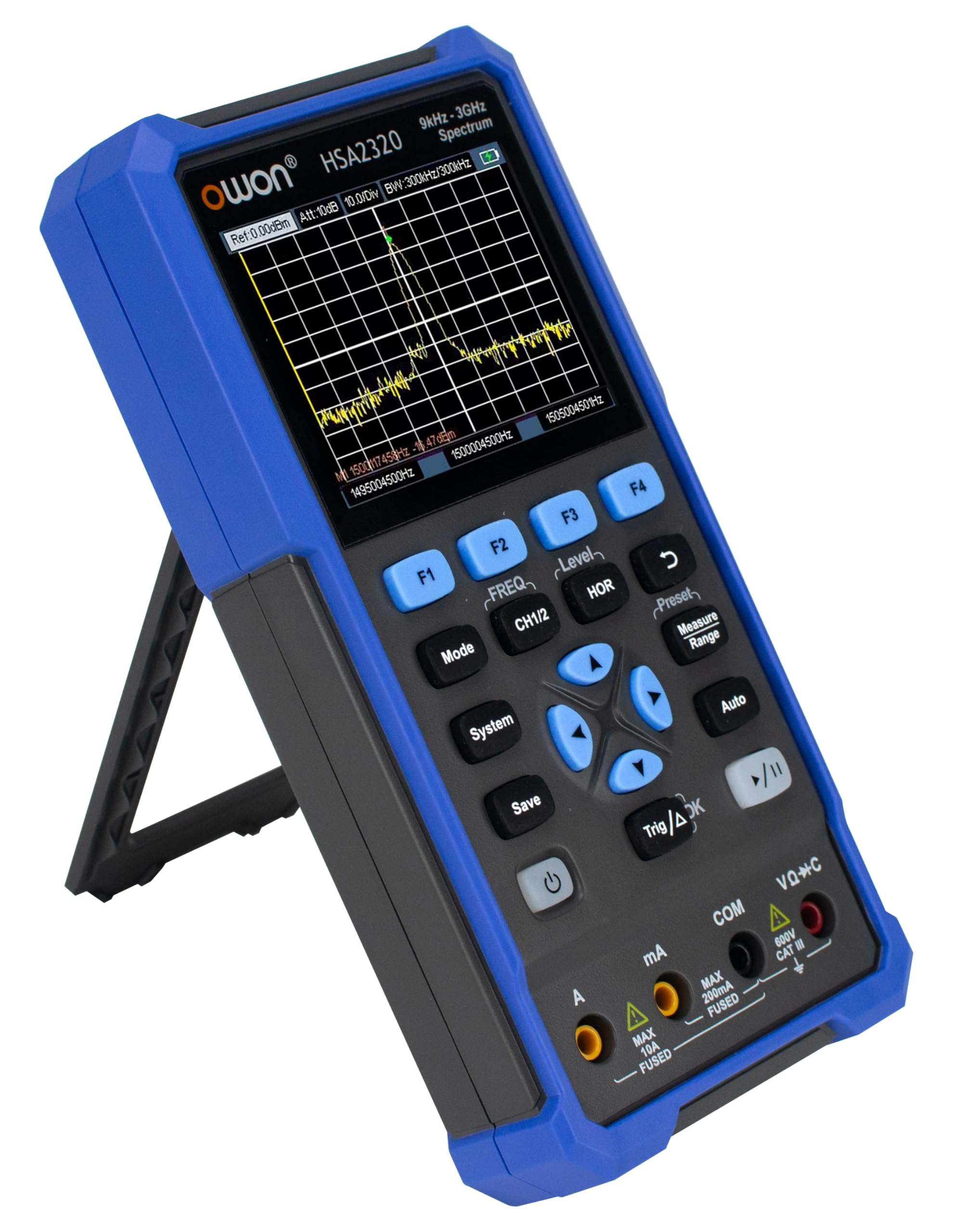
Figure 3.1: OWON HSA2320 Front View. This image displays the device's front, highlighting the central 3.5-inch color LCD screen, surrounded by various function buttons, a rotary encoder for navigation, and input jacks at the bottom for probes and test leads.
3.2 Side and Rear Panels
The side and rear panels contain the power input, USB-C port, and ventilation openings.
- Power Button: Located on the side, used to turn the device on/off.
- USB Type-C Port: For charging and PC connectivity.
- Probe Inputs: BNC connector for oscilloscope probe, banana jacks for multimeter test leads.
4. Setup
4.1 Powering On/Off
- Charging the Battery: Connect the provided power adapter to the USB Type-C port and plug it into a power outlet. The charging indicator will illuminate.
- Power On: Press and hold the power button on the side of the device until the OWON logo appears on the screen.
- Power Off: Press and hold the power button until the shutdown prompt appears, then confirm to power off.
4.2 Initial Configuration
Upon first power-on or after a factory reset, you may need to configure basic settings such as language, date, and time. Navigate through the menus using the rotary encoder and function buttons.
5. Operating Modes
The HSA2320 features three primary operating modes: Spectrum Analyzer, Oscilloscope, and Multimeter. You can switch between modes using the dedicated mode selection buttons or through the main menu.
5.1 Spectrum Analyzer Operation
The spectrum analyzer mode allows you to observe signals in the frequency domain.
- Enter Spectrum Analyzer Mode: Select "Spectrum Analyzer" from the main menu or press the dedicated SA button.
- Connect Antenna/Probe: Connect an appropriate antenna or RF probe to the RF input port.
- Set Center Frequency: Use the controls to set the desired center frequency for your measurement (9 kHz to 3 GHz).
- Set Span: Adjust the frequency span to view a wider or narrower range around the center frequency.
- Set Resolution Bandwidth (RBW): Configure the RBW (200 Hz to 850 kHz) for optimal signal resolution and noise floor.
- Marker Functions: Use markers to precisely measure frequency and amplitude of specific signal components.
5.2 Oscilloscope Operation
The oscilloscope mode displays voltage signals as a function of time.
- Enter Oscilloscope Mode: Select "Oscilloscope" from the main menu or press the dedicated DSO button.
- Connect Probe: Connect the oscilloscope probe to the BNC input. Ensure the probe attenuation setting (e.g., 1X, 10X) matches the setting on the device.
- Adjust Vertical Scale (Volts/Div): Set the voltage per division to match the amplitude of the signal you are measuring.
- Adjust Horizontal Scale (Time/Div): Set the time per division to view the desired number of cycles of your signal.
- Trigger Settings: Configure the trigger level, type (edge, pulse), and source to stabilize the waveform display.
- Measurements: Use automatic measurement functions (e.g., frequency, peak-to-peak voltage, RMS) or cursors for manual measurements.
5.3 Multimeter Operation
The multimeter mode provides precise measurements of various electrical parameters.
- Enter Multimeter Mode: Select "Multimeter" from the main menu or press the dedicated DMM button.
- Connect Test Leads: Insert the red test lead into the VΩmA jack and the black test lead into the COM jack.
- Select Measurement Function: Choose the desired function (e.g., DC Voltage, AC Voltage, Resistance, Capacitance, Diode Test, Continuity) using the function buttons.
- Perform Measurement: Connect the test leads to the circuit or component under test. Observe the reading on the display.
- Safety Note: Always ensure the correct function is selected before connecting test leads to avoid damage to the device or circuit.
6. Maintenance
6.1 Cleaning
To clean the exterior of the instrument, use a soft cloth dampened with mild detergent and water. Do not use abrasive cleaners or solvents. Ensure the device is powered off and disconnected from all power sources before cleaning.
6.2 Battery Care
To prolong battery life, avoid fully discharging the battery frequently. If the device will not be used for an extended period, charge it to approximately 50% and store it in a cool, dry place. Recharge every few months to prevent deep discharge.
6.3 Firmware Updates
Periodically check the OWON official website for firmware updates. Firmware updates can provide new features, performance improvements, and bug fixes. Follow the instructions provided with the firmware update package carefully.
7. Troubleshooting
| Problem | Possible Cause | Solution |
|---|---|---|
| Device does not power on. | Battery is discharged; Power adapter not connected or faulty. | Connect the power adapter and charge the device. Ensure the power adapter is working. |
| No signal displayed in Oscilloscope mode. | Probe not connected correctly; Vertical scale too high/low; Trigger not set correctly. | Check probe connection. Adjust Volts/Div. Adjust trigger level and type. |
| Incorrect Multimeter readings. | Wrong function selected; Test leads faulty; Poor contact. | Select the correct measurement function. Check test leads for damage. Ensure good contact with the circuit. |
| Spectrum Analyzer shows high noise floor. | RBW too wide; External interference; Faulty antenna/probe. | Reduce RBW. Check for nearby RF sources. Test with a different antenna/probe. |
8. Specifications
| Parameter | Value |
|---|---|
| Model | HSA2320 |
| Spectrum Analyzer Frequency Range | 9 kHz - 3 GHz |
| Spectrum Analyzer Resolution Bandwidth (RBW) | 200 Hz - 850 kHz |
| Oscilloscope Bandwidth | 200 MHz |
| Oscilloscope Sample Rate | 1 GSa/s (Real-time) |
| Oscilloscope Record Length | 8K |
| Oscilloscope Waveform Refresh Rate | 10,000 wfrms/s |
| Multimeter Digits | 4 1/2 |
| Display | 3.5-inch LCD |
| Connectivity | USB Type-C |
| Dimensions (L x W x H) | 198 x 96 x 38 mm (7.8 x 3.8 x 1.5 inches) |
| Weight | 0.6 kg (1.32 lbs) |
| Manufacturer | OWON |
| Country of Origin | China |
9. Warranty and Support
OWON products are designed and manufactured to the highest quality standards. For warranty information, please refer to the warranty card included with your product or visit the official OWON website. Keep your proof of purchase for warranty claims.
For technical support, troubleshooting assistance, or service inquiries, please contact OWON customer support through their official website or the contact information provided in your product documentation. Please have your model number (HSA2320) and serial number ready when contacting support.
Official Website: www.owon.com