
Introduction
The PREXISO Stud Finder Wall Scanner 5-in-1, Model PWDX-N38, is an advanced electronic tool designed for accurate detection of various objects concealed behind walls. This device features five scanning modes to locate wood studs, metal objects (ferrous and non-ferrous), and live AC wires, enhancing safety and efficiency for construction, renovation, and decoration tasks. Its user-friendly design includes a large backlit display and clear indicators for precise results.
Safety Information
Important Safety Warnings:
- Sensing depth and accuracy can vary due to factors such as moisture content of materials, wall texture, and paint. Always exercise caution.
- Calibration is essential before each use. Ensure proper calibration for accurate readings.
- In wood mode, do not release the side button during detection to maintain continuous scanning.
- The detector must be re-calibrated when scanning a different region or on different walls to ensure consistent accuracy.
- The device indicates live AC wires in all modes. Always be aware of this warning to prevent drilling into electrical wires.
- Use this tool on interior dry walls only. It is not applicable to stone or metal walls or low-density plasterboard.
- Wallpaper and freshly painted walls may require several weeks to dry completely after application for optimal detection performance.
Product Overview
The PREXISO Stud Finder features a robust design with a large backlit display and intuitive controls. Familiarize yourself with the components below:

Image: PREXISO Stud Finder with key components labeled, including the Marker V-groove, Light indicator, Mode indicator, Large backlit display, Side button for calibration, Power On/Off/Wood Mode button, Metal Mode button, and AC Mode button.
- Large Backlit Display: Provides clear visual feedback on detection status, signal strength, and battery level.
- Light Indicator: A green light indicates calibration readiness, while a red light signifies an object has been detected.
- Mode Indicator: Displays the currently selected scanning mode.
- Side Button: Used for manual calibration in stud mode.
- Power On/Off/Wood Mode Button: Activates the device and selects wood scanning modes.
- Metal Mode Button: Selects the metal detection mode.
- AC Mode Button: Selects the live AC wire detection mode.
- Marker V-groove: Helps in precisely marking the detected object's location.
Setup
Before using your PREXISO Stud Finder, ensure the 9V battery is correctly installed.
Battery Installation
- Locate the battery compartment on the back of the device.
- Open the battery cover.
- Insert a new 9V battery, ensuring correct polarity.
- Close the battery cover securely.
Video: An official product video demonstrating the features and usage of the PREXISO Stud Finder, including battery installation and various scanning modes. This video is provided by the seller, GPJ Decoration.
Operating Instructions
The PREXISO Stud Finder offers five distinct scanning modes for comprehensive wall detection. Proper calibration is crucial for accurate results.
Calibration
Calibration prepares the device for accurate scanning based on the wall material.
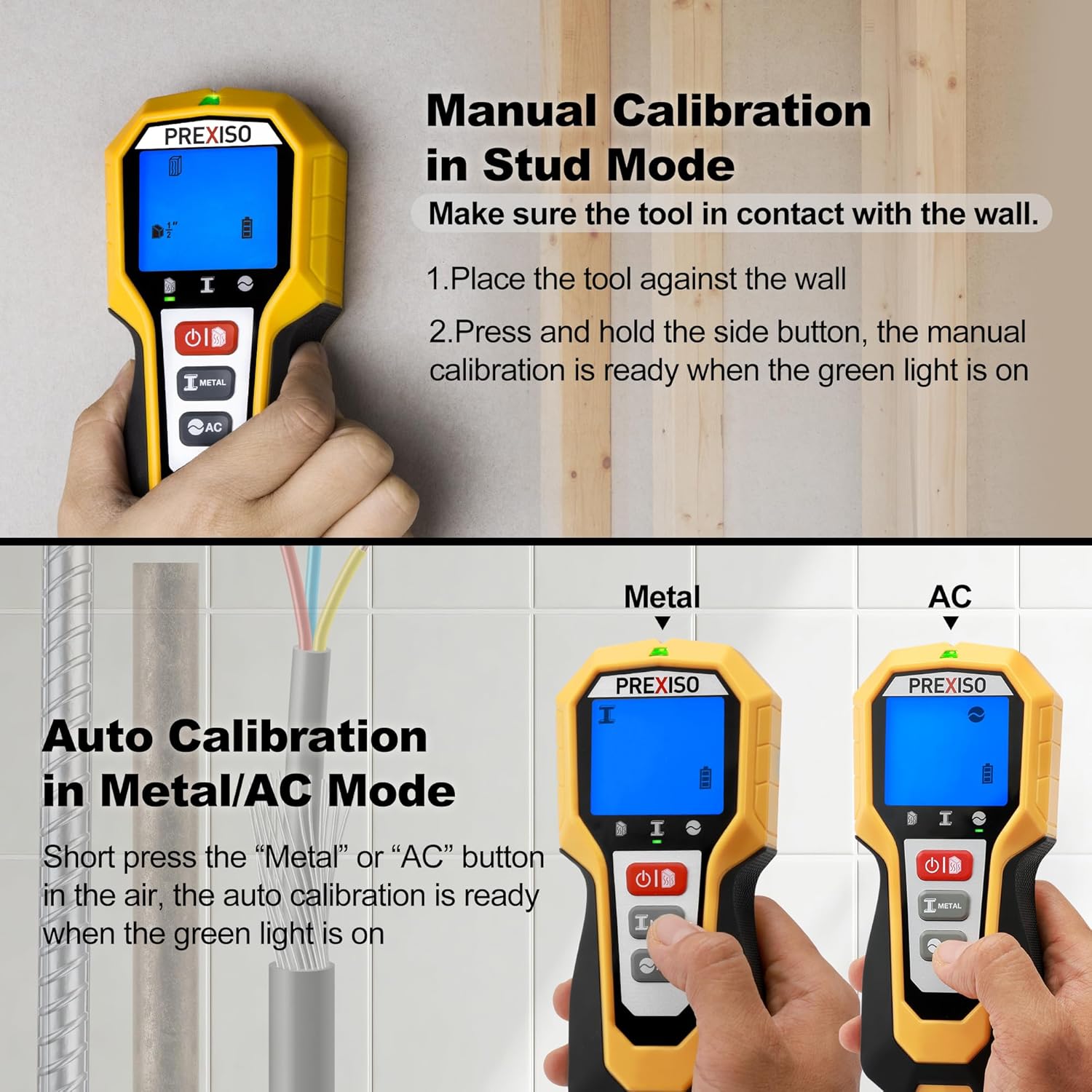
Image: The PREXISO Stud Finder demonstrating the calibration process for both stud mode (manual) and metal/AC modes (automatic).
Manual Calibration (Stud Mode)
- Place the tool flat against the wall where you intend to scan.
- Press and hold the side button. The green light will turn on, and a beep will sound, indicating that manual calibration is ready.
- Keep the side button pressed throughout the scanning process in stud mode.
Auto Calibration (Metal/AC Mode)
- For Metal or AC modes, simply short press the corresponding "Metal" or "AC" button while holding the device in the air, away from any surfaces.
- The green light will turn on, indicating that auto-calibration is complete and the device is ready for use in the selected mode.
Scanning Modes
The device features five scanning modes to detect different materials at varying depths:

Image: An illustration detailing the five scanning modes of the PREXISO Stud Finder, showing detection depths for metal (ferrous & non-ferrous), AC wires, and wood studs (1/2", 1", 1-1/2" deep).
Stud Scan Modes
These modes are designed to locate the edges and center of wood studs behind drywall.
- Stud 1/2" Scan: Detects wood studs up to 1/2 inch (13mm) deep.
- Stud 1" Scan: Detects wood studs up to 1 inch (25mm) deep.
- Stud 1-1/2" Scan: Detects wood studs up to 1-1/2 inches (38mm) deep.
To find a stud's center:

Image: The PREXISO Stud Finder in action, showing the process of manual calibration, slow movement across the wall, and the red light and audio alert indicating the center of a stud.
- Perform manual calibration as described above.
- Slowly slide the tool horizontally across the wall, keeping it in full contact with the surface.
- When the device approaches a stud, an arrow will appear on the screen indicating the direction of the target. The signal strength bars will increase.
- When the center of the stud is found, a steady beep will sound, the indicator light will turn red, and the display will show "CENTER".
- Mark the location with a pencil.
Metal Scan Mode
This mode detects ferrous and non-ferrous metal objects, such as pipes or rebar.
- Metal Detection: Can detect metal objects up to 1-3/8 inches (60mm) deep.
AC Wire Scan Mode
This mode identifies live unshielded AC electrical wires.
- AC Scan: Can detect live AC wires up to 2 inches (51mm) deep.
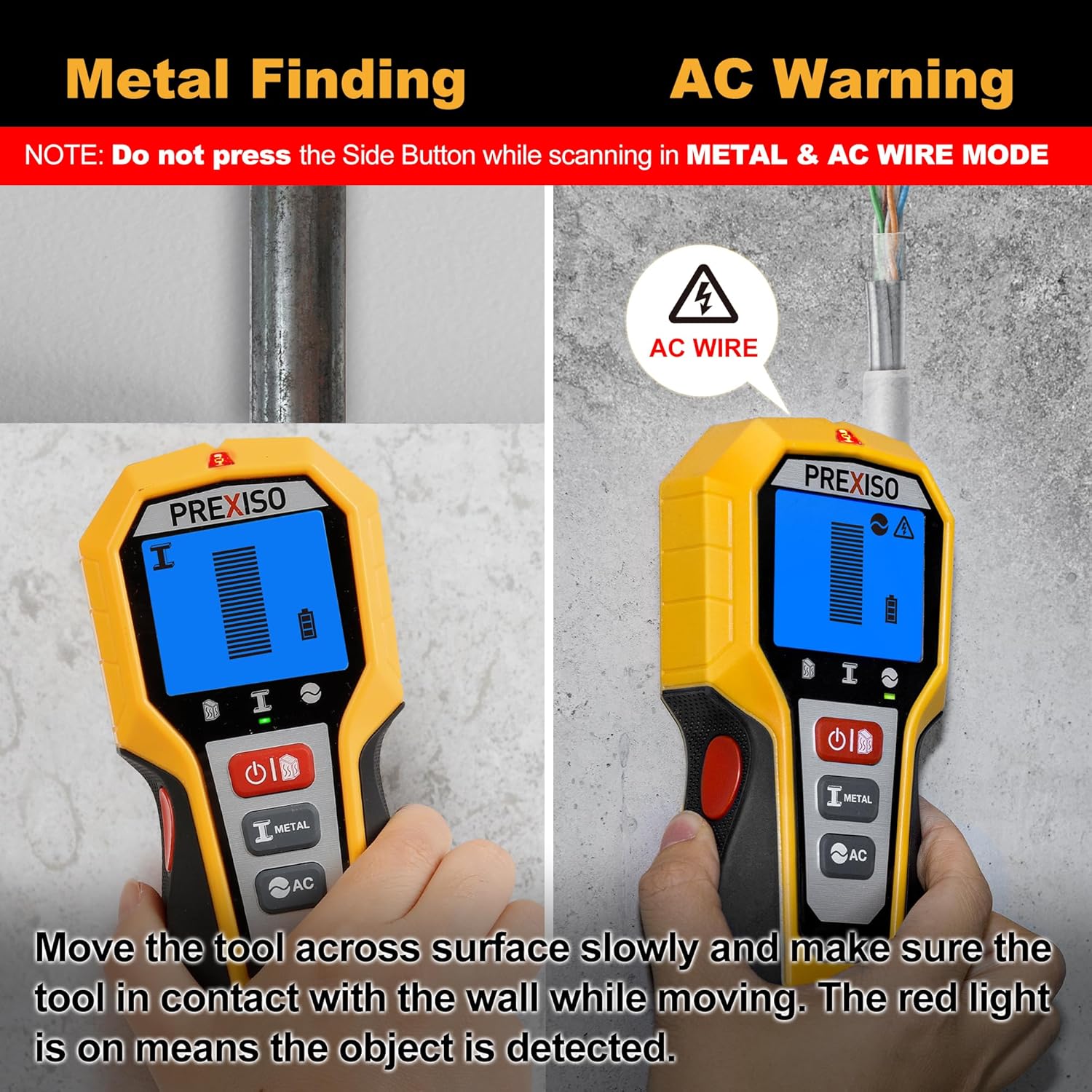
Image: The PREXISO Stud Finder demonstrating metal detection (left) and live AC wire warning (right). Note: Do not press the side button when scanning in Metal & AC Wire Mode.
Interpreting the Display and Indicators
The device provides clear visual and audio feedback:

Image: The PREXISO Stud Finder highlighting its easy-to-read large backlit screen and LED indicator, along with a comfortable overmold soft grip.
- Green LED: Indicates the device is calibrated and ready for scanning.
- Red LED: Illuminates when an object is detected.
- Audio Alert: A steady beep sounds when the center of a stud is found or when a strong signal for metal/AC is detected.
- Signal Strength Bars: On the display, these bars increase as the device gets closer to an object.
- Arrow Indicator: Guides you towards the target object's direction.
- Battery Icon: Shows the current battery level.
Maintenance
To ensure the longevity and optimal performance of your PREXISO Stud Finder, follow these maintenance guidelines:
- Cleaning: Wipe the device with a soft, damp cloth. Do not use abrasive cleaners or solvents.
- Storage: Store the stud finder in a dry, dust-free environment when not in use. Remove the battery if storing for extended periods to prevent leakage.
- Battery Replacement: Replace the 9V battery when the low battery indicator appears on the display to ensure accurate operation.
- Avoid Extreme Conditions: Do not expose the device to extreme temperatures, direct sunlight, or high humidity.
Troubleshooting
If you encounter issues with your PREXISO Stud Finder, consider the following common solutions:
| Problem | Possible Cause | Solution |
|---|---|---|
| Inaccurate readings or inconsistent detection. | Improper calibration, wall conditions (moisture, texture, paint), or low battery. | Ensure proper calibration before each scan. Re-calibrate when moving to a new area or wall. Check wall conditions; allow freshly painted walls to dry. Replace the battery if low. |
| Device does not turn on. | Dead or incorrectly installed battery. | Check battery installation and replace with a fresh 9V battery. |
| No detection in stud mode. | Side button not held during scan, or wall material is unsuitable. | Ensure the side button is continuously pressed while scanning in stud mode. Confirm the wall is interior dry wall, not stone, metal, or low-density plasterboard. |
| False AC wire warnings. | Interference from other electrical sources or device proximity to outlets. | Scan slowly and confirm the signal. Be aware that the device indicates AC wires in all modes. |
Specifications
| Feature | Detail |
|---|---|
| Brand | Prexiso |
| Model Number | PWDX-N38 |
| Power Source | Battery Powered (9V battery required) |
| Material | Plastic |
| Item Weight | 5.3 ounces |
| Package Dimensions | 9.25 x 4.57 x 1.73 inches |
| Recommended Uses | Construction Site Scanning |
| Stud Scan Depth | 1/2" (13mm), 1" (25mm), 1-1/2" (38mm) |
| Metal Detection Depth | Up to 1-3/8" (60mm) |
| AC Wire Detection Depth | Up to 2" (51mm) |
Warranty and Support
For warranty information and customer support, please refer to the documentation included with your product packaging or visit the official Prexiso website. Keep your purchase receipt as proof of purchase for any warranty claims.


