1. Safety Information
Read all safety warnings and instructions carefully before installing, operating, or performing maintenance on this appliance. Keep this manual for future reference.
- Ensure the refrigerator is connected to a grounded power outlet.
- Do not damage the refrigerant circuit.
- Do not use electrical appliances inside the food storage compartments unless they are of the type recommended by the manufacturer.
- Unplug the appliance before cleaning or performing maintenance.
- Keep ventilation openings clear of obstruction.
- This appliance is intended for household use only.
2. Product Overview
The Haier SmartChoice HRT-683ISU1 is a 598-liter, 3-door side-by-side frost-free refrigerator designed for efficient food storage and preservation. It features a convertible zone, Smart Sense AI, and an Expert Inverter Compressor.
Key Features:
- 3-Door Side-by-Side Design: Offers separate compartments for fresh food and freezer, with an additional convertible zone.
- Magic Convertible Zone: Allows temperature settings from -18°C to 5°C, converting between freezer and fridge as needed.
- Smart Sense AI: Intelligent technology for optimized temperature management.
- Expert Inverter Compressor: Provides energy efficiency, reduced noise, and long-lasting performance.
- Digital Display Panel: External control for easy temperature adjustments without opening the door.
- Deo Fresh Technology: Helps maintain freshness of food for extended periods.
- Triple Twist Ice Tray: Convenient ice production and storage.
- Anti-Bacterial Gasket: Prevents bacteria build-up for hygienic storage.
- Toughened Glass Shelves: Durable and easy to clean.
- Stabilizer Free Operation: Designed to operate without an external stabilizer (within specified voltage range).
Components:
The refrigerator includes:
- Refrigerator Unit
- Egg Tray
- Ice Tray
- User Manual (accessible from brand website)
- Warranty Card (use Amazon invoice for warranty claims)

Figure 2.1: Front view of the Haier SmartChoice 598L Refrigerator in Inox Steel finish.

Figure 2.2: Side view of the Haier SmartChoice 598L Refrigerator.
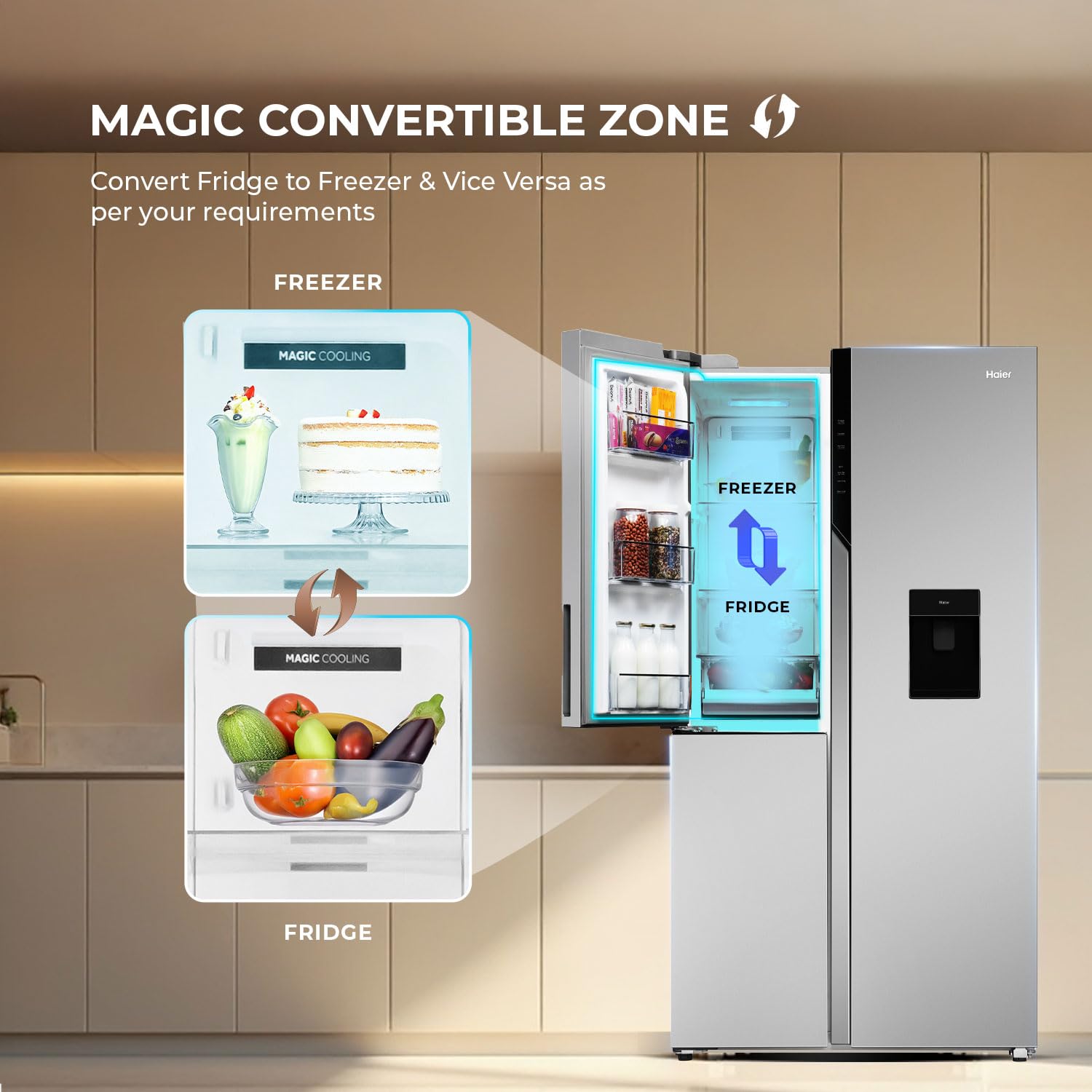
Figure 2.3: Back view of the Haier SmartChoice 598L Refrigerator, showing the easy-clean back design.
3. Setup and Installation
3.1 Unpacking
- Carefully remove all packaging materials.
- Inspect the refrigerator for any damage during transit. Report any damage to your retailer immediately.
- Remove all internal packing, including shelves and drawers, before cleaning.
3.2 Placement
- Place the refrigerator on a firm, level surface.
- Ensure adequate ventilation around the appliance. Maintain a minimum clearance of 10 cm (4 inches) from the back and sides.
- Avoid direct sunlight or heat sources (e.g., stoves, radiators) as this can increase energy consumption.
- Do not install in areas with extreme temperatures.
3.3 Leveling
Adjust the leveling feet at the bottom of the refrigerator to ensure it is stable and level. This helps in proper door alignment and efficient operation.
3.4 Electrical Connection
- Connect the power cord to a dedicated 230V, 50Hz grounded electrical outlet.
- The refrigerator is designed for stabilizer-free operation within a specified voltage range. Consult the product specifications for details.
- Allow the refrigerator to stand upright for at least 2-4 hours before plugging it in to allow refrigerants to settle.
4. Operating Instructions
4.1 Digital Display Panel
The digital display panel on the exterior of the refrigerator allows for easy control of settings without opening the doors. This panel typically includes options for Fridge, Freezer, Auto Set, Power Cool, Turbo Icing, and a 3-second lock function.

Figure 4.1: Digital control panel for temperature and mode settings.
4.2 Temperature Control
- Use the digital display to adjust the temperature for the refrigerator and freezer compartments.
- The recommended temperature for the fresh food compartment is 2°C to 4°C.
- The recommended temperature for the freezer compartment is -18°C.
4.3 Magic Convertible Zone
The Magic Convertible Zone offers flexible storage by allowing you to switch its function between a freezer and a refrigerator. This zone can be set to temperatures ranging from -18°C to 5°C.
- Access the convertible zone settings via the digital display panel.
- Select the desired temperature or mode (e.g., Fridge or Freezer) for this specific compartment.
- Allow time for the temperature to stabilize after making changes.

Figure 4.2: Illustration of the Magic Convertible Zone, showing its ability to switch between freezer and fridge modes.
4.4 Smart Sense AI and Connectivity
The refrigerator is equipped with Smart Sense AI for intelligent temperature management and can be connected via Wi-Fi for remote control and monitoring through a dedicated app.
- Download the Haier Smart Home app from your device's app store.
- Follow the in-app instructions to connect your refrigerator to your home Wi-Fi network.
- Once connected, you can monitor and adjust settings, including the convertible zone, and manage food inventory remotely.

Figure 4.3: Diagram illustrating Smart Sense AI, Smart Connectivity, and Smart Food Management features.
4.5 Ice Production (Triple Twist Ice Tray)
To use the Triple Twist Ice Tray:
- Fill the ice trays with water.
- Place them in the designated freezer compartment.
- Once frozen, twist the knobs to release the ice cubes into the storage box below.
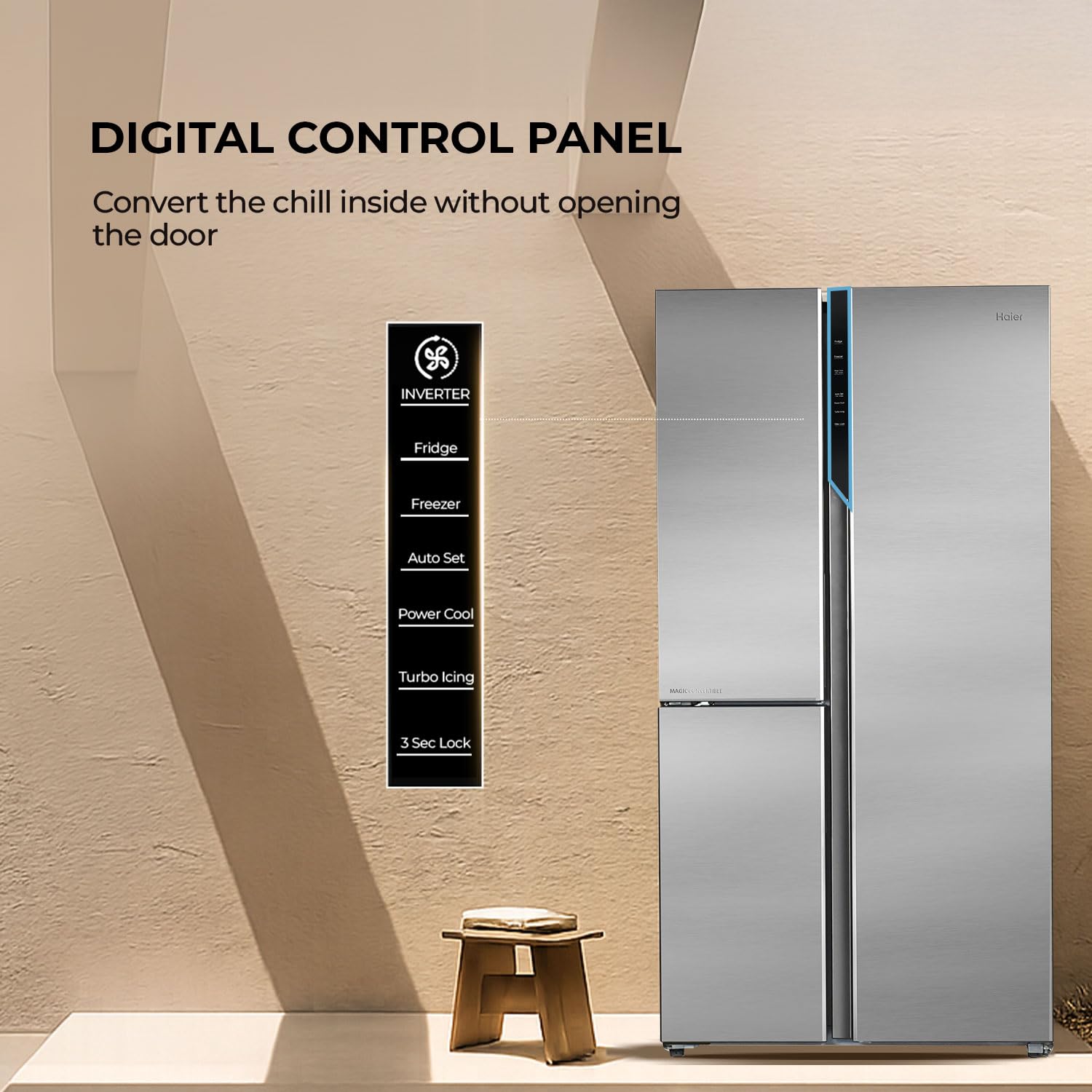
Figure 4.4: Close-up of the Triple Twist Ice Tray for convenient ice making.
5. Maintenance and Care
Regular maintenance ensures optimal performance and longevity of your refrigerator.
5.1 Cleaning the Interior
- Unplug the refrigerator before cleaning.
- Remove all food items, shelves, and drawers.
- Wipe the interior with a soft cloth dampened with a solution of mild detergent and warm water.
- Rinse with clean water and dry thoroughly.
- Clean the Anti-Bacterial Gasket regularly to prevent mold and bacteria growth.

Figure 5.1: Illustration of Deo Fresh Technology, which helps maintain freshness and reduce odors.

Figure 5.2: Close-up of the Anti-Bacterial Gasket, designed to prevent bacterial build-up.
5.2 Cleaning the Exterior
Wipe the exterior surfaces with a soft, damp cloth. For stubborn stains, use a mild, non-abrasive cleaner. Avoid harsh chemicals or abrasive pads.
5.3 Power Saving Tips
- Do not open the doors frequently or leave them open for extended periods.
- Allow hot foods to cool before placing them in the refrigerator.
- Ensure the door seals are clean and intact to prevent cold air leakage.
- Defrost the freezer when ice build-up exceeds 5mm (though this is a frost-free model, occasional manual defrosting might be needed in extreme conditions or if issues arise).
6. Troubleshooting
Before contacting service, check the following common issues and solutions:
| Problem | Possible Cause | Solution |
|---|---|---|
| Refrigerator not cooling | Power cord unplugged; temperature set too high; door not closed properly; poor ventilation. | Check power connection; adjust temperature settings; ensure doors are sealed; clear obstructions around the unit. |
| Unusual noise | Refrigerator not level; objects touching the back wall; compressor noise (normal). | Level the appliance; ensure nothing is touching the back; normal compressor sounds are expected. |
| Water leakage | Drain hole blocked; water dispenser tray overflowing. | Clear the drain hole; ensure water dispenser tray is correctly positioned. |
| Digital display not working | Power issue; panel malfunction. | Check power supply; if issue persists, contact customer service. |
If the problem persists after checking these points, please contact Haier customer service.
7. Specifications
| Feature | Detail |
|---|---|
| Brand | Haier |
| Model | HRT-683ISU1 |
| Capacity | 598 Litres (Fresh Food: 399 L, Freezer: 199 L) |
| Energy Rating | 3 Star Energy Efficiency |
| Annual Energy Consumption | 525 Kilowatt Hours Per Year |
| Installation Type | Freestanding |
| Form Factor | Convertible, Freezer Bottom, Multi Door |
| Special Features | Inverter Compressor, Touch Control, Smart Sense AI, Deo Fresh Technology |
| Colour | Inox Steel |
| Voltage | 230 Volts |
| Number of Drawers | 5 |
| Defrost System | Frost Free |
| Shelf Type | Toughened Glass |
| Number of Shelves | 3 |
| Item Dimensions (WxHxD) | 90.5 x 177.5 x 69.7 cm |
| Net Weight | 97 kg |
| Country of Origin | India |

Figure 7.1: Dimensions and energy efficiency label for the Haier HRT-683ISU1 refrigerator.
8. Warranty and Support
Your Haier SmartChoice Refrigerator comes with a comprehensive warranty:
- Product Warranty: 1 year comprehensive warranty.
- Compressor Warranty: 10 years warranty on the inverter compressor.
To avail warranty services, please retain your Amazon invoice as proof of purchase.
For further assistance, technical support, or to schedule a service appointment, please contact Haier customer service. You can find contact details on the official Haier website or your warranty card.
The full user manual can be accessed from the official Haier brand website.


