
HeroSet HS5202
HeroSet Big and Tall Office Chair User Manual
Model: HS5202
Introduction
Thank you for choosing the HeroSet Big and Tall Office Chair, Model HS5202. This manual provides detailed instructions for assembly, operation, maintenance, and troubleshooting to ensure you get the most out of your new office chair. Designed for comfort and durability, this chair features a 500lbs capacity, adjustable lumbar support, and high-quality PU leather for a superior seating experience.
Safety Information
Please read all instructions carefully before assembly and use. Keep this manual for future reference.
- Do not exceed the maximum weight capacity of 500 lbs (227 kg).
- Ensure all screws and bolts are securely tightened before use. Periodically check and re-tighten as necessary.
- Avoid standing on the chair or using it as a step stool.
- Keep hands and fingers clear of moving parts during adjustment.
- Use the chair on a flat, stable surface.
- Do not expose the chair to direct sunlight or extreme temperatures for prolonged periods, as this may damage the material.
Parts List
Before beginning assembly, verify that all components are present and undamaged. If any parts are missing or damaged, please contact customer support.
| Part | Description | Quantity |
|---|---|---|
| A | Backrest | 1 |
| B | Seat Cushion | 1 |
| C | Armrests | 2 |
| D | Mechanism Plate | 1 |
| E | Gas Lift Cylinder | 1 |
| F | Base (Metal) | 1 |
| G | Wheels (PU Casters) | 5 |
| H | Hardware Pack (Screws, Washers, Allen Wrench) | 1 |

Figure 1: Exploded view of chair components, showing the backrest, seat cushion, armrests, mechanism, gas lift, base, and wheels.
Setup and Assembly
Follow these steps to assemble your HeroSet office chair. It is recommended to have a second person assist with certain steps.
- Attach Wheels to Base: Insert the five wheels (G) into the holes at the end of each leg of the metal base (F). Push firmly until they click into place.

Figure 2: Illustration showing the insertion of wheels into the chair's metal base.
- Insert Gas Lift: Place the gas lift cylinder (E) into the center hole of the assembled base (F).
- Attach Mechanism to Seat: Align the mechanism plate (D) with the pre-drilled holes on the underside of the seat cushion (B). Ensure the front of the mechanism faces the front of the seat. Secure with screws from the hardware pack (H) using the provided Allen wrench. Tighten all screws firmly.
- Attach Armrests to Seat: Attach the armrests (C) to the sides of the seat cushion (B) using the screws from the hardware pack (H). Do not fully tighten yet.
- Attach Backrest to Seat and Armrests: Align the backrest (A) with the mounting plates on the armrests (C) and the back of the seat cushion (B). Secure with screws from the hardware pack (H). Once all screws are in place, fully tighten all screws for the armrests and backrest.
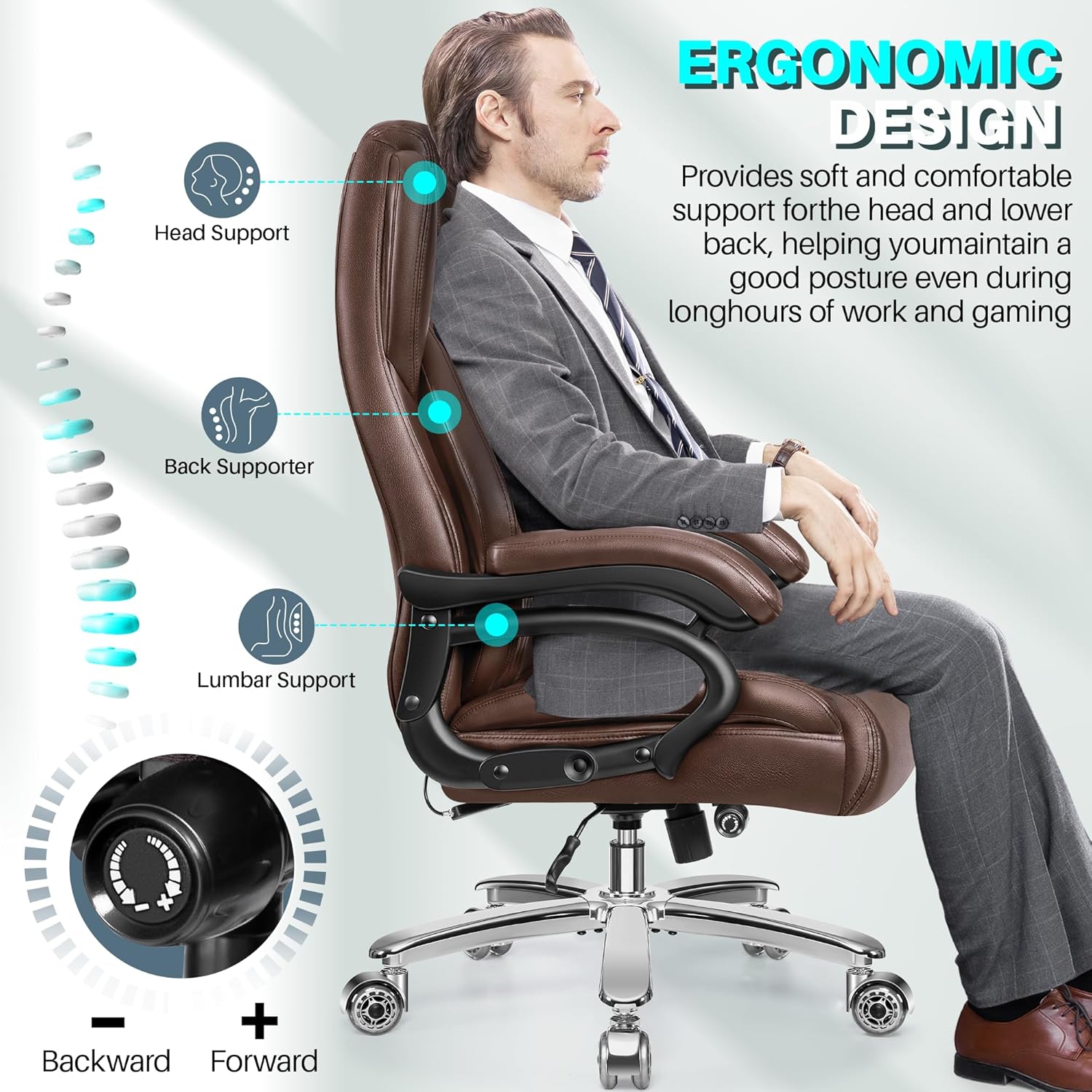
Figure 3: Diagram illustrating the connection points for the backrest and armrests to the seat base.
- Connect Seat Assembly to Gas Lift: Carefully place the assembled seat and backrest onto the gas lift cylinder (E), ensuring the tapered end of the gas lift fits securely into the mechanism plate. Apply downward pressure to seat the connection.

Figure 4: Image showing the final assembly step where the chair top is placed onto the gas lift and wheeled base.
Operating Instructions
Your HeroSet office chair offers several adjustable features for personalized comfort.
1. Seat Height Adjustment
To adjust the seat height, locate the lever on the right side under the seat cushion.
- To raise the seat: While standing, pull the lever upwards. The seat will rise automatically. Release the lever at the desired height.
- To lower the seat: While seated, pull the lever upwards. The seat will lower. Release the lever at the desired height.

Figure 5: Visual guide for adjusting the chair's height using the side lever, illustrating the 4-inch adjustment range.
2. Backrest Tilt and Rocking Function
The chair features a rocking function and adjustable backrest angle up to 30 degrees.
- To enable rocking: Pull the same lever (used for height adjustment) outwards from under the seat. The chair will now rock freely.
- To lock the backrest: Push the lever inwards. The backrest will lock in its upright position.
- To adjust rocking tension: Rotate the round tension knob located under the front of the seat. Turn clockwise to increase tension (making it harder to rock) and counter-clockwise to decrease tension (making it easier to rock).

Figure 6: Illustration of the chair's rocking mechanism, showing the lever for activation and the knob for tension adjustment, with a 90-120 degree rocking range.
3. Adjustable Lumbar Support
The built-in lumbar support can be adjusted to fit your lower back curve.
- Locate the knob on the right side of the backrest.
- Turn the knob clockwise to increase the lumbar support (push it forward).
- Turn the knob counter-clockwise to decrease the lumbar support (pull it backward).

Figure 7: Visual representation of the ergonomic design, highlighting head, back, and adjustable lumbar support, with a close-up of the lumbar adjustment knob.
Maintenance and Care
Proper maintenance will extend the life and appearance of your HeroSet office chair.
- Cleaning the PU Leather: Wipe the leather surface with a soft, damp cloth. For tougher stains, use a mild soap solution and wipe dry immediately. Avoid harsh chemicals, abrasive cleaners, or solvents, as these can damage the material.
- Checking Fasteners: Periodically (every 3-6 months) check all screws and bolts to ensure they are tight. Re-tighten as needed to maintain stability and prevent squeaking.
- Wheel Care: Keep the wheels clean by removing any hair or debris that may accumulate around the casters. This ensures smooth movement and prevents floor scratches.
- Gas Lift: The gas lift is maintenance-free. Do not attempt to disassemble or lubricate it.
- Avoid Overloading: Do not exceed the chair's 500 lbs weight capacity.

Figure 8: Detail of the chair's high-quality PU leather, highlighting its waterproof, easy-to-clean, fine, smooth, and odor-free characteristics.
Troubleshooting
Refer to this section for common issues and their solutions.
| Problem | Possible Cause | Solution |
|---|---|---|
| Chair wobbles or feels unstable. | Loose screws or bolts. | Check and re-tighten all assembly screws, especially those connecting the backrest, seat, and armrests. |
| Chair does not adjust height. | Gas lift not properly seated or faulty; lever mechanism stuck. | Ensure the gas lift is fully inserted into the base and mechanism. Check if the height adjustment lever moves freely. If the issue persists, the gas lift may need replacement (contact support). |
| Chair squeaks when moving. | Loose connections; friction between parts. | Re-tighten all screws. Apply a small amount of silicone lubricant to moving metal-on-metal parts if necessary (avoiding the gas lift). |
| Wheels do not roll smoothly. | Debris (hair, lint) caught in casters. | Turn the chair over and remove any debris from the wheels. Clean the wheel axles. |
| Lumbar support does not adjust. | Adjustment knob or internal mechanism issue. | Ensure the knob is not stripped. If the mechanism feels jammed, do not force it. Contact customer support for assistance. |
Specifications
| Feature | Detail |
|---|---|
| Model Name | HS5202 |
| Brand | HeroSet |
| Color | Brown |
| Product Dimensions (D x W x H) | 22"D x 23.6"W x 45.7"H |
| Weight Capacity | Up to 500 lbs (227 kg) |
| Frame Material | Alloy Steel |
| Upholstery Material | High-Quality PU Leather |
| Seat Depth | 22 inches |
| Adjustable Height Range | Approx. 4 inches (from 44.9" to 48.7" total height) |
| Rocking Angle | Up to 30 degrees (90-120 degrees) |
| Wheels | PU Casters (Skateboard Wheels) |
| Gas Lift | SGS Certified Class 4 |

Figure 9: The HeroSet Big and Tall Office Chair, showcasing its robust design and 500 lbs capacity.
Warranty and Support
HeroSet is committed to providing high-quality products and customer satisfaction. For warranty information, technical support, or to order replacement parts, please contact our customer service team.
- Customer Service: Refer to the contact information provided with your purchase or visit the official HeroSet website.
- Returns: This product typically includes a 30-day easy return policy. Please check your purchase details for specific return conditions.
- Protection Plans: Extended protection plans may be available for purchase.
For further assistance, you may visit the HeroSet Store on Amazon.