Introduction
This manual provides essential information for the safe and efficient operation of your Philips LED Olas Ceiling Fan. Please read these instructions carefully before installation and use, and retain them for future reference. This ceiling fan combines a dimmable LED light with a powerful fan, designed to provide optimal air circulation and customizable lighting for your home.
Safety Information
Important: Always disconnect power at the main circuit breaker before installation, maintenance, or cleaning. Installation must be performed by a qualified electrician in accordance with local wiring regulations.
- Ensure the mounting structure can support the weight of the fan.
- Maintain a minimum clearance of 2.3 meters (7.5 feet) from the floor to the fan blades.
- Do not insert objects into the path of the rotating blades.
- This appliance is for indoor use only.
- Use only the remote control provided for operation.
Package Contents
Verify that all components are present before beginning installation:
- Philips LED Olas Ceiling Fan unit
- Remote Control
- Mounting hardware (screws, brackets, etc.)
- Instruction Manual (this document)
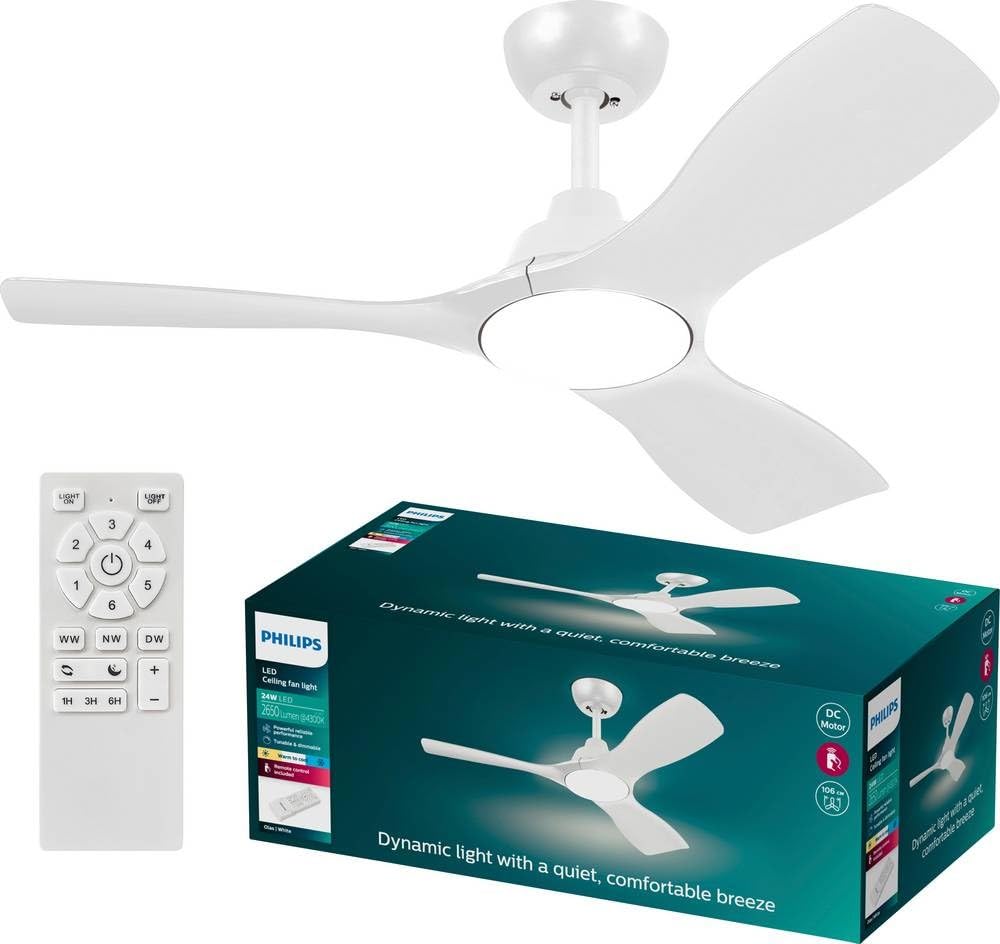
Figure 1: Philips LED Olas Ceiling Fan. This image displays the complete ceiling fan unit, featuring three sleek white blades and a central integrated LED light.
Setup and Installation
Professional installation is recommended. Follow these general steps:
- Power Disconnection: Turn off power at the circuit breaker to avoid electrical shock.
- Mounting Bracket Installation: Securely attach the mounting bracket to a ceiling joist or a suitable electrical junction box capable of supporting the fan's weight.
- Wiring: Connect the fan's electrical wires to the household wiring according to the wiring diagram provided in the separate installation guide (if applicable) or by a qualified electrician. Ensure all connections are secure.
- Fan Assembly: Attach the fan motor housing to the mounting bracket. Install the fan blades and light fixture as per the specific instructions included with your product.
- Remote Control Setup: Insert batteries (not included) into the remote control. Pair the remote with the fan if required (refer to specific pairing instructions).
- Power Restoration: Restore power at the circuit breaker and test the fan's operation.

Figure 2: Fan Motor Housing and Blade Connection. This image provides a closer view of the fan's central unit, showing where the blades connect to the motor housing and the integrated LED light.
Operating Instructions
Your Philips LED Olas Ceiling Fan can be controlled using the provided remote control or a compatible wall switch.
Remote Control Functions:
- Power On/Off: Press the ON/OFF button to turn the fan and light on or off.
- Fan Speed: Use the FAN SPEED buttons to cycle through different fan speeds (e.g., Low, Medium, High). The powerful fan is designed for effective air circulation.
- Light On/Off: Press the LIGHT button to control the integrated LED light independently.
- Dimming: Use the DIMMER buttons (often marked with + and -) to adjust the brightness of the LED light. The light is dimmable and customizable.
- SceneSwitch: If available, press the SCENESWITCH button to cycle through pre-set lighting scenes.
- Summer/Winter Mode: The fan features year-round usability. Press the MODE button (or a dedicated switch on the fan motor housing) to switch between summer mode (downward airflow for cooling) and winter mode (upward airflow for heat distribution).
The fan's silent motor ensures quiet operation while providing powerful airflow.
Maintenance
Regular maintenance ensures optimal performance and longevity of your ceiling fan.
- Cleaning: Dust the fan blades and motor housing periodically with a soft, damp cloth. Do not use abrasive cleaners or solvents. Ensure the fan is turned off and power is disconnected before cleaning.
- Blade Inspection: Check fan blades for any cracks or damage. Replace damaged blades immediately.
- Tightness Check: Periodically check all screws and connections for tightness. Retighten as necessary.
- Light Source: The integrated LED light source is designed for long life. If replacement is ever needed, consult a qualified technician.
Troubleshooting
If you encounter issues with your Philips LED Olas Ceiling Fan, refer to the following common problems and solutions:
| Problem | Possible Cause | Solution |
|---|---|---|
| Fan does not start. | No power supply; loose wiring; remote control battery dead. | Check circuit breaker; ensure all wiring connections are secure; replace remote control batteries. |
| Fan wobbles. | Loose mounting screws; unbalanced blades. | Tighten all mounting screws; ensure blades are securely attached and balanced (balancing kit may be required). |
| Light does not work. | No power to light; faulty LED module; remote control issue. | Check power supply; ensure light is turned on via remote/switch; contact support if LED module is suspected faulty. |
| Remote control not working. | Dead batteries; remote not paired. | Replace batteries; re-pair remote control with the fan (refer to specific pairing instructions). |
If the problem persists after attempting these solutions, please contact customer support.
Specifications
| Brand | Philips LED |
| Model Number | 8720169369979 |
| Dimensions (L x W x H) | 106 cm x 106 cm x 31 cm (Diameter 106 cm, Height 31 cm) |
| Color | White |
| Material | Metal |
| Voltage | 220 Volts (AC) |
| Bulb Type | Integrated LED |
| Luminous Flux | 1500 Lumen |
| Energy Label | 62.5 lm/W |
| Included Components | Remote Control |
| Installation Type | Ceiling Mount |
| Indoor/Outdoor Use | Indoor |
Warranty and Support
Philips LED products are designed for reliability and performance. This product comes with a 1-year availability of spare parts.
For technical assistance, warranty claims, or further information, please refer to the contact details provided with your purchase documentation or visit the official Philips LED website.
Note: Keep your proof of purchase for warranty purposes.


