
DEVAISE ABGY018
DEVAISE Ergonomic Mesh Office Desk Chair with Footrest (Model ABGY018) - Instruction Manual
Your guide to assembly, operation, and maintenance.
Introduction
Thank you for choosing the DEVAISE Ergonomic Mesh Office Desk Chair with Footrest, Model ABGY018. This manual provides detailed instructions for the safe assembly, operation, and maintenance of your new office chair. Please read this manual thoroughly before use and retain it for future reference.
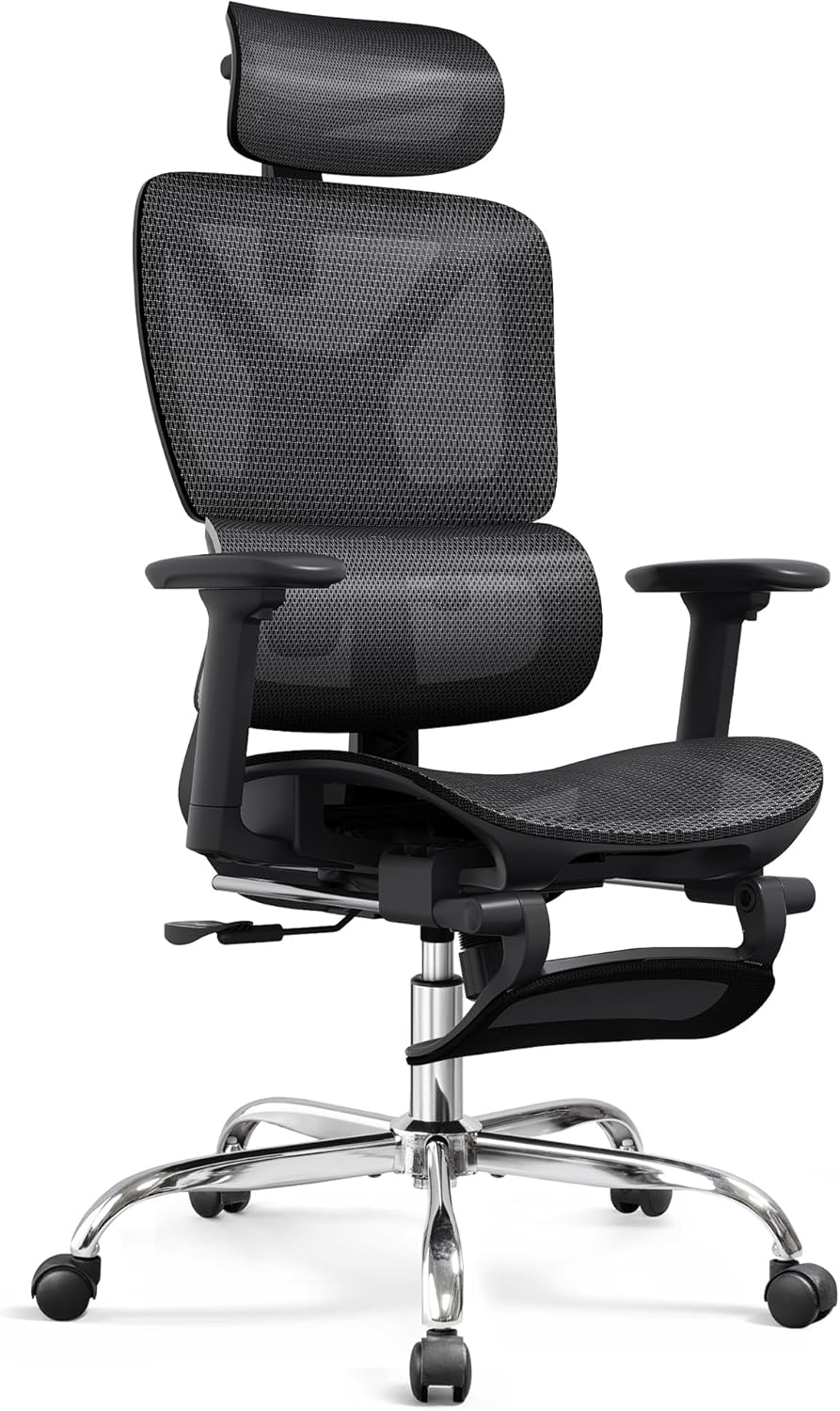
Image: The DEVAISE Ergonomic Mesh Office Desk Chair with Footrest, showcasing its design and features.
Safety Information
- Ensure all parts are present and undamaged before assembly. Do not use if any parts are missing or damaged.
- Follow assembly instructions carefully. Incorrect assembly can lead to instability and injury.
- This chair is designed for indoor use only.
- Do not stand on the chair.
- Do not use the chair as a step stool.
- Maximum weight capacity: 400 pounds (181 kg). Do not exceed this limit.
- Keep children away from moving parts during adjustment.
- Regularly check all bolts and screws to ensure they are tight.
- Avoid exposing the chair to direct sunlight or extreme temperatures to prevent material degradation.
Package Contents
Before beginning assembly, please verify that all components listed below are included in your package:
- Backrest Assembly
- Seat Cushion Assembly with Armrests
- Headrest
- Five-pronged Metal Base
- SGS Class 4 Gas Lift
- PU Quiet Casters (5 pieces)
- Footrest Assembly
- Hardware Kit (screws, washers, Allen wrench)
- Instruction Manual
Setup and Assembly
Assembly is estimated to take approximately 20 minutes. Follow these steps carefully:
- Attach Casters to Base: Insert the five PU quiet casters into the holes at the end of each leg of the five-pronged metal base. Push firmly until they click into place.
- Insert Gas Lift: Place the SGS Class 4 gas lift into the center hole of the assembled base.
- Attach Seat to Gas Lift: Carefully align the center mechanism of the seat cushion assembly with the top of the gas lift. Press down firmly to secure.
- Attach Backrest: Secure the backrest assembly to the seat mechanism using the provided screws and Allen wrench. Ensure all screws are tightened securely.
- Install Headrest: Slide the headrest into the designated slots at the top of the backrest. Adjust to your preferred height and angle.
- Attach Footrest: Connect the footrest assembly to the underside of the seat, following the specific instructions in the hardware kit for proper attachment.

Image: Diagram illustrating the chair's dimensions and key components, useful for assembly reference.
Operating Instructions
1. Seat Height Adjustment
To adjust the seat height, locate the lever on the right side beneath the seat. While seated, pull the lever up to lower the seat. To raise the seat, stand up slightly and pull the lever up. Release the lever at your desired height to lock it in place.
2. Recline and Tilt-Lock Function
The chair offers multiple reclining positions: 90° (work), 110° (relax), and 135° (sleep). To recline, pull the lever on the left side beneath the seat outwards to unlock the rocking function. Lean back to your desired angle and push the lever inwards to lock the tilt. To adjust tilt tension, rotate the knob located at the front underside of the seat.

Image: Visual guide demonstrating the chair's recline angles (90°, 110°, 135°) and the tilt adjustment knob.
3. Lumbar Support Adjustment
The adaptive lumbar support can be adjusted to provide optimal lower back comfort. Use the controls on the side of the backrest to move the lumbar support up or down, and in or out, to fit the natural curve of your spine.

Image: Illustration showing the adjustable ergonomic lumbar support and its movement range.
4. Headrest Adjustment
The 3D bi-axial headrest can be adjusted for height and angle. Gently pull or push the headrest to move it up or down. Rotate the headrest pad to achieve your desired neck and head support angle.

Image: Diagram detailing the 3D bi-axial headrest's rotation capabilities (60° whole rotation, 90° sub-axis rotation).
5. Armrest Adjustment
The 3D adjustable armrests can be moved in three directions: up and down, left and right, and rotated. Use the buttons or levers on the armrests to unlock and adjust them to your preferred position. Release the button/lever to lock.

Image: Visual representation of the armrest adjustments: up/down, left/right, and rotation.
6. Footrest Operation
To extend the footrest, pull it out from underneath the seat. It will slide out smoothly. To retract, push it back in until it is fully stored under the seat. The footrest provides additional support for relaxation.

Image: The DEVAISE office chair with its footrest extended, positioned in a home office environment.
Maintenance
- Cleaning: Wipe clean with a damp cloth. Avoid harsh chemicals or abrasive cleaners that may damage the mesh or frame.
- Inspection: Periodically check all screws and bolts for tightness. Re-tighten if necessary to ensure stability and safety.
- Casters: Keep casters free of debris (hair, dust, etc.) to ensure smooth movement and prevent floor scratches.
- Gas Lift: Do not attempt to disassemble or repair the gas lift yourself. Contact customer support if it malfunctions.
Troubleshooting
| Problem | Possible Cause | Solution |
|---|---|---|
| Chair does not adjust height | Gas lift malfunction or lever not engaged. | Ensure the height adjustment lever is fully engaged. If the issue persists, contact customer support for gas lift replacement. |
| Chair wobbles or feels unstable | Loose screws or improper assembly. | Check all assembly screws and tighten them securely. Ensure the gas lift is properly seated in the base and seat mechanism. |
| Casters do not roll smoothly | Debris caught in casters or damaged casters. | Remove any hair or debris from the caster wheels. If casters are damaged, they may need replacement. |
| Backrest does not recline or lock | Tilt-lock mechanism not engaged or tension too tight/loose. | Ensure the tilt-lock lever is correctly engaged/disengaged. Adjust the tilt tension knob to find the desired resistance. |
Specifications
| Feature | Detail |
|---|---|
| Brand | DEVAISE |
| Model Name | ABGY018 Home Office Desk Chair |
| Color | Black & Footrest |
| Material | Mesh |
| Product Dimensions (D x W x H) | 27.6"D x 27.8"W x 47.2"H |
| Maximum Weight Recommendation | 400 Pounds (181 kg) |
| Gas Lift Certification | SGS Class 4 |
| Caster Type | PU Quiet Casters (BIFMA 5.1-Certified) |
| Back Style | Mesh Back |
| Reclining Positions | 90° (Work), 110° (Relax), 135° (Sleep) |
| Arm Style | 3D Adjustable |
| Included Components | Arm Pad, Footrest |
| Item Weight | 41.4 pounds |
Warranty and Customer Support
The DEVAISE Ergonomic Mesh Office Desk Chair (Model ABGY018) is backed by a two-year warranty from the date of purchase. This warranty covers manufacturing defects and material flaws under normal use.
For any questions, concerns, or warranty claims, please contact our dedicated customer support team. Provide your model number (ABGY018) and proof of purchase for efficient service.
Contact Information: Please refer to the contact details provided on the DEVAISE official website or your purchase documentation for the most up-to-date support channels.
Related documentsABGY018

Ask a question about this manual
Ask about setup, troubleshooting, compatibility, parts, safety, or missing instructions. Manuals+ will review the question and use this page’s manual context to help answer it.