Introduction
The Naturewater SOFT-V1 water softener provides a continuous supply of decalcified, soft water. It is versatile for various applications, including cooking, household appliances, and bathroom use, with a maximum flow rate of 1,000 liters per hour. This system is also suitable for aquaristics. Softened water improves the preparation of hot beverages and is generally better tolerated by the body. Additionally, showering with softened water is healthier for skin and hair. Household appliances like washing machines and dishwashers benefit from a longer lifespan when operating with treated water, as limescale deposits are minimized.
The softening process occurs through ion exchange, controlled by a special resin. The system includes a 12.5-liter resin tank. This resin absorbs calcium and magnesium ions (commonly referred to as "limescale in water") and releases sodium ions. This exchange reduces water hardness without affecting the initial pH. A key advantage of this system is the automatic regeneration of the exchange resin. Using a salt or brine reserve, the device can exchange bound magnesium and calcium ions for sodium ions during the regeneration process, effectively removing "limescale" from the system. The resin then regains its initial capacity and can be reused. Softening salt needs to be added to the system at regular intervals.

Figure 1: Front view of the Naturewater NW-SOFT-V1 Water Softener.
Setup and Installation
The Naturewater NW-SOFT-V1 water softener is designed for countertop installation. Ensure the installation location is level, dry, and protected from freezing temperatures and direct sunlight. Allow sufficient space around the unit for maintenance and connections.
Connecting the Water Softener
- Water Supply Connection: Connect the hard water inlet to the designated port on the softener. Ensure all connections are secure and leak-free.
- Soft Water Outlet: Connect the soft water outlet to your household plumbing system.
- Drain Connection: Attach the drain hose to the softener's drain port and route it to an appropriate drain, ensuring there is an air gap to prevent back-siphonage.
- Brine Line Connection: Connect the brine line from the salt tank to the control valve.
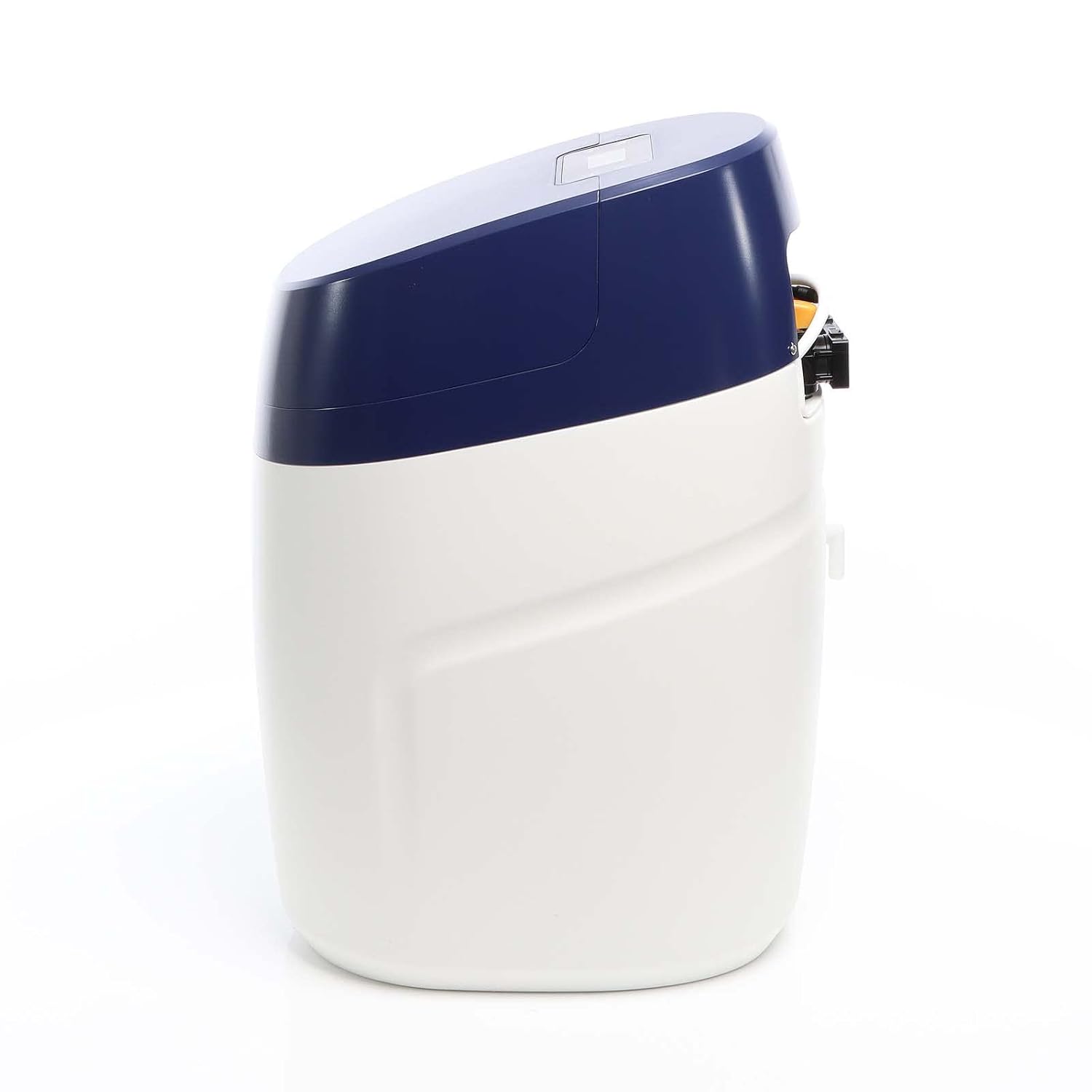
Figure 2: Side view illustrating water inlet and outlet connections.

Figure 3: Rear view detailing the connection points for water and drain lines.
Electrical Connection
Connect the power cable to a suitable electrical outlet. Ensure the power supply matches the unit's requirements.
Initial Resin Preparation
Before first use, the resin module may require initial flushing or preparation as per the detailed instructions in the full manual (not provided here). Ensure the resin tank is filled with the appropriate amount of softening salt.
Operation
The Naturewater NW-SOFT-V1 operates on an ion exchange principle to remove hardness minerals (calcium and magnesium) from your water supply. The system is designed for automatic operation.
Ion Exchange Process
Hard water flows through the resin bed, where calcium (Ca²⁺) and magnesium (Mg²⁺) ions are exchanged for sodium (Na⁺) ions. This process effectively softens the water without altering its pH level.

Figure 4: Illustration of the ion exchange process where calcium and magnesium ions are replaced by sodium ions.
Automatic Regeneration
The system features automatic regeneration. When the resin bed becomes saturated with hardness minerals, the control valve initiates a regeneration cycle. During this cycle, a brine solution (saltwater) is drawn from the salt tank and flushed through the resin. This process recharges the resin by replacing the accumulated calcium and magnesium ions with sodium ions from the brine. The displaced hardness minerals are then flushed to the drain.

Figure 5: Internal diagram showing the automatic central control valve, brine tank, resin tank, and flow paths for hard water, soft water, and regeneration brine.
Control Panel
The unit is equipped with a control panel (visible on top of the unit) for programming and monitoring. Refer to the full product manual for detailed instructions on setting regeneration cycles and other parameters. The interface is typically in English and designed for ease of use.
Maintenance
Adding Softening Salt
Regularly check the salt level in the brine tank. Add softening salt as needed to ensure proper regeneration. The frequency depends on your water hardness and water consumption. It is recommended to keep the salt level at least halfway full.
Cleaning
Periodically clean the exterior of the unit with a damp cloth. Avoid using abrasive cleaners. Inspect the brine tank for any salt bridges or sludge buildup and clean as necessary to ensure proper brine flow.
System Checks
- Check for any leaks around connections.
- Ensure the drain line is clear and not obstructed.
- Verify that the regeneration cycles are occurring as programmed.
Troubleshooting
| Problem | Possible Cause | Solution |
|---|---|---|
| Water is not soft | Low salt level in brine tank; Salt bridge in brine tank; Incorrect regeneration settings; Bypass valve open. | Add softening salt; Break up salt bridge and add salt; Check and adjust regeneration settings; Ensure bypass valve is closed. |
| Loss of water pressure | Clogged filters (if applicable); Obstruction in plumbing; Unit in regeneration cycle. | Clean or replace filters; Check plumbing for blockages; Wait for regeneration cycle to complete. |
| Excessive salt consumption | Regeneration frequency too high; Incorrect salt dosage setting. | Adjust regeneration frequency; Verify salt dosage settings. |
| Unit not regenerating | Power outage; Control valve malfunction; Brine line clogged. | Check power supply; Consult a qualified technician; Inspect and clear brine line. |
For issues not listed here or if troubleshooting steps do not resolve the problem, please contact customer support.
Technical Specifications
| Feature | Detail |
|---|---|
| Model Name | SOFT-V1 |
| Brand | Naturewater |
| Capacity | 12.5 Liters (Resin Tank) |
| Flow Rate | Up to 1000 Liters per hour |
| Installation Method | Countertop |
| Purification Method | Ion Exchange |
| Special Features | Ion exchange and automatic regeneration |
| Power Source | Electric Cable |
| Product Dimensions (L x W x H) | 32.8 cm x 45 cm x 65.1 cm |
| Item Weight | 19.9 Kilograms |
| Color | White |
| Manufacturer | WilTec |
Warranty and Support
Specific warranty details are not provided in the product information. Please refer to your purchase documentation or contact the retailer/manufacturer for warranty information.
For technical support or further assistance, please contact Naturewater customer service or the seller, Wiltec Wildanger Technik GmbH.


