
1. Product Overview
The Samsung Galaxy A56 5G is a feature-rich smartphone designed for enhanced performance and user experience. It includes advanced camera capabilities, a vibrant display, and robust durability features. This manual provides essential information for setting up, operating, and maintaining your device.

Image: Front and back view of the Samsung Galaxy A56 5G smartphone.
Key Features:
- Awesome Intelligence: Features like Circle to Search with Google, Object Eraser, Best Face, Auto Trim, and Instant Slo-Mo.
- Advanced Camera System: 50MP main camera, 12MP ultra-wide, 5MP macro, and 12MP front camera with Super HDR and Enhanced Nightography.
- Vibrant Display: 6.7-inch FHD+ Super AMOLED display with 120Hz refresh rate and 1200-nit Vision Booster.
- Powerful Performance: Octa-core Exynos 1580 (4nm) processor with 12GB RAM and 256GB internal storage.
- Durable Design: Slim metal frame, Corning Gorilla Glass Victus+ on front and back, and IP67 dust and water resistance.
- Long-term Support: Up to 6 major Android OS upgrades and 6 years of security updates.
2. Setup Guide
2.1 What's in the Box
Upon unboxing your Samsung Galaxy A56 5G, you should find the following items:
- Samsung Galaxy A56 5G Device
- Quick Start Guide
- USB-C to USB-C Cable
- SIM Ejector Tool
Note: The charger is sold separately and is not included in the box.

Image: Contents of the product box, including the phone, cable, guide, and SIM tool.
2.2 Inserting the SIM Card
The Galaxy A56 5G supports Dual SIM functionality, allowing you to use two physical Nano-SIM cards or one physical Nano-SIM and an eSIM simultaneously. Follow these steps to insert your SIM card(s):
- Locate the SIM card tray on the side of your device.
- Insert the SIM ejector tool into the small hole next to the tray and push gently until the tray pops out.
- Place your Nano-SIM card(s) into the tray with the gold contacts facing down. Ensure they are correctly seated.
- Carefully push the SIM tray back into the slot until it clicks into place.
For eSIM activation, please refer to your mobile carrier's instructions.
2.3 Initial Power On and Setup
To power on your device for the first time:
- Press and hold the Power/Side key until the Samsung logo appears.
- Follow the on-screen prompts to complete the initial setup, including language selection, Wi-Fi connection, Google account sign-in, and security settings (fingerprint recognition is available).
- Ensure your device is connected to a GSM network for cellular services.
3. Operating Instructions
3.1 Navigating the Android 15 Interface
Your Galaxy A56 5G runs on Android 15 with Samsung's One UI 7, offering an intuitive and customizable user experience. Swipe up from the bottom of the screen to access the app drawer, swipe down from the top for quick settings and notifications, and use gestures or navigation buttons for home, back, and recent apps.
3.2 Awesome Intelligence Features
The device integrates several AI-powered features to enhance daily tasks:
- Circle to Search with Google: Circle, highlight, or tap an object or text on your screen to instantly get Google Search results.
- Object Eraser: Remove unwanted distractions from the background of your photos.
- Best Face: Capture the best expressions in group photos.
- Auto Trim: Automatically summarize your videos.
- Instant Slo-Mo: Easily slow down specific moments in your videos.

Image: Demonstrates the 'Awesome Search' feature, including voice search, text search, and circle-to-search.

Image: Illustrates 'Awesome Intelligence' features like Best Face, Auto Trim, and Instant Slo-Mo.
3.3 Camera Usage
The Galaxy A56 5G features a versatile camera system:
- Rear Camera: 50MP (Wide, f/1.8), 12MP (Ultra-Wide, f/2.2), and 5MP (Macro, f/2.4).
- Front Camera: 12MP (f/2.2) for high-resolution selfies and videos.
To take photos or videos:
- Open the Camera app.
- Select your desired mode (Photo, Video, Portrait, Pro, etc.).
- Tap the shutter button to capture an image or start/stop video recording.
Utilize features like Enhanced Nightography for clear low-light photos and Super HDR for optimal colors and contrast in selfie videos.

Image: Details of the camera system, including selfie camera, rear camera lenses, nightography, and continuous shooting.
4. Maintenance and Care
4.1 Device Durability
The Galaxy A56 5G is built with durability in mind:
- Corning Gorilla Glass Victus+: Protects both the front and back of the device from scratches and minor impacts.
- IP67 Rating: Provides dust and water resistance. The device can withstand immersion in up to 1 meter of fresh water for up to 30 minutes. Avoid exposure to saltwater, chlorinated water, or other liquids.

Image: Highlights the durability features including OS upgrades, Gorilla Glass Victus+, and IP67 rating.
4.2 Software Updates
Samsung provides extensive software support for the Galaxy A56 5G, including:
- Up to 6 major Android OS upgrades.
- 6 years of security updates.
Regularly check for and install software updates to ensure optimal performance, security, and access to new features. Go to Settings > Software update > Download and install.
5. Troubleshooting
If you encounter issues with your device, consider the following basic troubleshooting steps:
- Device Not Responding: Press and hold the Power/Side key and Volume Down key simultaneously for about 7-10 seconds to force restart the device.
- Network Connectivity Issues: Check if your SIM card is properly inserted. Toggle Airplane Mode on and off. Restart your device. Verify your mobile data settings.
- Battery Draining Quickly: Reduce screen brightness, close unused apps, disable unnecessary background processes, and check for apps consuming excessive power in battery settings.
- App Malfunctions: Clear the cache and data of the problematic app (Settings > Apps > [App Name] > Storage > Clear cache/data). If the issue persists, uninstall and reinstall the app.
- Software Glitches: Ensure your device software is up to date. A factory reset can resolve persistent software issues, but remember to back up your data first.
For more complex issues, consult Samsung's official support website or contact customer service.
6. Specifications
| Feature | Detail |
|---|---|
| Brand | Samsung |
| Model Name | Galaxy A56 5G |
| Operating System | Android 15 (with One UI 7) |
| Processor | Exynos 1580 (4nm) Octa-core |
| RAM | 12 GB |
| Internal Storage | 256 GB |
| Screen Size | 6.7 Inches |
| Display Type | FHD+ Super AMOLED |
| Resolution | 1080 x 2340 Pixels |
| Refresh Rate | 120 Hz |
| Rear Camera | 50 MP (Wide) + 12 MP (Ultra-Wide) + 5 MP (Macro) |
| Front Camera | 12 MP |
| Battery Capacity | 5000 Milliamp Hours |
| Cellular Technology | 5G |
| Wireless Carrier | Unlocked (GSM Only) |
| SIM Card Slot Count | Dual SIM (Nano-SIM + eSIM) |
| Connector Type | USB Type C |
| Biometric Security | Fingerprint Recognition (under display, optical) |
| Water Resistance Level | IP67 (Dust and Water Resistant) |
| Item Weight | 14.88 ounces |
| Item Dimensions | 6 x 4 x 2 inches |
| Model Year | 2024 |

Image: Detailed dimensions of the Samsung Galaxy A56 5G.
7. Warranty and Support
7.1 Product Warranty
This Samsung Galaxy A56 5G (Renewed) device comes with a 90-day limited warranty. Please retain your proof of purchase for warranty claims.
7.2 Amazon Renewed Program
As an Amazon Renewed product, this device has been professionally inspected, tested, and refurbished to be fully functional. It is eligible for Amazon Renewed coverage in conjunction with Amazon's Return Policy and the A-to-z Guarantee, offering a 90-day refund/replacement policy.
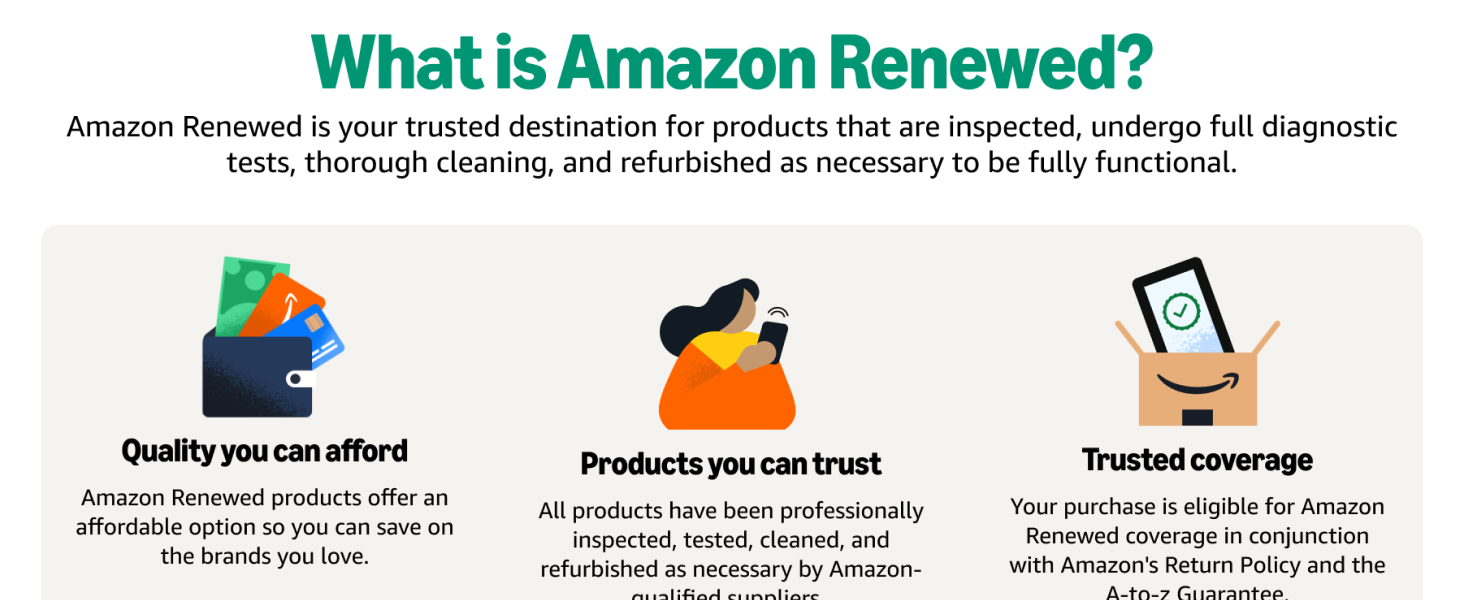
Image: Explains the Amazon Renewed program, highlighting quality and reliability.
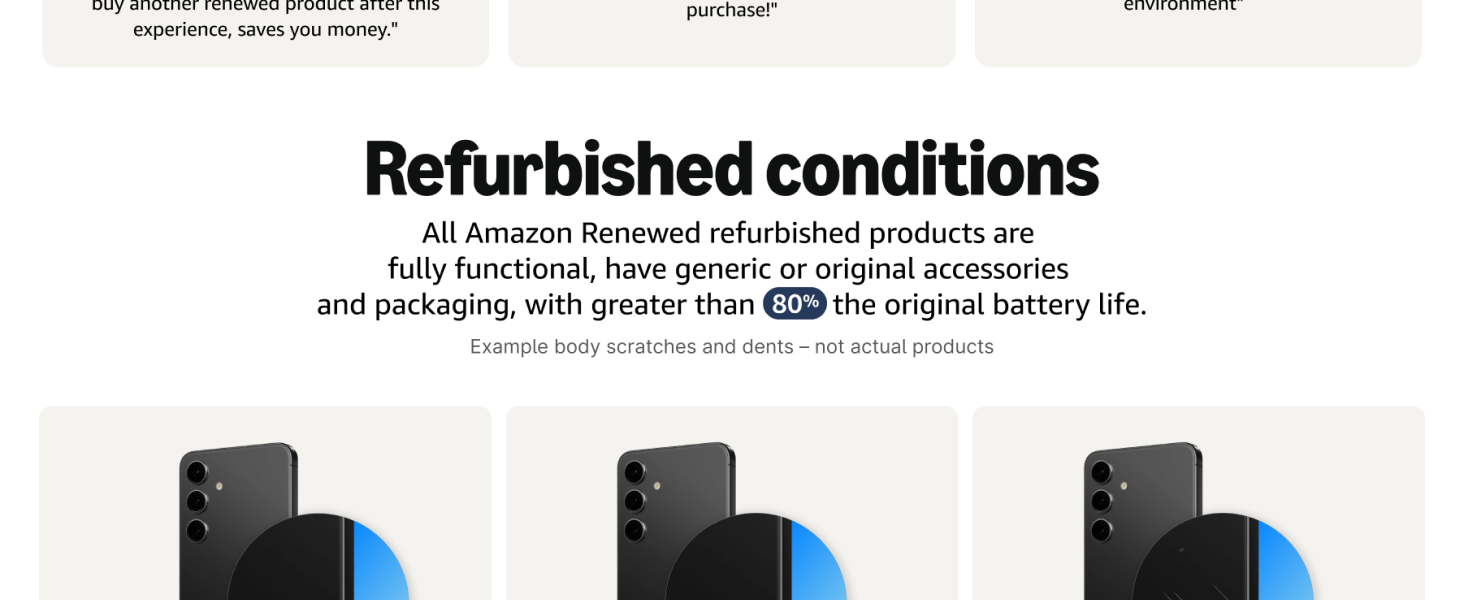
Image: Details the refurbished conditions for Amazon Renewed products (Excellent, Good, Acceptable).
For more information on Amazon Renewed products and their return policy, please visit the Amazon Renewed Store.


