
1. Introduction
The K&F Concept Suction Cup Mount JPKF31.165 is a versatile accessory designed for securely attaching action cameras to smooth, flat surfaces. This manual provides essential information for the safe and effective use of your suction cup mount. Please read these instructions carefully before use to ensure optimal performance and safety.
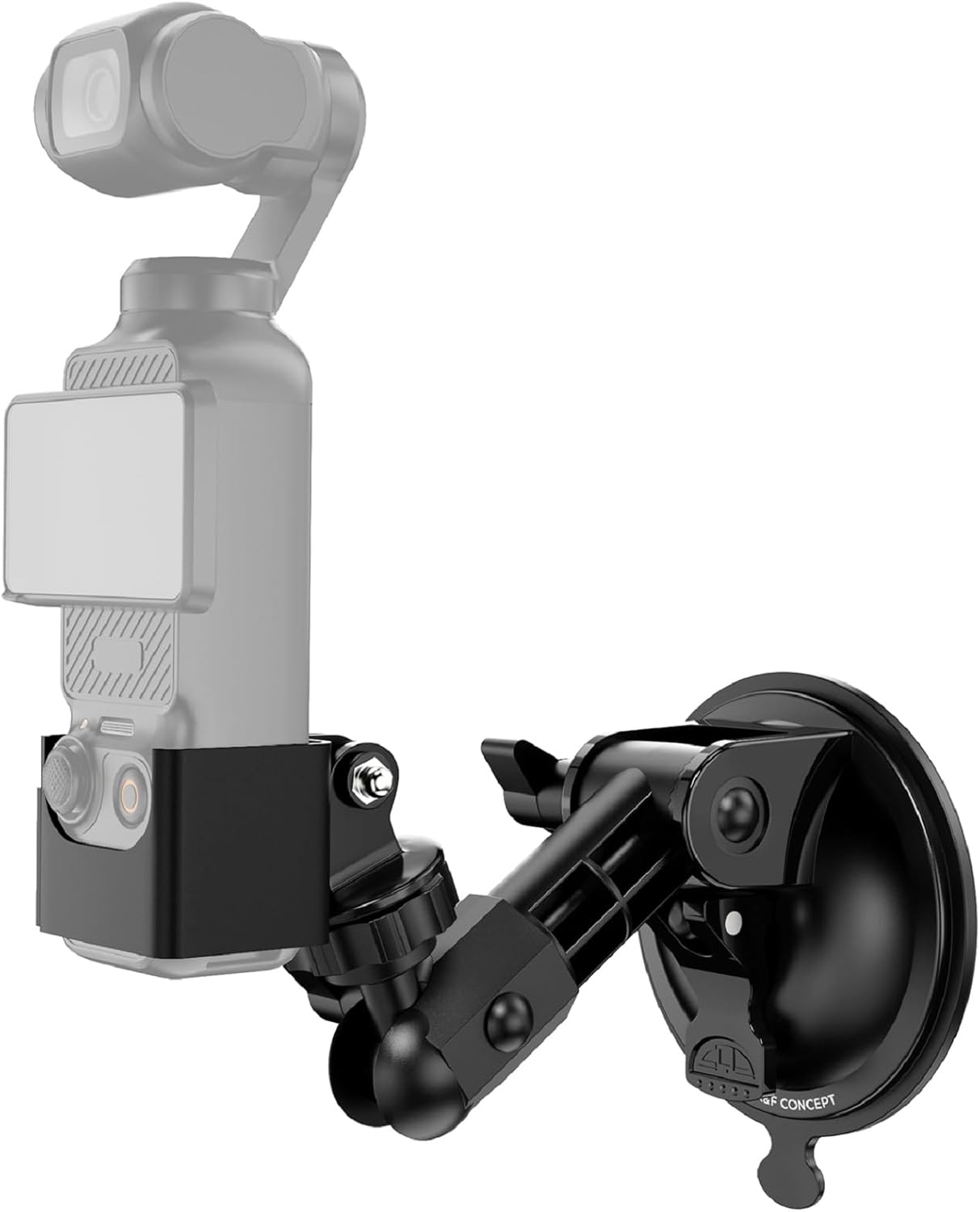
Figure 1: K&F Concept Suction Cup Mount with an action camera.
2. Product Overview
This section details the components and key features of your K&F Concept Suction Cup Mount.
2.1 Components
- Suction Cup Base
- Adjustable Arm with Ball Joints
- 1/4-inch Screw Adapter
- 3-Prong Action Camera Adapter
- DJI Osmo Pocket 3 Expansion Frame (included for specific compatibility)

Figure 2: Exploded view showing the individual components of the mount.
2.2 Key Features
- Powerful 85mm Suction Cup: Provides strong vacuum adhesion to smooth, flat surfaces like glass, tiles, or vehicle bodies, ensuring secure camera mounting without leaving residue.
- Wide Compatibility: Equipped with a standard 1/4-inch screw and a 3-prong adapter, supporting a broad range of action cameras including GoPro, DJI Osmo Action 3/4/5 Pro, Insta360 X4/X3/X2/One, Insta360 Ace Pro/Ace Pro 2, Go3/Go3 S, and AKASO. A dedicated frame for DJI Osmo Pocket 3 is also included.
- 3-Axis Adjustable Design: Features a 3-axis adjustment mechanism, allowing for 180-degree rotation on two axes and 360-degree rotation on one axis. This enables precise angle adjustments for diverse shooting scenarios, including tilting, panning, and oblique shots.
- Reusable and Washable Suction Surface: The adhesive surface of the suction cup can be washed with water to restore its stickiness if it becomes dirty or dusty, ensuring long-term stable adhesion and cost-effectiveness.
- High Load Capacity: Supports a maximum load of approximately 1kg (2.2 lbs). This allows for secure mounting of the Osmo Pocket 3 body along with additional accessories such as battery grips or small LED lights.
3. Setup
Follow these steps to properly set up and mount your K&F Concept Suction Cup Mount.
- Attach Camera to Mount:
- For DJI Osmo Pocket 3: Insert the Pocket 3 into the dedicated expansion frame. Attach the expansion frame to the 3-prong action camera adapter, then connect the adapter to the 1/4-inch screw on the mount's adjustable arm.
- For other action cameras (GoPro, Insta360, etc.): Attach your camera directly to the 3-prong action camera adapter or use the 1/4-inch screw if your camera has a compatible thread.
- Prepare Mounting Surface: Ensure the desired mounting surface (e.g., glass, car body) is clean, dry, and smooth. Wipe away any dust or debris with a clean cloth.
- Remove Protective Film: Carefully peel off the protective film from the suction cup surface.
- Apply Suction Cup: Press the suction cup firmly against the clean, smooth surface.
- Engage Suction Lock: Push down the lever or button on the suction cup base to create a vacuum seal, securing the mount in place.
- Adjust Angle: Loosen the adjustment knobs on the arm to set your desired shooting angle. Tighten the knobs securely once the angle is set.

Figure 3: Visual guide for installing the suction cup mount.

Figure 4: The mount can be used in diverse environments, such as car interiors, exteriors, and windows.
4. Operating Instructions
The 3-axis adjustable design allows for flexible positioning of your camera to capture various perspectives.
- Angle Adjustment: The mount features two axes that can rotate 180 degrees and one axis that can rotate 360 degrees. Loosen the corresponding knobs to adjust the camera's tilt, pan, or rotation.
- Secure Tightening: Always ensure all adjustment knobs are tightened firmly after positioning your camera to prevent movement during recording.
- Surface Suitability: For optimal performance, use the suction cup on smooth, non-porous surfaces. Avoid textured, dirty, or uneven surfaces, as these may compromise suction strength.

Figure 5: The mount offers 180-degree and 360-degree rotation for flexible camera positioning.
5. Maintenance
Proper maintenance ensures the longevity and performance of your suction cup mount.
- Cleaning the Suction Cup: If the suction cup's adhesive surface becomes dirty or loses its stickiness, gently wash it with clean water. Allow it to air dry completely before re-use. Do not wipe the adhesive surface with abrasive materials or cloths, as this can damage it.
- General Cleaning: Wipe the rest of the mount with a soft, damp cloth as needed.
- Storage: Store the mount in a clean, dry place away from extreme temperatures and direct sunlight. Re-apply the protective film to the suction cup if storing for extended periods to prevent dust accumulation.

Figure 6: The suction cup can be washed to restore its adhesive properties.
6. Troubleshooting
Refer to this section for solutions to common issues you might encounter.
- Mount Not Sticking:
- Ensure the mounting surface is perfectly clean, dry, and smooth. Any dust, dirt, or texture will prevent a proper seal.
- Wash the suction cup surface with water and let it air dry completely to restore stickiness.
- Verify that the suction lock lever is fully engaged.
- Camera Vibration/Unstable Footage:
- Ensure all adjustment knobs are tightened securely.
- Check the load capacity. While the mount supports up to 1kg, dynamic loads (e.g., during vehicle movement) may require a lower weight for optimal stability.
- Consider the length of the arm extension; longer extensions can increase leverage and potential for vibration.
- Difficulty Adjusting Angles:
- Loosen the adjustment knobs sufficiently before attempting to change the angle. Do not force adjustments.

Figure 7: The mount supports 500g dynamic load and 1000g static load.
7. Specifications
| Feature | Detail |
|---|---|
| Brand | K&F CONCEPT |
| Model Number | JPKF31.165 |
| Mount Type | Suction Cup Mount |
| Compatible Devices | Osmo Pocket 3, GoPro, DJI Osmo Action, Insta360 (with appropriate adapters) |
| Load Capacity | Up to 1 kg (2.2 lbs) |
| Color | Black |
| Package Dimensions | 16.5 x 8.7 x 6.1 cm |
| Item Weight | 190 g |
8. Warranty and Support
K&F Concept products are designed for reliability and performance. For warranty information, technical support, or service inquiries, please visit the official K&F Concept website or contact their customer service directly. Keep your purchase receipt as proof of purchase.
Official K&F Concept Website: www.kentfaith.com