
1. Introduction
This manual provides essential information for the proper use and maintenance of your Huawei Nova 14 Pro 5G MIA-AL00 smartphone. Please read this guide thoroughly before using your device to ensure optimal performance and safety. This device is a high-performance 5G smartphone featuring a 12GB RAM and 256GB storage capacity, designed for advanced mobile communication and multimedia experiences.
2. Safety Information
- Do not expose the device to extreme temperatures, direct sunlight, or high humidity.
- Use only approved chargers and accessories to prevent damage and ensure safety.
- Avoid dropping or subjecting the device to severe impact.
- Keep the device away from medical implants and devices to avoid interference.
- Dispose of the device and its battery responsibly according to local regulations.
3. Package Contents
Verify that your package contains the following items:
- Huawei Nova 14 Pro 5G MIA-AL00 Smartphone
- USB Type-C Cable
- Power Adapter
- SIM Eject Tool
- Quick Start Guide
- Warranty Card
Note: Specific contents may vary by region.
4. Device Overview
Familiarize yourself with the physical components of your Huawei Nova 14 Pro 5G.
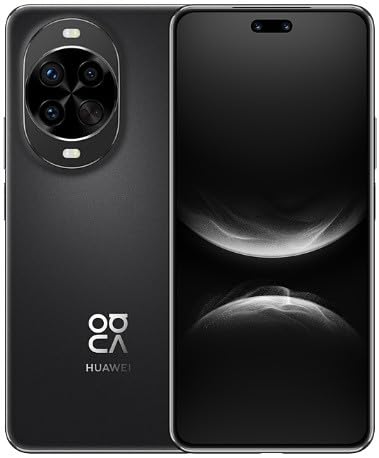
This image displays the Huawei Nova 14 Pro 5G MIA-AL00. The front view shows the full-screen display with a pill-shaped cutout for the front cameras. The back view highlights the circular camera module with multiple lenses and flash, along with the 'HUAWEI' logo and 'NOVA' branding.
Key Components:
- Front Camera: Located at the top of the display.
- Display: Touchscreen interface for all operations.
- Power Button: Typically on the right side, used to power on/off and wake/sleep the device.
- Volume Buttons: Adjacent to the power button, for adjusting audio levels.
- USB Type-C Port: At the bottom, for charging and data transfer.
- SIM Card Slot: Located on the side, for inserting SIM cards.
- Rear Camera Module: Prominently featured on the back, housing multiple lenses and flash.
- Fingerprint Sensor: Integrated into the display or power button for secure unlocking.
5. Setup
5.1. Inserting SIM Cards
- Locate the SIM card slot on the side of your device.
- Insert the SIM eject tool into the small hole next to the slot to open the tray.
- Place your Nano-SIM cards (up to two) onto the tray with the gold contacts facing down. Ensure they are correctly oriented.
- Carefully reinsert the tray into the device.
5.2. Initial Power On and Setup
- Press and hold the Power button until the Huawei logo appears.
- Follow the on-screen instructions to select your language, region, and connect to a Wi-Fi network.
- Set up your Google account or Huawei ID.
- Configure security features such as fingerprint unlock, face unlock, or a screen lock password/PIN.
6. Operating Your Device
6.1. Basic Functions
- Making Calls: Open the Phone app, enter the number, and tap the call icon.
- Sending Messages: Open the Messages app, tap to compose a new message, enter recipient and text.
- Internet Connectivity: Ensure mobile data is enabled or connect to a Wi-Fi network. The device supports 5G connectivity for fast internet speeds.
6.2. Camera Usage
Open the Camera app from your home screen. You can switch between various modes like Photo, Video, Portrait, and Night mode. Tap the shutter button to capture images or start/stop video recording. Utilize the multiple lenses for different photographic effects.
6.3. Security Features
- Fingerprint Unlock: Register your fingerprints in Settings > Biometrics & password.
- Face Unlock: Set up face recognition for convenient unlocking.
- Screen Lock: Use a PIN, pattern, or password to secure your device.
7. Maintenance
7.1. Cleaning Your Device
Use a soft, lint-free cloth to gently wipe the screen and back of the device. Avoid using harsh chemicals or abrasive materials. For stubborn smudges, slightly dampen the cloth with water.
7.2. Software Updates
Regularly check for software updates to ensure your device has the latest features, security patches, and performance improvements. Go to Settings > System & updates > Software update.
7.3. Battery Care
- Avoid fully discharging the battery frequently.
- Do not leave the device charging for extended periods after it reaches 100%.
- Keep the device within optimal temperature ranges during charging and use.
8. Troubleshooting
8.1. Device Not Powering On
- Ensure the battery is charged. Connect the device to a charger for at least 10 minutes.
- Press and hold the Power button for 10-15 seconds to force a restart.
8.2. Network Issues
- Check if your SIM card is properly inserted.
- Verify that mobile data is enabled in Settings.
- Restart the device.
- Reset network settings (Settings > System & updates > Reset > Reset network settings).
8.3. Apps Crashing or Freezing
- Close and reopen the app.
- Clear the app's cache (Settings > Apps > [App Name] > Storage > Clear cache).
- Ensure the app is updated to its latest version.
9. Specifications
| Feature | Specification |
|---|---|
| Brand | HUAWEI |
| Model Name | Nova 14 Pro 5G |
| Model Number | MIA-AL00 |
| RAM Memory Installed Size | 12 GB |
| Memory Storage Capacity | 256 GB |
| Cellular Technology | 5G |
| SIM Card Slot Count | Dual SIM |
| Colour | Black |
| Form Factor | Bar |
| Country/Region of origin | China |
10. Warranty and Support
Your Huawei Nova 14 Pro 5G MIA-AL00 is covered by a limited warranty. Please refer to the warranty card included in your package for detailed terms and conditions. For technical support, service, or further inquiries, please visit the official Huawei support website or contact your local authorized service center. Keep your proof of purchase for warranty claims.


