
Introduction
This manual provides comprehensive instructions for the installation, operation, and maintenance of your new ClimaTek TH5220D1003 Non-Programmable Digital Thermostat. Please read this manual thoroughly before installation and use to ensure proper function and safety. Keep this manual for future reference.
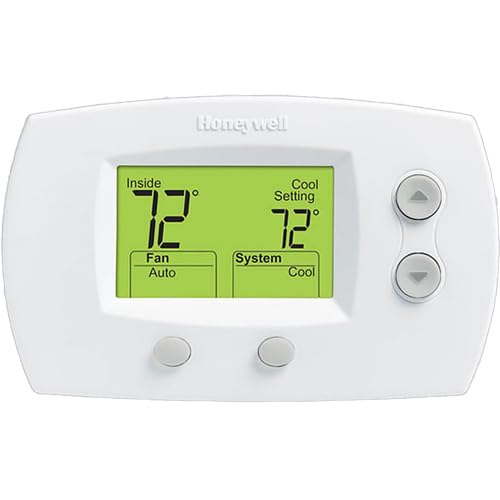
Image: Front view of the ClimaTek TH5220D1003 Non-Programmable Digital Thermostat. The display shows an indoor temperature of 72 degrees Fahrenheit and a cool setting of 72 degrees Fahrenheit. The fan is set to auto, and the system mode is set to cool. Control buttons are visible on the right and bottom of the unit.
Safety Information
- Always disconnect power to the heating/cooling system before installing or servicing the thermostat.
- Installation should be performed by a qualified technician if you are unsure about electrical wiring.
- Do not short out terminals on the gas valve or at the heating/cooling system to test the thermostat. This can damage the thermostat and void the warranty.
- Ensure all wiring connections are secure and comply with local electrical codes.
Installation and Setup
1. Tools Required
- Phillips screwdriver
- Drill (if new mounting holes are needed)
- Wire strippers (if needed)
2. Removing Old Thermostat
- Turn off power to the heating/cooling system at the main circuit breaker or fuse box.
- Remove the cover of your old thermostat.
- Take a picture of the wiring connections for reference. Label each wire with the terminal designation (e.g., R, G, Y, W).
- Disconnect the wires and remove the old thermostat base from the wall.
3. Mounting New Thermostat
- Pull the thermostat cover off the base.
- Position the new thermostat base on the wall, using the old mounting holes if possible. Mark new holes if necessary.
- Drill new holes (if marked) and insert wall anchors.
- Secure the thermostat base to the wall using the provided screws.
4. Wiring
Connect the wires to the corresponding terminals on the new thermostat base. Refer to the picture taken earlier and the wiring diagram below. This thermostat is designed to replace Honeywell TH5220D1003 and similar non-programmable digital thermostats.
| Terminal | Description |
|---|---|
| R | 24V AC power (heating) |
| Rc | 24V AC power (cooling) - often jumped to R |
| G | Fan relay |
| Y | Compressor contactor (cooling) |
| W | Heat relay (heating) |
| C | Common wire (optional, for continuous power) |
After wiring, carefully push excess wire back into the wall opening and snap the thermostat cover onto the base.
5. Power On and Initial Settings
- Restore power to the heating/cooling system at the circuit breaker.
- The thermostat display should light up.
- Set the system switch to HEAT, COOL, or OFF as desired.
- Set the fan switch to AUTO (fan runs only when heating/cooling is on) or ON (fan runs continuously).
Operating Instructions
System Switch Settings:
- COOL: Operates the cooling system.
- OFF: Turns off both heating and cooling systems.
- HEAT: Operates the heating system.
Fan Switch Settings:
- AUTO: The fan runs only when the heating or cooling system is operating. This is the most common setting.
- ON: The fan runs continuously, regardless of whether the heating or cooling system is active.
Adjusting Temperature:
Use the Up and Down arrow buttons on the right side of the thermostat to adjust the desired temperature setting. The display will show the current room temperature and the set temperature.
Maintenance
- Cleaning: Wipe the thermostat with a soft, damp cloth. Do not use abrasive cleaners or solvents.
- Battery Replacement: This thermostat typically uses 2 AA batteries (not included). When the low battery indicator appears on the display, replace the batteries promptly to ensure continuous operation.
- Air Filter: Regularly check and replace your system's air filter as recommended by your HVAC system manufacturer. A dirty filter can restrict airflow and impact system performance.
Troubleshooting
| Problem | Possible Cause | Solution |
|---|---|---|
| No display or blank screen | No power; dead batteries (if applicable) | Check circuit breaker; replace batteries. |
| Heating/Cooling system not responding | Incorrect system setting; wiring issue; tripped circuit breaker | Ensure system switch is set to HEAT/COOL; check wiring connections; reset circuit breaker. |
| Temperature reading seems inaccurate | Thermostat location (drafts, direct sunlight) | Ensure thermostat is not in direct sunlight or near heat sources/drafts. |
| Fan runs continuously in AUTO mode | Fan switch set to ON | Set fan switch to AUTO. |
If problems persist after attempting these solutions, contact a qualified HVAC technician.
Specifications
- Model: TH5220D1003
- Type: Non-Programmable Digital Thermostat
- Compatibility: Single-stage heating and cooling systems (24V AC)
- Power Source: 2 AA Batteries (not included) or 24V AC from HVAC system (C-wire required for continuous backlight/power)
- Temperature Range: 40°F to 99°F (4.5°C to 37°C)
- Dimensions: Approximately 1 x 11 x 9 inches
- Weight: Approximately 13 ounces
Warranty and Support
This ClimaTek product is designed for durability and performance. For warranty information or technical support, please refer to the documentation provided with your purchase or contact your retailer. As an OEM upgraded replacement part, specific warranty terms may vary.
For further assistance, you may visit the ClimaTek Store on Amazon.