
1. Introduction
This manual provides instructions for the proper use and maintenance of your Basike FON233-F18 Bluetooth Earphones. Please read this guide thoroughly before using the product to ensure optimal performance and longevity.
2. Package Contents
Verify that all items are present in the package:
- 2 x TWS Earphones (Left and Right)
- 1 x Charging Case
- 1 x USB-C Charging Cable
- 3 x Pairs of Silicone Eartips (S, M, L)
- 1 x User Manual (this document)

Image: The Basike FON233-F18 earphones, charging case, and accessories laid out.
3. Product Overview
Familiarize yourself with the components of your Basike FON233-F18 earphones.
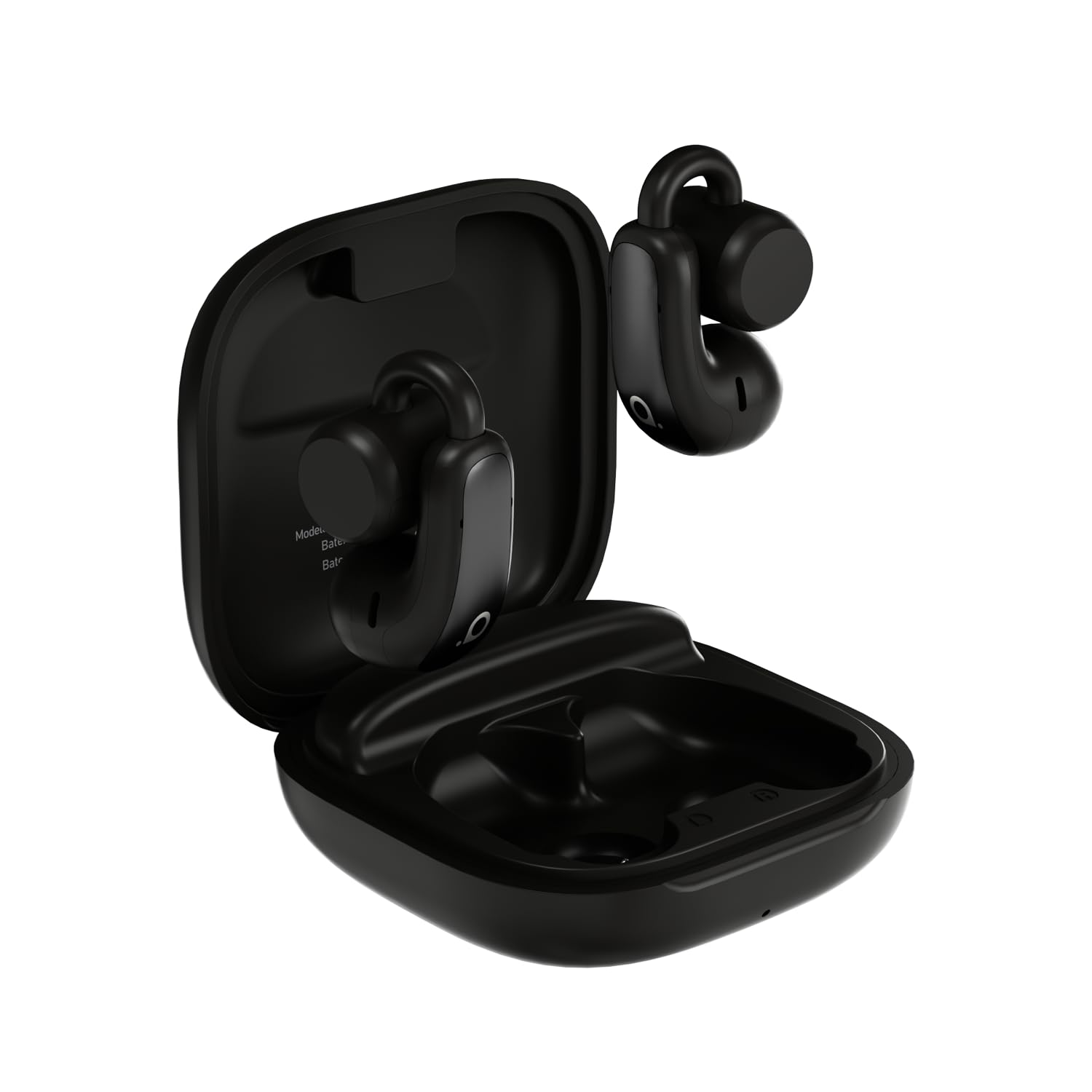
Image: A detailed view of the Basike FON233-F18 earphones and charging case, highlighting key features like touch control area, charging contacts, and microphone.
- Earbuds: Left and Right, with touch control surfaces.
- Charging Case: Stores and charges the earbuds.
- USB-C Port: For charging the case.
- LED Indicators: On earbuds and case, showing charging status and connection.
4. Setup
4.1. Charging the Earphones and Case
Before first use, fully charge the earphones and charging case.
- Place the earphones into the charging case. Ensure they are correctly seated.
- Connect the USB-C charging cable to the charging port on the case and plug the other end into a 5V compatible USB power adapter (not included).
- The LED indicator on the case will show charging status. Once fully charged, the indicator will change or turn off.
- Earbuds take approximately 1 hour to fully charge. The charging case takes approximately 1.2 hours.

Image: A hand holding the USB-C charging cable, connecting it to the charging case of the Basike FON233-F18 earphones.
4.2. Pairing with a Bluetooth Device
Follow these steps to pair your earphones with your smartphone or other Bluetooth-enabled device:
- Ensure the earphones are charged.
- Open the charging case. The earphones will automatically enter pairing mode, and their LED indicators will flash.
- On your device, go to Bluetooth settings and enable Bluetooth.
- Search for available devices and select "Basike FON233-F18" from the list.
- Once connected, the earphone LED indicators will stop flashing, and your device will confirm the connection.
- The earphones support dual device connection, allowing simultaneous connection to two devices (e.g., phone and laptop).

Image: Both Basike FON233-F18 earphones are shown, ready for pairing or use.
5. Operating Instructions
The Basike FON233-F18 earphones feature intuitive touch controls.
5.1. Power On/Off
- Power On: Open the charging case, or long-press the touch area on both earphones for 3 seconds.
- Power Off: Place the earphones back into the charging case and close the lid, or long-press the touch area on both earphones for 5 seconds.
5.2. Music Control
- Play/Pause: Single tap on either earphone.
- Next Track: Double tap the right earphone.
- Previous Track: Double tap the left earphone.
- Volume Up: Slide finger up on the right earphone's touch area.
- Volume Down: Slide finger down on the left earphone's touch area.
5.3. Call Control
- Answer/End Call: Single tap on either earphone.
- Reject Call: Long press on either earphone for 2 seconds.
5.4. Voice Assistant
- Activate Voice Assistant: Triple tap on either earphone.
5.5. Game Mode (Low Latency)
- Activate/Deactivate Game Mode: Quadruple tap on either earphone. This mode reduces audio latency for gaming and video.
6. Maintenance
Proper care ensures the longevity of your earphones.
- Cleaning: Use a soft, dry cloth to clean the earphones and charging case. Do not use abrasive cleaners or immerse in water.
- Storage: When not in use for extended periods, store the earphones in their charging case.
- Battery Care: To maintain battery health, recharge the charging case every 3 months if not used regularly. Avoid extreme temperatures.
- Water Resistance: The earphones are IPX5 water-resistant, meaning they can withstand splashes and sweat. Do not submerge them in water.
7. Troubleshooting
If you encounter issues, try the following solutions:
| Problem | Solution |
|---|---|
| Earphones not pairing. |
|
| No sound from one earphone. |
|
| Charging case not charging. |
|
| Low audio volume. |
|
8. Specifications
| Feature | Detail |
|---|---|
| Model Number | FON233-F18 |
| Bluetooth Version | 5.3 |
| Bluetooth Range | 10 meters |
| Earphone Battery Capacity | 50mAh |
| Earphone Playtime | Up to 7 hours (at 80% volume) |
| Earphone Charging Time | 1 hour |
| Charging Case Battery Capacity | 400mAh (provides 21 extra hours) |
| Charging Case Charging Time | 1.2 hours |
| Speaker Driver Size | 10mm |
| Microphone Sensitivity | -38dB (with ENC Noise Reduction for calls) |
| Noise Control | Noise Cancellation |
| Water Resistance Rating | IPX5 |
| Control Type | Touch Control |
| Compatible Devices | iOS, Android, and other Bluetooth-enabled devices |
| Material | ABS/SBC |
| Impedance | 32 Ohms |
| Frequency Response | 5 KHz (Note: This value is unusually low for a full frequency range and may refer to a specific characteristic.) |
| Earphone Form Factor | Clip-on Earbuds |
| Product Weight (Earphones + Case) | 220 Grams |
| Carrying Case Weight | 200 Grams |
| Carrying Case Dimensions (L x W x H) | 5.7 cm x 2.6 cm x 5.7 cm |
| External Test Certification | ANATEL: 13637-21-14103 |
9. Warranty and Support
9.1. Warranty Information
This product comes with a 90-day warranty against manufacturing defects from the date of purchase.
Basike is not responsible for damages caused by improper use of the product or use with an incompatible electrical device.
Please retain your proof of purchase for warranty claims.
9.2. Customer Support
For further assistance or inquiries, please contact Basike customer support through the retailer where the product was purchased or visit the official Basike website.
Manufacturer: Basike