1. Introduction
Welcome to the user manual for your NORTH EDGE Triton Solar Powered Dive Watch. This manual provides comprehensive instructions on how to set up, operate, maintain, and troubleshoot your watch. Designed for durability and precision, the Triton watch is an ideal companion for both daily wear and underwater adventures, featuring 1000FT/300M water resistance and a luminous dial for clear visibility.
Key features of your watch include:
- Solar-Powered Quartz Diving Watch
- Water Resistance up to 1000FT/300M
- Luminous Hands for low-light conditions
- Efficient energy conservation and recharging when exposed to ordinary light, automatically initiating functions without user intervention.
2. Product Overview
2.1 Watch Components
Familiarize yourself with the main components of your NORTH EDGE Triton watch:
- Dial: Displays time, features luminous markers and hands.
- Bezel: Unidirectional rotating ceramic dive bezel for timing dives.
- Crown: Screw-down crown for setting time and ensuring water resistance.
- Strap: Durable silicone strap for comfortable wear.
- Case Back: Engraved with model and water resistance information.

Figure 2.1: Front view of the NORTH EDGE Triton Solar Powered Dive Watch.

Figure 2.2: Back view of the watch, highlighting the engraved case back.

Figure 2.3: Side view of the watch, showcasing the crown and bezel design.

Figure 2.4: Detail of the water-resistant screw-down steel crown.

Figure 2.5: Unidirectional Rotating Ceramic Dive Bezel.
3. Setup
3.1 Initial Charge
Your NORTH EDGE Triton watch is solar-powered and requires light exposure to charge its internal battery. For optimal performance, ensure the watch is exposed to light regularly. Upon first use or after prolonged storage in darkness, place the watch under a bright light source (natural sunlight is ideal) for several hours to ensure a full charge. The watch automatically manages its energy conservation and recharging functions.

Figure 3.1: Light Intensity Curve and Charging Efficiency.

Figure 3.2: Solar Endurance and Time Accuracy.
3.2 Setting the Time
To set the time on your NORTH EDGE Triton watch, follow these steps:
- Unlock the Crown: Rotate the crown counter-clockwise until it pops out slightly to Position 1. This unlocks the crown from its water-resistant sealed position.
- Pull to Set Time: From Position 1, gently pull the crown out one more notch to Position 2. The watch hands will stop, indicating it is in time-setting mode.
- Adjust Time: Rotate the crown clockwise or counter-clockwise to set the desired time.
- Push and Lock Crown: Once the time is set, push the crown back in fully to Position 0 and rotate it clockwise to screw it down tightly. This ensures the watch maintains its water resistance.

Figure 3.3: Time Adjustment Instructions.
3.3 Adjusting the Strap
The silicone strap is designed for comfort and durability. To adjust the strap, simply use the buckle to find the appropriate hole that provides a snug yet comfortable fit on your wrist. Ensure the watch is not too tight to allow for proper circulation, nor too loose to prevent it from sliding around.
4. Operating Instructions
4.1 Solar Charging
The NORTH EDGE Triton watch utilizes solar power, converting light into electrical energy to power the watch and charge its rechargeable battery. This eliminates the need for regular battery replacements. For optimal charging, expose the watch to direct sunlight or strong artificial light. The watch is designed to operate for extended periods on a full charge, even in complete darkness.
4.2 Using the Dive Bezel
The unidirectional rotating ceramic dive bezel is a crucial tool for divers to measure elapsed time underwater. To use the bezel:
- Align the Marker: Before descending, rotate the bezel counter-clockwise until its triangle marker (▼) aligns with the minute hand.
- Monitor Elapsed Time: As time passes, the minute hand will move away from the triangle marker. The number on the bezel that the minute hand points to indicates the elapsed time in minutes since the dive began.
- Unidirectional Rotation: The bezel rotates only counter-clockwise to prevent accidental increases in recorded dive time, which could lead to dangerous miscalculations of remaining air or decompression limits.

Figure 4.1: Bezel Operation Guide.
4.3 Water Resistance Guidelines
Your NORTH EDGE Triton watch boasts a water resistance rating of 1000FT/300M, making it suitable for professional marine activity and serious surface water sports, but not for saturation diving. To maintain its water resistance:
- Always ensure the crown is fully screwed down before exposing the watch to water.
- Do not operate the crown or push buttons (if any) while the watch is submerged or wet.
- Avoid exposing the watch to hot water, steam, or sudden temperature changes, as this can compromise seals.
- Rinse the watch with fresh water after exposure to saltwater to prevent corrosion.
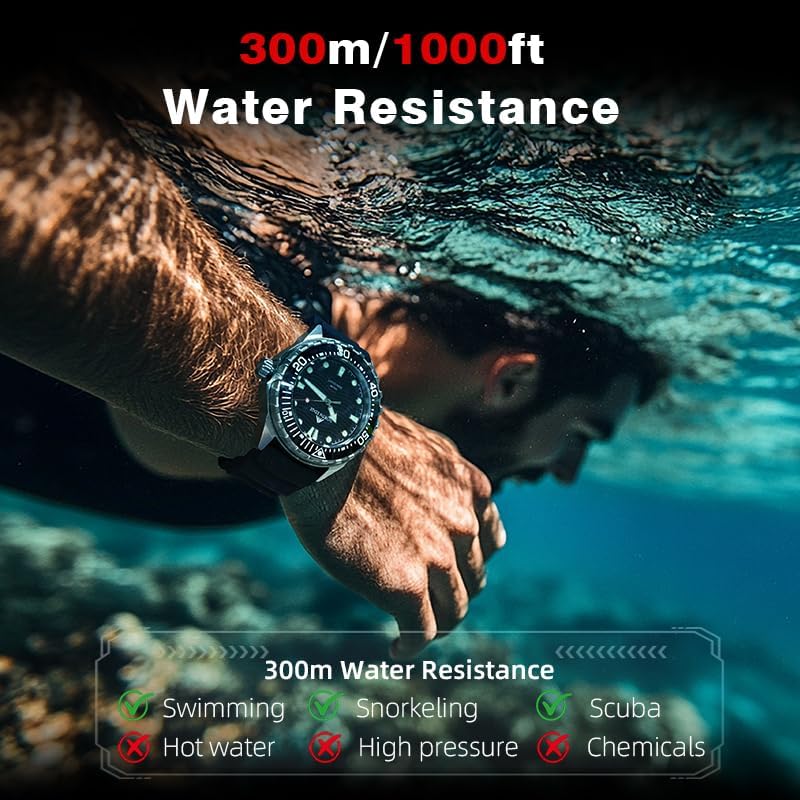
Figure 4.2: Water Resistance Capabilities.
5. Maintenance
5.1 Cleaning
To keep your watch in optimal condition:
- Wipe the watch case and strap with a soft, damp cloth.
- For stubborn dirt, use a mild soap solution and rinse thoroughly with fresh water.
- Ensure the watch is completely dry before storing or wearing.
- Avoid using harsh chemicals or abrasive materials, which can damage the watch's finish or seals.
5.2 Storage
When not in use, store your watch in a cool, dry place away from direct sunlight and extreme temperatures. To maintain the solar battery's charge, avoid prolonged storage in complete darkness. Occasional exposure to light will help preserve battery life.
5.3 Battery Life
The solar-powered battery in your NORTH EDGE Triton watch is designed for long-term use and does not require regular replacement under normal conditions. Its lifespan is significantly extended by consistent exposure to light. If the watch stops or the hands move erratically, it may indicate a low charge. Expose it to bright light for several hours to recharge.
6. Troubleshooting
| Problem | Possible Cause | Solution |
|---|---|---|
| Watch stops or hands move erratically. | Insufficient charge. | Expose the watch to bright light (preferably direct sunlight) for several hours to fully recharge. |
| Time is incorrect. | Time needs to be reset. | Refer to Section 3.2 "Setting the Time" and ensure the crown is fully screwed down after adjustment. |
| Bezel is stiff or difficult to rotate. | Accumulation of dirt or debris. | Rinse the bezel area under running fresh water while rotating it to dislodge any debris. If the issue persists, contact customer support. |
| Water inside the watch. | Crown not properly screwed down, or seals compromised. | Immediately take the watch to a qualified watch repair professional. Do not attempt to open the watch yourself. Ensure the crown is always screwed down tightly before water exposure. |
7. Specifications
| Feature | Detail |
|---|---|
| Model | B0FCSHSV6M |
| Movement | Solar-Powered Quartz |
| Water Resistance | 300M / 1000FT |
| Case Material | 316L Stainless Steel |
| Bezel Type | Unidirectional Rotating Ceramic Dive Bezel |
| Dial Features | Luminous Hands and Markers |
| Strap Material | Silicone |
| Clasp Type | Buckle |
| Dimensions (Package) | 2.75 x 2.75 x 2.75 inches |
| Weight (Package) | 7.68 ounces |
| Batteries | 1 AAA batteries required (included, likely referring to the internal rechargeable cell) |
| Date First Available | June 11, 2025 |
| Manufacturer | NORTH EDGE |
8. Warranty and Support
8.1 Protection Plans
Additional protection plans may be available for your NORTH EDGE Triton watch. These plans typically offer extended coverage beyond the standard manufacturer's warranty. Please refer to your purchase documentation or the retailer's website for details on available 2-Year and 3-Year protection plans, as well as comprehensive coverage options like 'Complete Protect'.
8.2 Customer Support
For any questions, concerns, or technical assistance not covered in this manual, please contact NORTH EDGE customer support. Contact information can typically be found on the product packaging, the official NORTH EDGE website, or through your original point of purchase.


