
FEZIBO FEZIBO 48x24 Inch Electric Height Adjustable Standing Desk with Double Drawer
FEZIBO 48x24 Inch Electric Height Adjustable Standing Desk with Double Drawer User Manual
Model: FEZIBO 48x24 Inch Electric Height Adjustable Standing Desk with Double Drawer
Introduction
This manual provides essential information for the safe and efficient use of your FEZIBO 48x24 Inch Electric Height Adjustable Standing Desk. Please read these instructions carefully before assembly and operation, and retain them for future reference.
Product Features
- Electric Height Adjustment: Reliable motor for height adjustment between 27.36''-46.06'' with low noise (under 50 dB).
- Spacious Work Surface: 48x24 inch desktop with integrated top shelves and double drawer design for organization.
- Stable Construction: Industrial-grade alloy steel frame and sturdy tabletop, capable of supporting up to two monitors.
- Memory Height & Anti-Collision Technology: Two programmable memory height buttons. The desk automatically reverses 2cm if it encounters obstacles during height adjustment to prevent damage or injury.
- Integrated Hooks: Convenient hooks for hanging headphones or bags.
- Mobility Options: Includes casters for easy movement and locking.
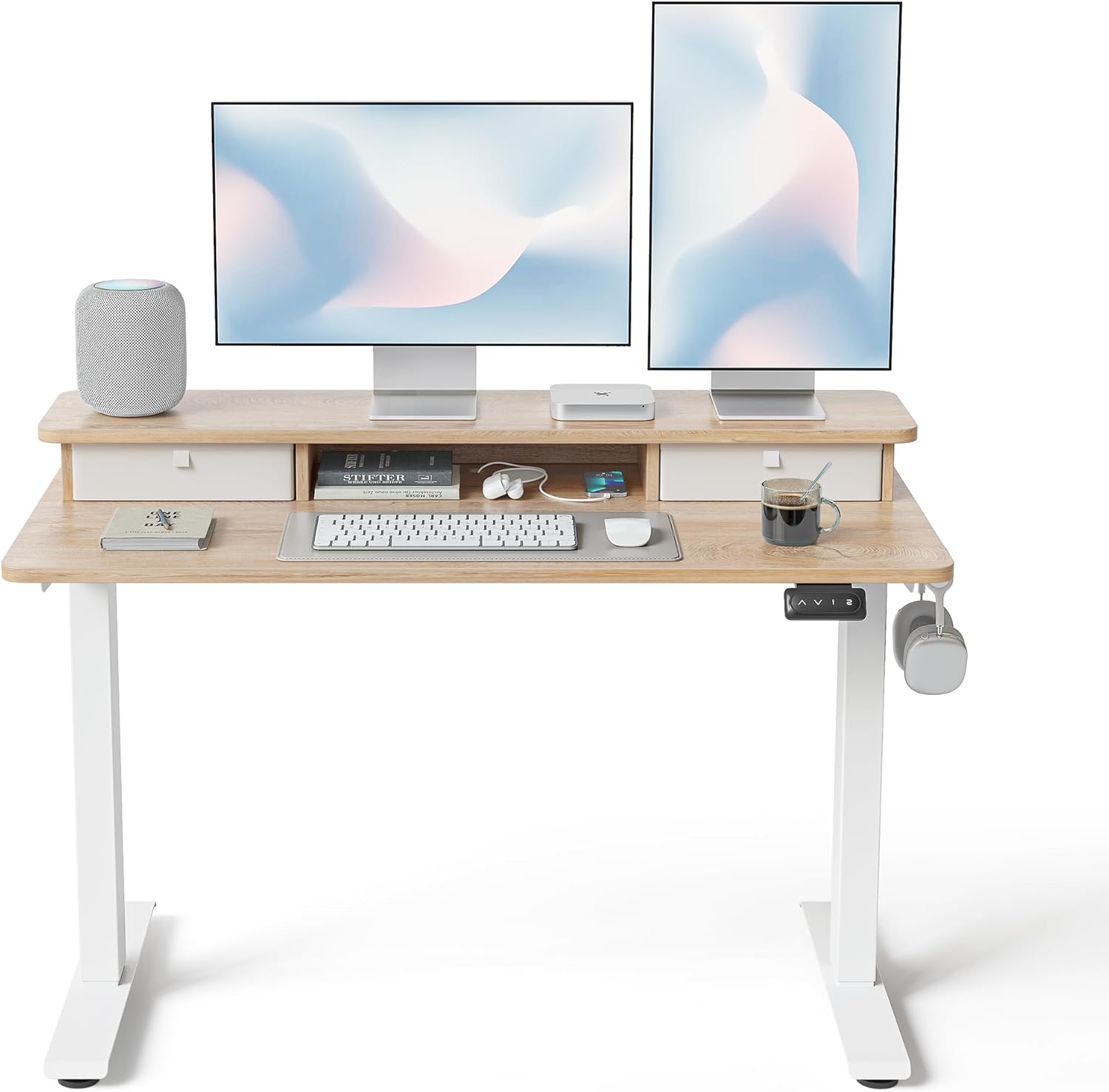
Image: FEZIBO 48x24 Inch Electric Height Adjustable Standing Desk in a home office setup, featuring two monitors, a laptop, keyboard, mouse, and other accessories. The desk includes a raised shelf with two drawers.
Safety Information
- Ensure all components are securely fastened before use.
- Keep children and pets away from the desk during operation.
- Do not overload the desk beyond its specified weight capacity.
- Ensure there are no obstructions in the path of the desk's movement (up or down).
- Disconnect power before cleaning or maintenance.
Setup and Assembly
A detailed installation video is available for reference. The package includes all necessary assembly tools and detailed instructions. Assembly typically takes 1.5 to 2.5 hours.
- Unpack all components and verify against the parts list in the included manual.
- Assemble the desk frame according to the provided diagrams.
- Attach the desktop and upper shelf.
- Install the electric motor and control panel.
- Connect the power cable to the motor and a wall outlet.
- Insert the fabric drawers into their designated slots.
- Attach the optional casters or fixed feet as desired.

Image: Diagram illustrating the dimensions of the FEZIBO standing desk, showing a width of 48 inches, depth of 24 inches, and adjustable height range from 27.36 inches to 45.06 inches.
Operating Instructions
Control Panel Overview
The control panel is located on the underside of the desktop, typically on the right side. It features up/down arrows and programmable memory buttons (1, 2, 3, 4).

Image: Close-up view of the FEZIBO standing desk's control panel, showing up/down arrow buttons and memory preset buttons labeled 1 and 2.
Adjusting Height
- Manual Adjustment: Press and hold the Up (^) or Down (v) arrow buttons to adjust the desk to your desired height. Release the button to stop.
- Memory Presets:
- To save a height: Adjust the desk to your preferred height. Press the 'S' button, then press one of the number buttons (1, 2, 3, or 4) until you hear a beep or see the display confirm.
- To use a saved height: Press the corresponding number button (1, 2, 3, or 4). The desk will automatically move to the saved position.
Reset Function
If the desk encounters issues or needs recalibration, perform a reset:
- Press and hold the Down (v) button for 5 seconds until the desk moves to its lowest position and then slightly up, indicating a successful reset.
Maintenance
- Cleaning: Wipe the desktop and frame with a soft, damp cloth. Avoid abrasive cleaners or harsh chemicals.
- Cable Management: Regularly check and organize cables to prevent tangles and damage.
- Lubrication: If you notice any unusual sounds during height adjustment, a small amount of lubricant (e.g., 3-in-1 oil) can be applied to the leg shafts and gear mechanisms.
- Inspection: Periodically inspect all screws and connections to ensure they are tight.
Troubleshooting
- Desk not moving:
- Check if the power cable is securely plugged into both the desk and the wall outlet.
- Perform a reset (see Operating Instructions).
- Error code on display:
- Refer to the detailed manual for specific error code meanings. Often, a reset can resolve these issues.
- Unusual noises during adjustment:
- Ensure the desk is not overloaded.
- Check for any obstructions.
- Consider applying lubricant to moving parts (see Maintenance).
- Anti-collision feature activating frequently:
- Ensure the desk's path is clear of any objects.
- The sensor sensitivity might need adjustment (refer to the full manual for advanced settings).
Specifications
| Feature | Detail |
|---|---|
| Brand | FEZIBO |
| Product Dimensions | 15.35"D x 48"W x 7.09"H (overall, including upper shelf) |
| Adjustable Height Range | 27.36" - 46.06" |
| Color | Maple |
| Style | Modern |
| Base Material | Alloy Steel |
| Top Material Type | Engineered Wood |
| Finish Type | Laminated |
| Special Feature | Electric Height Adjustable, Double Drawers, Anti-Collision, Memory Presets, Hooks |
| Assembly Required | Yes |
| Noise Level (Operation) | Under 50 dB |
Warranty and Support
For warranty information and technical support, please refer to the documentation included with your product or visit the official FEZIBO website. Protection plans are also available for extended coverage.
- 2-Year Protection Plan: $37.99
- 3-Year Protection Plan: $46.99
- Complete Protect: $16.99/month (covers eligible past and future purchases)
Related documentsFEZIBO 48x24 Inch Electric Height Adjustable Standing Desk with Double Drawer


Ask a question about this manual
Ask about setup, troubleshooting, compatibility, parts, safety, or missing instructions. Manuals+ will review the question and use this page’s manual context to help answer it.