Introduction
This manual provides detailed instructions for the safe and effective use of your BAOFENG F22 FRS Two-Way Radio. Please read this manual thoroughly before operating the device to ensure proper function and to prevent damage.
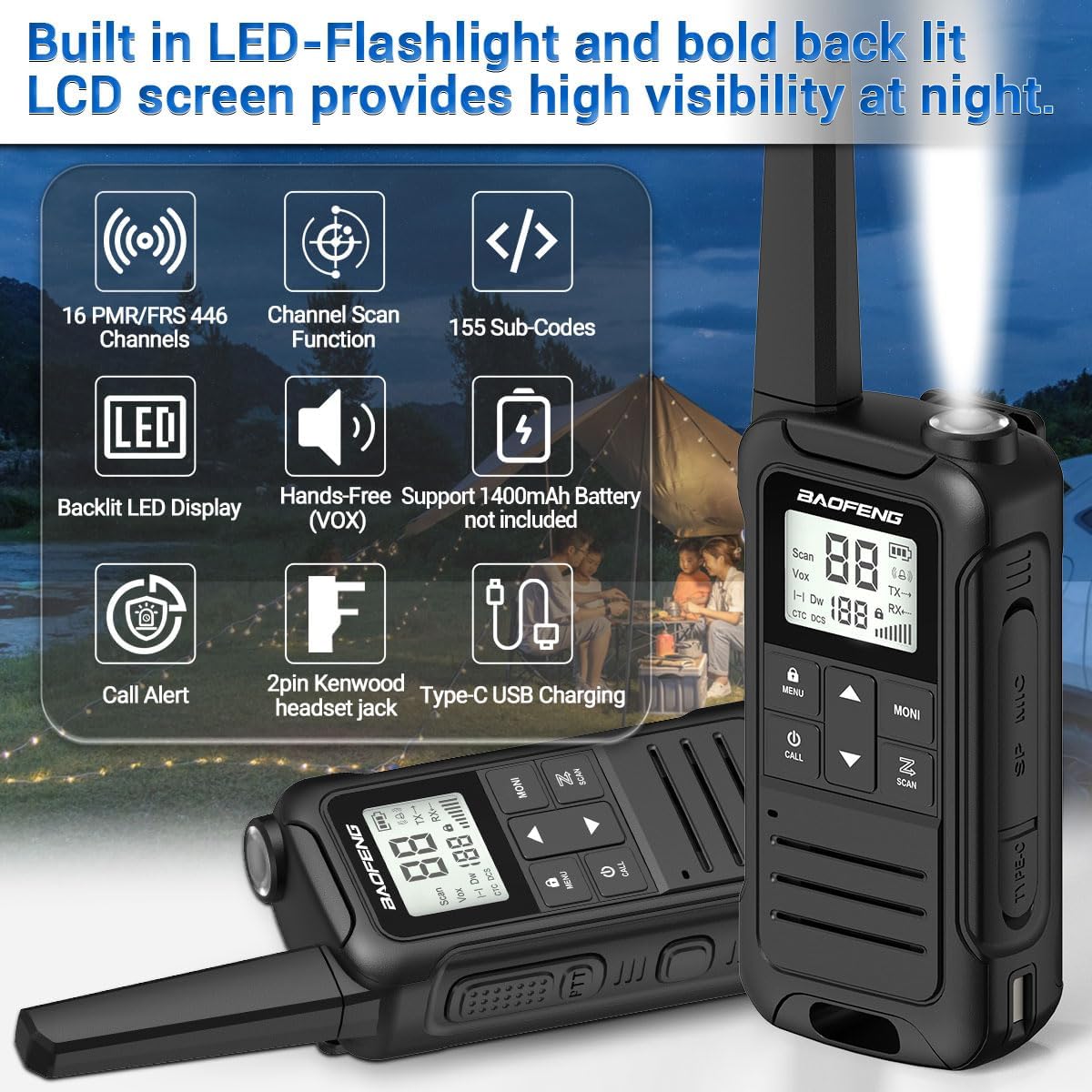
Image: BAOFENG F22 Two-Way Radio showing its built-in LED flashlight, backlit LCD screen, 16 PMR/FRS 446 channels, channel scan, 155 sub-codes, hands-free (VOX) support, 1400mAh battery (not included in image, but supported), call alert, 2-pin Kenwood headset jack, and Type-C USB charging.
Package Contents
Verify that all items are present in your package:
- BAOFENG F22 Walkie Talkie (2 units)
- Belt Clip (2 units)
- Hand Strap (2 units)
- 1400 mAh Rechargeable Li-ion Battery (4 units)
- User Manual (1 unit)
- 2-in-1 Type-C USB Charger (1 unit)
Product Overview
Familiarize yourself with the components and controls of your F22 radio.
Image: Diagram illustrating the BAOFENG F22 radio's components, including Antenna, Belt Clip Lock Tab, Flashlight, Backlit LCD Display, UP Button, Menu/Lock Button, Power/Call Button, DOWN Button, Speaker, PTT (Push-To-Talk) Button, Weather Monitor Button, Accessory Port, Scan Button, Type-C USB Charging Port, and Battery Release Latch. Dimensions are also shown: 2.16 inches width, 1.34 inches depth, and 6.89 inches height.
Setup
1. Battery Installation
- Locate the battery compartment on the back of the radio.
- Press the battery release latch and remove the battery cover.
- Insert the 1400 mAh Li-ion battery pack, ensuring the contacts align correctly.
- Replace the battery cover and ensure it clicks securely into place.

Image: Two 1400mAh Li-ion battery packs (Model: BL-T22 and LB-T22) for the BAOFENG F22 radio, showing their specifications and safety warnings.
2. Charging the Battery
- Connect the Type-C USB charger to the charging port on the side of the radio.
- Plug the other end of the charger into a compatible USB power source (e.g., wall adapter, power bank, computer USB port).
- The charging indicator on the radio will illuminate. Allow sufficient time for a full charge (approximately 3-4 hours for a depleted battery).
- Disconnect the charger once charging is complete.

Image: Illustration of the BAOFENG F22 radio being charged via its Type-C USB port, showing connections to various power sources like a wall adapter, power bank, and car charger. It also depicts the rechargeable Li-ion battery pack and the option to use 3xAA non-rechargeable alkaline batteries (not included).
3. Attaching the Belt Clip
- Align the belt clip with the grooves on the back of the radio.
- Slide the belt clip downwards until it locks into place.
- To remove, lift the belt clip lock tab and slide the clip upwards.
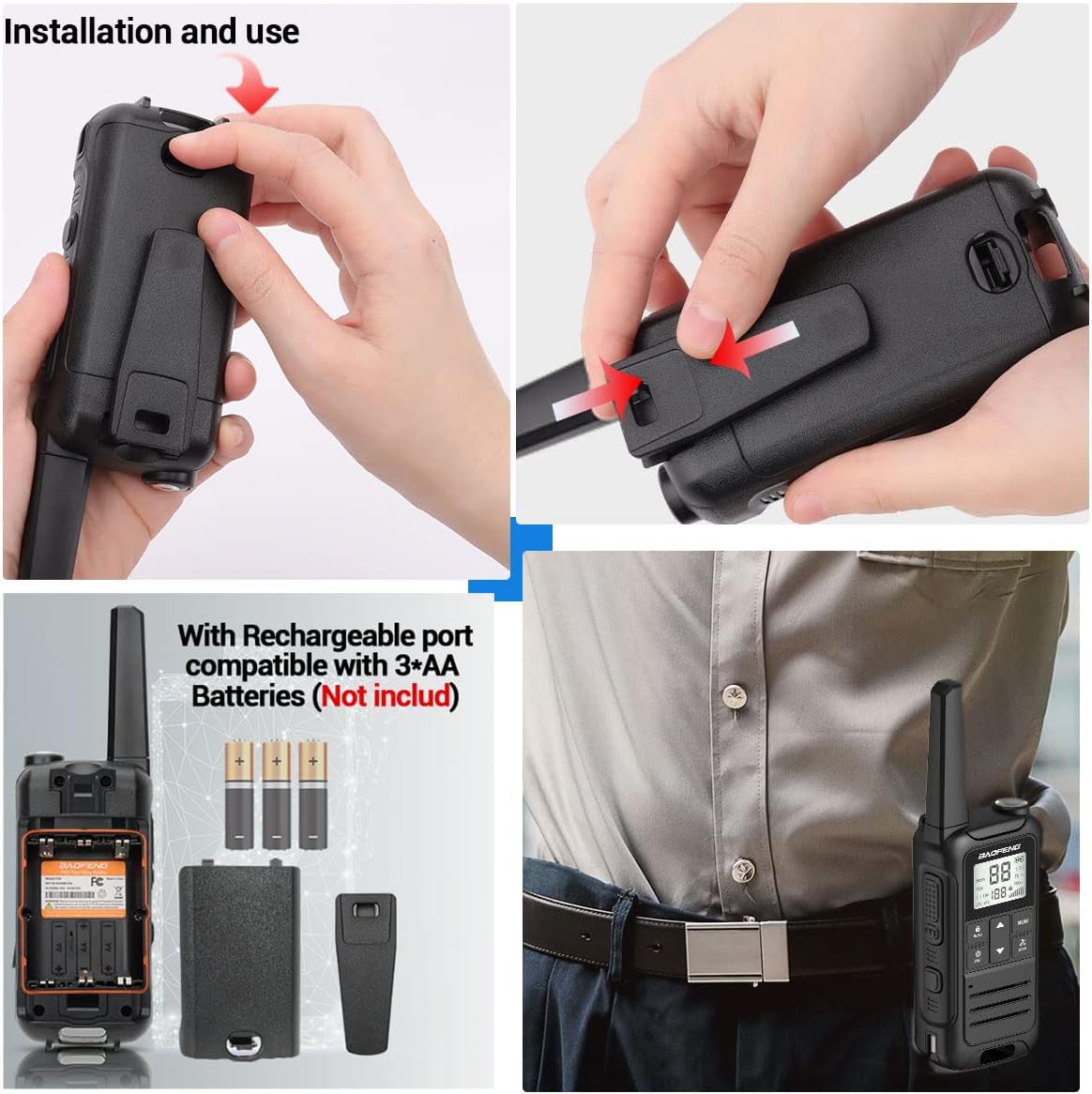
Image: A four-panel image demonstrating the installation of the battery cover and belt clip on the BAOFENG F22 radio, along with an illustration of the internal battery compartment and the radio being worn on a belt.
Operating Instructions
1. Power On/Off
- To Power On: Press and hold the Power/Call Button until the LCD screen illuminates.
- To Power Off: Press and hold the Power/Call Button until the screen turns off.
2. Channel Selection
- Use the UP and DOWN buttons to select one of the 22 FRS channels.
- Ensure all radios you wish to communicate with are set to the same channel.
3. Privacy Codes (CTCSS/DCS)
- The F22 supports 50 CTCSS and 105 DCS privacy codes.
- To set a privacy code:
- Press the Menu/Lock Button to enter the menu.
- Navigate to the CTCSS or DCS setting using the UP/DOWN buttons.
- Press Menu/Lock Button again to select the setting.
- Use UP/DOWN to choose your desired code.
- Press Menu/Lock Button to confirm and exit.
- For communication, both radios must be on the same channel and have the same privacy code set.
4. Transmitting and Receiving (PTT)
- To Transmit: Press and hold the PTT (Push-To-Talk) Button on the side of the radio. Speak clearly into the microphone. Release the PTT button to stop transmitting.
- To Receive: The radio will automatically receive signals when the PTT button is not pressed and it is on the same channel and privacy code as the transmitting radio.
5. VOX Function (Hands-Free Operation)
- The VOX function allows you to transmit without pressing the PTT button, by detecting your voice.
- To activate/deactivate VOX:
- Press the Menu/Lock Button to enter the menu.
- Navigate to the VOX setting.
- Press Menu/Lock Button again to select.
- Use UP/DOWN to set the VOX sensitivity level (higher number for lower sensitivity). Select "OFF" to deactivate.
- Press Menu/Lock Button to confirm and exit.
6. NOAA Weather Alert
The F22 radio can scan 12 NOAA Weather channels and provide alerts for severe weather conditions.
- To activate Weather Alert:
- Press the Weather Monitor Button (often labeled "MONI" or with a weather icon) to enter NOAA weather mode.
- The radio will scan for active weather alerts.
- When an alert is detected, the radio will sound an alarm.
- This feature is crucial for outdoor activities to stay informed about potential hazards.

Image: The BAOFENG F22 radio highlighting its NOAA Service capability, showing the radio in an outdoor setting with icons representing various weather phenomena like blizzards, fires, earthquakes, and rainstorms, indicating its ability to withstand extreme weather conditions and listen to all hazards weather channels and alerts.
7. Flashlight Operation
- Press the Flashlight Emergency Button (usually located on the top or side) to turn the LED flashlight on or off.
8. Other Functions
- Channel Scanning: Press the Scan Button to initiate channel scanning. The radio will stop on an active channel. Press again to resume scanning.
- Call Alert: Press the Call Button to send an audible alert tone to other radios on the same channel.
- Keypad Lock: Press and hold the Menu/Lock Button to lock or unlock the keypad, preventing accidental changes.
- Dual Monitoring Mode: Allows monitoring of two channels simultaneously. Refer to the on-screen indicators for active channel.
- 8 Ring Tone Options: Customizable call tones. Access through the menu settings.
Maintenance
1. Battery Care
- To maximize battery life, fully charge the battery before first use.
- Avoid overcharging or completely discharging the battery frequently.
- Store batteries in a cool, dry place when not in use.
- If using AA alkaline batteries, remove them if the radio will not be used for an extended period to prevent leakage.
2. Cleaning
- Wipe the radio's exterior with a soft, damp cloth.
- Do not use harsh chemicals or abrasive cleaners.
- Ensure the Type-C USB port and headset jack are free of dust and debris.
3. Storage
- Store the radio in a dry, dust-free environment away from extreme temperatures.
- Remove batteries if storing for more than 30 days.
Troubleshooting
| Problem | Possible Cause | Solution |
|---|---|---|
| Radio does not power on. | Battery is depleted or incorrectly installed. | Charge the battery. Reinstall the battery, ensuring proper contact. |
| Cannot transmit or receive. | Incorrect channel or privacy code. Radios out of range. | Verify both radios are on the same channel and privacy code. Move closer to the other radio. |
| Poor audio quality. | Low battery. Obstructions. Volume too low. | Charge battery. Move to an open area. Adjust volume. |
| Keypad is unresponsive. | Keypad lock is active. | Press and hold the Menu/Lock Button to unlock the keypad. |
| NOAA Weather Alert not working. | Not in NOAA mode. No active alerts in the area. | Ensure you have pressed the Weather Monitor Button. Check local weather conditions. |
Specifications
- Model: BAOFENG F22
- FCC ID: 2AJGM-F22
- Channels: 22 FRS Channels, 12 NOAA Weather Channels
- Privacy Codes: 50 CTCSS, 105 DCS
- Battery Type: 1400 mAh Rechargeable Li-ion Battery Pack (included), compatible with 3xAA Alkaline Batteries (not included)
- Charging: Type-C USB
- Headset Jack: 2-Pin Kenwood compatible
- Features: Built-in Flashlight, Backlit LCD Display, VOX (Hands-Free), Channel Scan, Call Alert, Keypad Lock, Dual Monitoring Mode, 8 Ring Tone Options, Low Battery Audible Alert
- Dimensions (approx.): 2.16 in (W) x 1.34 in (D) x 6.89 in (H) (including antenna)
Warranty and Support
For warranty information, please refer to the documentation provided with your purchase or visit the official BAOFENG website. For technical assistance or customer service inquiries, please contact the seller or manufacturer directly. Customer service is available to assist with any purchase-related concerns.


