
1. Introduction
This manual provides essential instructions for the safe and efficient operation of your Anker SOLIX F3000 Portable Power Station, BP3000 Expansion Battery, and 400W Solar Panel. Please read this manual thoroughly before using the product and retain it for future reference. This system is designed to provide reliable power for various applications, including home backup, RV use, camping, and emergency situations.
2. Safety Instructions
- Do not disassemble, repair, or modify the unit. Incorrect reassembly may cause fire or injury.
- Do not expose the unit to fire or high temperatures.
- Do not use or store the unit in direct sunlight, near heat sources, or in high-temperature environments.
- Do not use or store the unit in a bathroom or in an area exposed to water or rain.
- Use only original or certified cables and accessories.
- Keep the unit away from children and pets.
- Ensure proper ventilation during use and charging to prevent overheating.
- Avoid dropping, impacting, or subjecting the unit to strong vibrations.
- In case of fire, use a dry powder fire extinguisher.
3. Package Contents
Verify that all items listed below are included in your package:
- Anker SOLIX F3000 Portable Power Station
- Anker SOLIX PS400 Portable Solar Panel
- Anker SOLIX BP3000 Expansion Battery
- AC charging cable
- High-voltage solar charging cable
- Battery-to-host cable
- User manual
- Warning notice
- Warranty card
Note: The F3000 Portable Power Station, BP3000 Expansion Battery, and 400W Solar Panel may be shipped separately. Please allow for the arrival of all components.
4. Product Overview
The Anker SOLIX F3000 system provides a robust and versatile power solution. It consists of the F3000 Portable Power Station, the BP3000 Expansion Battery for increased capacity, and a 400W Solar Panel for renewable energy charging.
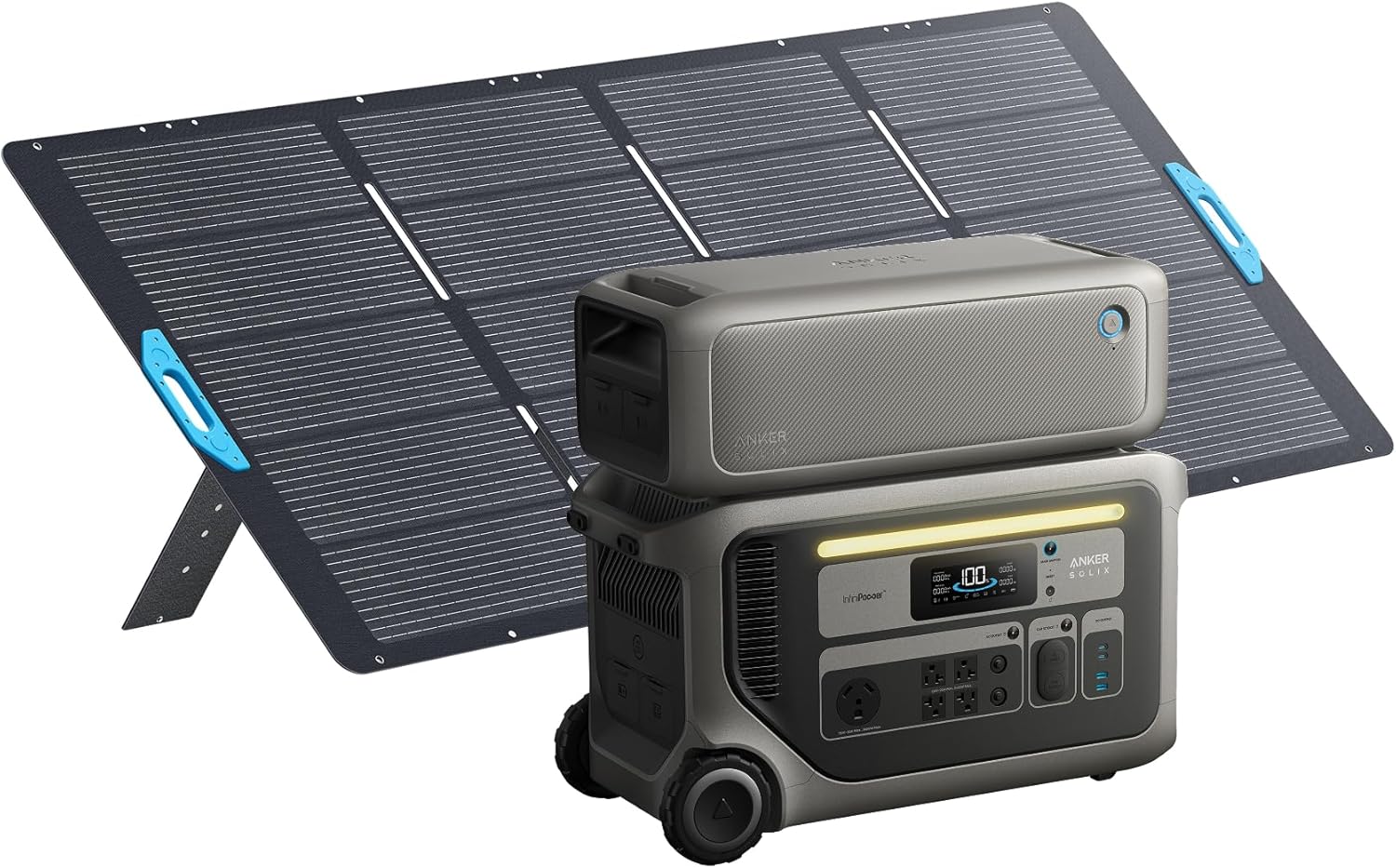
Image: The complete Anker SOLIX F3000 system, including the portable power station, expansion battery, and 400W solar panel.
4.1 Anker SOLIX F3000 Portable Power Station
The F3000 is the core unit, featuring multiple output ports (AC, DC, USB) and a clear display for monitoring power status. It is equipped with wheels for portability.
4.2 Anker SOLIX BP3000 Expansion Battery
The BP3000 expands the energy storage capacity of the F3000, allowing for longer power backup times. It connects directly to the F3000.

Image: The Anker SOLIX F3000 Portable Power Station with the BP3000 Expansion Battery stacked on top, illustrating the modular design.
4.3 Anker SOLIX PS400 Portable Solar Panel
The 400W solar panel provides a renewable charging source for the F3000 system, ideal for off-grid use or reducing electricity costs.

Image: The Anker SOLIX F3000 Portable Power Station positioned next to the unfolded 400W Solar Panel, ready for solar charging.
5. Setup
5.1 Initial Charging
Before first use, fully charge the Anker SOLIX F3000 Power Station using the provided AC charging cable. Connect the AC charging cable to the power station's AC input port and then to a wall outlet. The display will indicate charging status.
5.2 Connecting the BP3000 Expansion Battery
To increase the F3000's capacity, connect the BP3000 Expansion Battery using the battery-to-host cable. Ensure both units are powered off before connecting. Align the connectors and secure them firmly. The F3000 will automatically recognize the connected expansion battery.
5.3 Connecting Solar Panels
Connect the 400W Solar Panel to the F3000 using the high-voltage solar charging cable. The F3000 supports dual voltage solar input via its 165V and 60V ports, allowing for up to 2,400W of solar recharging. Position the solar panel in direct sunlight for optimal charging efficiency.

Image: The Anker SOLIX F3000 connected to multiple solar panels, demonstrating its 2,400W max dual voltage solar input capability.
The solar panel features adjustable stands to optimize its angle towards the sun. Adjust the panel to 30°, 40°, 50°, or 80° for maximum sunlight exposure.

Image: Illustration of the Anker SOLIX 400W Solar Panel's four adjustable angles (30°, 40°, 50°, 80°) for optimal sun exposure.
5.4 Home Backup Integration
For advanced home backup solutions, the Anker SOLIX F3000 can be integrated with an optional Bi-Directional Inlet Box and Smart Meter. This allows for automatic storage of solar energy or low-cost off-peak electricity, optimizing energy usage and potentially reducing utility bills.
6. Operating Instructions
6.1 Turning On/Off
Press and hold the main power button on the F3000 to turn the unit on or off. The display will illuminate upon activation.
6.2 Using AC Output
To use the AC outlets, ensure the F3000 is powered on and press the AC power button. Plug your appliances into the 120V AC outlets. The F3000 provides 3,600W of continuous power. For demanding appliances requiring 240V, two F3000 units can be paired with a Double Voltage Hub (sold separately).

Image: The Anker SOLIX F3000 Power Station connected and actively powering multiple household appliances, demonstrating its capacity for essential home use.
6.3 Using DC and USB Output
Press the DC or USB power buttons to activate these output ports. Connect your devices to the appropriate DC (e.g., car port, Anderson Powerpole) or USB (USB-A, USB-C) ports. The display will show the active output.
6.4 Recharging the Power Station
The F3000 offers multiple recharging options:
- AC Recharging: Connect the AC charging cable to a standard wall outlet. The F3000 supports hyper-fast 3,600W AC recharging.
- Solar Recharging: Connect the 400W Solar Panel (or other compatible solar panels) to the F3000's solar input ports. The system supports up to 2,400W of solar input.
- Generator Recharging: Connect a 120V fuel generator to the F3000. The power station supports 3,600W pass-through charging, allowing it to recharge while simultaneously powering connected appliances.

Image: The Anker SOLIX F3000 Power Station connected to a fuel generator, illustrating its capability for rapid 3,600W pass-through charging.
- EV Station/Alternator Charger: Future or optional charging methods may include EV charging stations and vehicle alternator chargers.
6.5 Anker App Integration
Download the Anker app for enhanced control and monitoring of your SOLIX F3000 system. The app allows you to adjust charge rates, enable power-saving modes, and utilize Time-of-Use (TOU) mode to optimize charging during off-peak electricity hours.
7. Maintenance
- Cleaning: Use a dry, soft cloth to clean the exterior of the power station and solar panel. Avoid using harsh chemicals or abrasive materials.
- Storage: Store the unit in a cool, dry place away from direct sunlight and extreme temperatures. For long-term storage, ensure the battery is charged to approximately 50-80% and recharge every 3-6 months to prolong battery life.
- Battery Care: The F3000 uses durable LiFePO4 batteries. Avoid fully discharging the battery frequently to maximize its lifespan.
8. Troubleshooting
If you encounter issues with your Anker SOLIX F3000 system, refer to the following common questions and answers:
- Q: How long can Anker SOLIX F3000 provide long-lasting backup power?
A: The F3000 features a 3kWh capacity and low power consumption. One F3000 can power a 190W fridge for 42 hours. With additional expansion batteries, capacity can be expanded up to 24kWh, providing up to 80 hours of power for essential appliances.
- Q: What types of solar panels can I use to charge Anker SOLIX F3000?
A: The F3000 features two PV inputs that support 2,400W. The High-PV input supports panels between 11-165V, connecting up to four 400W solar panels in series for 1,600W. The Low-PV input supports panels between 11-60V, connecting two 400W solar panels in parallel for 800W.
- Q: How does Anker SOLIX 3,600W pass-through charging work with my gas generator?
A: The F3000 works with most 120V gas generators if it has a TT-30 plug or adapter. Pass-through charging allows the F3000 to charge and discharge simultaneously, avoiding power interruptions. Log into the Anker app to set the generator's power rating.
- Q: How does Anker SOLIX F3000 provide 240V output?
A: The F3000 only provides 120V output by itself. For 240V output, connect two F3000s together with a Double Voltage Hub (sold separately).
- Q: How can I lower electricity bills with Anker SOLIX F3000?
A: The F3000 features self-locking outlets and a smart meter to prioritize solar power for daily use. Enable TOU mode in the app to charge when prices are low and power when prices are high. The F3000 has two PV inputs, supporting 2,400W of solar for appliances.
9. Specifications
| Feature | Specification |
|---|---|
| Brand | Anker SOLIX |
| Model Name | Anker SOLIX F3000 |
| Battery Type | LFP |
| AC Input (AC Charging Cable) | 120V~ 15A Max (< 3 Hr), 1800W Max, 12A (Continuous), 60Hz, L+N+PE |
| High-PV Input | 11-165V=17A Max, 1,600W |
| Low-PV Input | 11-60V=17A Max, 800W |
| DC Input Port | 60V=120A Max |
| AC Output (NEMA 5-20R) | 120V~ 20A Max, 60Hz, 2400W Max |
| USB-A Output | 5V=2.4A, 12W (per Port) |
| USB-C Output | 5V=3A / 9V=3A / 15V=3A / 20V=3A / 20V=5A, 100W (per Port) |
| UPS | 20 ms |
| Discharging Temperature | -4°F-104°F / -20°C-40°C |
| Charging Temperature | 32°F-104°F / 0°C-40°C |
| Dimensions | 25.6"L x 11.8"W x 14.8"H (651×300×377 mm) |
| Net Weight | 91.5 lb / 41.5 kg |
| Wattage | 3600 watts |
| Fuel Type | Solar |
| Power Source | Battery Powered |
| Voltage | 120 Volts (AC) |
| Special Feature | Portable |
| Total Power Outlets | 3 (AC outlets) |
| UPC | 194644242459 |
| Manufacturer | Anker |
| Part Number | A1782 |
10. Warranty and Support
The Anker SOLIX F3000 Portable Power Station, BP3000 Expansion Battery, and 400W Solar Panel are covered by a 5-year warranty. For detailed warranty terms, please refer to the warranty card included in your package or visit the official Anker SOLIX website.
For technical support, troubleshooting assistance, or to inquire about replacement parts, please contact Anker customer support through their official website or the contact information provided in your warranty documentation.
11. Important Notices
11.1 30% Tax Credit Eligibility
You may be eligible to take advantage of the Residential Clean Energy Credit. The US Residential Clean Energy Credit offers a nonrefundable tax credit of up to 30% for qualified clean energy installations in private homes. Under current law, this credit is set to phase out beginning in 2033 and to terminate after the end of 2034.
However, the IRS has yet to provide comprehensive guidance on eligible expenditures. Homeowners should visit the IRS website to see if they qualify for the credit, which also covers other clean energy technologies like solar panels.
Disclaimer:
This information is for educational purposes only and should not be construed as legal or tax advice. We provide no guarantees, assurances, or representations that tax credits, deductions, or other similar benefits may be available with respect to or in connection with any of our products. We encourage you to do your own due diligence and consult with your own tax advisor regarding your tax situation and the potential applicability of tax credits, deductions, or other similar benefits.


