
1. Introduction
This manual provides detailed instructions for the setup, operation, maintenance, and troubleshooting of your AWOL VISION 120-inch Folding Outdoor Projector Screen with Stand (Model: MW-PF120). Please read this manual thoroughly before assembly and use to ensure optimal performance and longevity of your product.
Key Features:
- 1.3dB Gain & 170° Ultra-Wide View: Features a premium 1.3dB optical gain coating and a 170° ultra-wide viewing angle, suitable for various viewing environments.
- Premium Durability: Constructed with grade zinc alloy to withstand gusts and moisture, designed for outdoor use.
- True All-Venue Performance: Matte white surface provides hotspot-free clarity in dark rooms, while weather-resistant fabric is suitable for outdoor gatherings.
- 3-Minute Cinema Magic - No Tools: Snap-button frame allows for quick assembly without specialized tools.
- Rolling Carry Packaging Design: Includes high-quality rollers and handles for easy transport. Folding size: 38.19 inches x 10.24 inches x 6.30 inches.
- Easy to Clean: Screen can be cleaned with mild soap and water.
- Universal Compatibility: Compatible with standard, short throw, and ultra short throw projectors.

Image 1.1: The AWOL VISION projector screen showcasing its 1.3dB gain and 170-degree ultra-wide viewing angle for clear images.
2. Package Contents
Please verify that all components are present in the package before beginning assembly:
- Projector Screen *1
- Carrying Bag *1
- Folding Leg *2
- Folding Frame *1
- Nylon Rope *2
- Eye Bolt *2
- Tent Stake *4 (Only for 180"/200" models)
- Knob Screw (long) *4
- Support Leg *2
- Knob Screw (short) *2

Image 2.1: Visual representation of all items included in the product package.
3. Setup Instructions
Follow these steps for quick and easy assembly of your projector screen. It is recommended to have two people for easier setup, especially for larger models.
- Unfold & Lock Frame: Take the frame from the carrying bag. Unfold the longer sections first until the hinges click into place. Ensure all corners form 90-degree angles with straight support bars.
- Attach Screen & Stretch: Unfold the screen material, being careful to avoid creases. Fasten the snap-buttons in strict order (e.g., A-B-C-D then E-F-G-H) to ensure even tension.
- Secure Top & Base: Screw eye bolts to the top frame for ropes. Insert folding legs into the bottom holes and tighten the small knob screws. Two-person lift is required to raise the screen. (Skip support legs for 120-inch models.)
- Anchor Legs: For grass surfaces, hammer tent stakes through the leg holes. For hard ground, use sandbags on the base for stability.
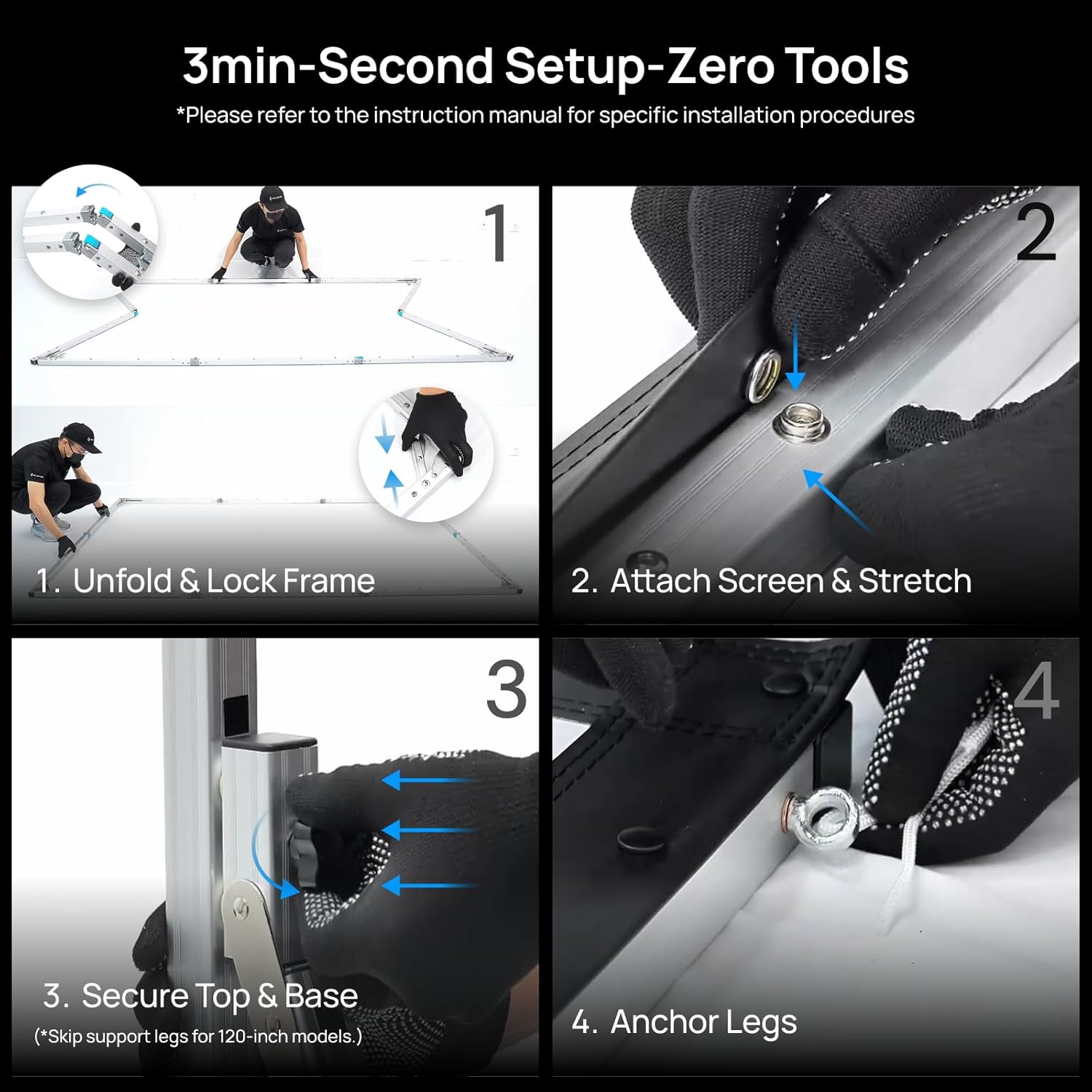
Image 3.1: Step-by-step visual instructions for assembling the projector screen.
Setup Video Guide:
Video 3.1: Official AWOL VISION setup guide for the portable folding matte white screen, demonstrating the assembly process.
4. Operating Instructions
Your AWOL VISION projector screen is designed for versatile use in various environments.
Viewing Angle and Compatibility:
The screen features a 170-degree ultra-wide viewing angle, ensuring a clear picture from almost any seat. It is universally compatible with standard, short throw, and ultra short throw projectors, allowing flexibility in your projection setup. The screen supports both front and rear projection.

Image 4.1: Illustration of the 170-degree wide viewing angle, ensuring optimal viewing from various positions.

Image 4.2: The screen's universal compatibility with different types of projectors (Ultra Short Throw, Short Throw, Long Throw).
5. Maintenance
To ensure the longevity and optimal performance of your projector screen, follow these simple maintenance guidelines:
- Cleaning: The screen material is designed for easy cleaning. Use a soft cloth dampened with mild soap and water to gently wipe the screen surface. Avoid harsh chemicals or abrasive materials, as these can damage the screen coating.
- Storage: When not in use, disassemble the screen and store it in the provided carrying bag. Ensure the screen material is folded neatly to minimize creases. Store in a cool, dry place away from direct sunlight and extreme temperatures.
- Handling: Always handle the screen material with clean hands to prevent smudges. Avoid touching the projection surface directly.
6. Troubleshooting
If you encounter any issues with your projector screen, refer to the following common problems and solutions:
Common Issues:
- Wrinkles or Creases on Screen:
Solution: Ensure the screen material is stretched tightly and evenly across the frame during assembly. The snap-button installation should be done systematically to distribute tension. Minor creases may naturally minimize over time with use. If persistent, gently warm the area with a hairdryer on a low setting from a distance, while gently stretching the fabric. - Screen Instability (Outdoor Use):
Solution: Always use the provided tent stakes to anchor the legs firmly into soft ground. For hard surfaces like concrete, use sandbags or other weights on the base of the legs to prevent tipping, especially in windy conditions. - Poor Image Quality (Hotspots, Glare):
Solution: Ensure your projector is correctly aligned with the screen. The screen is designed to reduce hotspots, but extreme angles or very bright ambient light can still affect image quality. Adjust projector position and minimize ambient light if possible. Verify that the screen surface is clean. - Difficulty Assembling Frame:
Solution: Refer to the setup instructions and video carefully. Ensure all hinges click into place. If a part feels stuck, do not force it; check for proper alignment. Lubrication may be applied to hinges if they become stiff over time.
7. Specifications
| Feature | Specification |
|---|---|
| Model Number | MW-PF120 |
| Size | 120 inches |
| Material | Fabric (Waterproof & Mildew-Proof PVC) |
| On-axis Peak Gain | 1.3dB |
| Resolution Support | Up to 8K |
| Viewing Angle | 170° |
| Frame Material | Aluminum Alloy |
| Projection Ratio | 16:9 |
| Screen Dimensions (W x H) | 2807*2242*943 mm (110.5"x88.3"x37.1") |
| Screen Weight | 20.9 lbs / 9.5 kg |
| Package Dimensions | 1100*290*215 mm (43.3"x11.4"x8.46") |
| Package Weight | 28.7 lbs / 13 kg |
| Mounting Type | Floor Mount |
| Operation Mode | Manual |

Image 6.1: Detailed specifications and dimensions for the 120-inch projector screen.
8. Warranty and Support
Warranty Information:
Your AWOL VISION projector screen comes with a 2-year warranty. This warranty covers manufacturing defects and ensures the product meets its specified performance standards under normal use. Please retain your proof of purchase for warranty claims.
Customer Support:
For any questions, technical assistance, or warranty claims, please contact AWOL VISION customer support:
- Phone / WhatsApp: +1 (888) 891-6866
- Email: support@awolvision.com