
1. Product Overview
The DELLA Serena 18000 BTU 22 SEER2 Smart WiFi Mini Split Heat Pump is an advanced climate control system designed for efficient heating and cooling of spaces up to 1000 sq.ft. This inverter-driven unit offers smart connectivity, allowing control via a dedicated app or voice commands through Alexa and Google Home. It features a high 22 SEER2 rating for energy efficiency and operates quietly.

Image 1.1: The DELLA Serena Mini Split Heat Pump system, including the indoor unit, outdoor unit, remote control, and a representation of the mobile app interface.
Key Features
- Smart Control: Integrated WiFi for control via the DELLA app, Alexa, or Google Home. Includes a geo-location function for automated temperature adjustments.
- Energy Efficiency: 18000 BTU/h capacity with a 22 SEER2 rating, offering up to 57% power savings through inverter technology.
- Quiet Operation: Operates at an ultra-silent 22 dBa in mute mode.
- Advanced Airflow: Features 4D airflow (up-down, left-right) for even temperature distribution.
- Multiple Modes: Includes I Feel mode, 24-hour timer, sleep mode, eco energy-saving mode, multiple fan speeds, turbo function, heating, cooling, auto, and dry (dehumidifying) modes.
- PureClean Technology: Prevents dust buildup and defrosts the indoor unit for cleaner air.
- Winter Performance: Equipped with a bottom heating element in the outdoor unit to prevent ice buildup and ensure reliable operation down to 5°F (-15°C).
- Installation Kit: Comes with a 16.4ft installation kit, including standard 1/4" & 1/2" outer dimension copper pipes.
2. Safety Guidelines
Read all safety warnings and instructions carefully before installing, operating, or performing maintenance on this appliance. Failure to follow these instructions may result in electric shock, fire, property damage, or personal injury.
General Safety
- This appliance is not intended for use by persons (including children) with reduced physical, sensory, or mental capabilities, or lack of experience and knowledge, unless they have been given supervision or instruction concerning use of the appliance by a person responsible for their safety.
- Children should be supervised to ensure that they do not play with the appliance.
- Do not insert fingers or foreign objects into the air inlet or outlet.
- Do not operate the unit with wet hands.
- Do not spray water directly onto the unit.
- Ensure the unit is installed on a stable, level surface to prevent vibration and noise.
Electrical Safety
- The unit requires a 208V-230V, 60Hz power supply with a maximum fuse size of 20A.
- Always ensure the power supply is disconnected before performing any maintenance or repairs.
- Do not use extension cords or multi-outlet adapters with this unit.
- Ensure proper grounding to prevent electric shock.
- If the power cord is damaged, it must be replaced by the manufacturer, its service agent, or similarly qualified persons to avoid a hazard.
3. Package Contents
Verify that all components listed below are included in your package before beginning installation.

Image 3.1: An exploded view diagram illustrating the various components included with the DELLA Serena Mini Split Heat Pump.
- 1 x Indoor Unit
- 1 x Outdoor Unit
- 1 x Remote Control
- 1 x Refrigerant Pipe (16.4ft)
- 1 x Drain Lines
- 1 x Wall Cap
- 1 x Mounting Plate
- 2 x AAA Batteries (for remote)
- 1 x Plasticine Putty
- Power Cords
- Communication Cable
- Bracket Template
- User Manual
4. Installation Instructions
Important: This DELLA Mini Split AC system mandates professional installation. It is not designed for DIY installation. Improper installation can lead to refrigerant leaks, electrical hazards, and void the product warranty. Line-set vacuuming is required during installation. Any alteration of line-set length requires adjusting freon levels by a qualified technician.
Pre-Installation Checklist
- Ensure the installation area is suitable for both indoor and outdoor units, considering space, airflow, and structural integrity.
- Confirm availability of a dedicated 208V-230V, 60Hz power supply with a 20A circuit breaker.
- Verify that the included 16.4ft copper pipes (1/4" & 1/2" outer dimension) are sufficient for your desired unit placement.
- Have all necessary tools and safety equipment ready for professional installation.
Installation Kit Details
The provided 16.4ft installation kit includes pre-charged R32 refrigerant for the specified line-set length. The drain pipe length is 78.7 inches. Ensure these lengths are adequate for your installation plan. Professional technicians will handle the connection of refrigerant lines, electrical wiring, and proper vacuuming of the system.
5. Operating Your Mini Split System
Your DELLA Serena Mini Split Heat Pump can be operated using the included remote control, the DELLA mobile application, or voice commands.
Remote Control Functions

Image 5.1: The remote control for the DELLA Serena Mini Split system, showing various buttons and their functions.
- On/Off: Powers the unit on or off.
- Switch Modes: Cycles through Auto, Cool, Heat, Dry, and Fan modes.
- Temp Up/Down: Adjusts the desired temperature.
- Fan Speed: Selects fan speed (Quiet, Low, Mid, High, Turbo).
- Vertical Swing: Controls vertical louver movement.
- Horizontal Swing: Controls horizontal louver movement.
- Turbo On/Off: Activates or deactivates rapid cooling/heating.
- ECO Mode: Engages energy-saving operation.
- Sleep Mode: Adjusts temperature for comfortable sleep and quiet operation.
- Timer Setting: Sets a timed on/off schedule.
- Display Light: Turns the unit's display light on or off.
- PureClean: Activates the self-cleaning function.
- Vicinity Sensor: Activates the 'I Feel' function, sensing temperature around the remote.
Smart Features (Wi-Fi App & Voice Control)
The DELLA Serena system offers advanced control options through its dedicated mobile application and compatibility with smart home assistants.

Image 5.2: Various screens of the DELLA mobile application, demonstrating control over modes, fan speed, timer, and scheduling.
- DELLA App: Download the DELLA app to your smartphone or tablet. Connect your mini split unit to your home WiFi network following the in-app instructions. The app allows for remote control, scheduling, mode selection, and monitoring from anywhere.
- Geo-Location Function: Utilize the app's exclusive geo-location feature to automatically adjust the unit's operation based on your proximity to home, optimizing energy use.
- Voice Control: Integrate your DELLA Serena unit with Amazon Alexa or Google Home for hands-free operation. Use simple voice commands to turn the unit on/off, adjust temperature, or change modes.
Operating Modes
- Cool Mode: Provides cooling to lower the room temperature.
- Heat Mode: Provides heating to raise the room temperature.
- Auto Mode: Automatically selects cooling or heating based on the set temperature and current room temperature.
- Dry Mode (Dehumidifying): Reduces humidity in the room without significant temperature change.
- Fan Only Mode: Circulates air without cooling or heating.
- ECO Mode: Optimizes operation for maximum energy savings.
- Sleep Mode: Adjusts temperature and fan speed for quiet, comfortable sleep.
6. Maintenance and Care
Regular maintenance ensures optimal performance and longevity of your DELLA Serena Mini Split Heat Pump.
Filter Cleaning
- The unit is equipped with reusable filters.
- Clean the air filters seasonally, or more frequently depending on usage and air quality.
- To clean, open the front panel of the indoor unit, remove the filters, and wash them with lukewarm water and mild detergent.
- Rinse thoroughly and allow them to air dry completely before reinserting.
PureClean Technology

Image 6.1: An internal view of the indoor unit highlighting the PureClean technology, which helps prevent dust buildup and defrosts the coil.
The PureClean technology actively prevents dust buildup and defrosts the indoor unit's coil, contributing to cleaner air and healthier living. This feature helps maintain the unit's efficiency and reduces the need for manual deep cleaning of the internal components.
Outdoor Unit Maintenance
- Keep the area around the outdoor unit clear of debris, leaves, and snow to ensure proper airflow.
- The outdoor unit is equipped with a bottom heating element to prevent ice buildup during winter operation, ensuring efficient defrosting and reliable performance.
- Periodically inspect the outdoor unit for any obstructions or damage.
7. Troubleshooting Guide
Refer to this guide for common issues and their potential solutions. If the problem persists, contact customer support.
| Problem | Possible Cause | Solution |
|---|---|---|
| Unit does not turn on | No power; Remote control batteries low; Circuit breaker tripped. | Check power supply; Replace remote batteries; Reset circuit breaker. |
| Insufficient cooling/heating | Dirty air filters; Obstruction in airflow; Incorrect mode setting; Room size exceeds capacity. | Clean air filters; Remove obstructions; Select appropriate mode; Ensure unit matches room size. |
| Unusual noise | Loose parts; Unit not level; Obstruction in fan. | Check for loose parts; Ensure unit is level; Remove fan obstruction. |
| Water leakage from indoor unit | Clogged drain pipe; Improper installation. | Clear drain pipe; Contact professional for inspection. |
| WiFi connectivity issues | Weak WiFi signal; Incorrect network settings. | Ensure strong WiFi signal; Reconfigure network settings in app. |
8. Technical Specifications
Detailed specifications for the DELLA Serena 18000 BTU Mini Split Heat Pump.
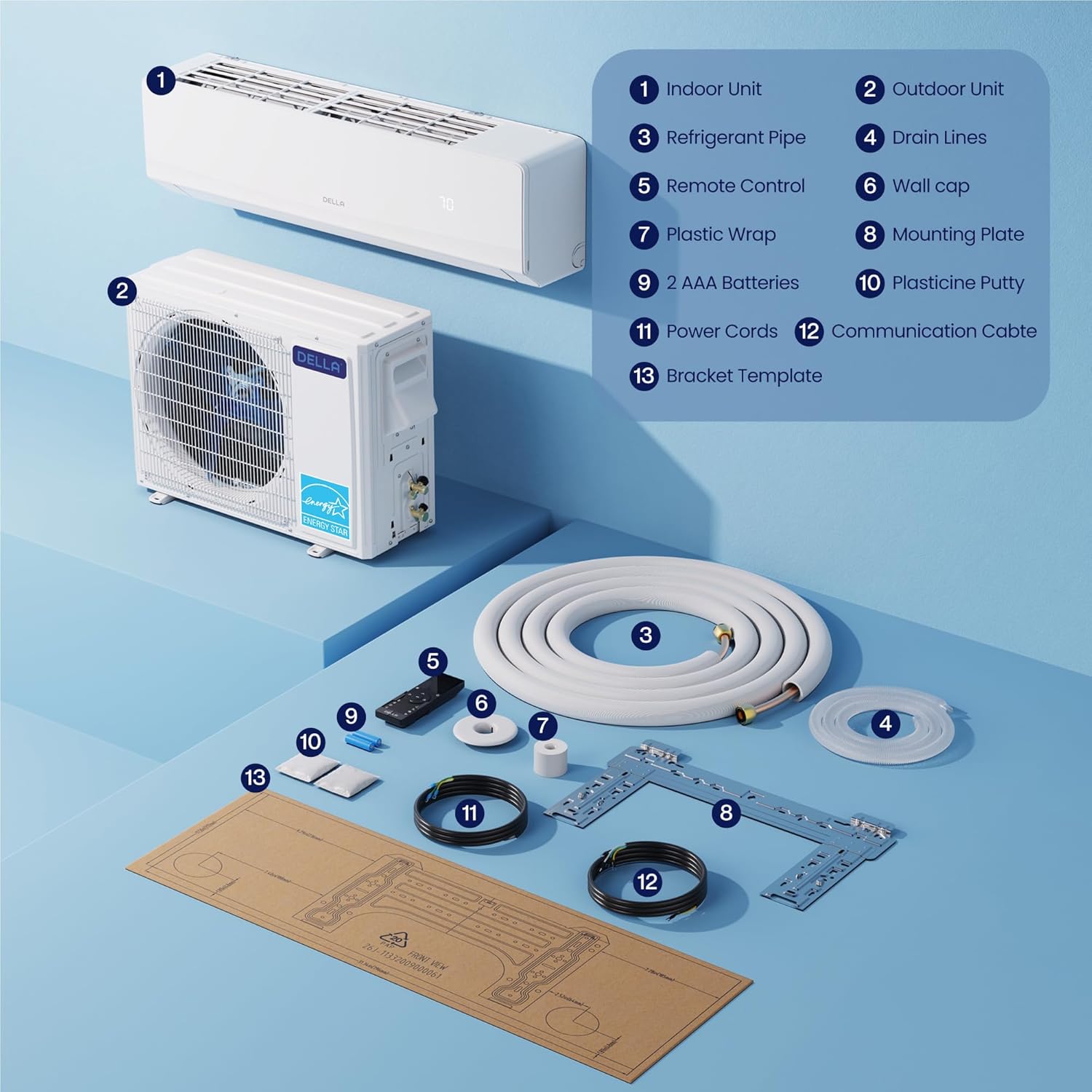
Image 8.1: A visual representation of the indoor and outdoor unit dimensions, along with key performance specifications.
| Specification | Value |
|---|---|
| Model Number | 18K2VR-22S-M-I+O |
| Cooling Capacity | 18000 BTU/h |
| Heating Capacity | 18000 BTU/h |
| SEER2 Rating | 22 |
| Power Supply | 208V-230V/60Hz |
| Max Input Power | 1450 Watts (Cooling), 1450 Watts (Heating) |
| Max Fuse Size | 20A |
| Refrigerant Type | R32 |
| Indoor Unit Dimensions (D x W x H) | 9.02" x 44.88" x 13.15" |
| Outdoor Unit Dimensions (D x W x H) | 11.81" x 30.91" x 21.85" |
| Item Weight | 28.7 pounds (Indoor Unit) |
| Control Method | App, Remote Control |
| Special Features | Dehumidifier, WiFi Enabled, PureClean Tech, Inverter System |
9. Warranty and Customer Support
DELLA is committed to providing reliable products and support.
Warranty Information

Image 9.1: A visual representation of the product's lifetime coverage, emphasizing best-in-class support and no additional costs.
The DELLA Serena Mini Split Heat Pump comes with a lifetime warranty, ensuring unmatched coverage and peace of mind. This warranty covers manufacturing defects and significant operational failures under normal use conditions. Please refer to the warranty card included in your package for full terms and conditions.
Customer Support

Image 9.2: A graphic detailing the available customer support channels, including phone support and 24/7 live chat.
For any questions, technical assistance, or warranty claims, DELLA provides comprehensive customer support:
- Live Chat: Available 24/7 for immediate assistance.
- Phone Support: Available Monday-Friday, 6 AM - 4 PM PST.
Please have your model number (18K2VR-22S-M-I+O) and purchase information ready when contacting support.