
1. Introduction
This manual provides instructions for the assembly, operation, and maintenance of your MSmask Twin Size Floating Bed Frame. Please read this manual thoroughly before assembly and retain it for future reference. This bed frame features a tufted storage headboard, integrated LED lighting, and a charging station.

Figure 1: MSmask Twin Size Floating Bed Frame, front view with pink LED lighting.
2. Safety Information
- Ensure all components are present and undamaged before assembly. Do not use if any parts are missing or broken.
- Assemble the bed frame on a soft, clean surface to prevent scratches.
- Tighten all screws and bolts securely. Periodically check and re-tighten fasteners.
- Do not exceed the maximum weight capacity of 800 lbs.
- Keep children away from the assembly area. Small parts may pose a choking hazard.
- Ensure electrical connections for the LED lights and charging ports are properly installed and not damaged.
3. Package Contents
Verify that all the following components are included in your package:
- Floating Bed Frame components (side rails, footboard, headboard)
- Wood Slats
- Tufted Headboard Cushion
- LED Light Strip and Controller
- Charging Station Module (1 Type-C, 3 USB ports)
- Assembly Hardware (screws, bolts, washers, Allen wrench)
- Installation Manual
4. Specifications
| Feature | Detail |
|---|---|
| Size | Twin |
| Product Dimensions (L x W x H) | 81.5" x 39.4" x 43.3" |
| Weight Limit | 800 Pounds |
| Item Weight | 81.8 Pounds |
| Upholstery Fabric Type | Faux Leather |
| Color | White |
| Special Features | Charging Station, LED Lighting, Storage Headboard, Hidden Legs |
| Assembly Required | Yes |
| Included Components | Floating Bed, Installation Manual, Necessary Tools |

Figure 2: Product dimensions and weight capacity.
5. Setup & Assembly
Assembly is required. Please follow the numbered instructions provided in the included installation manual. Ensure all parts are laid out and identified before beginning. Two people are recommended for assembly.
5.1 Pre-Assembly Checks
- Unpack all components and compare them with the parts list in your separate installation manual.
- Clear an adequate space for assembly.
- Gather necessary tools (an Allen wrench is typically included).
5.2 Assembly Steps
Refer to the detailed, numbered steps in the separate installation manual for precise assembly instructions. Key steps generally include:
- Attach the side rails to the headboard and footboard.
- Install the center support beam and legs.
- Place and secure the wood slats onto the frame. The slats include EVA bars for noise reduction.
- Install the LED light strip and connect the charging station to a power source.

Figure 3: Detail of wood slat with EVA bar for noiseless operation.
6. Operating Instructions
6.1 LED Lighting System
The integrated LED lighting system offers customizable ambiance for your bedroom. It can be controlled via a dedicated mobile application or the included remote control.
- APP Control: Download the specified mobile application (refer to the installation manual for QR code or app name). Connect your device via Bluetooth to access over 60,000 RGB colors, 29 dynamic modes, music synchronization, timing functions, and microphone control.
- Remote Control: Use the provided remote to adjust colors, brightness, and switch between various lighting modes.

Figure 4: LED lighting features and control options.
6.2 Charging Station
The headboard includes a built-in charging station for convenient access to power for your electronic devices.
- The charging station features 1 Type-C port (5V/3A) and 3 USB ports (5V/2A).
- Connect the bed frame's power cord to a standard wall outlet to activate the charging ports.
- Use appropriate cables to charge up to four devices simultaneously.
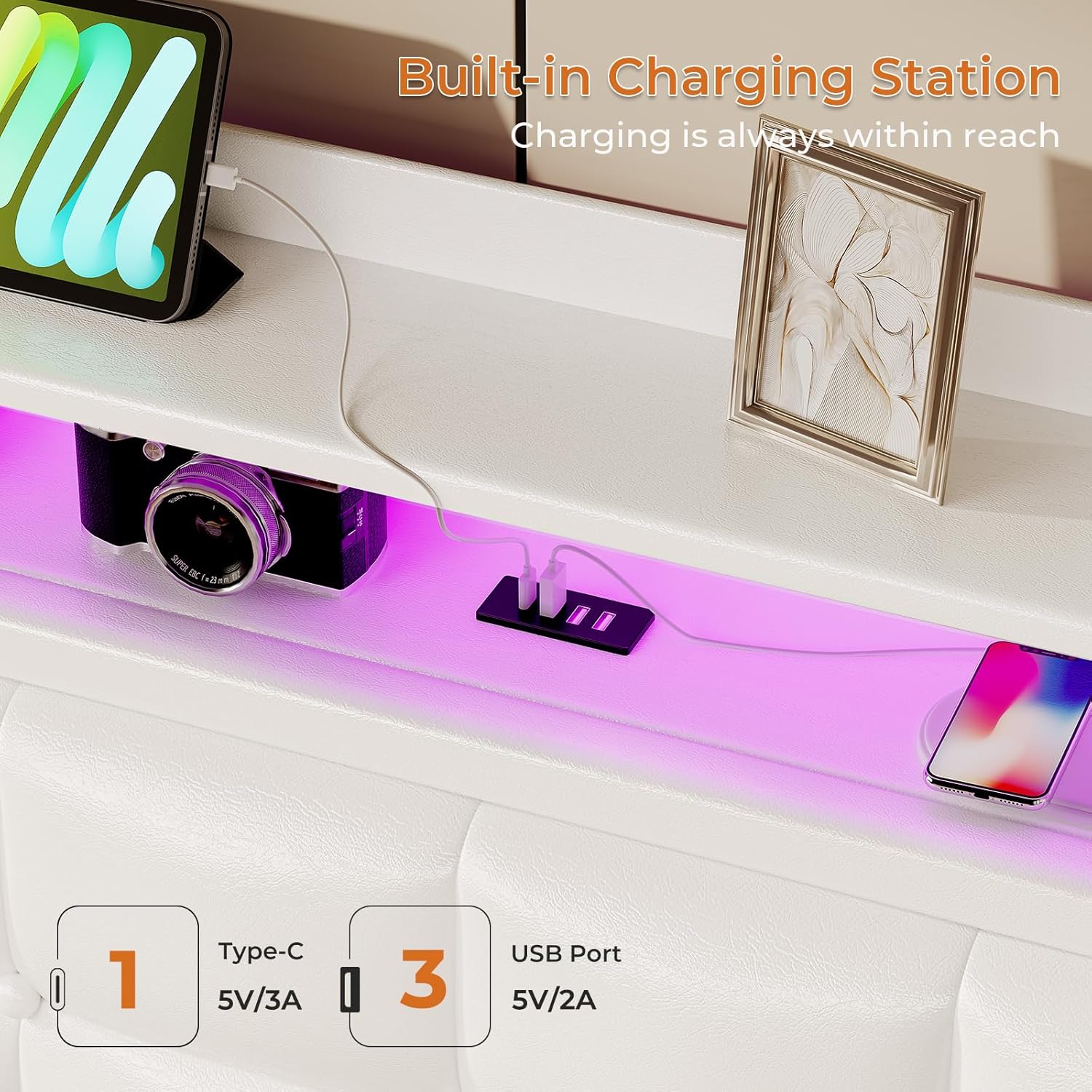
Figure 5: Integrated charging station with Type-C and USB ports.
6.3 Headboard Storage
The tufted headboard features two layers of storage shelves and a hidden compartment.
- The open shelves are suitable for displaying small items, books, or placing frequently used objects.
- The hidden storage area behind the tufted panel provides discreet storage for personal items or to reduce clutter. Access by lifting the upholstered panel.
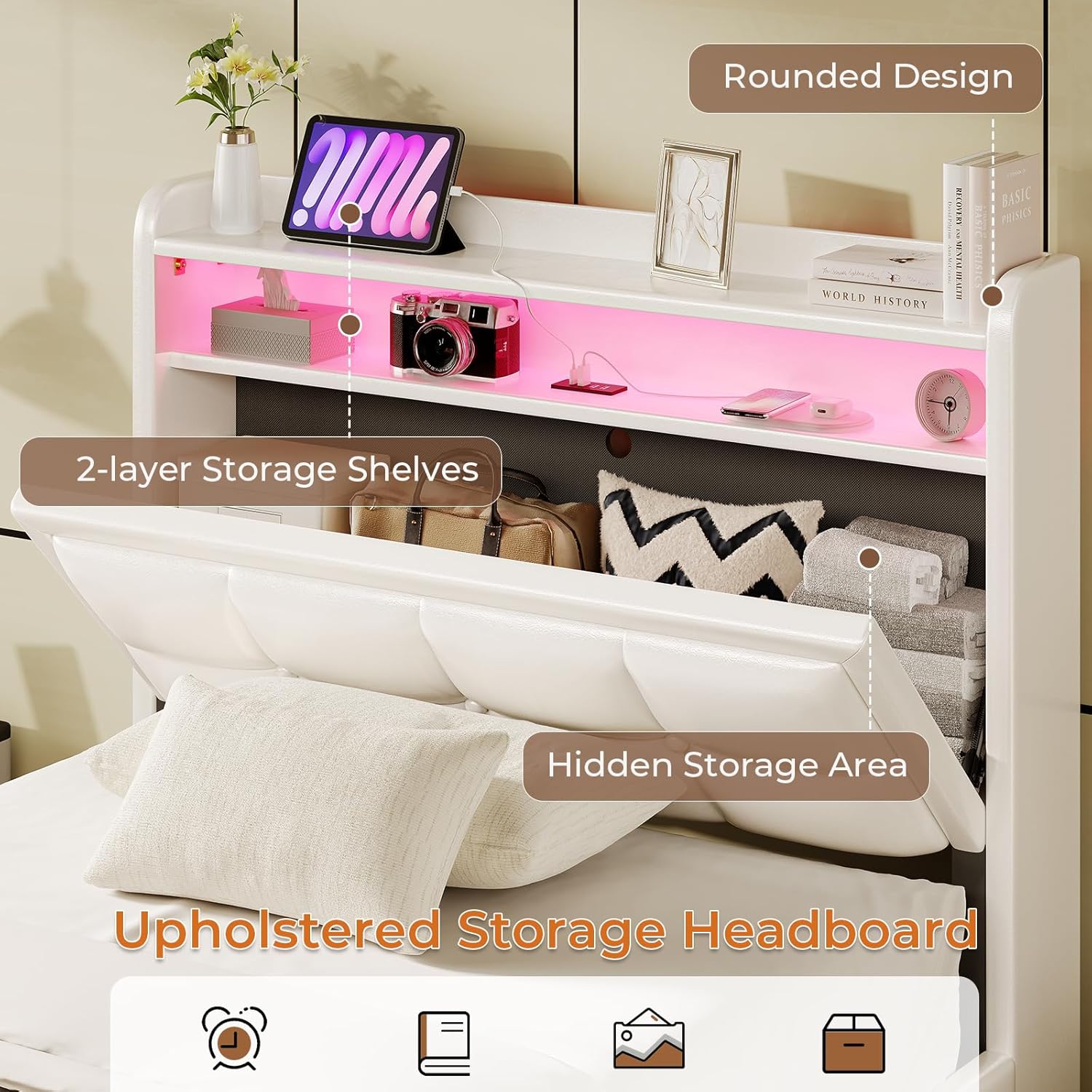
Figure 6: Headboard with open and hidden storage compartments.
6.4 Floating Design
The bed frame incorporates hidden support legs, creating a floating aesthetic. This design also minimizes the risk of foot collision with bed frame supports.

Figure 7: Illustration of the hidden leg design preventing foot collision.

Figure 8: The floating design allows for easier cleaning underneath the bed.
7. Maintenance
7.1 Cleaning
- For the faux leather upholstery, wipe with a soft, damp cloth. Avoid harsh chemicals or abrasive cleaners.
- For the frame, dust with a dry cloth.
- Do not expose electrical components (LEDs, charging ports) to liquids.

Figure 9: Detail of the faux leather upholstery for cleaning reference.
7.2 Fastener Checks
Periodically inspect all bolts and screws to ensure they remain tight. Re-tighten as necessary to maintain stability and prevent squeaking.
8. Troubleshooting
- LED Lights Not Working: Check if the power adapter is securely plugged into both the wall outlet and the bed frame. Ensure the remote control has working batteries. Try resetting the LED controller by unplugging and replugging the power.
- Charging Ports Not Functioning: Verify the bed frame's main power cord is properly connected to a live wall outlet. Ensure your device's charging cable is fully inserted into the port.
- Bed Frame Squeaks: Re-tighten all assembly bolts and screws. Ensure the wood slats are properly seated and the EVA bars are intact.
- Bed Frame Feels Unstable: Check that all support legs are making firm contact with the floor and that all connections are securely tightened.
9. Warranty & Support
9.1 Warranty Information
This MSmask bed frame comes with a Limited Warranty. Please refer to the warranty card included in your package for specific terms, conditions, and duration of coverage.
9.2 Customer Support
If you encounter any problems with delivery, installation, or any other issues related to your MSmask Twin Size Floating Bed Frame, please contact MSmask customer service. We are committed to providing professional support to ensure your satisfaction.
For assistance, please visit the MSmask Store on Amazon or refer to the contact information provided in your product packaging.