
1. Introduction
Thank you for purchasing the SENCOR SPT 3907 Bluetooth Radio Player. This compact and versatile device offers multiple audio playback options, including CD, Bluetooth, USB, and FM radio. This manual provides essential information for safe and efficient use of your new player. Please read it thoroughly before operation and retain it for future reference.
2. Safety Instructions
- Power Source: Ensure the power supply voltage matches the rating indicated on the unit. Use only the provided power cable.
- Water and Moisture: Do not expose the unit to rain, moisture, or dripping/splashing liquids. Do not place objects filled with liquids, such as vases, on the unit.
- Ventilation: Do not block any ventilation openings. Ensure adequate space around the unit for proper airflow.
- Heat: Keep the unit away from heat sources such as radiators, heat registers, stoves, or other apparatus (including amplifiers) that produce heat.
- Cleaning: Unplug the unit from the wall outlet before cleaning. Use a soft, dry cloth. Do not use liquid cleaners or aerosol cleaners.
- Servicing: Do not attempt to service this product yourself. Refer all servicing to qualified service personnel.
- Batteries: When using batteries, ensure correct polarity. Do not mix old and new batteries, or different types of batteries. Remove batteries if the unit is not used for extended periods.
3. Package Contents
Verify that all items are present in the package:
- SENCOR SPT 3907 Radio Player
- Remote Control
- AC Power Cable
- Documentation (this manual)
4. Product Features
The SENCOR SPT 3907 is designed for versatile audio entertainment:
- Output Power: 4W RMS for clear sound.
- CD Player: Supports CD-R/RW discs with programmable playback for up to 20 songs.
- Bluetooth Connectivity: Bluetooth V2.1 + EDR for wireless audio streaming from compatible devices.
- USB Playback: USB connection for MP3 file playback with programmable playback for up to 99 songs.
- FM Radio: Stereo FM radio receiver with digital tuning and 30 station presets.
- AUX-IN: 3.5mm auxiliary input for connecting external audio sources.
- Display: Backlight LCD display for easy navigation.
- Remote Control: Full-function remote control for convenient operation.
- Power Options: Operates on AC 100-240V or D/LR20 batteries for portability.
- Additional Functions: Repeat and random playback modes.
5. Controls and Functions
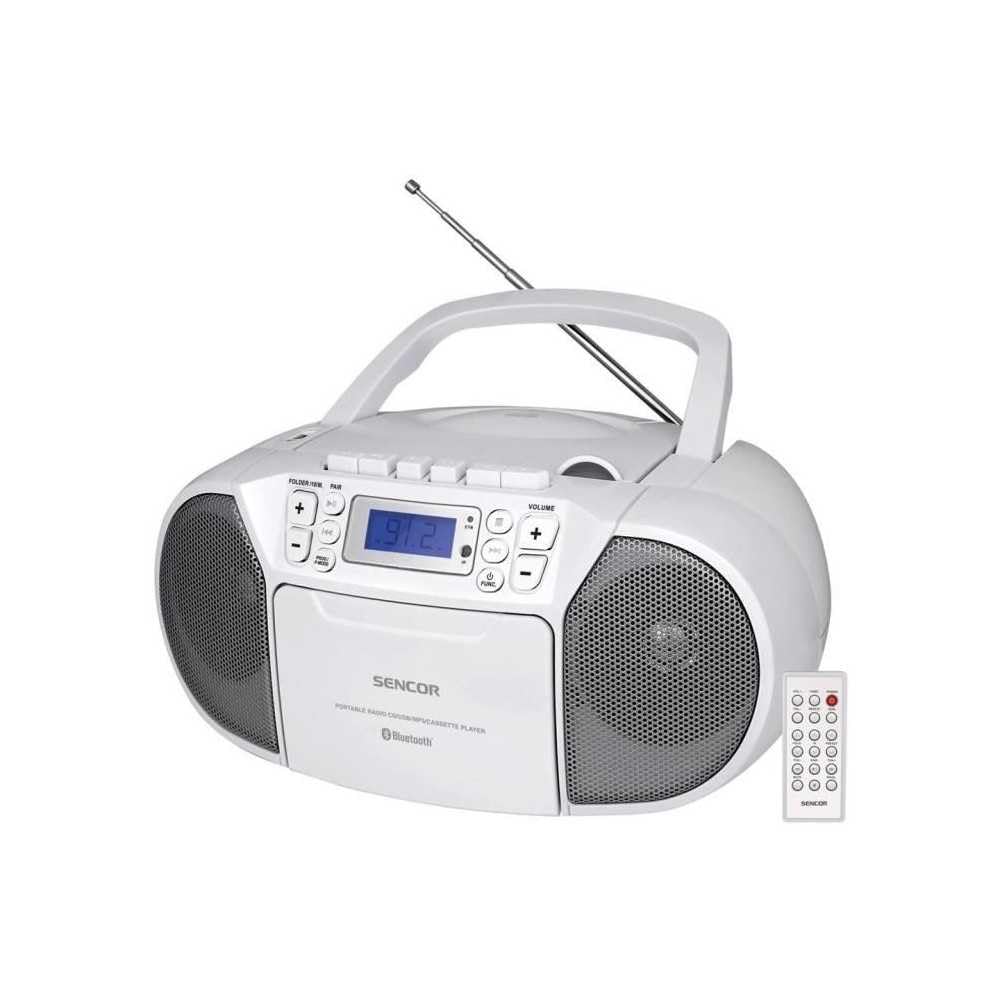
Front view of the SENCOR SPT 3907 unit, highlighting the control buttons, LCD screen, CD tray, and speakers. The remote control is also visible.
Front Panel Controls:
- POWER Button: Turns the unit on or off.
- MODE Button: Switches between CD, Bluetooth, USB, FM Radio, and AUX-IN modes.
- VOLUME +/- Buttons: Adjusts the audio output level.
- PLAY/PAUSE (►/▮▮) Button: Starts or pauses playback in CD, Bluetooth, or USB mode.
- SKIP (◀◀ / ►►) Buttons: Skips to the previous or next track/station.
- STOP (■) Button: Stops playback.
- FOLDER / PAIR Button: Navigates folders in USB mode; initiates Bluetooth pairing.
- FUNC Button: Accesses additional functions (e.g., program, repeat, random).
- LCD Display: Shows current mode, track number, frequency, and other information.
- CD Compartment: For inserting audio CDs.
- USB Port: For connecting USB storage devices.
- AUX-IN Jack: For connecting external audio devices.
- Headphone Output: For private listening.
Rear Panel Controls:
- AC Power Input: Connects the AC power cable.
- FM Antenna: Extendable telescopic antenna for FM reception.
Remote Control:
The remote control duplicates most of the front panel functions for convenient operation from a distance. Refer to the remote control diagram in the included documentation for specific button layouts.
6. Setup
6.1 Power Connection
The SENCOR SPT 3907 can be powered by AC mains or batteries.
AC Power:
- Ensure the unit is switched off.
- Connect the supplied AC power cable to the AC input jack on the rear of the unit.
- Plug the other end of the AC power cable into a standard wall outlet (AC 100-240V, 50/60Hz).
Battery Power:
- Open the battery compartment cover located on the bottom of the unit.
- Insert 6 x D/LR20 size batteries (not included), ensuring correct polarity (+/-) as indicated inside the compartment.
- Close the battery compartment cover securely.
Note: When the AC power cable is connected, battery power is automatically disconnected. Remove batteries if the unit will not be used for an extended period to prevent leakage.
6.2 Antenna Setup
For optimal FM radio reception, fully extend the telescopic FM antenna located on the rear of the unit. Adjust its position for the best signal.
7. Operating Instructions
7.1 Power On/Off and Mode Selection
- Press the POWER button to turn the unit on. The LCD display will light up.
- Press the MODE button repeatedly to cycle through available modes: CD, Bluetooth, USB, FM Radio, AUX-IN. The selected mode will be shown on the LCD display.
- Press the POWER button again to turn the unit off.
7.2 CD Playback
- Press the MODE button to select CD mode.
- Open the CD compartment cover.
- Place a CD (CD-R/RW compatible) with the label side facing up onto the spindle.
- Close the CD compartment cover. The unit will read the disc, and the total number of tracks will appear on the display.
- Press the PLAY/PAUSE button to start playback.
- Use the SKIP (◀◀ / ►►) buttons to skip tracks.
- Press the STOP (■) button to stop playback.
- Program Playback: While in STOP mode, press the FUNC button to enter program mode. Use SKIP buttons to select tracks and FUNC again to confirm. Up to 20 CD songs can be programmed.
7.3 Bluetooth Operation
- Press the MODE button to select Bluetooth mode. The display will show 'BT' and flash, indicating it's in pairing mode.
- On your Bluetooth-enabled device (e.g., smartphone, tablet), enable Bluetooth and search for available devices.
- Select 'SPT 3907' from the list of devices. Once paired, the 'BT' indicator on the display will stop flashing and remain solid.
- Start playing audio on your connected device. The sound will be streamed through the SENCOR SPT 3907.
- Use the PLAY/PAUSE and SKIP buttons on the unit or remote control to manage playback.
7.4 USB Playback
- Insert a USB flash drive (containing MP3 files) into the USB port.
- Press the MODE button to select USB mode. The unit will automatically read the files.
- Press the PLAY/PAUSE button to start playback.
- Use the SKIP (◀◀ / ►►) buttons to skip tracks.
- Press the FOLDER button to navigate between folders on the USB drive.
- Program Playback: While in STOP mode, press the FUNC button to enter program mode. Use SKIP buttons to select tracks and FUNC again to confirm. Up to 99 MP3 songs can be programmed.
7.5 FM Radio Operation
- Press the MODE button to select FM Radio mode. The current frequency will appear on the display.
- Extend the telescopic antenna for better reception.
- Automatic Tuning: Press and hold the SKIP (◀◀ / ►►) buttons for a few seconds to automatically scan for the next available station.
- Manual Tuning: Briefly press the SKIP (◀◀ / ►►) buttons to fine-tune the frequency step-by-step.
- Preset Stations: To save a station, tune to the desired frequency, then press the FUNC button. Use SKIP buttons to select a preset number (P01-P30), then press FUNC again to confirm.
- To recall a preset station, press the FUNC button repeatedly to cycle through saved stations.
7.6 AUX-IN Connection
- Connect one end of a 3.5mm audio cable (not included) to the AUX-IN jack on the SENCOR SPT 3907.
- Connect the other end of the cable to the headphone jack or audio output of your external audio device (e.g., MP3 player, smartphone).
- Press the MODE button to select AUX-IN mode.
- Start playback on your external device. The audio will be played through the SENCOR SPT 3907.
- Adjust the volume using the VOLUME +/- buttons on the unit or remote control, and also on your external device.
8. Maintenance
8.1 Cleaning the Unit
Wipe the exterior of the unit with a soft, dry cloth. Do not use abrasive cleaners, waxes, or solvents as they may damage the finish. Ensure the unit is unplugged from the power source before cleaning.
8.2 CD Lens Care
If the CD player experiences reading errors, the lens may need cleaning. Use a commercially available CD lens cleaner disc. Do not touch the lens directly.
8.3 Battery Replacement
When the unit operates on batteries and the sound becomes distorted or the unit stops functioning, replace all batteries with new D/LR20 batteries, ensuring correct polarity.
9. Troubleshooting
| Problem | Possible Cause | Solution |
|---|---|---|
| No power | Power cable not connected; Batteries depleted or incorrectly inserted. | Check AC power connection; Replace batteries, ensuring correct polarity. |
| No sound | Volume too low; Incorrect mode selected; Headphones connected. | Increase volume; Select correct mode (CD, BT, USB, FM, AUX); Disconnect headphones. |
| CD not playing / Skipping | CD dirty or scratched; CD inserted incorrectly; CD lens dirty. | Clean or replace CD; Insert CD with label side up; Use a CD lens cleaner. |
| Bluetooth not connecting | Unit not in pairing mode; Device too far; Bluetooth not enabled on external device. | Ensure unit is in BT pairing mode; Move device closer; Enable Bluetooth on your device. |
| Poor FM reception | Antenna not extended or positioned correctly; Weak signal. | Fully extend and adjust the telescopic antenna; Try moving the unit to a different location. |
10. Specifications
| Feature | Specification |
|---|---|
| Model | SPT 3907 |
| Output Power | 4W RMS |
| Supported Media | CD-R, CD-RW, Bluetooth, MP3, USB |
| Bluetooth Version | V2.1 + EDR |
| FM Radio Presets | 30 stations |
| Connectivity | Auxiliary (3.5mm), USB |
| Power Source | AC 100-240V, 50/60Hz; 6 x D/LR20 batteries |
| Item Weight | 1 kg 960 g |
| Dimensions | (Not specified in provided data) |
11. Warranty and Support
SENCOR products are manufactured to high-quality standards and are warranted against manufacturing defects. For specific warranty terms and conditions, please refer to the warranty card included with your purchase or visit the official SENCOR website. For technical support, service, or inquiries, please contact your local SENCOR distributor or authorized service center.


