
1. Introduction
Thank you for choosing the RIVERSONG Airfly L12 True Wireless Earbuds. This manual provides detailed instructions on how to set up, operate, and maintain your earbuds to ensure optimal performance and longevity. Please read this manual thoroughly before using the product and retain it for future reference.
2. Package Contents
Please check the package contents upon unboxing. If any items are missing or damaged, contact your retailer or RIVERSONG customer support.
- RIVERSONG Airfly L12 True Wireless Earbuds (Left and Right)
- Charging Case
- USB Charging Cable
- User Manual
3. Product Overview
Familiarize yourself with the components of your Airfly L12 earbuds and charging case.
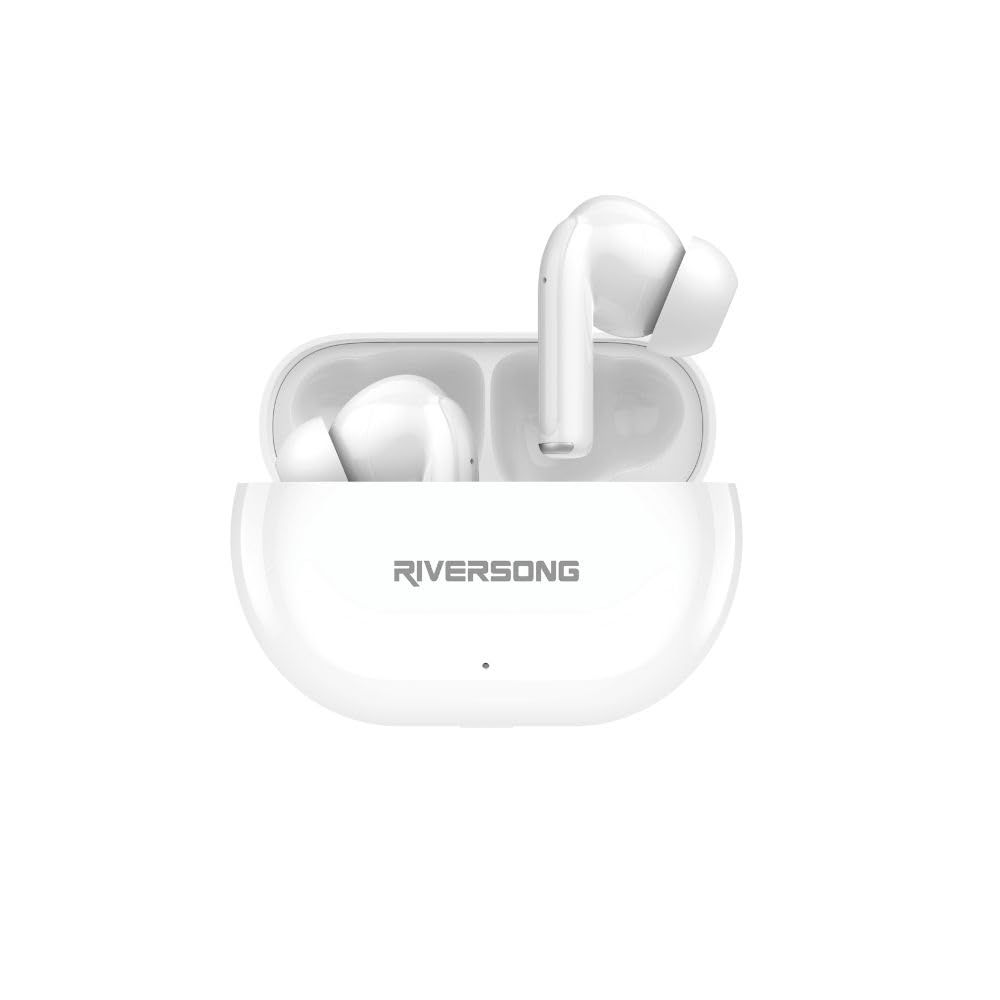
Image 1: RIVERSONG Airfly L12 True Wireless Earbuds and Charging Case. This image displays both earbuds nestled within their compact charging case, illustrating their sleek white design.
Earbud Components
- Touch Control Area: For managing music, calls, and voice assistant.
- Microphone: For calls and voice commands.
- LED Indicator: Shows connection and battery status.
- Charging Contacts: For charging inside the case.
Charging Case Components
- Earbud Charging Slots: Securely holds and charges the earbuds.
- Charging Port: USB port for charging the case.
- Case LED Indicator: Displays charging status and battery level of the case.
4. Setup
4.1 Charging the Earbuds and Case
Before first use, fully charge both the earbuds and the charging case.
- Charge the Charging Case: Connect the provided USB charging cable to the charging port on the case and a USB power adapter (not included). The case LED indicator will show charging progress.
- Charge the Earbuds: Place the earbuds into their respective slots in the charging case. Ensure the charging contacts align. The earbud LED indicators will light up to confirm charging.
A full charge typically takes approximately 1.5 hours for the earbuds and 2 hours for the charging case. The case provides up to 30 hours of total playtime.
4.2 Pairing with Your Device
The Airfly L12 earbuds automatically enter pairing mode when removed from the charging case.
- Enable Bluetooth: Turn on Bluetooth on your smartphone or other device.
- Remove Earbuds: Open the charging case and remove both earbuds. They will automatically power on and attempt to pair with each other.
- Select 'Airfly L12': On your device's Bluetooth settings, search for available devices and select 'Airfly L12'.
- Confirm Connection: Once connected, the earbud LED indicators will turn off or flash slowly, and you will hear an audible confirmation.
Note: If pairing fails, place the earbuds back into the case, close the lid, wait a few seconds, and then repeat the steps. The earbuds will automatically reconnect to the last paired device when removed from the case, if Bluetooth is enabled on the device.
5. Operating Instructions
The Airfly L12 earbuds feature intuitive touch controls for various functions.
5.1 Power On/Off
- Power On: Open the charging case, and the earbuds will automatically power on. Alternatively, press and hold the touch control area on both earbuds for 3 seconds.
- Power Off: Place the earbuds back into the charging case and close the lid. Alternatively, disconnect Bluetooth and the earbuds will power off after 5 minutes, or press and hold the touch control area on both earbuds for 5 seconds.
5.2 Music Control
| Function | Action |
|---|---|
| Play/Pause | Single tap on either earbud |
| Next Track | Double tap on the right earbud |
| Previous Track | Double tap on the left earbud |
| Volume Up | Triple tap on the right earbud |
| Volume Down | Triple tap on the left earbud |
5.3 Call Control
| Function | Action |
|---|---|
| Answer/End Call | Single tap on either earbud |
| Reject Call | Press and hold on either earbud for 2 seconds |
5.4 AI Voice Assistant
Activate your device's AI voice assistant (Siri, Google Assistant, etc.) with a simple command.
- Activate Voice Assistant: Press and hold the touch control area on either earbud for 2 seconds (when not on a call).
6. Maintenance
Proper care ensures the longevity and performance of your Airfly L12 earbuds.
6.1 Cleaning
- Use a soft, dry, lint-free cloth to clean the earbuds and charging case.
- Do not use harsh chemicals, cleaning solvents, or strong detergents.
- Gently clean the charging contacts on both the earbuds and the case with a cotton swab to ensure good connection.
6.2 Storage
- Store the earbuds in their charging case when not in use to protect them and keep them charged.
- Avoid storing in extreme temperatures (hot or cold) or in highly humid environments.
7. Troubleshooting
If you encounter issues with your Airfly L12 earbuds, refer to the following common solutions.
7.1 Earbuds Not Pairing with Device
- Ensure Bluetooth is enabled on your device.
- Make sure the earbuds are charged.
- Place earbuds back in the case, close the lid, then open and remove them to re-enter pairing mode.
- Forget 'Airfly L12' from your device's Bluetooth list and try pairing again.
7.2 Only One Earbud Working
- Ensure both earbuds are charged.
- Place both earbuds back into the charging case, close the lid, and then remove them simultaneously to allow them to re-sync with each other.
- If the issue persists, try resetting the earbuds (refer to the full reset instructions in the comprehensive manual if available, or contact support).
7.3 Charging Issues
- Check if the charging cable is securely connected to both the case and the power source.
- Ensure the charging contacts on the earbuds and inside the case are clean and free of debris.
- Try using a different USB cable or power adapter.
7.4 Poor Sound Quality / Disconnections
- Ensure the earbuds are within the Bluetooth range of your device (typically 10 meters/33 feet).
- Avoid physical obstructions between the earbuds and your device.
- Check for interference from other wireless devices.
- Ensure the earbuds are clean and free from earwax buildup.
8. Specifications
Key technical specifications for the RIVERSONG Airfly L12 True Wireless Earbuds:
- Model Name: RS.AIRFLYL12-EA572.WT
- Connectivity Technology: Wireless (Bluetooth)
- Wireless Communication Technologies: Bluetooth
- Noise Control: Environmental Noise Cancellation (ENC)
- Ear Placement: In Ear
- Form Factor: In Ear
- Control Method: Touch
- Water Resistance Level: IPX5 (Sweat & Water Resistant)
- Item Weight: 0.07 Kilograms
- Manufacturer: RIVERSONG
- Country of Origin: China
- Compatible Devices: Smartphones, Tablets, Smart Speakers, Laptops, Desktops, Car Audio Systems
9. Warranty and Support
RIVERSONG products are designed and manufactured to the highest quality standards. For detailed warranty information, please refer to the warranty card included in your package or visit the official RIVERSONG website.
If you require technical assistance or have questions regarding your Airfly L12 earbuds, please contact RIVERSONG customer support through their official website or the contact information provided in your product packaging. Please have your model number (RS.AIRFLYL12-EA572.WT) and proof of purchase ready when contacting support.