Introduction
Welcome to the ESKUTE F200 Electric Folding Bicycle user manual. This manual provides essential information for the safe and efficient operation, maintenance, and troubleshooting of your new electric bicycle. Please read this manual thoroughly before your first ride and keep it for future reference.

Figure 1: The ESKUTE F200 Electric Folding Bicycle.
What's in the Box
Upon unboxing your ESKUTE F200, please verify that all components listed below are present and undamaged:
- 1 x ESKUTE F200 Electric Bicycle
- 1 x 36V 280.8 Wh Lithium-ion Battery
- 1 x Battery Charger
- 1 x Assembly Tool Kit
- 1 x Warranty Card
- User Manual (this document)

Figure 2: Included components and partial assembly steps.
Setup and Initial Assembly
The ESKUTE F200 comes 90% pre-assembled. Follow these steps to complete the setup:
- Unfold the Handlebar: Carefully unfold the handlebar stem and secure it in the upright position using the quick-release lever. Ensure it clicks firmly into place.
- Install the Saddle: Insert the saddle post into the frame's seat tube. Adjust the height to a comfortable riding position and secure it with the quick-release clamp. Ensure the minimum insertion mark is not visible.
- Attach the Pedals: Identify the left (L) and right (R) pedals. The left pedal screws counter-clockwise, and the right pedal screws clockwise. Apply a small amount of grease to the threads and tighten them securely with the provided wrench.
- Charge the Battery: Before your first ride, fully charge the battery. Connect the charger to the battery port and then to a power outlet. The indicator light on the charger will change when fully charged.
- Perform a Safety Check: Before riding, check tire pressure, brake function, and ensure all quick-release levers and bolts are securely tightened.
Figure 3: Step-by-step assembly guide for the ESKUTE F200.
Operating Instructions
Powering On/Off and Display
To power on the bicycle, press and hold the power button on the handlebar display. The integrated display will show speed, battery level, and other essential information. Press and hold the power button again to turn off the bike.

Figure 4: Handlebar controls and display.
Riding Modes
The ESKUTE F200 features a 250W high-speed brushless motor, providing stable and continuous power. It offers pedal assist modes to enhance your riding experience. Use the control buttons on the handlebar to switch between assistance levels.

Figure 5: Motor specifications and assistance levels.
Folding and Unfolding
The F200 is designed for easy portability. To fold the bike:
- Open the seat post quick-release and lower the seat tube completely.
- Open the frame hinge latch and fold the bike in half.
- Fold the pedals inwards.
- Lower the handlebar stem.
Reverse these steps to unfold the bicycle. Ensure all latches and quick-releases are securely fastened before riding.

Figure 6: Folding process of the ESKUTE F200.

Figure 7: The ESKUTE F200 fits easily into a car trunk when folded.
Video 1: A short demonstration of the ESKUTE F200's folding mechanism and portability.
Maintenance
- Battery Care: Charge the battery regularly, even if not in use, to prolong its lifespan. Avoid completely draining the battery. Store the battery in a cool, dry place.
- Tire Pressure: Check tire pressure before each ride. Maintain the recommended PSI (usually indicated on the tire sidewall) for optimal performance and safety. The 14-inch wide tires are designed for various terrains.
- Brakes: Regularly inspect brake pads and discs for wear. Ensure the brakes respond effectively. The F200 is equipped with dual disc brakes for reliable stopping power.
- Cleaning: Clean the bicycle with a damp cloth. Avoid using high-pressure water jets directly on electrical components.
- General Inspection: Periodically check all bolts, nuts, and quick-release levers for tightness. Lubricate the chain as needed.

Figure 8: Dual disc brake system for enhanced safety.
Troubleshooting
| Problem | Possible Cause | Solution |
|---|---|---|
| Bike does not power on | Battery not charged or not properly connected. | Ensure battery is fully charged and securely inserted. Check power button. |
| Motor not assisting | Low battery, incorrect assist level, or sensor issue. | Charge battery. Select a higher assist level on the display. Check for loose connections. |
| Brakes feel weak | Worn brake pads, loose cable, or air in hydraulic system (if applicable). | Inspect and replace brake pads if worn. Adjust brake cable tension. Consult a professional if issues persist. |
| Unusual noises | Loose components, dry chain, or debris. | Check all bolts and quick-releases. Lubricate chain. Inspect for foreign objects. |
Specifications
| Feature | Detail |
|---|---|
| Model | F200 |
| Motor | 250W High-Speed Brushless Motor |
| Battery | 36V 7.8Ah (280.8 Wh) Lithium-ion |
| Max Speed | 25 km/h (15.5 mph) |
| Range | 35-50 km (21-31 miles) depending on terrain and mode |
| Weight | 21 kg (46.3 lbs) |
| Max Load | 120 kg (265 lbs) |
| Recommended Rider Height | 150-180 cm (4'11" - 5'11") |
| Wheel Size | 14 inches (14x2.125") |
| Brakes | Dual Disc Brakes (160mm) |
| Frame Material | High-Carbon Steel |
| Folded Dimensions | 64.5 x 74 x 32 cm (25.4 x 29.1 x 12.6 inches) |
| Features | Digital Display, Foldable, Portable, Rechargeable, Adjustable Saddle, Shock-absorbing Seat Post, LED Headlight, Rear Reflector, USB Phone Support, Folding Pedals, Bell |
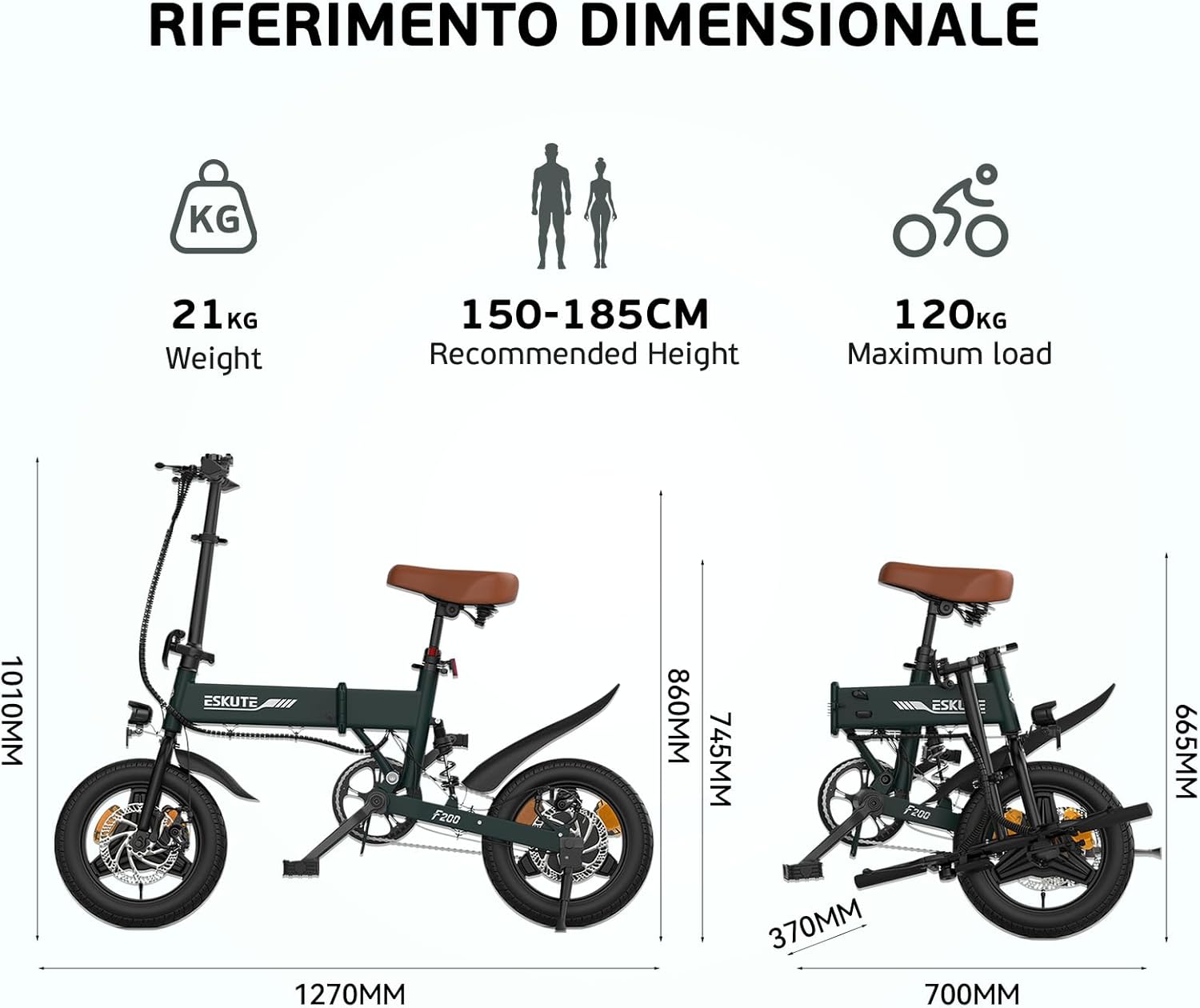
Figure 9: ESKUTE F200 dimensions and weight specifications.
Warranty and Support
ESKUTE offers reliable and professional support for your purchase. The product comes with a warranty (details on the included Warranty Card). For any questions, technical assistance, or warranty claims, please contact ESKUTE customer service. The customer service team is available 24/7 to assist you.
Please refer to the Warranty Card included in your package for specific terms and conditions regarding your product's warranty.


