1. Introduction
This manual provides detailed instructions for the safe and efficient use of your GYMAX Walking Pad Treadmill. Please read this manual thoroughly before operating the device and retain it for future reference.
The GYMAX Walking Pad is a versatile 3-in-1 exercise machine designed for walking, jogging, and under-desk use. It features a powerful 2.5 HP brushless motor, a 7-layer non-slip running belt with shock absorption, an LED display, and remote control operation. It offers a speed range of 0.5-4 MPH, 12 preset programs, and 3 countdown modes to support various fitness goals.
2. Important Safety Information
To reduce the risk of serious injury, read all important precautions and instructions in this manual before using the walking pad. GYMAX assumes no responsibility for personal injury or property damage sustained by or through the use of this product.
- Consult your physician before beginning any exercise program.
- Keep children and pets away from the walking pad at all times.
- Place the walking pad on a level surface with at least 2 feet of clear space behind it.
- Wear appropriate exercise clothing and athletic shoes.
- Do not operate the walking pad if it is damaged or malfunctioning.
- Do not exceed the maximum weight capacity of 340 lbs (154 kg).
- Always hold the remote control securely during operation.
- Unplug the walking pad from the power outlet when not in use or before cleaning/maintenance.
3. Package Contents
Verify that all components are present and undamaged upon opening the package:
- 1 x GYMAX Walking Pad Treadmill
- 1 x Remote Control
- 1 x Treadmill Lubricant
- 1 x Instruction Manual
4. Setup
4.1 Unpacking and Placement
The GYMAX Walking Pad comes fully assembled. Carefully remove all packaging materials. Place the walking pad on a firm, level surface. Ensure there is adequate space around the unit for safe operation, particularly at the rear.

Image: The GYMAX Walking Pad Treadmill in use, showing its compact design and the included remote control.
4.2 Power Connection
Connect the power cord to a grounded 110V AC outlet. Ensure the power switch on the walking pad is in the "OFF" position before plugging it in.
5. Operating Instructions
5.1 Powering On/Off
- To power on: Plug in the walking pad and flip the main power switch to "ON". The LED display will illuminate.
- To power off: Flip the main power switch to "OFF" and unplug the unit from the wall outlet.
5.2 Using the Remote Control
The included remote control allows for easy adjustment of speed, programs, and modes.
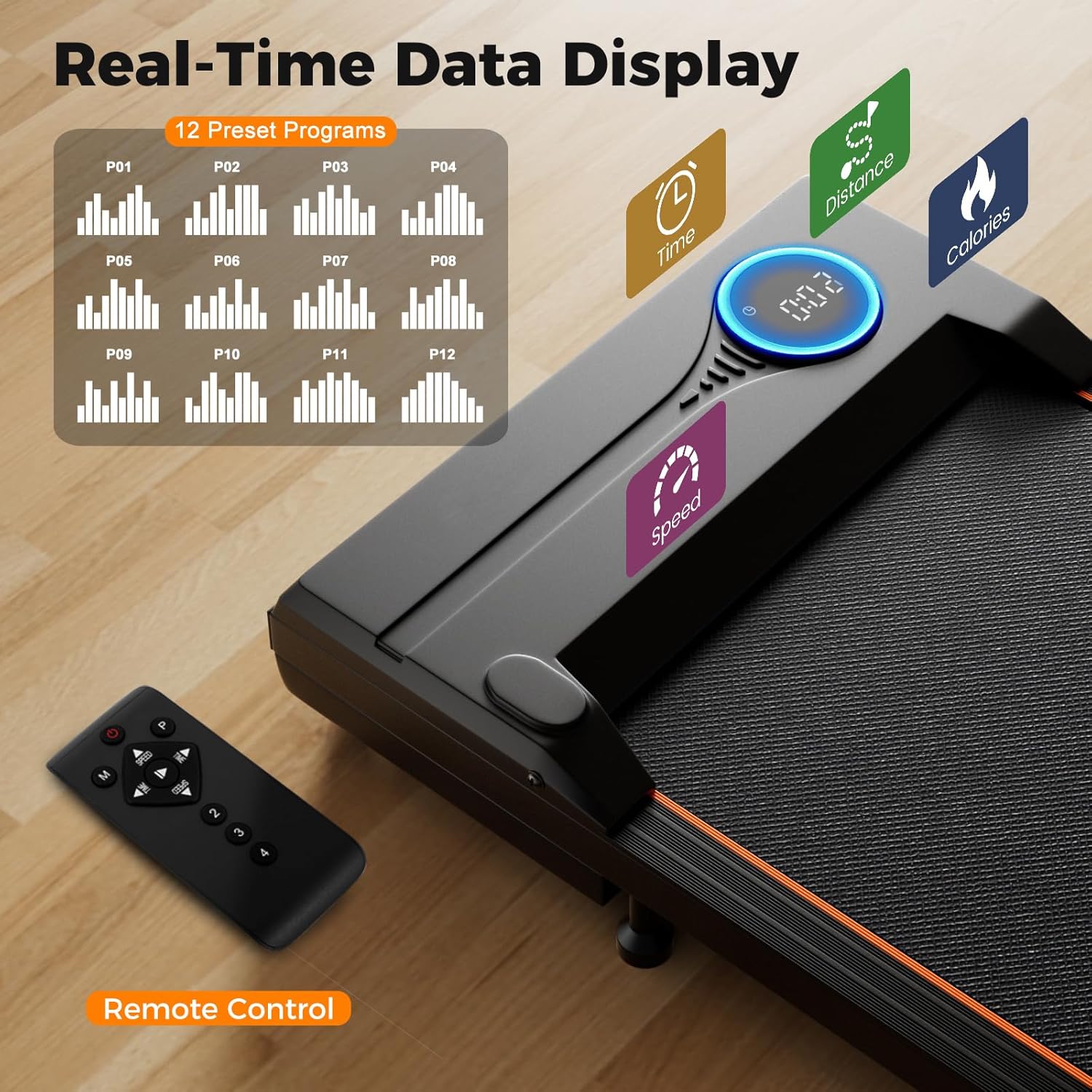
Image: Close-up of the LED display showing real-time data and the remote control for operation.
- Start/Stop Button: Press to start or pause the walking pad.
- Speed +/- Buttons: Adjust the speed in increments of 0.1 MPH.
- Mode Button: Cycle through different display modes (Time, Distance, Calories).
- Program Button: Select from 12 preset programs (P01-P12).
5.3 Speed Adjustment and Modes
The walking pad offers a speed range of 0.5-4 MPH, suitable for various activities:
- Working: 0.5-1.5 MPH (ideal for use under a standing desk)
- Walking: 0.5-2.5 MPH
- Jogging: 2.5-4 MPH

Image: Visual representation of the three primary usage modes: Working, Walking, and Jogging, with their corresponding speed ranges.
5.4 Preset Programs (P01-P12)
The walking pad includes 12 pre-programmed workouts. Press the "Program" button on the remote to cycle through P01 to P12. Each program has varying speed profiles to challenge your workout.
5.5 Countdown Modes
Utilize the 3 countdown modes to set specific workout goals:
- Time Countdown: Set a target workout duration (5-99 minutes).
- Distance Countdown: Set a target distance (1-99 miles).
- Calories Countdown: Set a target calorie burn (20-990 calories).
The walking pad retains fitness data even after pausing, allowing for breaks without losing progress.
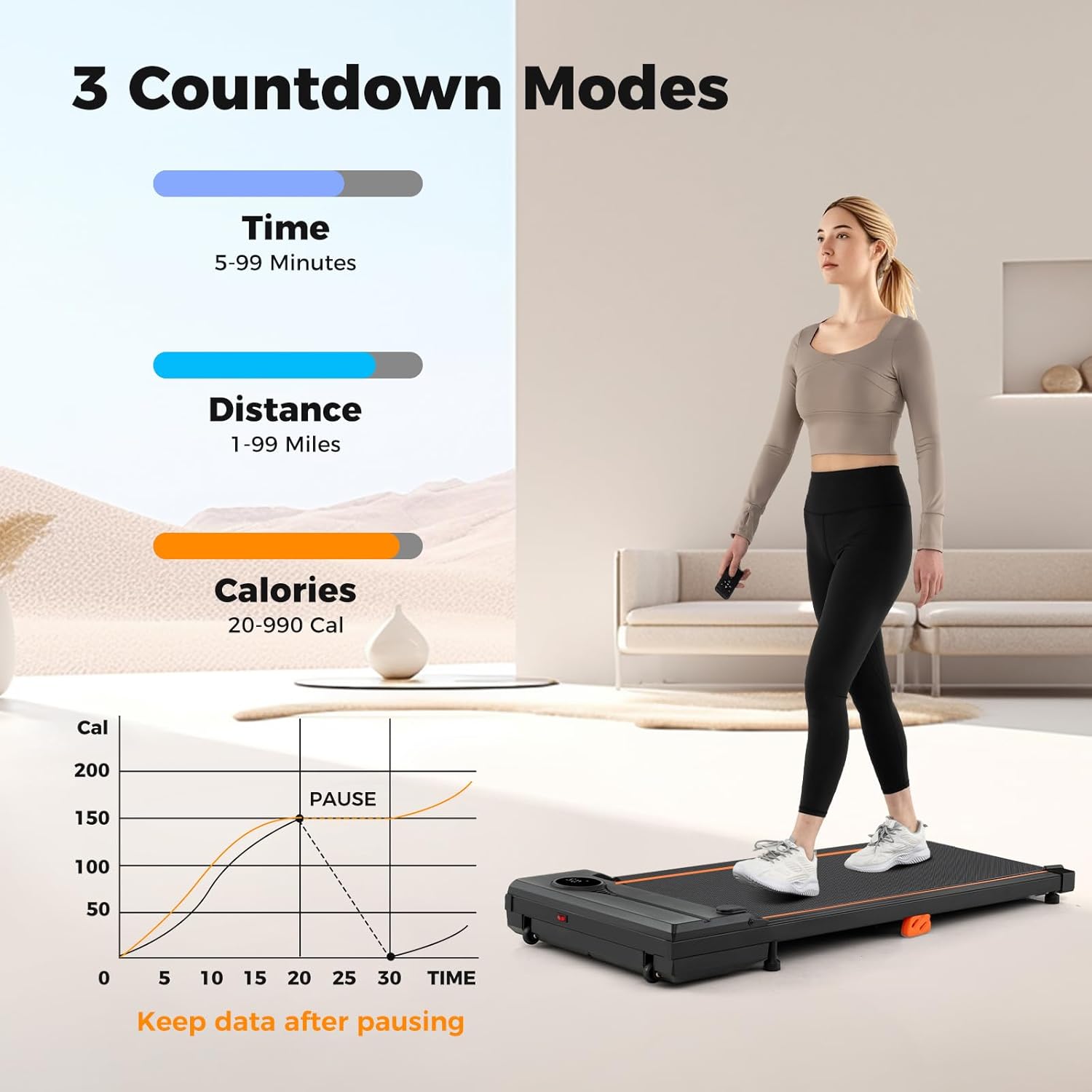
Image: Illustration of the three countdown modes (Time, Distance, Calories) and the feature to retain data when paused.
6. Maintenance
6.1 Cleaning
Regularly clean the walking pad to ensure optimal performance and longevity.
- Always unplug the unit before cleaning.
- Wipe down the surface with a damp cloth. Avoid abrasive cleaners or solvents.
- Periodically vacuum under the walking pad to prevent dust buildup.
6.2 Lubrication
The running belt requires periodic lubrication to reduce friction and extend its lifespan. Use the provided treadmill lubricant.
- Unplug the walking pad.
- Gently lift the edge of the running belt.
- Apply a small amount of lubricant evenly under the belt, towards the center.
- Plug in the walking pad and run it at a low speed (e.g., 1 MPH) for 2-3 minutes to distribute the lubricant.
- Lubricate every 3-6 months, or after approximately 100 hours of use, depending on usage frequency.
7. Troubleshooting
| Problem | Possible Cause | Solution |
|---|---|---|
| Walking pad does not power on. | Not plugged in; power switch off; circuit breaker tripped. | Ensure power cord is securely plugged in. Check main power switch. Reset household circuit breaker if necessary. |
| Running belt slips or hesitates. | Belt requires lubrication; belt tension is incorrect. | Lubricate the running belt as per Section 6.2. If slipping persists, contact customer support for belt tension adjustment instructions. |
| Remote control not responding. | Remote battery low or depleted; obstruction between remote and sensor. | Replace the CR2025 battery in the remote control. Ensure a clear line of sight to the walking pad's sensor. |
| Unusual noise during operation. | Loose components; foreign object under belt; motor issue. | Stop the walking pad immediately. Inspect for loose parts or foreign objects. If noise persists, discontinue use and contact customer support. |
If you encounter issues not listed here or if the suggested solutions do not resolve the problem, please contact GYMAX customer support.
8. Specifications
| Model Name: | Walking Pad |
| Model Number: | GM2204 |
| Color: | Black |
| Material: | Metal, ABS, MDF (Alloy Steel) |
| Product Dimensions (L x W x H): | 43" x 19" x 4.7" (109.2 cm x 48.3 cm x 11.9 cm) |
| Running Belt Size (L x W): | 35.5" x 15.5" (90.2 cm x 39.4 cm) |
| Net Weight: | 36.5 lbs (16.5 kg) |
| Weight Capacity: | 340 lbs (154 kg) |
| Motor Power: | 2.5 HP (Brushless) |
| Voltage: | 110V |
| Frequency: | 60Hz |
| Current: | 10A |
| Speed Range: | 0.5-4 MPH |
| Power Cord Length: | 6.2 ft (1.9 m) |
| Remote Control Battery: | CR2025 |
| Special Features: | Compact Design, Lightweight, 7-Layer Running Belt, 6 Shock Absorbers, Low Noise (<45dB), 2 Built-in Wheels |

Image: Detailed product dimensions and electrical specifications of the GYMAX Walking Pad.
9. Warranty and Support
9.1 Warranty Information
The GYMAX Walking Pad Treadmill comes with a 90-day warranty from the date of purchase. This warranty covers manufacturing defects under normal use. It does not cover damage caused by misuse, accident, unauthorized modification, or improper maintenance.
Please retain your proof of purchase for warranty claims.
9.2 Customer Support
For technical assistance, warranty claims, or to order replacement parts, please contact GYMAX customer support. Refer to the contact information provided on the GYMAX official website or your purchase documentation.
You can visit the official GYMAX store for more information: GYMAX Store


