
Lenovo ThinkCentre M700 SFF
Lenovo ThinkCentre M700 SFF Desktop Computer User Manual
Model: ThinkCentre M700 SFF | Brand: Lenovo
1. Introduction
This manual provides essential information for setting up, operating, maintaining, and troubleshooting your Lenovo ThinkCentre M700 SFF Desktop Computer. The ThinkCentre M700 SFF is a compact and powerful small form factor desktop designed for various computing needs, featuring a 6th Gen Dual Core i3-6100 processor, 16GB DDR4 RAM, and a 960GB Solid State Drive, running on Windows 11 Pro.

Figure 1: Lenovo ThinkCentre M700 SFF Desktop Computer with included peripherals.
2. Setup Guide
2.1 Unpacking the System
Carefully remove all components from the packaging. Ensure the following items are present:
- 1 Lenovo ThinkCentre M700 SFF Business Desktop PC
- 1 Keyboard
- 1 Mouse
- 1 Power Cord
2.2 Connecting Peripherals
Connect the keyboard and mouse to the available USB ports on the computer. Connect your monitor to either the DisplayPort or VGA port on the rear of the computer. Finally, connect the power cord to the computer and then to a power outlet.

Figure 2: Connecting the keyboard and mouse to the desktop.

Figure 3: Complete desktop setup with monitor.
2.3 Initial Power On
Press the power button located on the front panel of the desktop. The system will boot up, and you will be guided through the initial setup process for Windows 11 Professional. Follow the on-screen instructions to configure your operating system, network settings, and user accounts.
3. Operating Your ThinkCentre M700 SFF
3.1 Front Panel Overview
The front panel provides convenient access to frequently used ports and controls.
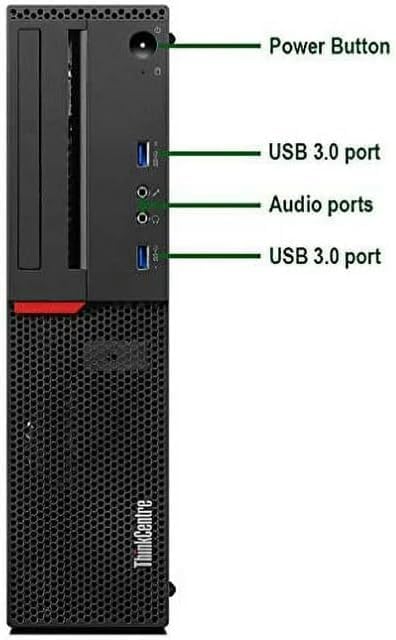
Figure 4: Front Panel Ports and Controls.
- Power Button: Turns the computer on or off.
- USB 3.0 Ports (x2): For connecting high-speed USB devices.
- Audio Ports: Headphone/Microphone Combo Jack for audio input and output.
3.2 Rear Panel Overview
The rear panel houses various ports for connecting external devices and network cables.

Figure 5: Rear Panel Ports.
- Display Ports (x1): For connecting digital displays.
- VGA Port (x1): For connecting analog displays.
- USB 3.0 Ports (x2): High-speed USB connections.
- USB 2.0 Ports (x2): Standard USB connections.
- RJ-45 (Ethernet) Port (x1): For wired network connection.
- PS/2 Ports (x2): For legacy keyboard and mouse connections.
- Line Out: Audio output for speakers.
- Line In: Audio input for microphones or other audio sources.
3.3 Windows 11 Pro
Your ThinkCentre M700 SFF comes pre-installed with Windows 11 Pro. Familiarize yourself with the operating system's interface, start menu, and settings. Regular Windows updates are crucial for security and performance.
4. Maintenance and Care
Proper maintenance ensures the longevity and optimal performance of your desktop computer.
- Cleaning: Regularly clean the exterior of the computer with a soft, dry cloth. Use compressed air to clear dust from vents and fans to prevent overheating.
- Software Updates: Keep your Windows operating system and drivers updated to the latest versions. This improves security, stability, and performance.
- Ventilation: Ensure the computer is placed in a well-ventilated area, away from direct sunlight or heat sources. Do not block the ventilation openings.
- Data Backup: Regularly back up important data to an external drive or cloud storage to prevent data loss.
5. Troubleshooting Common Issues
This section provides solutions for common problems you might encounter.
| Problem | Possible Cause | Solution |
|---|---|---|
| Computer does not power on | Loose power cable; faulty power outlet | Check power cable connections; try a different power outlet. |
| No display on monitor | Loose video cable; monitor off or faulty | Ensure video cable is securely connected to both computer and monitor; check monitor power and input source. |
| Slow system performance | Too many programs running; low disk space; malware | Close unnecessary applications; free up disk space; run a malware scan. |
| No internet connection | Loose Ethernet cable; Wi-Fi disabled; router issue | Check Ethernet cable; ensure Wi-Fi is enabled; restart router/modem. |
6. Technical Specifications
Detailed specifications for your Lenovo ThinkCentre M700 SFF Desktop Computer.
| Feature | Specification |
|---|---|
| Processor | 6th Gen Dual Core i3-6100 (3.7 GHz) |
| RAM | 16GB DDR4 RAM |
| Storage | 960GB Solid State Drive (SSD) |
| Operating System | Windows 11 Professional (64-bit) |
| Graphics | Integrated Graphics |
| Front Ports | 2x USB 3.0, 1x 3.5 mm Headphone/Microphone Combo Jack |
| Rear Ports | 2x USB 3.0, 2x USB 2.0, 1x RJ-45, 1x DisplayPort, 1x VGA, 2x PS/2 ports |
| Wireless Connectivity | WiFi, Bluetooth |
| Dimensions | 21.65 x 16.93 x 7.87 inches (approximate package dimensions) |
| Weight | 14.3 pounds |
7. Warranty and Support
This renewed product typically comes with a 90-day return policy for refund or replacement. For specific warranty details and technical support, please refer to the documentation provided by your seller or contact the seller directly through your purchase platform. Ensure you retain your proof of purchase for any warranty claims.
No official product videos from the seller were available for embedding in this manual.