
Ieejdn 808
Makeup Vanity Desk with Mirror and Lights User Manual
Model: 808 | Brand: Ieejdn
Introduction
Thank you for purchasing the Ieejdn Makeup Vanity Desk. This manual provides detailed instructions for assembly, operation, maintenance, and troubleshooting to ensure safe and efficient use of your new vanity desk. Please read this manual thoroughly before beginning assembly or operation and retain it for future reference.

Figure 1: Assembled Ieejdn Makeup Vanity Desk with Mirror and Lights.
Important Safety Information
Please observe the following safety precautions to prevent injury or damage to the product:
- Always assemble the product on a clean, flat, and stable surface to prevent scratching or damage.
- Ensure all screws and fasteners are securely tightened before use. Periodically check and re-tighten as necessary.
- Do not overload drawers or shelves. Distribute weight evenly.
- Keep electrical components (power strip, lights) away from water or excessive moisture.
- Unplug the power strip when not in use or during cleaning.
- Keep small parts and packaging materials away from children to prevent choking hazards.
- Do not stand or sit on the vanity desk.
Assembly Instructions
This vanity desk requires self-assembly. The process is designed to be straightforward with clear instructions provided in the included assembly guide. It is recommended to have two people for assembly.
Package Contents:
Verify all parts are present before beginning assembly. Refer to the parts list in your separate assembly guide for detailed component identification.
Required Tools (Not Included):
- Phillips head screwdriver
- Hammer (optional, for dowels)
Assembly Steps:
- Unpack and Organize: Carefully unpack all components and lay them out on a soft, clean surface to prevent scratches. Group similar parts together.
- Assemble Base Frame: Follow the numerical steps in the separate assembly guide to connect the main frame components using the provided hardware.
- Install Drawers and Slides: Attach the metal slides to the drawer panels and the vanity frame. Assemble the drawer boxes and insert them into the slides. Ensure smooth operation.

Figure 2: Illustration of smooth three-section drawer slides for easy access.
- Attach Mirror and Shelving Unit: Secure the mirror and upper shelving unit to the main desk frame as indicated in the guide.
- Connect Power Strip: Integrate the built-in power strip into its designated slot. Ensure the power cord is routed safely and not pinched.
- Install Pegboard (Optional): The leg-area storage features a pegboard with two installation methods (facing inward or outward). Choose your preferred orientation and secure it.

Figure 3: Leg-area storage with pegboard, showing inward and outward facing options.
- Final Placement: The vanity desk offers flexible placement methods, including an "L" shape or a straight configuration. Position the separate six-drawer cabinet to the left or right of the main desk to suit your space.

Figure 4: Two placement methods: "L" shape and straight configuration.
- Tighten All Fasteners: Once fully assembled, re-check and tighten all screws and connections to ensure stability.
Operating Instructions
LED Mirror Lights:
The vanity mirror features dimmable LED lights with three color modes:
- Changing Color Mode: Lightly touch the on/off button located on the mirror surface to cycle through the three color modes: Natural Light, Warm Light, and Cool Light.
- Adjusting Brightness: Long press the on/off button to adjust the brightness of the selected light mode. Release the button when the desired brightness is achieved.
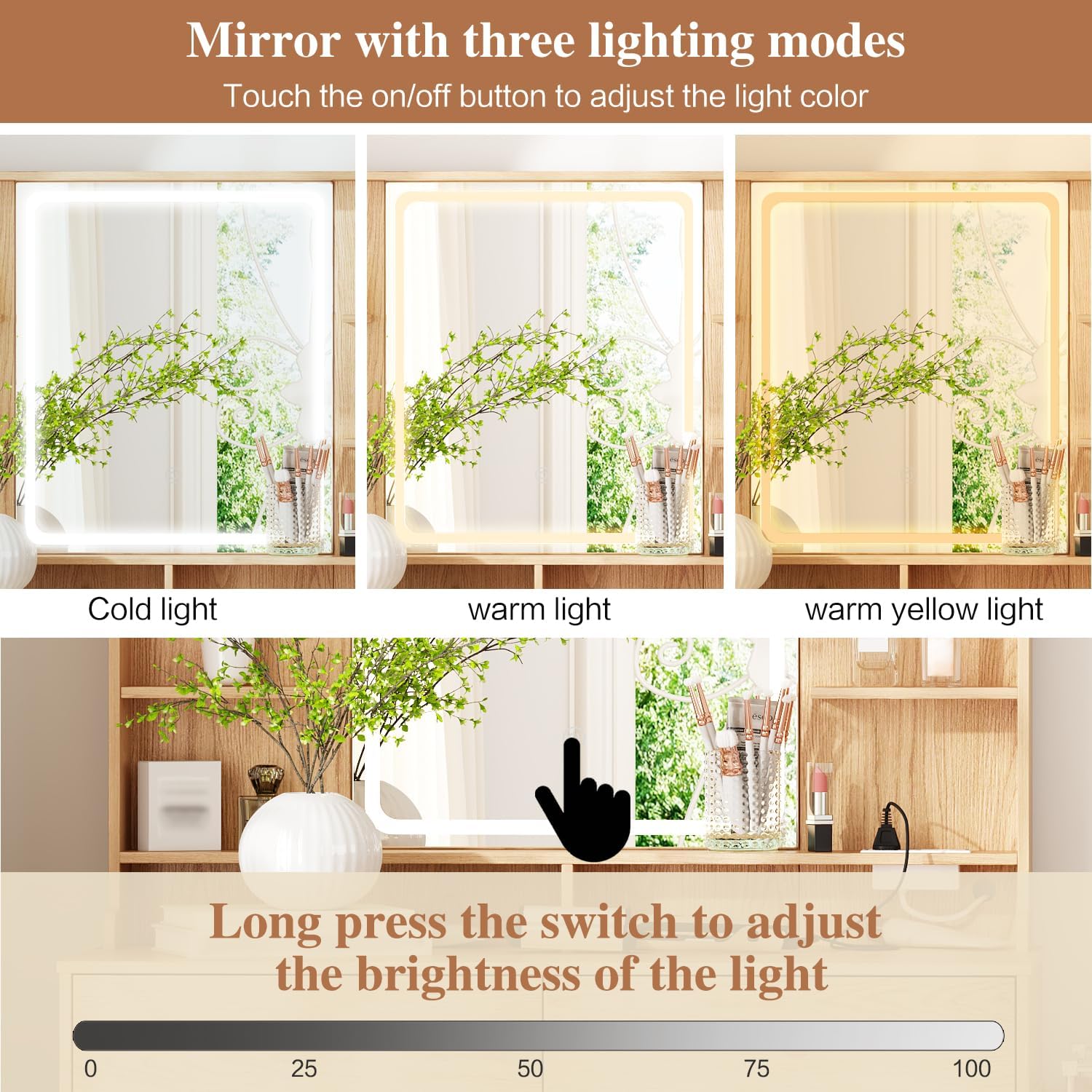
Figure 5: Touch controls for LED mirror light color and brightness.
Built-in Power Strip:
The integrated power strip provides convenient access to power for your electronic devices.
- AC Outlets: Two standard 125V/12A AC outlets are available for devices such as hairdryers, curling irons, or other small appliances.
- USB Ports: One 5V/2A USB-A port and one PD20W Type-C port are available for charging smartphones, tablets, and other USB-powered devices.
- Usage: Plug the vanity desk's main power cord into a wall outlet. Then, plug your devices into the appropriate ports on the power strip.
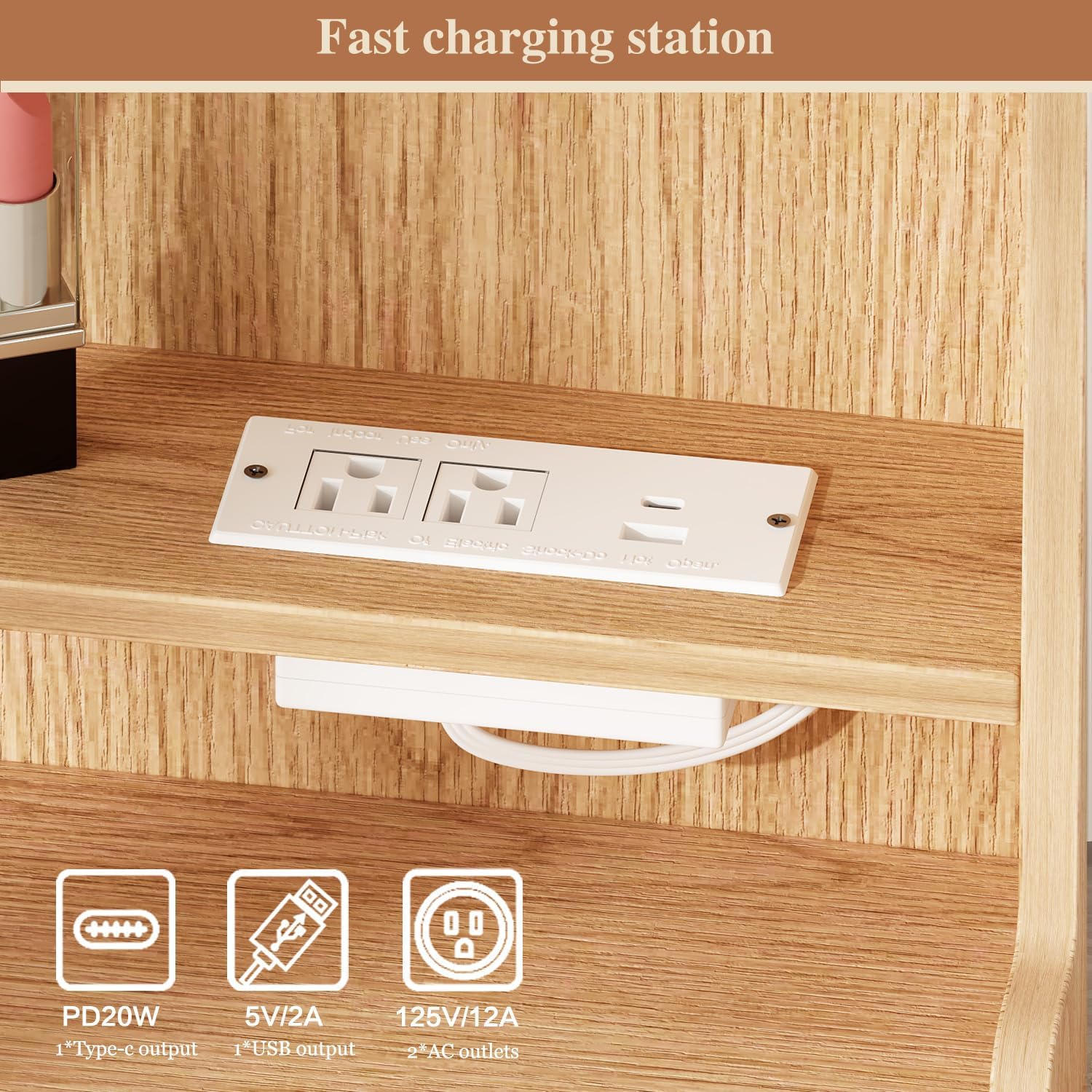
Figure 6: Close-up of the integrated power strip with various charging options.
Storage Features:
The vanity desk offers extensive storage solutions:
- Drawers: Utilize the multiple drawers for organizing cosmetics, skincare products, jewelry, and other personal items. The smooth metal slides ensure easy opening and closing.
- Shelves: The open shelves around the mirror provide accessible storage for frequently used items or decorative pieces.
- Pegboard: The leg-area pegboard can be used with hooks (included) to hang small accessories, hair ties, or other items.
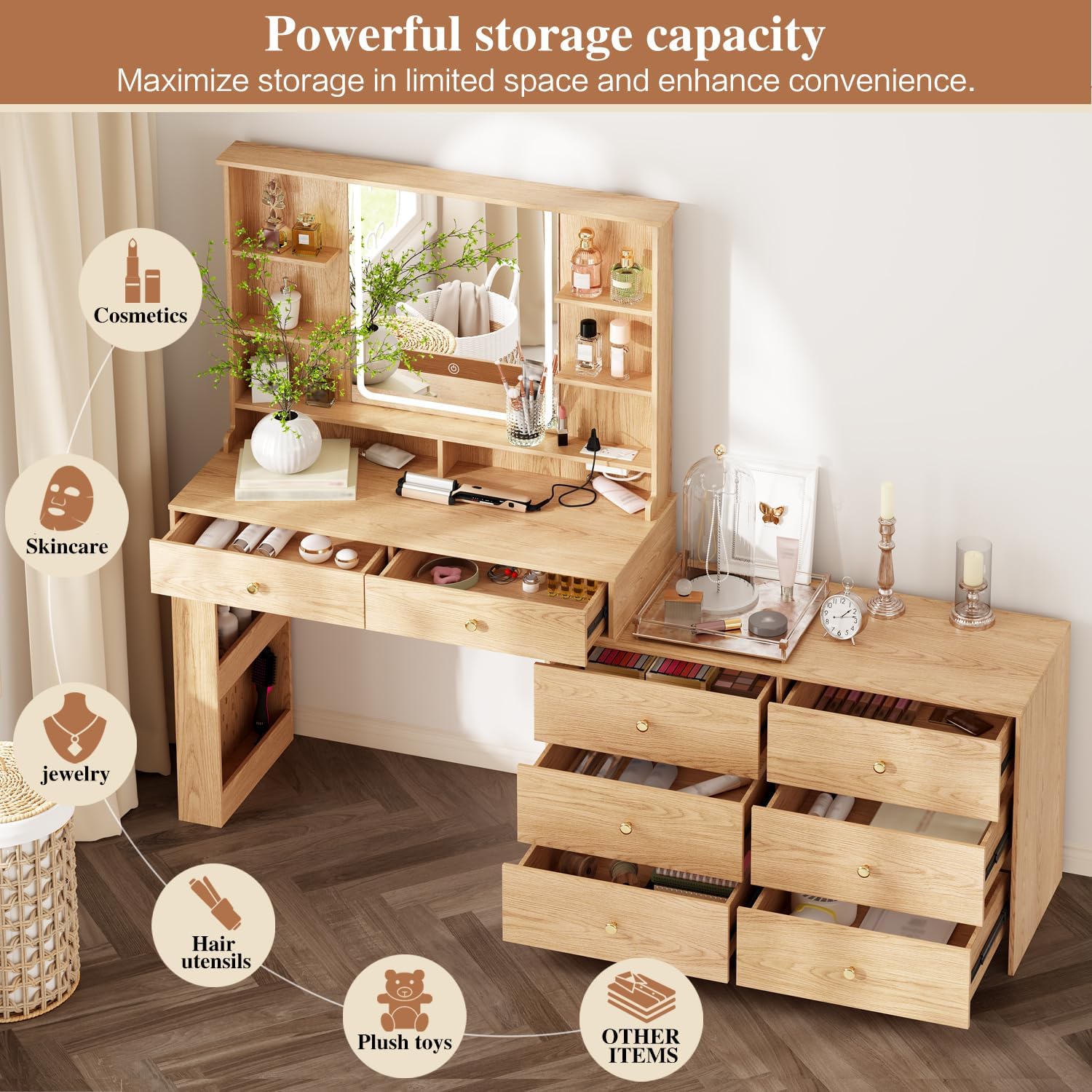
Figure 7: Overview of the vanity desk's powerful storage capacity, including drawers and shelves.
Maintenance
Proper care will extend the life and appearance of your vanity desk:
- Cleaning: Wipe the surfaces with a dry cloth. For stubborn marks, a slightly damp cloth can be used, followed immediately by a dry cloth. Avoid harsh chemicals or abrasive cleaners.
- Mirror Care: Clean the mirror with a glass cleaner and a soft, lint-free cloth. Do not spray cleaner directly onto the mirror; apply it to the cloth first.
- Hardware: Periodically check all screws and fasteners to ensure they remain tight. Re-tighten as needed to maintain stability.
- Avoid Direct Sunlight: Prolonged exposure to direct sunlight may cause fading or damage to the wood finish.
Troubleshooting
| Problem | Possible Cause | Solution |
|---|---|---|
| LED lights not turning on. |
|
|
| Drawers are stiff or do not slide smoothly. |
|
|
| Vanity desk feels wobbly. |
|
|
Specifications
| Feature | Detail |
|---|---|
| Model Number | 808 |
| Brand | Ieejdn |
| Dimensions (Assembled) | 15.75"D x 40-68"W x 55.91"H (Adjustable Width) |
| Item Weight | 52 pounds |
| Frame Material | Engineered Wood |
| Color | Wood |
| Furniture Finish | Paintless |
| Mirror Lighting | 3 Color Modes (Natural, Warm, Cool), Dimmable LED |
| Power Strip | 2x AC Outlets (125V/12A), 1x USB-A (5V/2A), 1x Type-C (PD20W) |
| Power Cord Length | 4.9 feet |
| Assembly Required | Yes |
| Care Instructions | Wipe with Dry Cloth |

Figure 8: Detailed dimensions of the vanity desk components.
Warranty and Customer Support
Ieejdn is committed to providing high-quality products and excellent customer service.
After-Sales Service:
If you encounter any product problems, missing parts, or require assistance with assembly or operation, please contact our customer support team. We are dedicated to resolving any issues promptly.
Returns:
This product is eligible for 30-day easy returns. Please refer to your purchase platform's return policy for detailed instructions.
For further assistance, please visit the Ieejdn Store on Amazon or contact customer support through your order details.
Related documents808


Ask a question about this manual
Ask about setup, troubleshooting, compatibility, parts, safety, or missing instructions. Manuals+ will review the question and use this page’s manual context to help answer it.