
KOSPET KOSPET MAGIC P10
KOSPET Magic P10 Smart Watch User Manual
Your comprehensive guide to setup, operation, and features.
1. Introduction
Welcome to the KOSPET Magic P10 Smart Watch user manual. This guide provides detailed instructions to help you get the most out of your new smartwatch. The KOSPET Magic P10 combines a sleek, durable design with advanced health monitoring, comprehensive sport tracking, and smart features to enhance your daily life.

The KOSPET Magic P10 Smart Watch in black, showcasing its vibrant AMOLED display.
2. What's in the Box
Upon unboxing your KOSPET Magic P10, you will find the following items:
- 1x KOSPET MAGIC P10 Smart Watch
- 1x Charging Cable
- 1x User Manual
- 1x Silicone Watch Bands

Diagram showing the KOSPET Magic P10 watch, charging cable, user manual, and silicone watch band included in the packaging.
3. Design and Display
The KOSPET Magic P10 features a durable stainless steel body, weighing only 56g for comfortable all-day wear. Its 1.96-inch AMOLED display with Corning Gorilla Glass ensures crystal-clear visibility even in bright sunlight, resisting daily scratches and damage. The display boasts up to 1000 nits brightness, making it easily readable outdoors. It also supports wet-touch operations, allowing for responsive interaction even with wet fingers.

Close-up view of the KOSPET Magic P10's design, highlighting the detailed crown and seamless strap integration.
4. Setup
4.1 Band Installation
To install or change the watch band:
- Remove the existing band by sliding the lever on the spring bar.
- Align the new band's spring bar with the holes on the watch lugs.
- Push the lever down to retract the spring bar, insert one end into the lug hole, then release the lever to secure the other end.
4.2 App Connection
To connect your KOSPET Magic P10 to your smartphone:
- Download the 'Apexmove' app from the Google Play Store or Apple App Store.
- Turn on Bluetooth on your phone.
- Open the Apexmove app, go to 'Device', and click 'Add a new device'.
- Click 'Pair' in the pop-up window on the watch and app to complete the connection.

Visual guide for connecting your KOSPET Magic P10 to the Apexmove app on your smartphone.
4.3 Notification Setup
To receive messages and app notifications:
For iOS Devices:
- Ensure the 'Apexmove' app remains active.
- Disable 'Do Not Disturb' and 'Low Power Mode' on your iPhone.
- In the Apexmove app, go to 'Device' and click 'SMS', then enable for desired apps.
- Go to your phone's 'Settings' to allow 'Apexmove' to access 'Notifications'.

Instructions for enabling message and app notifications on iOS devices.
For Android Devices:
- Keep Apexmove active (add to whitelist in settings if necessary).
- Turn off 'Do Not Disturb' and 'Low Power Mode'.
- In the Apexmove app, go to 'Device' and click 'SMS Reminder', then enable for desired apps.
- Go to your phone's 'Settings' to allow 'Apexmove' to access 'Notifications'.

Instructions for enabling message and app notifications on Android devices.
5. Operating the Smart Watch
The KOSPET Magic P10 offers seamless integration with your smartphone for various smart features:
- Bluetooth Calling: Make and receive phone calls directly from your wrist.
- Message Notifications: View incoming messages and app notifications.
- Music Control: Control music playback on your phone (play, pause, skip tracks).
- AI Voice Assistant: Utilize the built-in AI voice assistant for quick commands and information.

The KOSPET Magic P10 displaying its multifunctional capabilities, including call handling, voice assistant, and message reminders.

The Magic P10 allows you to manage calls and music directly from your wrist, providing convenience on the go.
6. Health Monitoring
Equipped with the advanced VC9213-4PD sensor, the KOSPET Magic P10 provides precise and reliable health data. It tracks various metrics in real-time:
- Heart Rate: Continuous 24/7 heart rate monitoring.
- Blood Oxygen (SpO2): Real-time blood oxygen saturation levels.
- Sleep Monitoring: Tracks sleep stages (deep sleep, light sleep, REM) and provides sleep quality analysis.
- Stress Monitoring: Assesses stress levels throughout the day.
- Emotion Tracking: Monitors emotional states.
- Menstrual Cycles: Supports tracking for women's health.

Visual representation of the KOSPET Magic P10's health monitoring capabilities, including blood oxygen, sleep, heart rate, and menstrual cycle tracking.

The P10 utilizes a 4PD sensor for accurate and consistent health tracking, whether during training or recovery.
7. Sport Modes and GPS Tracking
The KOSPET Magic P10 supports 180 sport modes, ensuring comprehensive tracking for almost any activity. It features built-in dual-band L1+L5 GPS with 6 satellite systems for fast and precise positioning, even in urban or wooded environments. Integrated sensors like a compass, barometer, and altimeter accurately track direction, air pressure, and elevation.

The KOSPET Magic P10 provides fast, clear, and reliable multi-GNSS positioning for accurate outdoor activity tracking.

The Apexmove app, designed exclusively for sports, helps create personalized training plans and track unique data.

Precision tracking with L1+L5 dual-frequency GNSS and 6 satellite systems, along with altitude, air pressure, and compass data.

The Magic Series tracks 180 sports with precision, helping users understand their body and stay consistent.
Official product video showcasing the KOSPET Magic P10's features, including its display, sensors, and various sport modes.
8. Water Resistance
The KOSPET Magic P10 boasts 5ATM water resistance, making it suitable for swimming and various water activities. It can withstand pressures equivalent to a depth of 50 meters. The watch is designed to recognize your stroke and record essential swimming metrics like lap splits, stroke count, pace, heart rate zones, and SWOLF.
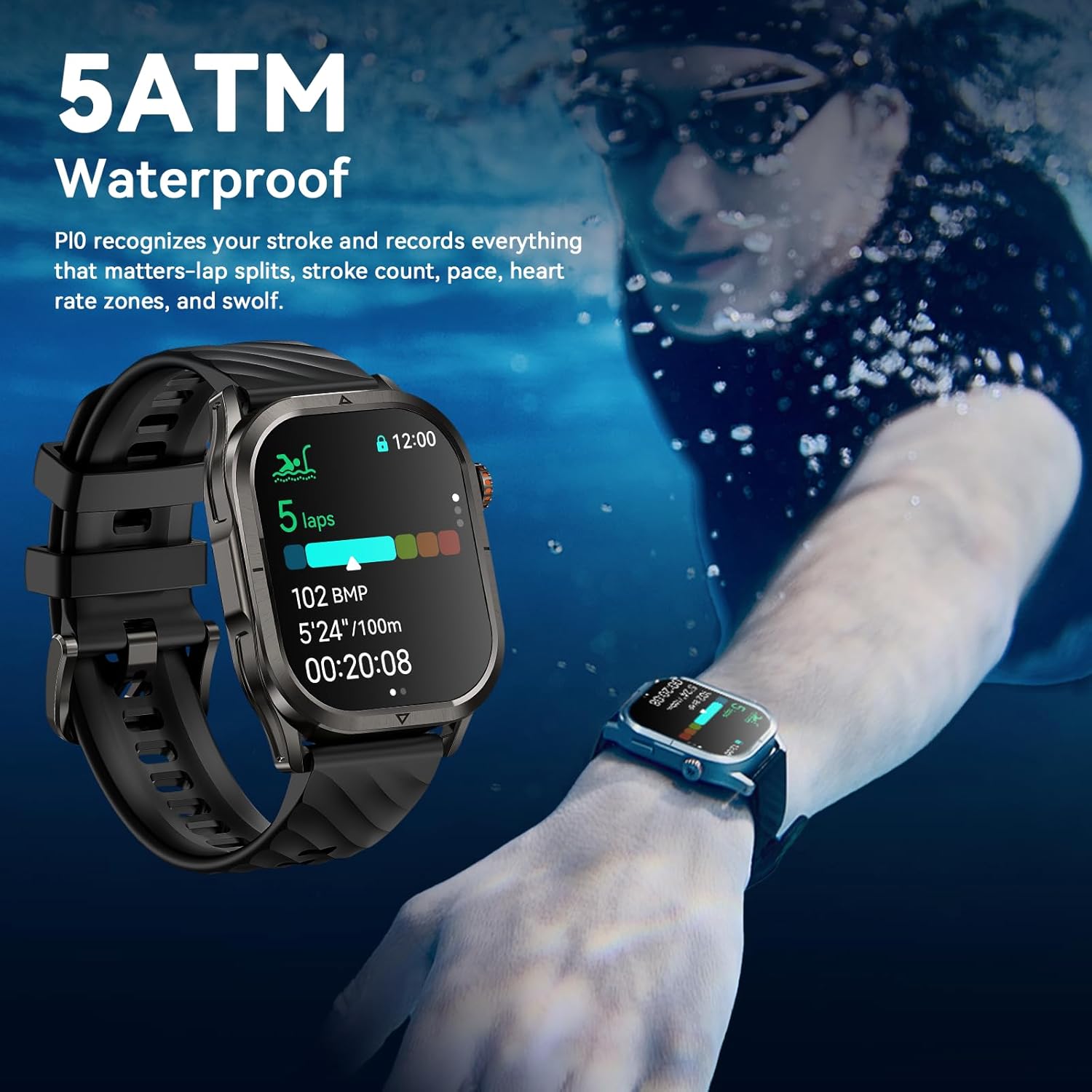
The KOSPET Magic P10 is 5ATM waterproof, capable of tracking swimming performance.

Designed for professional swimming, the P10 records lap splits, stroke count, pace, heart rate zones, and SWOLF.
9. Battery Life
The KOSPET Magic P10 is equipped with a high-density 450mAh battery, offering impressive endurance. Combined with an advanced AI power-saving algorithm, it maximizes battery efficiency to provide:
- Up to 50 days in standby mode.
- 14–21 days of typical use.
- Up to 18 hours in GPS workout mode.
This extended battery life minimizes the need for frequent recharging, making it ideal for daily use and extended adventures.
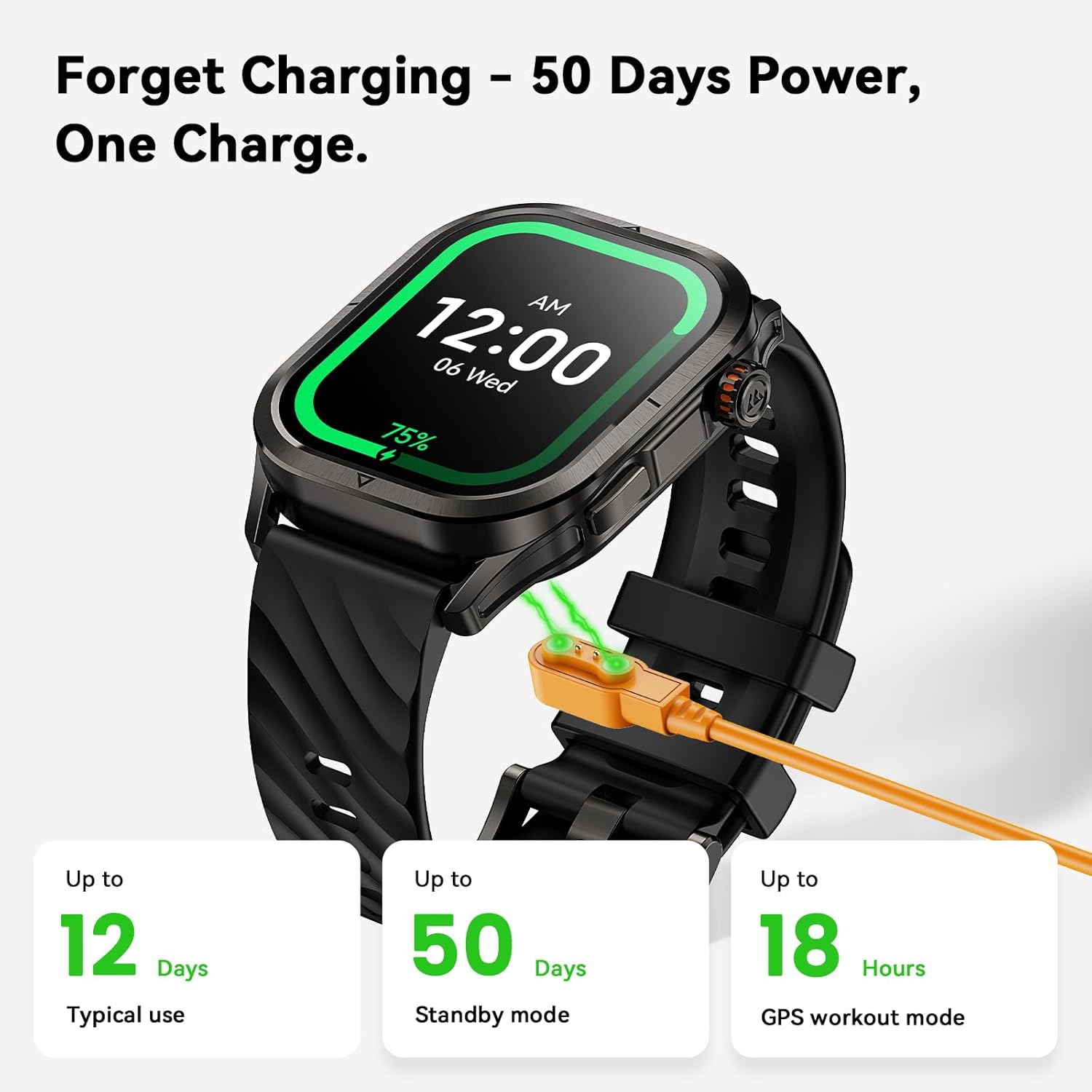
The KOSPET Magic P10 offers up to 50 days of standby power on a single charge.

Detailed breakdown of the KOSPET Magic P10's extra-long battery life under various usage scenarios.
10. Specifications
| Feature | Detail |
|---|---|
| Brand | KOSPET |
| Model Number | KOSPET MAGIC P10 |
| Screen Size | 1.96 Inches AMOLED |
| Water Resistance | 5ATM |
| GPS | Built-in Dual-Band L1+L5 GPS (6 satellite systems) |
| Sensors | VC9213-4PD (Heart Rate, SpO2), Compass, Barometer, Altimeter |
| Battery Capacity | 450 Milliamp Hours |
| Typical Use Battery Life | 14-21 Days |
| Standby Battery Life | Up to 50 Days |
| Connectivity | Bluetooth |
| Operating System Compatibility | Android 5.1+ and iOS 10.0+ |
| Item Weight | 9.5 ounces |
| Material | Stainless Steel Body |
11. Maintenance
To ensure the longevity and optimal performance of your KOSPET Magic P10 Smart Watch, follow these maintenance guidelines:
- Cleaning: Regularly wipe the watch screen and body with a soft, lint-free cloth. For stubborn smudges, slightly dampen the cloth with water. Avoid harsh chemicals or abrasive materials.
- Strap Care: Clean silicone straps with mild soap and water. For leather straps, avoid prolonged exposure to water and direct sunlight; clean with a specialized leather cleaner if necessary.
- Charging: Use only the provided magnetic charging cable. Ensure the charging contacts on the watch and cable are clean and dry before charging to prevent corrosion.
- Storage: When not in use for extended periods, store the watch in a cool, dry place away from direct sunlight and extreme temperatures.
- Water Exposure: While 5ATM water-resistant, avoid exposing the watch to high-velocity water (e.g., jet skiing) or hot water/steam (e.g., hot showers, saunas) as this can compromise the seals.
12. Troubleshooting
If you encounter issues with your KOSPET Magic P10, try the following common troubleshooting steps:
- Watch Not Turning On: Ensure the watch is fully charged. Connect it to the charger and wait a few minutes before attempting to power it on.
- Cannot Pair with Phone: Make sure Bluetooth is enabled on your phone and the watch. Ensure the watch is within range. Try restarting both the watch and your phone. If issues persist, try unpairing and re-pairing the device in the Apexmove app.
- Notifications Not Appearing: Verify that notification permissions are granted for the Apexmove app in your phone's settings (refer to Section 4.3). Ensure 'Do Not Disturb' or 'Low Power Mode' are off.
- Inaccurate Health Data: Ensure the watch is worn snugly on your wrist, not too tight or too loose. Clean the sensor on the back of the watch. Avoid excessive movement during measurements.
- GPS Not Locking On: Ensure you are in an open outdoor area with a clear view of the sky. Allow a few minutes for the GPS to acquire a signal.
- Screen Unresponsive: If the screen is unresponsive, try restarting the watch by long-pressing the power button. If wet, ensure the screen is dry or use the wet-touch feature.
- Battery Draining Quickly: Reduce screen brightness, disable unnecessary notifications, and limit continuous heart rate monitoring if not needed. Ensure no background apps are excessively draining power.
For persistent issues, please refer to the official KOSPET support resources or contact customer service.
13. Warranty and Support
KOSPET products are designed for durability and performance. For information regarding warranty coverage, returns, or technical support, please visit the official KOSPET website or refer to the warranty card included in your product packaging.
You can also find additional support and product information by visiting the KOSPET Store on Amazon.
Ask a question about this manual
Ask about setup, troubleshooting, compatibility, parts, safety, or missing instructions. Manuals+ will review the question and use this page’s manual context to help answer it.