
1. Introduction
The OTTOCAST Mirror Touch is a car adapter designed to seamlessly mirror your smartphone screen onto your vehicle's display. This device enables two-way control, allowing you to interact with your smartphone apps directly from your car's touchscreen. Enjoy videos from platforms like YouTube and Netflix, navigate with Google Maps, and check social media, all from the comfort of your car's display.
This product offers near-zero latency, providing a smooth and responsive experience akin to using your smartphone directly. Maps and videos are displayed in full screen without interruptions or black bars, enhancing your in-car entertainment and navigation.
2. Important Safety Information
- Always operate the device responsibly and in accordance with local traffic laws. Distracted driving can lead to accidents.
- Do not attempt to install or repair the device while driving.
- Keep the device away from water, extreme temperatures, and direct sunlight to prevent damage.
- Use only the provided cables and accessories to ensure proper functionality and safety.
- Ensure the device is securely connected to prevent disconnections during vehicle operation.
3. Package Contents
Please check that all items are present in your package:
- OTTOCAST Mirror Touch Main Unit
- USB Type-A to Type-C Conversion Adapter
- User Manual

Image: The OTTOCAST Mirror Touch main unit, a USB Type-A to Type-C adapter, and the user manual are included in the package.
4. Product Overview
The OTTOCAST Mirror Touch is a compact and powerful device designed to enhance your in-car experience. It features:
- Two-Way Control Mirroring: Operate your smartphone directly from your car's display.
- Wireless CarPlay: Seamlessly connect your iPhone for a wireless CarPlay experience.
- Fast Charging: Supports 27W fast charging for your smartphone while mirroring (requires Type-C port on Mirror Touch).
- Privacy Protection: No login information or viewing history is stored in the car, ensuring your data remains private.
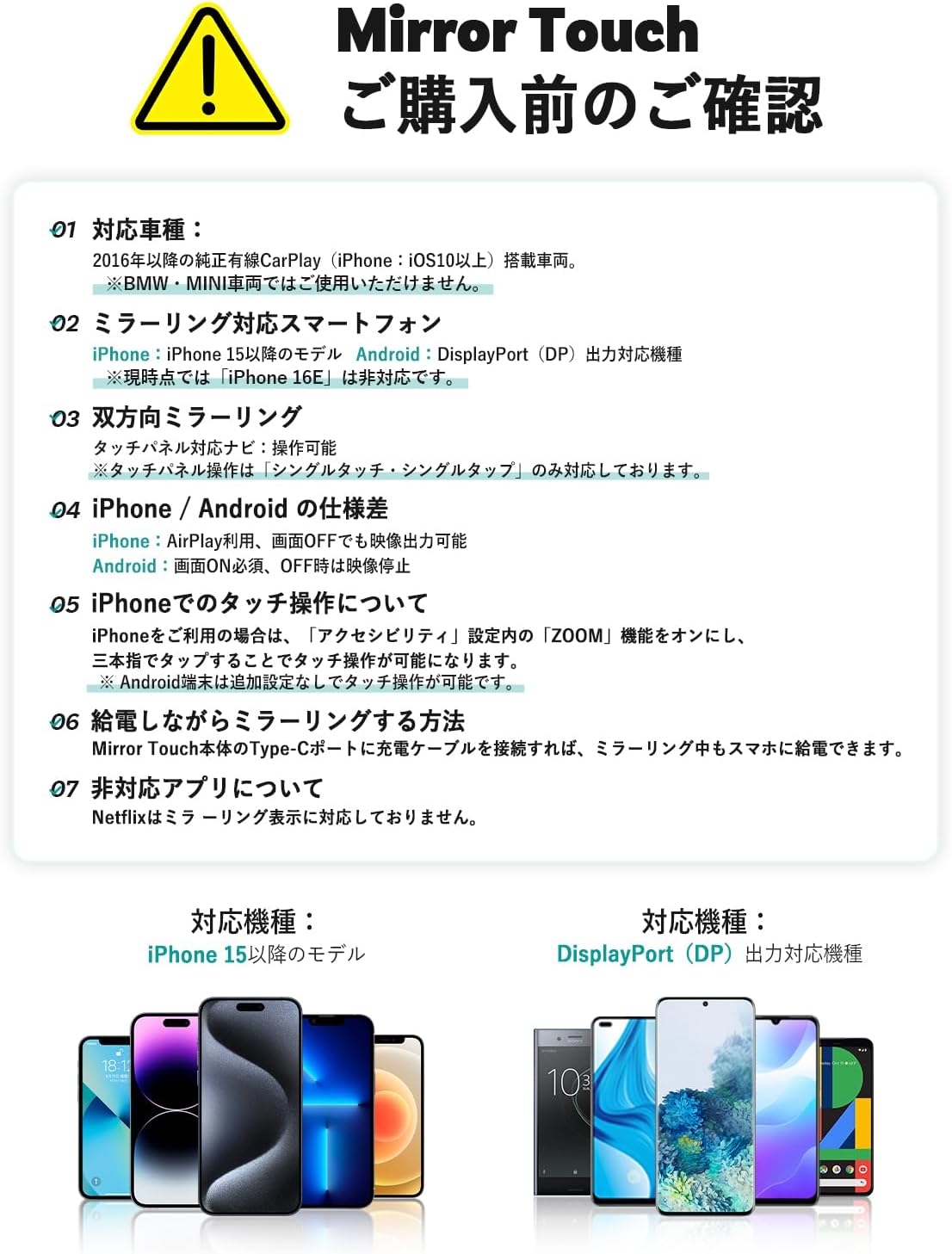
Image: The Mirror Touch adapter connected in a car, displaying a smartphone screen on the vehicle's infotainment system.
5. Compatibility
5.1 Vehicle Compatibility
- Compatible with vehicles equipped with factory-wired CarPlay from 2016 onwards.
- Note: Not compatible with BMW or MINI vehicles.
- For Alphard 40 series and VOLVO XC40 (2019 model), previous touch position misalignment issues have been resolved with firmware updates. Please ensure your device firmware is up to date if you experience similar symptoms.
5.2 Smartphone Compatibility
- iPhone: iPhone 15 models and later. (As of July 19, 2025, iPhone 16E is not supported.)
- Android: Smartphones supporting DisplayPort (DP) Alt Mode output.

Image: An iPhone screen being mirrored onto a car's display, demonstrating compatibility.
6. Setup Instructions
Connecting the OTTOCAST Mirror Touch is a simple plug-and-play process:
- Connect: Plug the Mirror Touch device into your car's USB port. Use the provided USB Type-A to Type-C adapter if necessary.
- Tap Icon: On your car's display, tap the Mirror Touch icon to initiate the connection.
- Settings (iPhone only): For iPhone users, enable the 'ZOOM' function in Accessibility settings to allow touch control with three fingers. Android devices typically do not require additional settings for touch control.
- Start Mirroring: Once connected, mirroring will begin. After the initial setup, the device will automatically connect to your smartphone when you start the engine, eliminating the need for repeated pairing.

Image: Visual guide illustrating the three steps for setting up the Mirror Touch: connecting the device, tapping the icon on the car display, and adjusting iPhone settings.
7. Operation
7.1 Two-Way Control
The Mirror Touch allows you to control your smartphone directly from your car's display. Swiping, scrolling, and tapping on the car screen will interact with your phone as if you were holding it. This feature is supported for single-touch and single-tap operations.
7.2 Media Playback
Enjoy videos from YouTube, Netflix, and other streaming services on your car's large screen. The device ensures full-screen display without black bars, providing an immersive viewing experience.

Image: A car's display showing a video playing in full screen, demonstrating the media playback capability of the Mirror Touch.
7.3 Navigation
Use Google Maps or other navigation apps from your smartphone, displayed clearly on your car's screen. The near-zero latency ensures real-time updates and smooth map interaction.
7.4 Screen Off Mirroring (iPhone)
For iPhone users, the AirPlay function allows mirroring to continue even when your smartphone screen is turned off. This helps conserve your phone's battery during long drives.

Image: An iPhone with its screen off, yet its content is still being mirrored to the car's display, showcasing the screen-off mirroring feature.
7.5 Charging While Mirroring
The Mirror Touch supports 27W fast charging for your smartphone. Connect a charging cable to the Mirror Touch's Type-C port to charge your phone while mirroring.

Image: A smartphone being fast-charged via the Mirror Touch adapter, which is connected to the car's USB port.
7.6 Video Demonstration
Watch this video for a demonstration of the OTTOCAST Mirror Touch's mirroring and control capabilities.
Video: A demonstration of the OTTOCAST Mirror Touch, showing how smartphone functions are extended to the car's display, allowing for swiping, scrolling, and tapping.
8. Maintenance
- Cleaning: Use a soft, dry cloth to clean the device. Do not use liquid cleaners or aerosols.
- Storage: When not in use, store the device in a cool, dry place away from direct sunlight.
- Cable Care: Avoid bending or twisting the cables excessively to prevent internal damage.
9. Troubleshooting
9.1 No Display/Connection Issues
- Ensure the Mirror Touch is securely plugged into the car's USB port.
- Verify your vehicle has factory-wired CarPlay and is compatible (2016+ models, excluding BMW/MINI).
- Check your smartphone's compatibility (iPhone 15+ or Android with DP Alt Mode).
- Restart your car's infotainment system and your smartphone.
9.2 Audio Delay
- Some users have reported minor audio delays (approx. 0.3 seconds). This can sometimes be improved by ensuring your device firmware is updated.
- If using Wireless CarPlay, ensure a stable Bluetooth connection.
9.3 Touch Control Issues
- For iPhone, ensure the 'ZOOM' function in Accessibility settings is enabled for three-finger touch control.
- If touch position is misaligned (e.g., in Alphard 40 series or Volvo XC40 2019), update the device firmware.
9.4 Specific App Limitations
- Netflix is not officially supported for mirroring display due to content protection policies.
- Other streaming services like YouTube and TikTok generally work.
9.5 Automatic Disconnection
- If mirroring disconnects when shifting to reverse gear, you may need to re-initiate mirroring from your smartphone after returning to drive.
- Ensure no other Bluetooth devices are interfering with the connection.
10. Specifications
| Feature | Description |
|---|---|
| Brand Name | OTTOCAST |
| Model | Mirror Touch |
| UPC | 725414684904 |
| GTIN | 725414684904 |
| Manufacturer | OTTOCAST |
| Country of Origin | China |
| Connectivity | Wireless CarPlay, Smartphone Mirroring (Two-Way Control) |
| Charging Support | 27W Fast Charging (via Type-C port) |
| Included Items | Main Unit, USB Type-A to Type-C Adapter, User Manual |
11. Warranty & Support
11.1 Manufacturer's Warranty
The OTTOCAST Mirror Touch comes with a one-year manufacturer's warranty from the date of purchase. This warranty covers defects in materials and workmanship under normal use. Please retain your proof of purchase for warranty claims.
11.2 Customer Support
For technical assistance, troubleshooting, or warranty inquiries, please contact OTTOCAST customer support:
- Phone: 00 81 3-6899-5900 (Weekdays 8:00 - 16:00 JST)
- Website: Visit the official OTTOCAST website for FAQs and additional support resources.


