1. Safety Information
Read all instructions carefully before operating the GlowSpark Heavy-Duty 4-Wheel Mobility Scooter. Failure to follow safety guidelines may result in injury or damage to the scooter.
1.1 General Safety Precautions
- Always wear appropriate safety gear, such as a helmet, when operating the scooter.
- Ensure the scooter is fully charged before each use to avoid unexpected power loss.
- Do not exceed the maximum weight capacity of 500 lbs (227 kg).
- Operate the scooter on stable, level surfaces. Avoid steep inclines greater than 20 degrees.
- Maintain a safe speed and be aware of your surroundings.
- Use the horn to alert others to your presence.
- Ensure all lights (headlights, tail lights, turn signals) are functional before operating in low light conditions.
- Avoid operating the scooter under the influence of alcohol or medication that may impair judgment.
- Always engage the brake when parking the scooter.
1.2 Emergency Procedures
- In case of an emergency, release the throttle and apply the brakes immediately.
- If the scooter malfunctions, safely stop the unit and contact customer support.
2. Product Overview
The GlowSpark Heavy-Duty 4-Wheel Mobility Scooter is designed for adults and seniors, offering robust performance and comfort for daily travel. It features a powerful motor, long-lasting battery, and various convenience features.

Image 2.1: The GlowSpark Heavy-Duty 4-Wheel Mobility Scooter, showcasing its robust design and red finish.
2.1 Key Features
- Powerful Motor and Battery: Equipped with an 800W motor system and a 60V 20Ah battery, providing a range of 25-31 miles and a maximum speed of 15 mph.
- Braking System: Features front and rear electronic brake systems for stable and responsive stopping.
- USB Charging Port: A convenient USB charging port is integrated for charging electronic devices.
- Ample Storage: Includes cup holders, a bag hook, under-seat storage, and a rear trunk for personal belongings.
- Terrain Capability: Designed to conquer inclines up to 20 degrees and navigate various terrains with 16-inch tires and dual rear shock absorbers.
- Adjustable Seating: The captain's seat offers adjustable backrest, headrest, armrests, and seat position (forth and back) for personalized comfort.
- Full LED Lighting System: Includes headlights, turn signals, and brake lights for enhanced visibility and safety.
- Safety Features: Rear anti-tip feature, dual mirrors for clear rear visibility, and an electromagnetic manual brake system.
- Remote Key Operation: Allows for intelligent remote control functions.

Image 2.2: Illustration of the full LED lighting system, including head LED lights, LED turn signals, and rear brake lights, ensuring visibility.
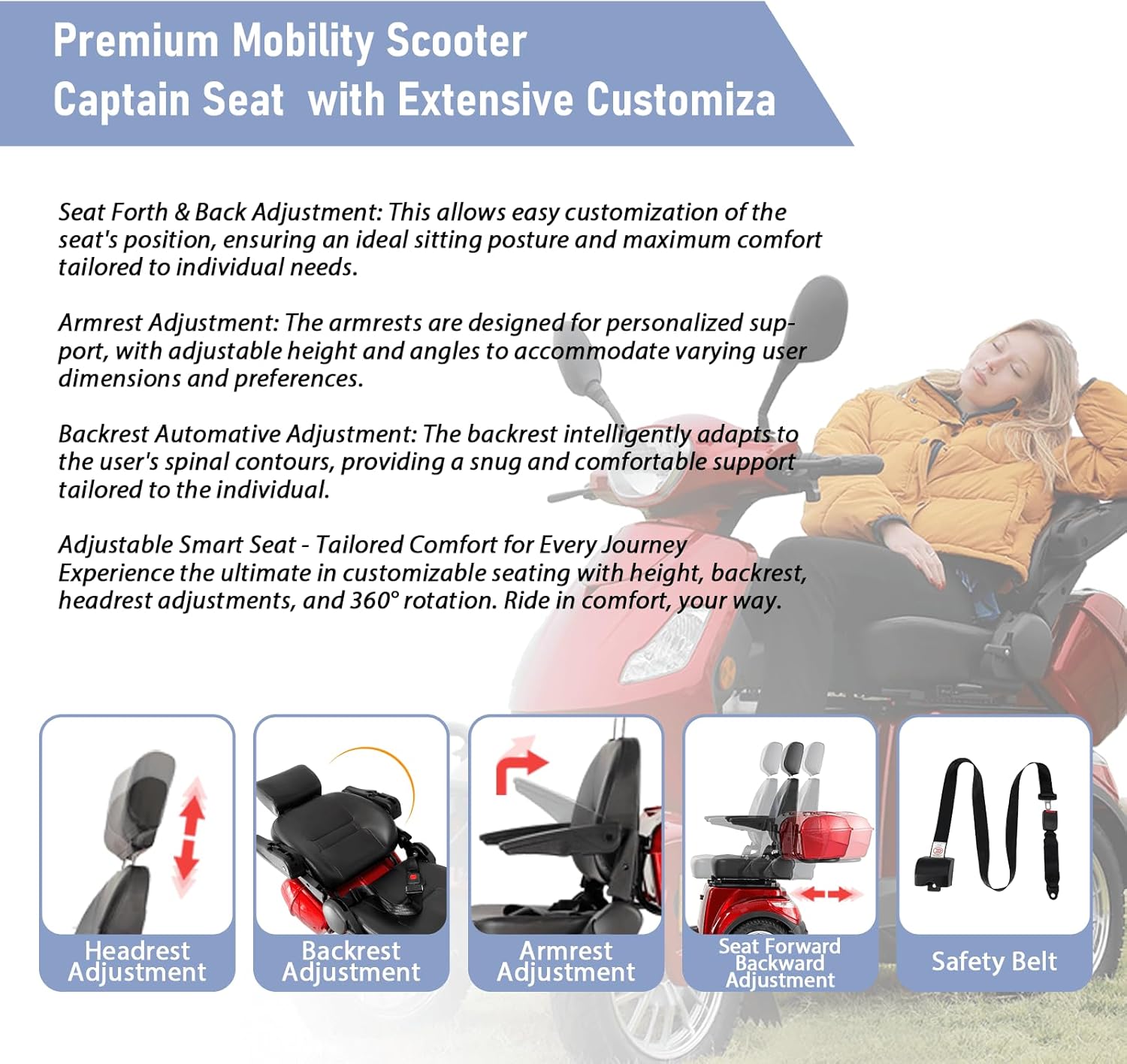
Image 2.3: Details of the scooter's storage options, including a front compartment with cup holder and hook, under-seat storage, and a lockable rear trunk.

Image 2.4: Visual representation of the adjustable captain seat, highlighting headrest, backrest, armrest, and seat forward/backward adjustments, along with the safety belt.

Image 2.5: Depiction of the scooter's ability to handle various terrains, including meadow, bumpy dirt, highway, and gravel roads, emphasizing its solid tires.

Image 2.6: Close-up views of key features including the LED headlight, front bumper, lockable rear trunk, cup holder, and anti-slip pedal.
3. Setup
The GlowSpark Heavy-Duty 4-Wheel Mobility Scooter arrives largely pre-assembled, with approximately 98% of the setup completed at the factory. Final assembly typically involves attaching the seat, mirrors, and any remaining accessories.
3.1 Initial Assembly Steps
- Unpacking: Carefully remove all components from the packaging. Retain packaging materials for future transport or storage.
- Seat Installation: Align the seat post with the receiver on the scooter chassis and secure it according to the included instructions. Ensure the seat is firmly locked in place.
- Mirror Attachment: Screw the rearview mirrors into their designated mounts on the handlebars. Adjust them for optimal rear visibility.
- Battery Connection: Ensure the battery is properly connected. Refer to the battery compartment for specific connection points.
- Initial Charge: Before first use, fully charge the scooter's battery. Connect the charger to the charging port and a standard electrical outlet. The charging indicator will show when charging is complete.
- Pre-Operation Check: Verify that all connections are secure, tires are properly inflated, and all controls (brakes, lights, horn) are functioning correctly.
4. Operating Instructions
Familiarize yourself with the scooter's controls before operating. The control panel is designed for intuitive use.
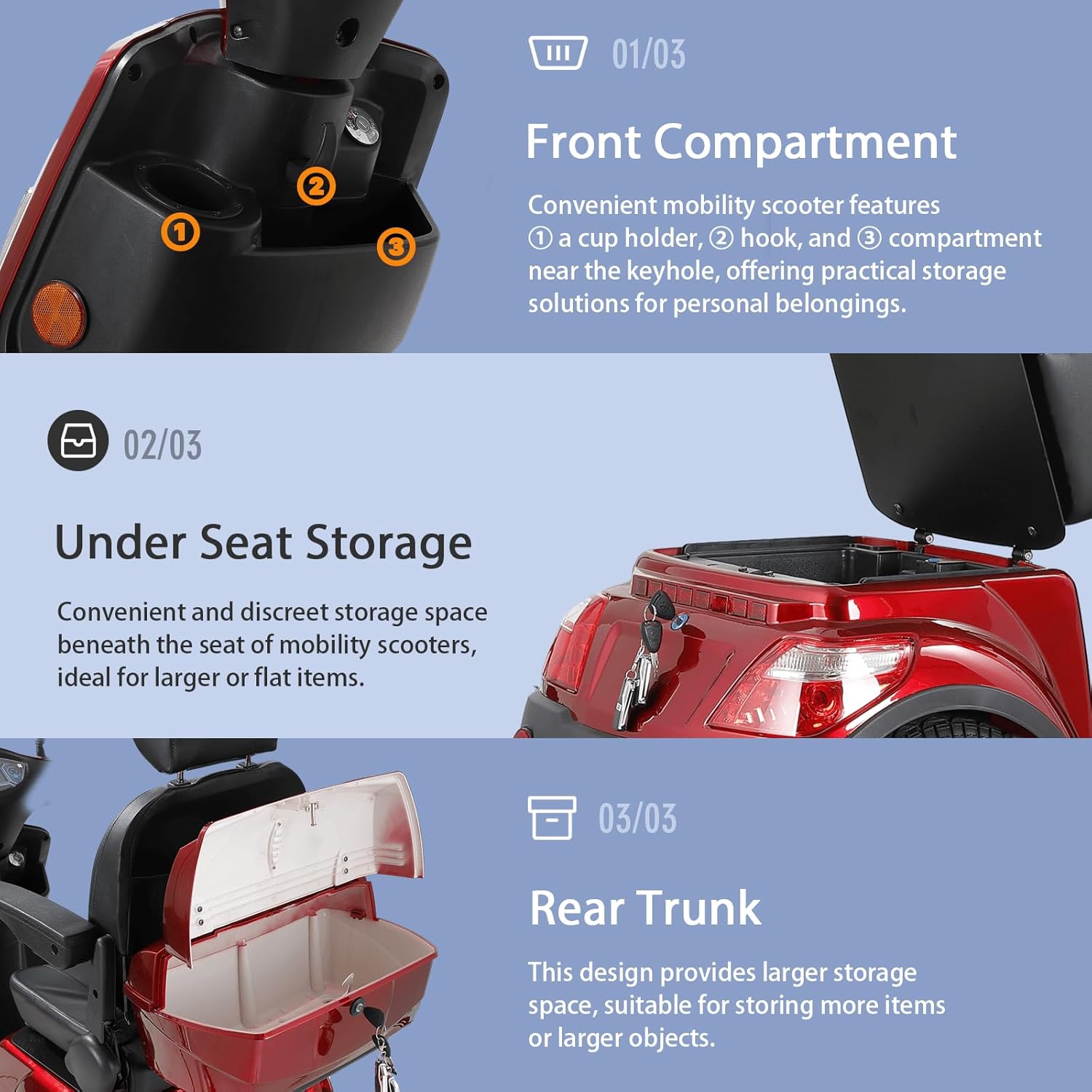
Image 4.1: Detailed view of the handlebar controls, including estimated speed, battery display, speed gear status, mileage, high-low beam switch, front brake lever, turn signal switch, horn, LED light switch, rear brake lever, three-speed gear selector, reverse button, and USB charging port.
4.1 Starting and Stopping
- To Start: Insert the key into the ignition and turn it to the 'ON' position. The display will illuminate.
- To Move: Gently twist the throttle handle to accelerate. The scooter has three speed gears (4 mph, 8 mph, 15 mph) which can be selected using the speed gear switch.
- To Stop: Release the throttle and apply the front and/or rear brake levers. For emergency stops, apply both brakes firmly.
- To Reverse: Press the reverse button and gently apply the throttle. Exercise caution when reversing.
- To Turn Off: Turn the key to the 'OFF' position and remove it.
4.2 Lighting and Horn
- Headlights: Use the LED light switch on the handlebar to turn the headlights on or off. A high-low beam switch is available for adjusting light intensity.
- Turn Signals: Use the turn signal switch to indicate turns. Ensure the signal cancels after the turn or manually switch it off.
- Horn: Press the horn button to alert pedestrians or other vehicles.
4.3 Remote Key Functions
The remote key provides additional convenience for operating your scooter.

Image 4.2: Diagram of the remote control key fob, showing buttons for starting an alarm sound, deactivating an alarm sound, locating the scooter with a voice prompt, and double-clicking to start the scooter.
- Start Alarm Sound: Press the alarm button to activate an audible alarm.
- Deactivate Alarm Sound: Press the deactivate button to turn off the alarm.
- Find Scooter: Click the scooter button to make the scooter emit a voice prompt, helping you locate it.
- Start Scooter: Double-click the start button to power on the scooter remotely.
4.4 Charging the Battery
- Locate the charging port on the scooter.
- Connect the charger cable to the charging port.
- Plug the charger into a standard electrical outlet.
- Monitor the charging indicator on the charger or scooter display. Disconnect the charger once the battery is fully charged to prevent overcharging.
5. Maintenance
Regular maintenance ensures the longevity and safe operation of your GlowSpark Mobility Scooter.
5.1 Battery Care
- Charge the battery regularly, even if the scooter is not in frequent use, to maintain battery health.
- Avoid completely draining the battery before recharging.
- Store the scooter and battery in a cool, dry place away from direct sunlight and extreme temperatures.
5.2 Tire Maintenance
- Check tire pressure monthly and inflate to the recommended PSI specified in the tire sidewall or specifications section.
- Inspect tires for wear, punctures, or damage. Replace worn or damaged tires promptly.
5.3 Cleaning and Storage
- Clean the scooter with a damp cloth and mild detergent. Avoid using abrasive cleaners or high-pressure water sprays.
- Ensure all electrical components remain dry during cleaning.
- When storing for extended periods, ensure the battery is fully charged and disconnected if possible. Cover the scooter to protect it from dust and moisture.
5.4 General Inspection
- Periodically check all nuts, bolts, and fasteners for tightness.
- Inspect brake cables and mechanisms for proper function and wear.
- Ensure all lights and electrical components are working correctly.
6. Troubleshooting
This section addresses common issues you might encounter with your mobility scooter.
6.1 Scooter Not Starting
- Check Battery: Ensure the battery is charged and properly connected.
- Key Position: Verify the key is fully inserted and turned to the 'ON' position.
- Circuit Breaker: Check if the circuit breaker has tripped. Reset if necessary.
- Brake Engaged: Ensure the parking brake is not engaged, as some models prevent starting when it is.
6.2 Battery Not Charging
- Charger Connection: Confirm the charger is securely plugged into both the scooter and the wall outlet.
- Power Outlet: Test the wall outlet with another device to ensure it is functional.
- Charger Indicator: Observe the charger's indicator light. If it does not illuminate or shows an error, the charger may be faulty.
6.3 Reduced Range or Speed
- Battery Health: The battery may be aging or not fully charged. Ensure proper charging cycles.
- Tire Pressure: Under-inflated tires can significantly reduce efficiency. Check and adjust tire pressure.
- Weight Load: Exceeding the maximum weight capacity can affect performance.
- Terrain: Operating on steep inclines or rough terrain will consume more power.
For issues not covered here, please contact customer support.
7. Specifications
Detailed technical specifications for the GlowSpark Heavy-Duty 4-Wheel Mobility Scooter.

Image 7.1: Diagram illustrating the scooter's dimensions (66.5"L x 27.2"W x 54.3"H) and a list of key specifications.
| Feature | Specification |
|---|---|
| Brand | GlowSpark |
| Model | B0FCLS58VB |
| Product Dimensions (L x W x H) | 66.5" x 27.2" x 54.3" |
| Item Weight | 282 Pounds (128 kg) |
| Max Load Weight Capacity | 500 lbs (227 kg) |
| Motor Power | 800W Differential Motor |
| Battery | 60V 20Ah Lead-Acid |
| Max Speed | 15 mph (3-speed options: 4 mph, 8 mph, 15 mph) |
| Driving Range | 25-31 miles |
| Max Climbing Angle | 20° |
| Tire Size | 16 inches |
| Seat Dimensions | 17.7" depth x 17.7" inch |
| Material | ABS, PC |
| Color | Red |
8. Warranty and Support
GlowSpark is committed to providing high-quality products and excellent customer service.
8.1 After-Sales Service
Our dedicated customer service team is available to assist you with any inquiries or concerns regarding your mobility scooter. For support, please refer to the contact information provided with your purchase documentation or visit the official GlowSpark website.
8.2 Legal Disclaimer
Statements regarding this product have not been evaluated by the FDA and are not intended to diagnose, treat, cure, or prevent any disease or health condition. This product is intended for mobility assistance and should be used in accordance with all local laws and regulations.


