
1. Introduction
Thank you for choosing the TESSAN TS-TC02US00 Voltage Converter and Universal Travel Adapter. This device is designed to convert foreign 220-240V electricity to 110-120V, allowing you to safely use your US-standard electronic devices abroad. It also functions as a universal travel adapter, providing compatibility with various international outlets. Please read this manual thoroughly before use to ensure safe and optimal performance.
2. Important Safety Information
- Voltage Conversion: This device is a step-down voltage converter (220-240V to 110-120V). It is intended for use with US-standard appliances that operate on 110-120V.
- Maximum Wattage: The total power consumption of all connected devices must NOT exceed 230W. Exceeding this limit can damage the converter and connected devices, and poses a fire hazard.
- Incompatible Appliances: Do NOT use this converter with high-wattage appliances such as hair dryers, coffee makers, electric kettles, irons, or microwave ovens. These devices typically exceed the 230W limit. Refer to the appliance's label for wattage information.
- Dual Voltage Devices: Many modern electronics (laptops, phones, tablets) are dual voltage (100-240V). For these devices, you only need to use the appropriate international plug adapter without engaging the voltage conversion function.
- Indoor Use Only: Do not expose the converter to rain, moisture, or extreme temperatures.
- Children: Keep out of reach of children.
- Ventilation: Ensure adequate ventilation around the converter during use. Do not cover it.
- Disassembly: Do not attempt to disassemble or modify the converter.

Image: This diagram illustrates examples of suitable low-wattage appliances (e.g., electric shaver, curling iron, electric toothbrush) and unsuitable high-wattage appliances (e.g., electric kettle, iron, hair dryer) for use with the converter, emphasizing the 230W limit.
3. Package Contents
- TESSAN TS-TC02US00 Voltage Converter Unit
- Detachable AC Power Cable (Type B for US outlets)
- 5 International Plug Adapters:
- Type C (Europe)
- Type G (UK)
- Type D (India)
- Type I (Australia/New Zealand)
- Type L (Italy)
- Storage Pouch
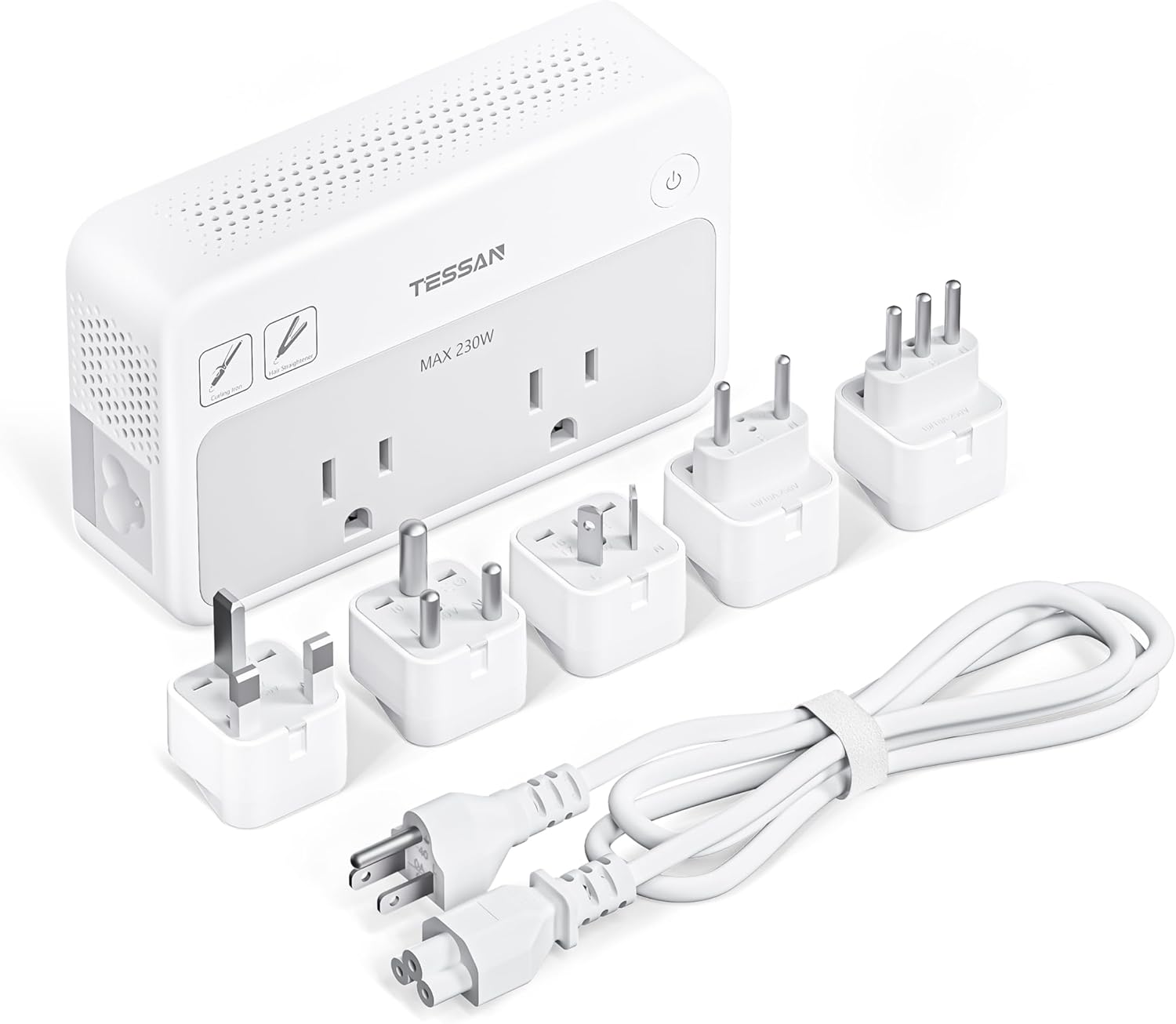
Image: The TESSAN voltage converter unit is shown alongside its detachable power cable and the five international plug adapters (Type C, G, D, I, L) that are included in the package.

Image: The included storage pouch is designed for easy organization and portability of the converter and its accessories.
4. Product Overview
The TESSAN TS-TC02US00 features a compact design with multiple charging options, making it ideal for international travel. It includes two standard US AC outlets, three USB-A ports, and one USB-C port.
4.1. Components
- Power Button: On/Off control for the unit.
- AC Outlets (x2): Standard US 3-prong outlets (110-120V output).
- USB-A Ports (x3): For charging USB-powered devices (12W Max total).
- USB-C Port (x1): Supports Power Delivery (PD) up to 18W for fast charging compatible devices.
- Input Port: For connecting the detachable AC power cable.
- Cooling Fan: Integrated fan for thermal management.

Image: The compact and lightweight design of the converter, with its dimensions highlighted, demonstrates its suitability for travel and easy packing in luggage.
5. Setup
5.1. Connecting to a Wall Outlet
- Identify the type of wall outlet in your destination country.
- Select the appropriate international plug adapter from the included set (Type C, G, D, I, or L).
- Attach the selected international plug adapter to the detachable AC power cable.
- Connect the other end of the AC power cable to the input port on the TESSAN voltage converter.
- Plug the assembled power cable and adapter into the wall outlet.

Image: This image displays the different international plug types (Type C for EU, Type G for UK, Type I for AU, Type L for IT, Type D for IN) and their typical usage regions, aiding in selecting the correct adapter.
6. Operating Instructions
6.1. Powering On/Off
- After connecting the converter to a wall outlet, press the power button on the unit to turn it on. An indicator light will illuminate.
- To turn off the converter, press the power button again.
6.2. Using AC Outlets (Voltage Conversion)
- Ensure your appliance is a single-voltage US-standard device (110-120V) and its wattage does not exceed 230W.
- Plug your appliance directly into one of the two AC outlets on the TESSAN converter.
- The converter will automatically step down the 220-240V input to 110-120V for your device.

Image: This image demonstrates the voltage converter in operation, taking 100-240V AC input from a wall socket and providing 110V AC output to a curling iron, while also charging a smartphone.
6.3. Using USB Charging Ports
- Connect your USB-powered devices (smartphones, tablets, cameras, etc.) to the USB-A or USB-C ports using appropriate charging cables.
- The USB-C port supports Power Delivery (PD) up to 18W for faster charging of compatible devices. The three USB-A ports provide a combined maximum of 12W.
- You can charge up to 4 USB devices simultaneously, in addition to two AC devices.

Image: This illustration shows the converter's capability to charge up to six devices concurrently, including two AC-powered devices and four USB-powered devices (one USB-C, three USB-A).

Image: A detailed view of the USB charging section, emphasizing the 18W Power Delivery (PD) capability of the USB-C port and the 12W maximum output for the USB-A ports.
7. Safety Features
The TESSAN TS-TC02US00 is equipped with multiple protection mechanisms to ensure the safety of your devices and the converter itself:
- Built-in Cooling Fan: Actively dissipates heat to prevent overheating during operation.
- Short-circuit Protection: Prevents damage from electrical shorts.
- Over-current Protection: Safeguards against excessive current flow.
- Over-voltage Protection: Protects devices from voltage spikes.
- Under-voltage Protection: Ensures stable operation by preventing use with insufficient voltage.
- Over-load Protection: Shuts down the unit if connected devices exceed the 230W limit.

Image: An illustration highlighting the integrated cooling fan, which helps maintain optimal operating temperature and protects the device from overheating.

Image: This diagram visually represents the multiple protection layers built into the converter, including safeguards against short-circuits, over-current, over-voltage, under-voltage, and over-load conditions.
8. Maintenance
- Cleaning: Disconnect the converter from the power outlet before cleaning. Use a dry, soft cloth to wipe the surface. Do not use liquid cleaners or abrasive materials.
- Storage: When not in use, store the converter and its accessories in the provided storage pouch in a cool, dry place, away from direct sunlight and moisture.
- Inspection: Periodically inspect the power cable and the converter for any signs of damage. Do not use if damaged.
9. Troubleshooting
- Converter not powering on:
- Ensure the power cable is securely connected to both the converter and the wall outlet.
- Verify that the wall outlet is functional.
- Press the power button firmly.
- Devices not charging/powering:
- Check if the converter is powered on (indicator light illuminated).
- Confirm that the total wattage of connected AC devices does not exceed 230W. If it does, disconnect some devices.
- Ensure your AC appliance is a 110-120V device.
- For USB devices, try a different USB port or cable.
- Verify that your device's charging cable is properly inserted.
- Converter feels hot:
- The built-in cooling fan should activate to manage heat. Ensure the fan vents are not blocked.
- If the converter becomes excessively hot, disconnect it immediately and reduce the load.
10. Specifications
| Feature | Specification |
|---|---|
| Model Number | TS-TC02US00 |
| Input Voltage | 100-240V AC, 50/60Hz |
| AC Output Voltage | 110-120V AC |
| Max AC Output Power | 230W |
| USB-C Output | PD 18W Max |
| USB-A Output | 12W Max (total for 3 ports) |
| Dimensions | 7.7 x 3.4 x 3.3 inches |
| Item Weight | 1.2 pounds |
| Included Plugs | Type C, G, D, I, L |
11. Warranty and Support
TESSAN products are designed for reliability and performance. For warranty information or technical support, please refer to the contact details provided with your purchase or visit the official TESSAN website. Please have your model number (TS-TC02US00) and purchase details ready when contacting support.