Introduction
This manual provides essential information for the safe and efficient operation, maintenance, and troubleshooting of your Segway Ninebot E2 Plus II Electric Scooter. Please read this manual thoroughly before your first ride to ensure proper usage and to maximize the lifespan of your scooter.

Figure 1: Segway Ninebot E2 Plus II Electric Scooter, showcasing its sleek design and compact form factor.
The Segway Ninebot E2 Plus II is designed for urban commuting and recreational use, offering a balance of speed, range, and portability. Key features include a top speed of 15.5 mph, a range of up to 16 miles in Eco Mode, and a robust steel frame. It is equipped with an enhanced front suspension system and inner hollow shock-absorbing tires for a comfortable ride.
Setup and Assembly
Your Segway Ninebot E2 Plus II Electric Scooter comes partially assembled. Follow these steps to complete the setup:
- Unboxing: Carefully remove all components from the packaging. Ensure all parts listed in the packing list are present.
- Handlebar Installation: Lift the handlebar stem to an upright position. Secure the folding mechanism latch firmly until it clicks into place.
- Handlebar Connection: Connect the cables from the handlebar to the main stem. Ensure the connections are secure. Attach the handlebar to the stem using the provided screws and tools.
- Initial Charge: Before first use, fully charge the scooter. Locate the charging port, typically near the base of the stem or on the deck. Connect the charger and plug it into a power outlet. The LED dashboard will indicate charging status. A full charge takes approximately 7.5 hours.

Figure 2: Front view of the scooter, highlighting the handlebar and stem assembly area.
Always ensure the scooter is powered off during assembly and charging to prevent accidental activation.
Operating Instructions
Familiarize yourself with the controls and features before riding.
Powering On/Off and Riding Modes
- Power On: Press the power button on the dashboard once to turn on the scooter.
- Power Off: Press and hold the power button for 2 seconds to turn off the scooter.
- Switch Modes: Press the power button twice to cycle through riding modes (Eco, Drive, Sport).
- Eco Mode: Maximizes range (up to 16 miles) at a lower speed (approx. 9.3 mph).
- Sport Mode: Provides maximum speed (up to 15.5 mph) and power (500W peak motor power) for dynamic riding, with a range of approximately 12 miles.

Figure 3: The 2.8-inch LED dashboard displays speed, battery level, and riding mode for easy monitoring.
Braking System
The scooter features a dual braking system for reliable stopping power:
- Front Electric Brake: Activated by the brake lever on the handlebar.
- Rear Drum Brake: Also activated by the brake lever, providing mechanical stopping force.

Figure 4: Illustration of the dual brake system, combining electronic and mechanical braking for enhanced safety.
Lighting System
The E2 Plus II is equipped with a 2.1W front light for visibility up to 44.3 ft and a built-in rear brake light to ensure you are seen by others.

Figure 5: The scooter's integrated front headlight and rear taillight for improved visibility during rides.
Folding Mechanism
The scooter features an easy-to-use folding mechanism for portability and storage. To fold, release the latch on the stem and carefully fold the stem downwards until it locks into place with the rear fender. This makes it convenient for transport or storage.

Figure 6: Side view of the scooter, illustrating its compact design and folding capability.
Maintenance
Regular maintenance ensures the longevity and safe operation of your scooter.
Battery Care
The scooter is equipped with a Smart BMS 2.0 (Battery Management System) for enhanced battery protection and lifespan. To maintain optimal battery health:
- Charge the battery fully before first use.
- Avoid completely draining the battery. Recharge regularly.
- Store the scooter in a cool, dry place when not in use, away from extreme temperatures.
- Do not expose the battery to water or fire.

Figure 7: The Smart BMS 2.0 system, designed to safeguard your scooter's battery with advanced protection features.
Tire and Suspension Care
The scooter features 8.1-inch inner hollow shock-absorbing tires, which are low-maintenance and do not require air pressure checks. The front double spring suspension system provides a smooth ride. Regularly inspect tires for wear and tear, and ensure the suspension components are free from debris.
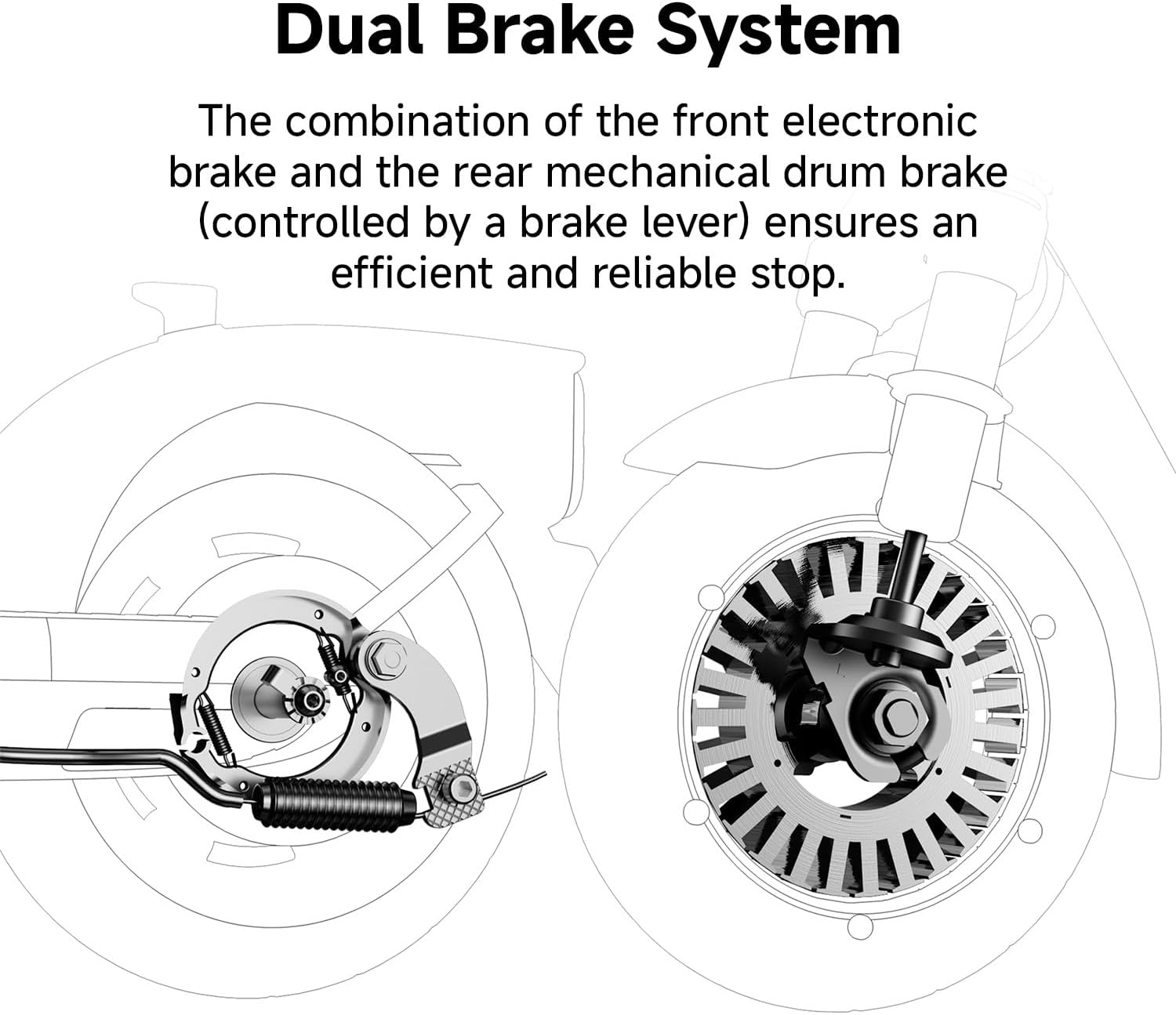
Figure 8: Close-up of the front double spring suspension, which helps absorb shocks for a more comfortable ride.
Cleaning and Storage
Clean the scooter with a damp cloth. Avoid using high-pressure water jets. When storing for extended periods, ensure the battery is partially charged (around 50-70%) and store in a dry, temperate environment.

Figure 9: Rear view of the scooter, showing the rear wheel and fender, important areas for cleaning and inspection.
Troubleshooting
If you encounter issues with your scooter, refer to the following common problems and solutions:
| Problem | Possible Cause | Solution |
|---|---|---|
| Scooter does not power on. | Low battery; loose connections. | Charge the battery fully. Check all cable connections, especially at the handlebar. |
| Reduced speed or range. | Low battery; heavy load; riding uphill; extreme temperatures. | Ensure battery is fully charged. Reduce load. Avoid steep inclines. Operate within recommended temperature range (14°F to 104°F). |
| Brakes not responding effectively. | Brake lever adjustment needed; worn brake components. | Inspect brake lever and cables. If issues persist, consult the full user manual or professional service. |
| Unusual noises during operation. | Loose parts; debris in wheels; motor issue. | Inspect the scooter for any loose screws or components. Clear any debris from wheels. If noise persists, seek professional assistance. |
For more detailed troubleshooting, please refer to the official User Manual PDF.
Specifications
| Feature | Detail |
|---|---|
| Brand | Segway |
| Model Name | Segway Ninebot eKickScooter E2 Plus II |
| Top Speed | 15.5 mph |
| Max Range | 16 miles (Eco Mode), 12 miles (Sport Mode) |
| Max Power | 500W |
| Weight Limit | 198 Pounds |
| Item Weight | 36.2 Pounds |
| Product Dimensions (LxWxH) | 42.6" x 17.6" x 46.3" |
| Wheel Size | 8.1 Inches |
| Wheel Type | Inner Hollow Shock-absorbing Tires |
| Suspension Type | Front Suspension (Double Spring) |
| Brake Style | Front electric brake, Rear drum brake |
| Charging Time | Approx. 7.5 Hours |
| Frame Material | Steel SPFH590 |
| Certifications | UL2271 & UL2272 Certified |
Warranty and Support
Your Segway Ninebot E2 Plus II Electric Scooter comes with a limited manufacturer's warranty:
- 2 Year Manufacturer Warranty: Covers Frame Stem, Wheel Hub Motor, Front Fork, Controller, Dashboard, and Wire Harness.
- 1 Year Manufacturer Warranty: Covers Folding Mechanism, Battery Assembly, Charger, Electronic Throttle, Brake Lever, Headlight, Taillight, Direction Indicator, and Direction Indicator Button.
For detailed warranty terms and conditions, please refer to the official Warranty PDF.
For further assistance, technical support, or to access the complete user manual, please use the resources below:


