
1. Important Safety Information
Please read all instructions carefully before installation and use. Retain this manual for future reference.
- Always follow the installation instructions provided to ensure proper and secure mounting.
- Exercise caution around the rounded edges of the cabinet to prevent accidental bumps or injuries.
- Operate the smooth hydraulic hinges gently when opening and closing the cabinet door to prevent slamming and potential damage.
- Always unplug the cabinet from the power source before performing any cleaning, maintenance, or service.
- This product is designed for surface mount installation only. Do not attempt to recess mount.
2. Product Overview
The Janboe Oval LED Medicine Cabinet is designed to provide functional storage and enhanced lighting for your bathroom. Key features include adjustable LED lighting, an anti-fog mirror, and a convenient USB shaver socket.

Front view of the Janboe Oval LED Medicine Cabinet with its integrated lighting illuminated.
Key Features:
- Durable powder-coated iron body for rust resistance.
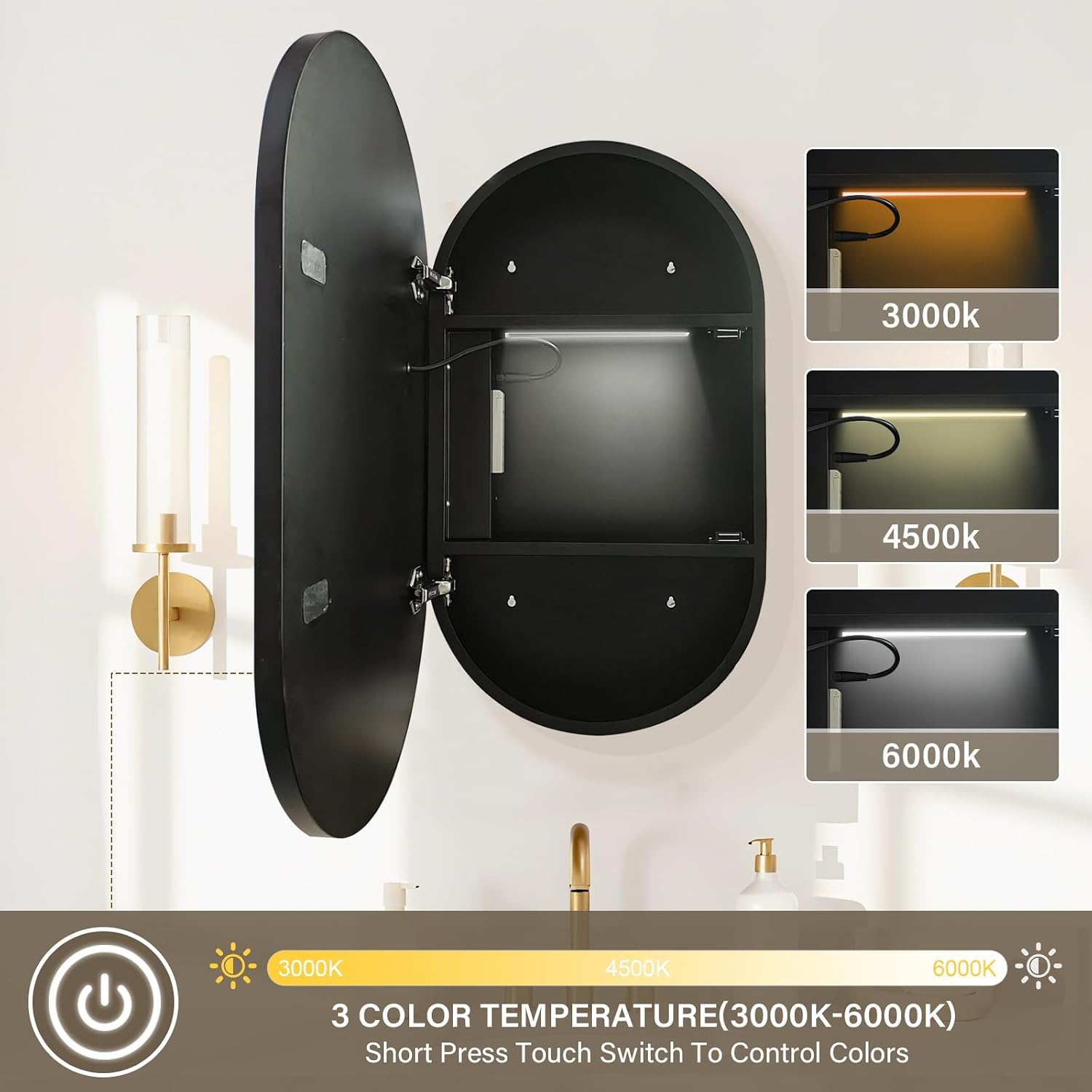
- Adjustable 3-color temperature LED lighting (3000K, 4500K, 6000K).
- Dimmable lighting from 10% to 100%.
- Built-in anti-fog functionality for a clear mirror.
- Integrated USB shaver socket for charging devices.
- Internal LED lighting for illuminated storage.
- Soft-closing hydraulic hinges for quiet operation.
3. Setup and Installation
This cabinet is designed for surface mount installation only. Ensure you have all necessary tools and follow local electrical codes.
Included Components:
- Janboe Oval LED Medicine Cabinet
- Installation accessories (screws, anchors, etc.)
Installation Steps (General Guidance):
- Preparation: Choose a suitable location on your bathroom wall, ensuring it is structurally sound and free from electrical wires or plumbing. Mark the desired height and position for the cabinet.
- Mounting Points: Use the included template (if provided) or measure the mounting points on the back of the cabinet. Mark these points on the wall.
- Drilling: Drill pilot holes at the marked locations. Insert wall anchors if necessary, depending on your wall material.
- Wiring: Connect the cabinet's electrical wiring to your household electrical supply according to local electrical codes. It is highly recommended to have a qualified electrician perform this step. Ensure power is OFF at the circuit breaker before connecting.
- Mounting: Carefully lift the cabinet and align the mounting holes with the screws or anchors on the wall. Secure the cabinet firmly using the provided installation accessories.
- Testing: Once securely mounted, restore power and test all functions (lights, defogger, USB socket).
Rear view of the cabinet, illustrating the mounting points for surface installation.

Internal components including the USB shaver socket, inner LED light strip, and soft-close hinges.
4. Operating Instructions
The Janboe Oval LED Medicine Cabinet features intuitive touch controls for its various functions.
4.1. LED Lighting Control

Visual guide for controlling the LED lighting's brightness and color temperature.
- Power On/Off: Tap the power icon on the mirror surface to turn the main LED light on or off.
- Adjust Color Temperature: Short press the touch switch to cycle through the three color temperatures: warm white (3000K), neutral white (4500K), and cool white (6000K).
- Adjust Brightness (Dimming): Long press the touch switch to adjust the brightness level from 10% to 100%. Release when the desired brightness is reached.
- Internal Lighting: The internal LED light illuminates automatically when the cabinet door is opened.
4.2. Anti-Fog Function

Illustration of the anti-fog feature, showing the defogger button and its effect on mirror clarity.
- Activate Defogger: Press the dedicated anti-fog button on the mirror surface.
- Operation: Allow approximately 5 minutes for the mirror to reach the optimal demisting temperature. The mist on the mirror surface will then dissipate.
4.3. USB Shaver Socket

The internal USB shaver socket, designed for charging electric shavers, toothbrushes, or mobile phones.
- Location: The USB shaver socket is located inside the cabinet.
- Usage: Use this port to conveniently charge electric shavers, toothbrushes, or other compatible USB-powered devices. This helps keep your countertop clear.
5. Maintenance and Care
Proper maintenance ensures the longevity and optimal performance of your medicine cabinet.
- Cleaning the Mirror: Always unplug the cabinet from the power source before cleaning. Use a soft, lint-free cloth and a non-abrasive glass cleaner. Spray cleaner onto the cloth, not directly onto the mirror or electrical components.
- Cleaning the Cabinet Body: Wipe the powder-coated iron body with a soft, damp cloth. For stubborn marks, use a mild, non-abrasive cleaner. Avoid harsh chemicals or abrasive materials that could damage the finish.
- Hinge Care: The soft-closing hydraulic hinges are designed for smooth operation. Avoid forcing the door open or closed. No special lubrication is typically required.
- Electrical Components: Do not attempt to clean or service any internal electrical components. If issues arise, consult a qualified technician.
6. Troubleshooting
If you encounter any issues with your Janboe Oval LED Medicine Cabinet, refer to the following common troubleshooting steps:
| Problem | Possible Cause | Solution |
|---|---|---|
| LED lights do not turn on. | No power supply; loose connection; faulty LED driver. | Check circuit breaker. Ensure all electrical connections are secure (consult an electrician if unsure). Contact customer support if the issue persists. |
| Anti-fog function is not working. | Defogger not activated; insufficient warm-up time; power issue. | Ensure the anti-fog button is pressed. Allow 5 minutes for the defogger to heat up. Check power supply. |
| USB shaver socket is not charging devices. | No power to the cabinet; device incompatibility; faulty socket. | Verify the cabinet has power. Test with a different USB device and cable. Contact customer support if the socket remains non-functional. |
| Cabinet door does not close smoothly. | Obstruction; hinge misalignment. | Check for any items obstructing the door. Inspect hinges for damage or misalignment. |
7. Specifications
| Feature | Detail |
|---|---|
| Brand | Janboe |
| Model Name | KCTL-4171-US |
| Dimensions (D x W x H) | 5.51" x 28" x 16" |
| Item Weight | 25 pounds |
| Material | Steel, Alloy Steel |
| Finish Type | Powder Coated |
| Mounting Type | Surface mount only |
| Shape | Capsule Shaped |
| Door Style | Mirrored |
| Special Features | 3 Color Temperature, Built-in Defogger, Dimmable, Internal Light, USB Shaver Socket |
| Assembly Required | No (for the cabinet itself, installation required) |
8. Warranty and Support
For warranty information, please refer to the documentation provided at the time of purchase or contact Janboe customer support directly. Details regarding specific warranty periods and coverage can be obtained from the manufacturer or authorized seller.
If you require further assistance, have questions about installation, operation, or encounter issues not covered in this manual, please contact Janboe customer service.