
ANENG 623
ANENG 623 Digital Automotive Multimeter Instruction Manual
Model: 623 | Brand: ANENG
1. Introduction
This manual provides detailed instructions for the safe and effective use of your ANENG 623 Digital Automotive Multimeter. The ANENG 623 is a versatile 20,000-count multimeter designed for precise automotive diagnostics and general electrical measurements. It features a unique 180° flip-cover design for protection and portability, a large backlit LCD screen, and a rechargeable lithium battery.
Key measurement capabilities include engine RPM, dwell angle, pulse width, AC/DC voltage, AC/DC current, resistance, duty cycle, circuit continuity, diode testing, capacitance, and temperature.
2. Safety Information
Always observe safety precautions when using electrical testing equipment. Failure to do so may result in injury or damage to the device or the item being tested.
- Ensure the multimeter is in good working condition before use.
- Do not exceed the maximum input values for any function.
- Use appropriate personal protective equipment (PPE) such as safety glasses.
- Verify the correct function and range settings before making measurements.
- Avoid contact with live circuits.
- The device features double fuse protection against overloading.
3. Package Contents
Verify that all items are present in your package:
- 1x ANENG 623 Multimeter Analyzer
- 1x Multimeter Kit (4x connection sockets, 2x PVC cables, 2x copper needles, 2x U-shaped inserts, 2x meter pens, 2x alligator clips, 2x puncture needles)
- 1x Circuit Test Lead
- 1x Temperature Line
- 1x Charging Cable
- 1x Instruction Manual
- 1x Storage Bag
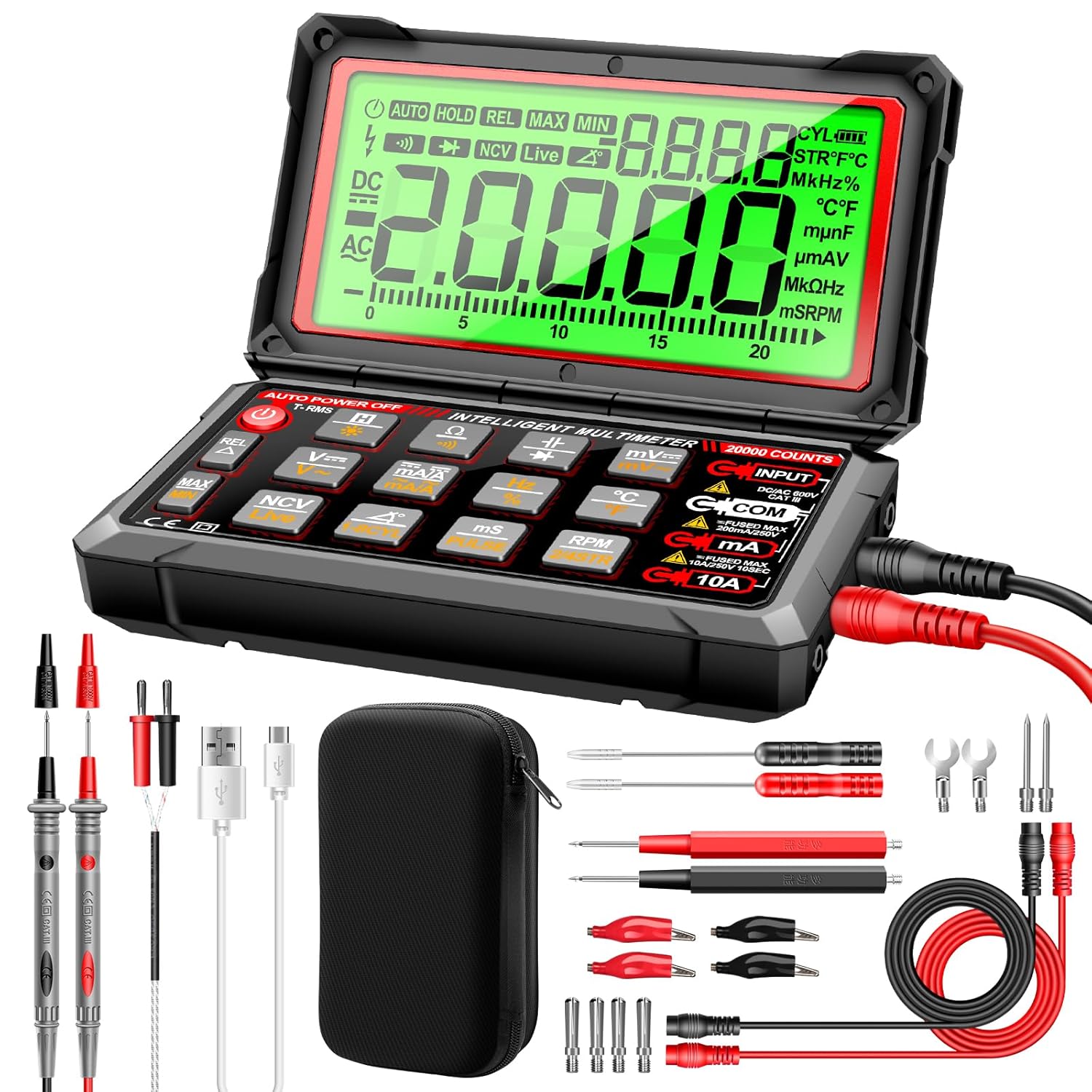
Figure 1: ANENG 623 Multimeter with all included accessories, such as test leads, alligator clips, temperature probe, and charging cable.
4. Product Overview
The ANENG 623 features a compact design with a protective flip-cover and a large, easy-to-read LCD display. Below is a diagram highlighting key components and controls.

Figure 2: Front view of the ANENG 623 Multimeter, showing the display, function buttons, and input jacks.
4.1 Key Features
- 20,000 Counts Display: High precision for detailed readings.
- 180° Flip-Cover Design: Protects the screen and enhances portability.
- Rechargeable Lithium Battery: Convenient charging via USB cable.
- Automotive Functions: RPM, Dwell Angle, Pulse Width for engine diagnostics.
- Non-Contact Voltage (NCV) Sensing: For detecting AC voltage without direct contact.
- Backlit LCD Screen: Improves readability in various lighting conditions.
- Auto Power Off: Conserves battery life when not in use.

Figure 3: The 180-degree flip screen design of the ANENG 623, offering flexibility and protection.
5. Setup
5.1 Charging the Battery
The ANENG 623 is equipped with a rechargeable lithium battery. Before first use, or when the battery indicator shows low power, charge the device using the provided USB charging cable.
- Connect the small end of the charging cable to the charging port on the multimeter.
- Connect the standard USB end to a compatible USB power adapter (e.g., phone charger) or a computer USB port.
- The charging indicator will illuminate during charging and turn off when fully charged.

Figure 4: The ANENG 623 Multimeter being charged via its USB port, indicating the rechargeable lithium battery feature.
5.2 Connecting Test Leads
Proper connection of test leads is crucial for accurate and safe measurements.
- Insert the black test lead into the "COM" (Common) input jack.
- For most voltage, resistance, capacitance, diode, and temperature measurements, insert the red test lead into the "INPUT" jack.
- For current measurements (mA/A), insert the red test lead into the corresponding "mA/A" or "10A" input jack, depending on the expected current range.
- Ensure all connections are secure before proceeding with measurements.
6. Operating Instructions
This section details how to use the ANENG 623 for various measurements.
6.1 Power On/Off
Press the power button to turn the multimeter on or off. The device features an auto power-off function to conserve battery life after a period of inactivity.
6.2 Basic Measurements (Voltage, Current, Resistance, Continuity)
The ANENG 623 often operates in an intelligent auto-ranging mode, simplifying basic measurements. Select the desired function using the mode buttons.
- Voltage (AC/DC): Select the 'V~' for AC voltage or 'V=' for DC voltage. Connect test leads in parallel with the circuit.
- Current (AC/DC): Select 'mA/A~' for AC current or 'mA/A=' for DC current. Connect test leads in series with the circuit. Ensure correct input jack for current range.
- Resistance (Ω): Select 'Ω'. Connect test leads across the component. Ensure the circuit is de-energized.
- Continuity: Select the continuity mode (often indicated by a buzzer icon). The device will beep if a continuous path is detected.

Figure 5: Examples of the ANENG 623 performing various measurements including AC voltage, temperature, capacitance, resistance, and current.
6.3 Automotive Diagnostics
The ANENG 623 is specifically designed for automotive applications.
6.3.1 Engine RPM Measurement
To measure engine revolutions per minute (RPM):
- Select the 'RPM' function on the multimeter.
- If the vehicle uses a distributor-less ignition system, connect the red test lead to the TACH signal line.
- If the vehicle uses a distributor ignition system, connect the red test lead to the engine end of the primary ignition coil.
- Connect the black test lead to a good ground terminal of the car battery.
- Start the engine and observe the RPM reading on the display.

Figure 6: Illustrated steps for connecting the ANENG 623 to an engine for RPM measurement.
6.3.2 Dwell Angle Measurement
To measure the dwell angle (for 1-8 cylinder engines):
- Select the 'DWELL' function (often labeled '1-8CYL' or similar).
- Connect the test leads as per the vehicle's service manual for dwell angle measurement. Typically, the red lead connects to the distributor's primary coil terminal and the black lead to ground.
- Start the engine and read the dwell angle in degrees on the display.
6.3.3 Pulse Width Measurement
To measure pulse width (up to 999.9ms):
- Select the 'mS PULSE' function.
- Connect the test leads to the signal source (e.g., fuel injector pulse).
- Observe the pulse width reading in milliseconds.
6.4 Non-Contact Voltage (NCV) Sensing
The NCV function allows for detection of AC voltage without direct contact with conductors.
- Select the 'NCV' or 'Live' function.
- Bring the top of the multimeter (where the NCV sensor is located) close to the suspected AC voltage source.
- The instrument will beep and the LCD analog bar will display the induction intensity, indicating the presence of AC voltage.

Figure 7: The ANENG 623 Multimeter detecting non-contact voltage, showing the visual and auditory indicators.
7. Maintenance
7.1 Cleaning
Wipe the multimeter with a damp cloth and mild detergent. Do not use abrasives or solvents. Ensure the device is off and disconnected from any power source before cleaning.
7.2 Battery Care
To prolong battery life, charge the device regularly and avoid fully discharging it for extended periods. If storing for a long time, charge the battery to approximately 50%.
7.3 Storage
Store the multimeter in a cool, dry place, away from direct sunlight and extreme temperatures. Use the provided storage bag to protect it from dust and physical damage.
8. Troubleshooting
| Problem | Possible Cause | Solution |
|---|---|---|
| Multimeter does not power on. | Low or depleted battery. | Charge the battery using the provided USB cable. |
| Inaccurate readings. | Incorrect function/range selected; poor test lead connection; damaged test leads. | Verify function and range. Ensure test leads are securely connected. Inspect test leads for damage and replace if necessary. |
| No continuity beep. | Open circuit; continuity mode not selected. | Ensure the circuit is closed. Select the continuity mode. |
| Display shows "OL" (Overload). | Measurement exceeds selected range or device capability. | Switch to a higher range (if applicable) or ensure the measurement is within the device's specifications. |
9. Specifications
| Feature | Specification |
|---|---|
| Display Counts | 20,000 |
| Engine RPM Range | 2/4 cylinder: 300-19,999 RPM |
| Dwell Angle | 1-8 cylinders, 0.1° resolution |
| Pulse Width | Up to 999.9ms |
| Power Source | Rechargeable Lithium Ion Battery (included) |
| Dimensions | Approximately 14.7cm x 8.6cm x 3.72cm (5.78 x 3.38 x 1.46 inches) |
| Safety Rating | Double fuse anti-burn protection |

Figure 8: Diagram showing the physical dimensions of the ANENG 623 Multimeter.
10. Warranty and Support
ANENG provides service and technical support for its products. For warranty claims, technical assistance, or further inquiries, please refer to the contact information provided with your purchase or visit the official ANENG website.
The package includes an instruction manual and a storage bag to help maintain your device. For additional support, please contact ANENG customer service.
Related documents623


Ask a question about this manual
Ask about setup, troubleshooting, compatibility, parts, safety, or missing instructions. Manuals+ will review the question and use this page’s manual context to help answer it.