
1. Introduction
This manual provides essential instructions for the assembly, operation, and maintenance of your wheelfun Huina 1502 1/18 Scale RC Semi Trailer Flatbed. This model is designed to be compatible with the Huina 1501 1/18 Remote Control Tractor Truck. Please read this manual thoroughly before operating the trailer to ensure safe and correct usage.
2. Safety Precautions
- Adult Supervision: This product is recommended for users aged 21 years and up. Adult supervision is advised during operation, especially for less experienced users.
- Battery Safety: Use only the specified 3.7V Li-Po battery. Do not overcharge, short-circuit, or expose the battery to extreme temperatures. Always disconnect the battery when not in use.
- Operating Environment: Operate the RC trailer in open areas, away from people, pets, and obstacles. Avoid operating near water, electrical lines, or busy roads.
- Moving Parts: Keep fingers, hair, and loose clothing away from moving parts such as wheels, support legs, and the tail board mechanism.
- Modifications: Do not modify the trailer or its components. Unauthorized modifications may lead to malfunction and void any potential warranty.
3. Package Contents
Verify that all items listed below are included in your package. If any items are missing or damaged, please contact customer support.
Included Items:
- 1x wheelfun Huina 1502 3-Axle Semi Trailer Flatbed Model (Red, Painted & Semi-assembled)
- 1x Electric Tail-Board
- 1x Electric Lifting Legs
- 1x 3.7V Li-Po Battery
- 1x Charging Cable (USB)

Image 3.1: The wheelfun Huina 1502 Semi Trailer Flatbed, shown with the included 3.7V Li-Po battery and USB charging cable.
Items Not Included (Required for Operation):
- Remote Controller and Receiver (compatible with Huina 1501 Tractor Truck)
- Light System (if desired)
4. Setup
4.1 Charging the Battery
- Connect the provided USB charging cable to a standard USB power adapter (not included) or a computer USB port.
- Connect the other end of the charging cable to the 3.7V Li-Po battery.
- Allow the battery to charge fully. The charging indicator (if present on the cable/adapter) will typically change color or turn off when charging is complete. Do not leave the battery unattended while charging.
4.2 Installing the Battery
- Locate the battery compartment on the underside of the trailer. This is typically secured by screws or a latch.
- Open the battery compartment.
- Carefully insert the charged 3.7V Li-Po battery into the compartment.
- Connect the battery connector to the trailer's power port. Ensure the polarity is correct.
- Close and secure the battery compartment.
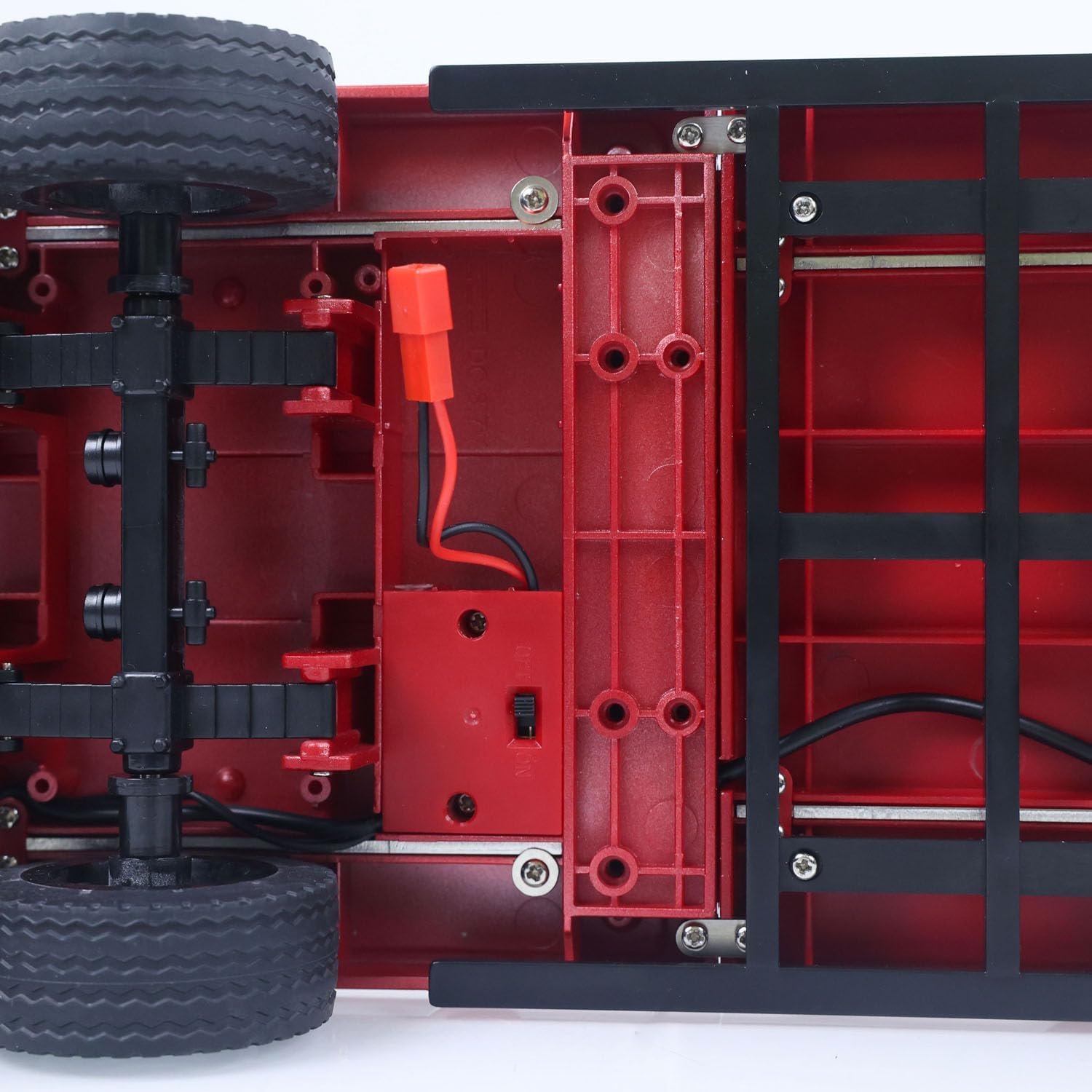
Image 4.1: Underside of the trailer, illustrating the battery compartment and the power switch. Ensure the battery is securely connected.
4.3 Connecting to the Tractor Truck (Huina 1501)
The Huina 1502 trailer is designed to connect to the Huina 1501 1/18 Remote Control Tractor Truck. Ensure your tractor truck is powered off before attempting connection.
- Align the trailer's kingpin with the fifth wheel coupling on the tractor truck.
- Carefully back the tractor truck under the trailer until the kingpin locks into place. You should hear a click or feel a secure connection.
- Connect any necessary electrical cables between the trailer and the tractor truck for power and control of the electric features (support legs, tail board). Refer to your Huina 1501 tractor truck manual for specific connection points.

Image 4.2: Side view of the trailer, showing the general structure for connection to a tractor truck.
5. Operating Instructions
Once the trailer is connected to the tractor truck and powered on, you can operate its electronic features using the tractor truck's remote control. Refer to your Huina 1501 tractor truck manual for specific button assignments.
5.1 Electric Support Legs
The trailer is equipped with electric support legs for stable parking and detachment from the tractor truck.
- Lowering: Use the designated button on your tractor truck's remote control to lower the support legs. Ensure the trailer is on a flat, stable surface before lowering.
- Raising: Use the designated button on your tractor truck's remote control to raise the support legs before driving. Ensure the legs are fully retracted to prevent damage during movement.

Image 5.1: Close-up view of the electric support legs in their extended position.
5.2 Electric Tail Board
The electric tail board allows for easy loading and unloading of cargo onto the flatbed.
- Lowering: Use the designated button on your tractor truck's remote control to lower the tail board.
- Raising: Use the designated button on your tractor truck's remote control to raise the tail board. Ensure it is fully raised and secured before moving the trailer.

Image 5.2: Rear view of the trailer, showing the tail board in its raised position, ready for transport.
6. Maintenance
- Cleaning: Wipe the trailer with a soft, dry cloth after each use to remove dust and debris. Avoid using water or harsh chemicals, which can damage electronic components or paint.
- Lubrication: Periodically check moving parts (e.g., support leg mechanisms, tail board hinges) for smooth operation. Apply a small amount of silicone lubricant if necessary.
- Storage: Store the trailer in a cool, dry place away from direct sunlight and extreme temperatures. Disconnect the battery if storing for extended periods.
- Battery Care: Follow all battery charging and storage guidelines to prolong battery life and ensure safety.
7. Troubleshooting
| Problem | Possible Cause | Solution |
|---|---|---|
| Trailer features (legs/tail board) not responding. |
|
|
| Support legs or tail board move slowly or intermittently. |
|
|
| Trailer detaches unexpectedly from tractor truck. |
|
|
8. Specifications
| Feature | Detail |
|---|---|
| Model | Huina 1502 |
| Scale | 1/18 |
| Material | Plastic, Metal |
| Color | Red |
| Length | Approx. 73.5 cm (28.9 inches) |
| Width | Approx. 14.3 cm (5.6 inches) |
| Height | Approx. 20.4 cm (8.0 inches) |
| Battery | 3.7V Li-Po (included) |
| Compatibility | Huina 1501 1/18 Remote Control Tractor Truck |
| Item Weight | 5.5 pounds (2.5 kg) |
| Recommended Age | 21 years and up |
9. Warranty and Support
For any questions, concerns, or support regarding your wheelfun Huina 1502 Semi Trailer Flatbed, please contact the seller or manufacturer directly. Retain your proof of purchase for warranty claims, if applicable. Specific warranty terms may vary and are typically provided at the point of purchase or on the manufacturer's official website.
If you encounter issues not covered in the troubleshooting section, please reach out to the Wheelfun RC Hobby seller for assistance.
