
KOSPET Magic P10
Contents
KOSPET Magic P10 Smartwatch User Manual
Model: Magic P10
Introduction
The KOSPET Magic P10 Smartwatch is a versatile and robust device designed for daily use and active lifestyles. Featuring a 1.96" AMOLED display, integrated GPS, and extensive health monitoring capabilities, it offers a comprehensive solution for tracking your fitness, managing communications, and staying connected. This manual provides essential information on setting up, operating, maintaining, and troubleshooting your Magic P10 smartwatch.

Image: KOSPET Magic P10 Smartwatch, showcasing its sleek design and vibrant display.
Setup and Pairing
Before using your KOSPET Magic P10, ensure it is fully charged and paired with your smartphone via the Apexmove app.
Initial Setup Steps:
- Charge the Smartwatch: Connect the included magnetic charger to the charging points on the back of the watch. Plug the USB end into a power adapter (not included). A full charge typically takes about 3 hours.
- Download the Apexmove App: Search for "Apexmove" in the Google Play Store (for Android) or Apple App Store (for iOS) and install it on your smartphone.
- Enable Bluetooth: On your smartphone, go to your Bluetooth settings and ensure Bluetooth is turned on.
- Pair the Device:
- Open the Apexmove app.
- Navigate to the "Device" section and tap "Add a new device."
- The app will search for nearby KOSPET devices. Select "KOSPET Magic P10" from the list.
- Confirm the pairing request on both your phone and the smartwatch.
- Grant Permissions: Allow the Apexmove app to access necessary permissions, such as notifications, location, and health data, for full functionality.

Image: Visual guide for connecting the smartwatch to your phone.
Receiving Notifications:
To ensure you receive messages and app notifications on your smartwatch, follow these steps:
For Android Devices:
- Keep the Apexmove app running in the background (add it to the whitelist if your phone has power-saving restrictions).
- Disable "Do Not Disturb" mode and power-saving mode on your phone.
- Do not log in to the Apexmove app on other devices to ensure correct message synchronization.
- In the Apexmove app, go to "Device" > "SMS Reminder" and enable it.
- Go to "Device" > "App Notification" and enable notifications for desired applications.

Image: Android notification setup guide.
For iOS Devices:
- Keep the Apexmove app running in the background.
- Disable "Do Not Disturb" mode and power-saving mode on your phone.
- Do not log in to the Apexmove app on other devices.
- In the Apexmove app, go to "Device" > "SMS" and enable it.
- Go to "Device" > "App" and enable notifications for desired applications.
- Ensure that in your phone's "Settings," you allow "Apexmove" to access "Notifications."

Image: iOS notification setup guide.
Operating Your Smartwatch
Basic Navigation:
- Swipe Up/Down: Access quick settings or notifications.
- Swipe Left/Right: Navigate through widgets like activity tracking, heart rate, weather, etc.
- Press Side Button/Crown: Return to the home screen or open the app menu.
Communication Features:
The KOSPET Magic P10 allows you to manage calls and receive notifications directly from your wrist.
- Answering/Making Calls: With Bluetooth connected, you can answer incoming calls or dial numbers directly from the watch. The built-in speaker and microphone provide clear audio.
- Message Reminders: Receive alerts for SMS, social media apps (e.g., Facebook, WhatsApp), and other notifications configured through the Apexmove app.
- Voice Assistant: Utilize the integrated voice assistant for quick queries or commands.

Image: Smartwatch showing call, voice assistant, and notification features.

Image: Managing calls directly from the smartwatch.
Health Monitoring:
The Magic P10 is equipped with advanced sensors (VC9213-4PD) for comprehensive health tracking.
- Heart Rate Monitoring: Real-time and continuous heart rate tracking, including Heart Rate Variability (HRV).
- Blood Oxygen (SpO₂) Monitoring: Measure your blood oxygen saturation levels.
- Sleep Tracking: Monitor your sleep stages (deep, light, REM) and provide insights into your sleep quality.
- Stress and Emotional State: Track your stress levels and emotional state throughout the day.
- Menstrual Cycle Tracking: For female users, track and predict menstrual cycles.

Image: Overview of health monitoring features.

Image: Advanced sensor for precise health data.
Sports Modes and GPS:
With over 180 sports modes and integrated dual-band GPS (L1+L5), the Magic P10 provides accurate tracking for various activities.
- 180+ Sports Modes: Includes running, cycling, swimming, badminton, indoor cycling, and many more. The watch adapts to your training style.
- Integrated GPS: Dual-band GPS and 6 satellite systems ensure ultra-fast and precise positioning, even in dense urban areas.
- Outdoor Sensors: Built-in compass, barometer, and altimeter provide accurate direction, pressure, and altitude monitoring for outdoor adventures.

Image: GPS tracking during outdoor activities.

Image: Precision tracking with integrated sensors.

Image: Tracking various sports activities.
Apexmove App Integration:
The exclusive Apexmove app enhances your smartwatch experience by providing personalized training and real-time tracking.
- Create personalized training plans.
- Track your unique fitness data and progress.
- Access detailed workout records and statistics.

Image: Apexmove app for personalized sports tracking.

Image: Apexmove app interface and features.
Maintenance
Battery Life:
The KOSPET Magic P10 features a 450 mAh high-density battery, optimized with an AI power-saving algorithm.
- Typical Use: Up to 12-21 days.
- Standby Mode: Up to 50 days.
- GPS Workout Mode: Up to 18 hours.
To maximize battery life, consider adjusting screen brightness, limiting continuous heart rate monitoring, and turning off unnecessary notifications.
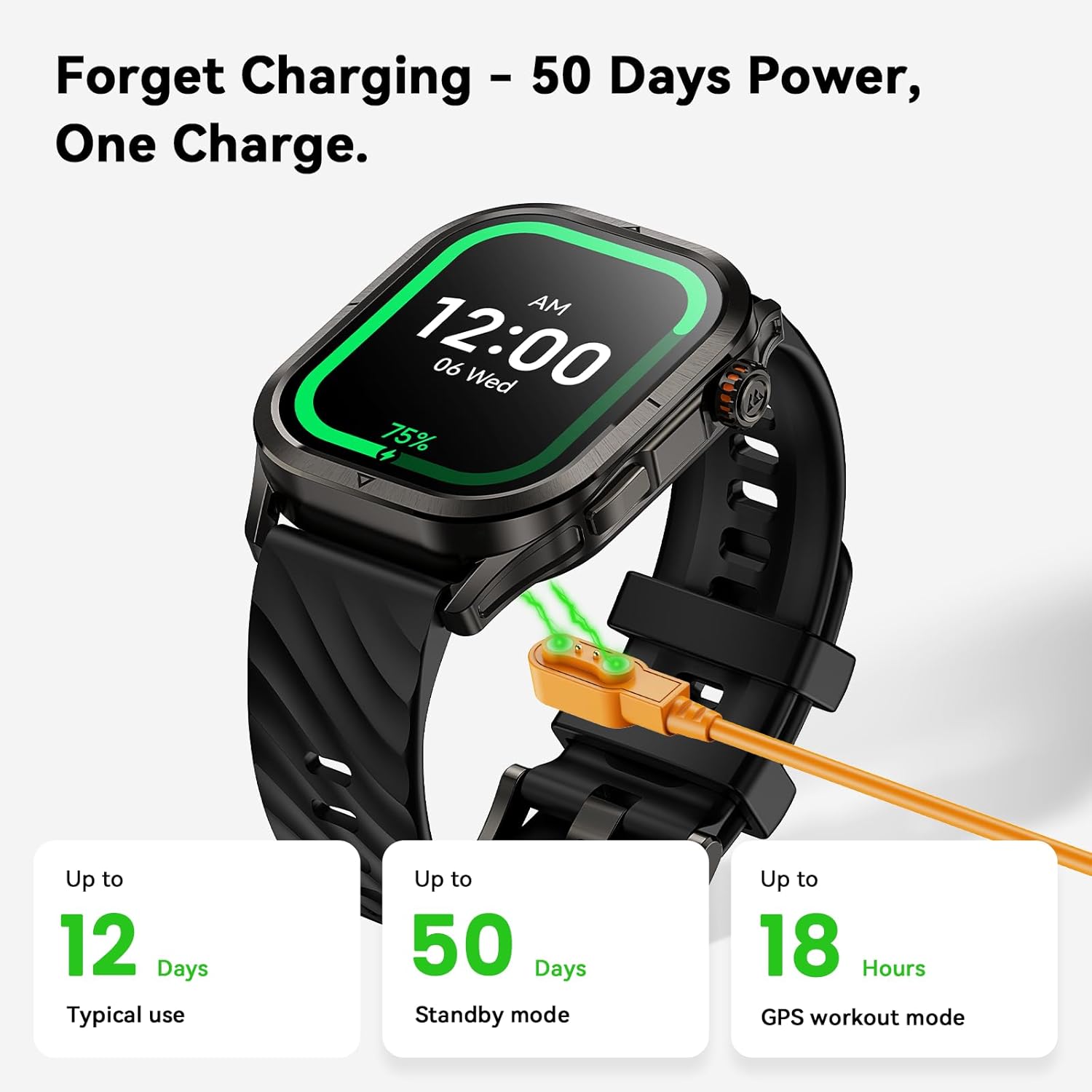
Image: Smartwatch charging and battery life overview.

Image: Detailed battery life information.
Water Resistance (5ATM):
The Magic P10 is 5ATM waterproof, meaning it can withstand pressures equivalent to a depth of 50 meters. This makes it suitable for swimming and shallow-water activities. It is not recommended for diving or high-pressure water activities.
- Rinse the watch with fresh water after exposure to saltwater or chlorinated water.
- Do not press buttons underwater.
- Avoid exposing the watch to hot water or steam.
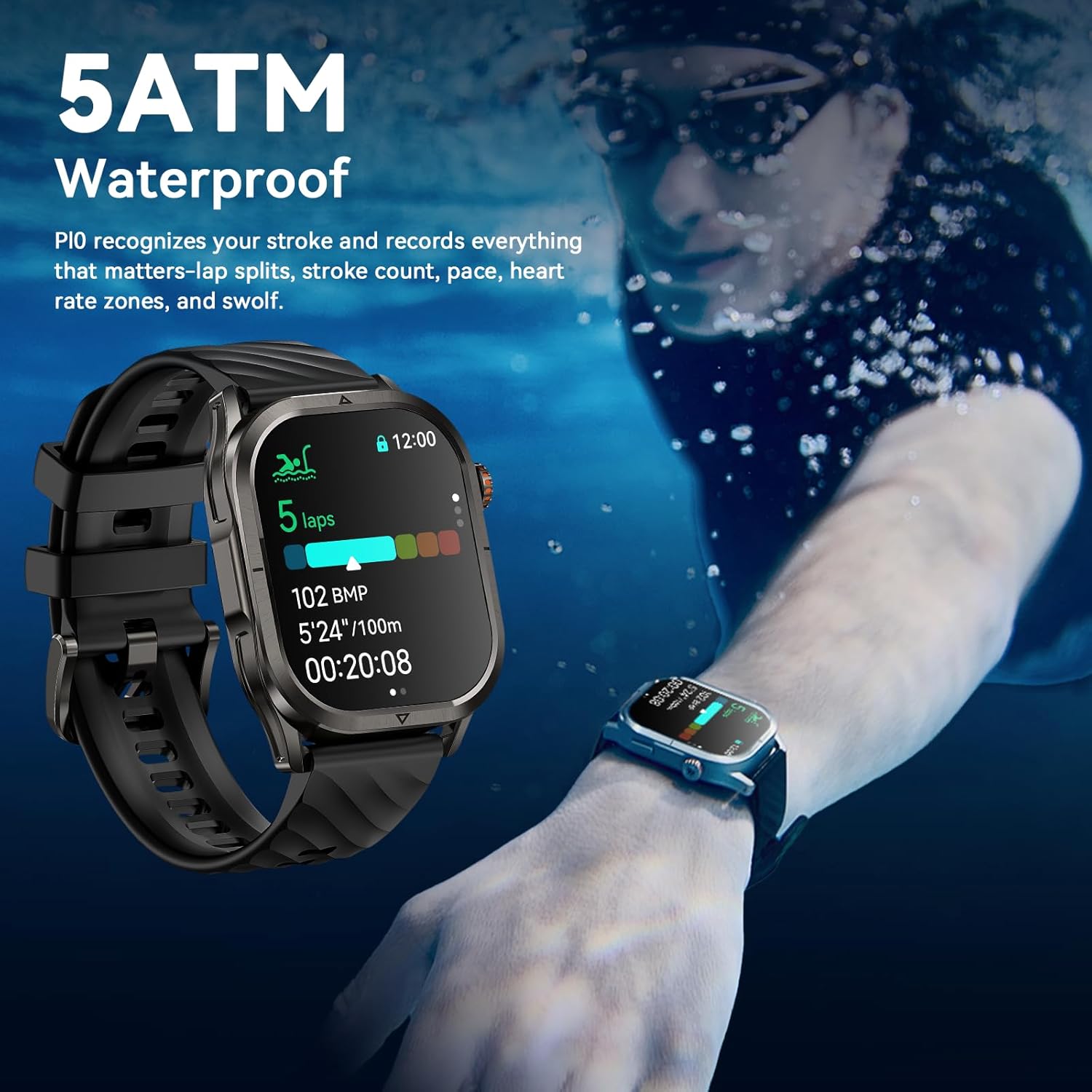
Image: Smartwatch being used during swimming, demonstrating 5ATM water resistance.

Image: Water resistance and swimming tracking capabilities.
Troubleshooting
Common Issues and Solutions:
- Watch not turning on: Ensure the watch is fully charged. If it still doesn't turn on, try holding the power button for 10-15 seconds.
- Cannot pair with phone:
- Ensure Bluetooth is enabled on your phone and the watch.
- Make sure the watch is within the Bluetooth range (typically 10 meters).
- Restart both the watch and your phone.
- Clear the Bluetooth cache on your phone (Android) or forget the device and re-pair (iOS).
- Notifications not received:
- Check notification settings in the Apexmove app (refer to "Setup and Pairing" section).
- Ensure the Apexmove app is running in the background and not restricted by power-saving modes.
- Disable "Do Not Disturb" mode on both your phone and watch.
- Inaccurate health data:
- Ensure the watch is worn snugly on your wrist, not too loose or too tight.
- Clean the sensor on the back of the watch regularly.
- Avoid excessive movement during measurements.
- GPS not connecting or inaccurate:
- Ensure you are in an open outdoor area with a clear view of the sky.
- Wait a few moments for the watch to acquire satellite signals.
- Ensure the GPS feature is enabled for your activity.
Specifications
| Feature | Detail |
|---|---|
| Brand | KOSPET |
| Model Name | Magic P10 |
| Display Size | 1.96 Inches |
| Display Type | AMOLED |
| Water Resistance | 5ATM |
| GPS | Integrated GPS (Dual-band L1+L5, 6 satellite systems) |
| Battery Capacity | 450 mAh |
| Battery Life (Typical) | 12-21 days |
| Battery Life (Standby) | Up to 50 days |
| Battery Life (GPS Workout) | Up to 18 hours |
| Charging Time | Approx. 3 hours |
| Memory Storage | 128 MB |
| Operating System Compatibility | Android (5.1+) and iOS (10.0+) |
| Special Features | Always On Display, Phone Call, Notifications, Activity Tracker, Health Monitoring (HR, SpO₂, Sleep, Stress, Menstrual Cycle), 180+ Sports Modes, Compass, Barometer, Altimeter |
| Dimensions | 11.8 x 10.8 x 7.2 cm; 270 g (Package) |

Image: Smartwatch dimensions and package contents.

Image: Compatibility with iOS and Android devices.
Warranty and Support
KOSPET is committed to providing high-quality products and excellent customer service.
- Warranty: The product typically comes with a 24-month warranty from the date of purchase, covering manufacturing defects. Please refer to your purchase documentation for specific warranty terms.
- Returns: A 30-day return service is generally available for eligible purchases.
- Customer Service: For technical support, warranty claims, or any inquiries, please contact KOSPET customer service. You can often find contact information on the official KOSPET website or through the retailer where you purchased the product.

Image: KOSPET Brand Logo.

Image: KOSPET support information: 24-hour customer service, 24-month warranty, 30-day return service.
Ask a question about this manual
Ask about setup, troubleshooting, compatibility, parts, safety, or missing instructions. Manuals+ will review the question and use this page’s manual context to help answer it.