
1. Introduction
This manual provides detailed instructions for the installation, operation, and maintenance of your Amico 60 Inch Smart Ceiling Fan with Lights. Please read this manual thoroughly before installation and retain it for future reference.
The Amico 60-inch smart ceiling fan features a reversible DC motor, 5 blades, 6 speed settings, 3 color temperature (3CCT) dimmable LED lighting, and smart control options including remote, app (Joinin Home/Smart Life/Tuya Smart), and voice control (Alexa/Google Home). It is designed for indoor use in various spaces such as living rooms, bedrooms, offices, and kitchens.
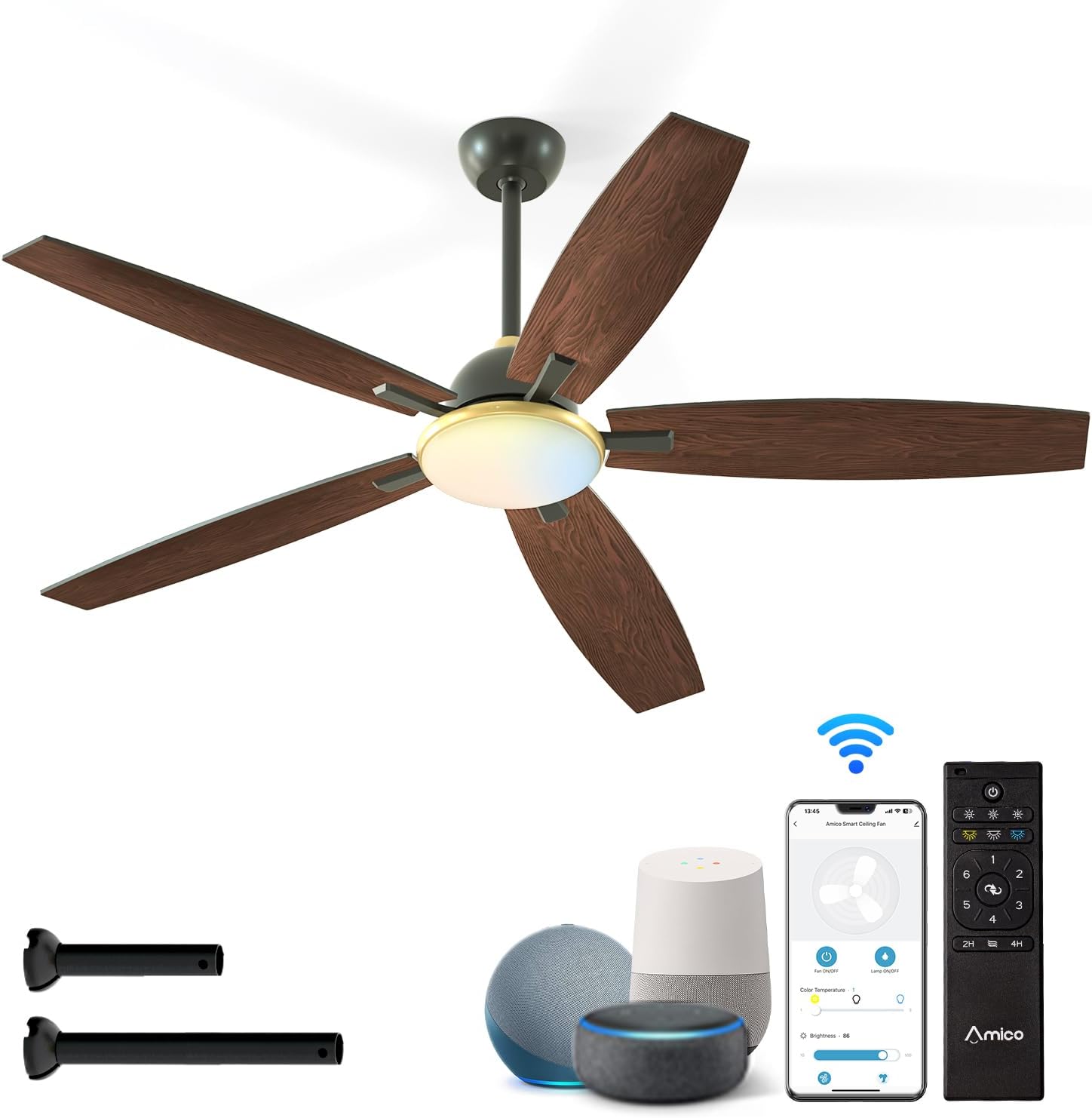
Figure 1: Amico 60 Inch Smart Ceiling Fan with included accessories and smart control options.
2. Safety Information
WARNING: To reduce the risk of fire, electric shock, or personal injury, always follow these basic precautions:
- Read all instructions before installing the fan.
- Ensure the installation site is structurally sound and can support the fan's weight.
- All wiring must be in accordance with national and local electrical codes. If you are unfamiliar with wiring, consult a qualified electrician.
- Disconnect power at the circuit breaker or fuse box before beginning installation or performing any maintenance.
- Do not operate the fan with a damaged power cord or plug.
- Avoid placing objects in the path of the fan blades.
- This fan is designed for indoor use only. Do not expose directly to rain.
3. Package Contents
Verify that all components are present before beginning installation. If any parts are missing or damaged, contact Amico customer service.
- Ceiling Fan Motor Assembly
- Fan Blades (5)
- Light Kit
- Remote Control with Wall Mount
- Downrods (5-inch and 10-inch options)
- Mounting Bracket
- Hardware Pack (screws, wire nuts, balance kit)
- User Manual

Figure 2: Fan dimensions and downrod options.
4. Setup and Installation
Professional installation is recommended if you are not experienced with electrical wiring or ceiling fan installation.
4.1 Pre-Installation Checks
- Ensure power is disconnected at the main circuit breaker.
- Confirm the ceiling junction box is securely mounted and capable of supporting the fan's weight (approximately 10 pounds).
- Determine the appropriate downrod length (5-inch or 10-inch) based on your ceiling height.
4.2 Mounting the Fan
- Attach the mounting bracket to the ceiling junction box using the provided screws.
- Assemble the downrod to the motor housing, feeding the wires through the downrod.
- Carefully lift the fan assembly and hang it from the mounting bracket.
4.3 Electrical Connections
Connect the fan's electrical wires to the household wiring according to the wiring diagram in the full instruction manual. Ensure all connections are secure using wire nuts.
4.4 Attaching Blades and Light Kit
- Securely attach the five fan blades to the motor housing.
- Connect the light kit wiring and attach the light kit to the fan assembly.
- Install the light shade.

Figure 3: Downrod and Sloped Ceiling Mount options.
5. Operating Instructions
Your Amico Smart Ceiling Fan offers multiple control methods for convenience.
5.1 Remote Control Operation
The included remote control allows for comprehensive fan and light adjustments.
- Power On/Off: Turn the fan and light on or off.
- Fan Speed: Select from 6 fan speeds (Levels 1-2: Low/Comfortable, Levels 3-4: Medium/Natural, Levels 5-6: High/Cooling).
- Light Control: Adjust light brightness (10%-100% dimmable) and select color temperature (3000K Warm White, 4000K Natural White, 6000K Cold White).
- Reversible Motor: Change fan direction for summer (downward airflow for cooling) or winter (upward airflow for heat circulation).
- Timer Setting: Set a sleep shutdown timer for 2 or 4 hours.

Figure 4: Remote control and smart features overview.

Figure 5: Remote control functionality.
5.2 Smart App Control
Download the Joinin Home, Smart Life, or Tuya Smart app to control your fan from your smartphone or tablet.
- Download the chosen app from your device's app store.
- Follow the in-app instructions to pair your fan with the app.
- Once paired, you can control all fan and light functions remotely.

Figure 6: App control interface.
5.3 Voice Control
Integrate your fan with Alexa or Google Home for hands-free operation.
- Ensure your fan is connected to the Smart Life/Tuya Smart app.
- Enable the Smart Life/Tuya Smart skill in your Alexa or Google Home app.
- Discover devices. You can now use voice commands like "Alexa, turn on the ceiling fan" or "Hey Google, set fan speed to 3."

Figure 7: Voice control in action.
5.4 Key Features
- 6 Adjustable Speeds: From a gentle breeze (Level 1-2) to strong cooling (Level 5-6).
- Reversible DC Motor: Optimizes air circulation for both summer (cooling) and winter (heat distribution).
- Noiseless Operation: Designed for quiet performance, operating at approximately 20dB, comparable to falling leaves.
- Customizable Dimmable Light: Adjust brightness from 10% to 100% and choose between 3000K (warm white), 4000K (natural white), and 6000K (cold white) color temperatures.

Figure 8: Fan speed settings.

Figure 9: Reversible motor for year-round comfort.

Figure 10: Quiet operation for peaceful environments.
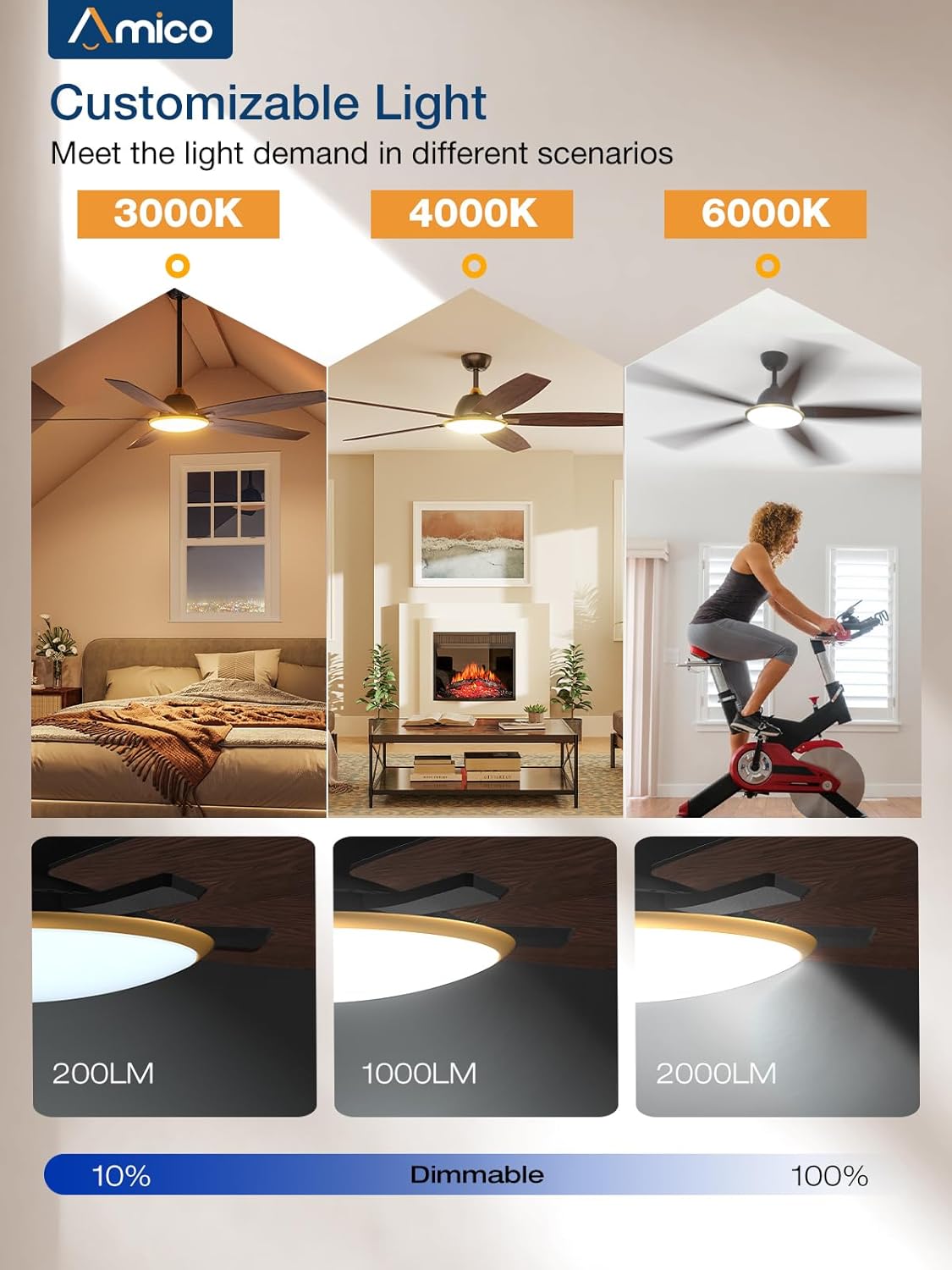
Figure 11: Customizable light settings.
6. Maintenance
Regular maintenance ensures optimal performance and longevity of your ceiling fan.
- Cleaning: Periodically wipe the fan blades and motor housing with a soft, damp cloth. Do not use abrasive cleaners or solvents.
- Light Kit: Ensure the light shade is clean for optimal light output.
- Blade Balance: If the fan wobbles, use the included blade balancing kit to correct it.
- Tighten Fasteners: Check all screws and fasteners annually to ensure they are secure.
- Power Disconnection: Always disconnect power before cleaning or performing any maintenance.
7. Troubleshooting
If you encounter issues with your Amico ceiling fan, refer to the following common problems and solutions.
| Problem | Possible Cause | Solution |
|---|---|---|
| Fan does not start | No power; loose wiring; remote control battery low. | Check circuit breaker. Ensure all wiring connections are secure. Replace remote control batteries. |
| Light does not work | Loose wiring in light kit; LED module failure. | Check light kit wiring connections. If issues persist, contact customer service. (Note: Some users reported issues with initial light connection, re-seating connectors may help.) |
| Fan wobbles | Loose blades; unbalanced blades; loose mounting bracket. | Ensure all blade screws are tight. Use the included balancing kit. Verify mounting bracket is secure. |
| Remote control not working | Low battery; remote not paired. | Replace remote batteries. Refer to the full manual for remote pairing instructions. |
| Smart control (App/Voice) not working | Wi-Fi connectivity issues; incorrect app pairing; skill not enabled. | Ensure your Wi-Fi network is stable. Re-pair the fan with the app. Verify the Smart Life/Tuya Smart skill is enabled in your voice assistant app. |
| Fan makes noise | Loose screws; motor issue. | Check all screws for tightness. If noise persists and is not typical airflow sound, contact customer service. |
For further assistance, please contact Amico customer support.
8. Specifications
- Brand: Amico
- Model Name: C0502AA0301022
- Product Dimensions: 60"D x 60"W x 15"H
- Item Weight: 10 pounds
- Color: Black
- Electric Fan Design: Ceiling Fan
- Power Source: AC
- Voltage: 120 Volts
- Number of Power Levels: 6 (Fan Speeds)
- Special Feature: LED Light, Dimmable, Reversible DC Motor, Smart Control (Wi-Fi, Voice)
- Light Color Temperature: 3000K (Warm White), 4000K (Natural White), 6000K (Cold White)
- Control Method: Remote, App (Joinin Home/Smart Life/Tuya Smart), Voice (Alexa/Google Home)
- Indoor/Outdoor Usage: Indoor (Not to be exposed directly to rain)
- Included Components: Light Kit, Remote Control, Downrods
- Batteries: 2 AAA batteries required for remote (included)
- Certification: ETL
9. Warranty and Support
Amico is committed to product quality and customer satisfaction. If you experience any issues or have questions regarding your Amico ceiling fan, please contact our customer service team.
While specific warranty details are not provided in this document, Amico customer service has been noted for its responsiveness and willingness to assist with product issues, including sending replacement parts when necessary. Please retain your proof of purchase for warranty claims.
Contact Information: Refer to the packaging or the official Amico website for the most current customer support contact details (email or phone).


