
Hoorola SW-RF12
Hoorola SW-RF12 Golf Rangefinder with Slope Instruction Manual
Model: SW-RF12
1. Introduction
Thank you for choosing the Hoorola SW-RF12 Golf Rangefinder. This device is designed to provide precise distance measurements for golf, hunting, and other outdoor activities. Featuring advanced slope compensation, flag lock technology, and a magnetic mount, the SW-RF12 enhances your accuracy and convenience. Please read this manual thoroughly to understand the proper operation, maintenance, and safety precautions for your new rangefinder.
2. Package Contents
Ensure all items are present in your package:
- Hoorola SW-RF12 Golf Rangefinder
- Carrying Case
- USB-C Charging Cable
- Lanyard
- Cleaning Cloth
- Instruction Manual
3. Product Overview
Familiarize yourself with the components of your Hoorola SW-RF12 Rangefinder.

Image 3.1: Front view of the Hoorola SW-RF12 Golf Rangefinder, showing the objective lenses and the Hoorola branding with model number SW-RF12.
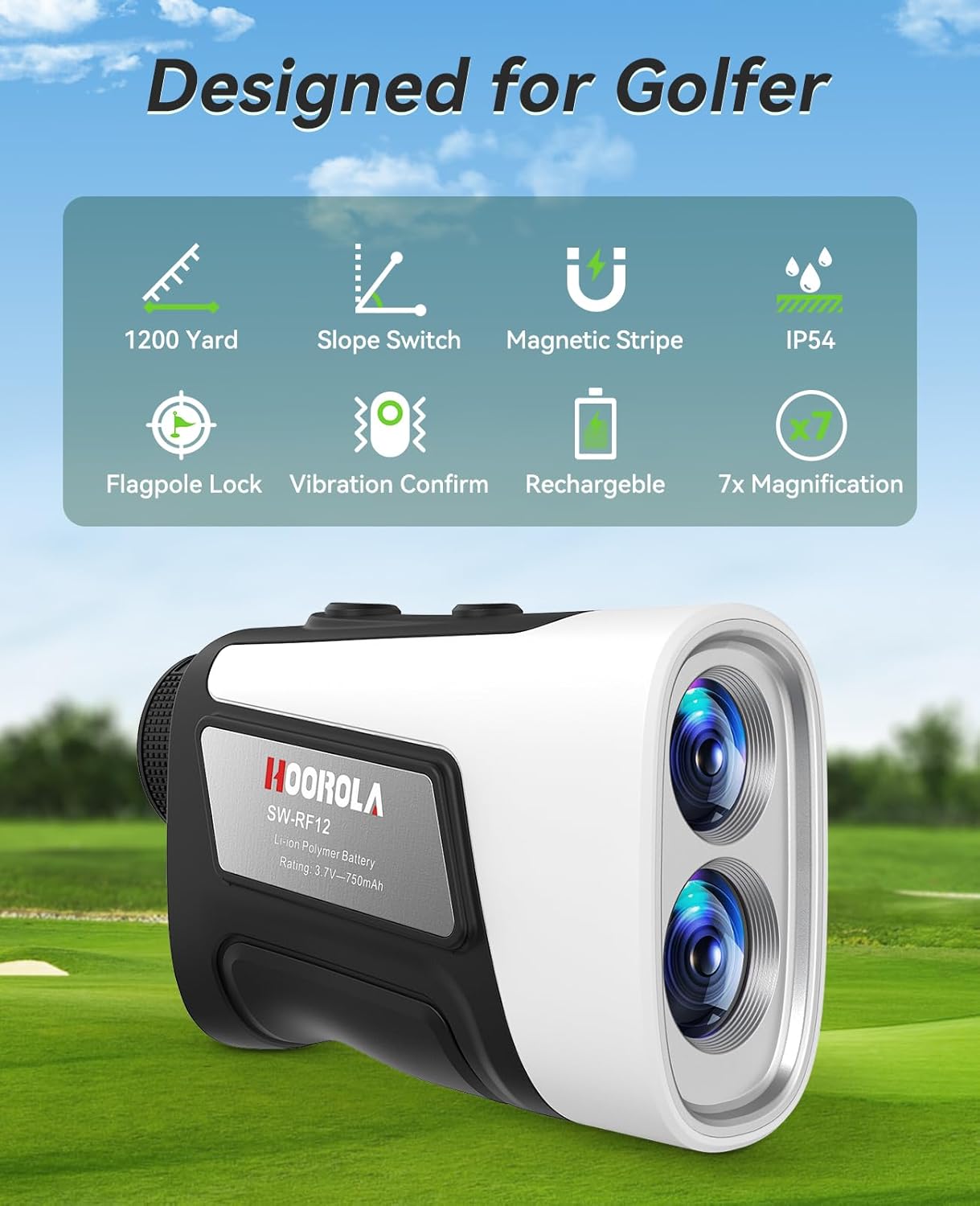
Image 3.2: Diagram highlighting key features: 1200 Yard range, Slope Switch, Magnetic Stripe, IP54 waterproof rating, Flagpole Lock, Vibration Confirm, Rechargeable battery, and 7x Magnification.
3.1 Key Components
- Objective Lens: Front lenses for viewing targets.
- Eyepiece/Diopter Adjustment: For focusing the display to your vision.
- Power/Measurement Button: Activates the device and takes measurements.
- Mode Button: Switches between different measurement modes.
- Slope Switch: Physical switch to enable or disable slope compensation.
- Magnetic Strip: Located on the side for attaching to metal surfaces.
- USB-C Charging Port: For recharging the internal battery.
4. Setup
4.1 Charging the Battery
The Hoorola SW-RF12 comes with a built-in rechargeable battery. Before first use, fully charge the device.
- Locate the USB-C charging port on the rangefinder.
- Connect the provided USB-C cable to the rangefinder and the other end to a USB power adapter (not included) or a computer USB port.
- The charging indicator will illuminate. It typically takes 1.5-2 hours for a full charge.
- Once fully charged, the indicator light will change or turn off. Disconnect the cable.
Note: A full charge provides approximately 20,000 measurements.

Image 4.1: Illustration showing the Hoorola SW-RF12 connected to a USB-C charging cable, with icons indicating 750mAh battery capacity, 15s auto-off, and 1.5-2H charging times.
4.2 Diopter Adjustment
Adjust the eyepiece to ensure a clear view of the internal display.
- Look through the eyepiece.
- Rotate the diopter adjustment ring (usually located near the eyepiece) until the display text and reticle appear sharp and clear to your eye.
5. Operating Instructions
5.1 Power On/Off
- To Power On: Press the Power/Measurement button briefly. The display will activate.
- To Power Off: The device will automatically power off after 15 seconds of inactivity to conserve battery.
5.2 Taking a Measurement
- Power on the rangefinder.
- Aim the reticle at your desired target.
- Press the Power/Measurement button once. The distance will be displayed instantly.

Image 5.1: Visual representation of the rangefinder's 3-1200 yard range and ±0.5 yard accuracy, along with 7x magnification, shown in a golf course setting.
5.3 Switching Modes
Press the Mode button briefly to cycle through the available measurement modes:
- Standard Ranging Mode: Measures straight-line distance.
- Slope Compensation Mode (Golf Mode): Provides adjusted distance based on incline/decline. Activate/deactivate using the physical slope switch.
- Flag Lock Mode with Vibration: Identifies the flagstick among background objects and vibrates to confirm lock.
- Continuous Scan Mode: Hold down the Power/Measurement button to scan multiple targets and get continuous distance updates.
- Speed Measurement Mode: Measures the speed of a moving object.
- Horizontal & Height Ranging Mode: Measures horizontal distance and vertical height.

Image 5.2: Depiction of the slope compensation feature, showing how the rangefinder calculates both straight-line distance and slope-adjusted distance. The image also shows the physical slope switch in ON and OFF positions.
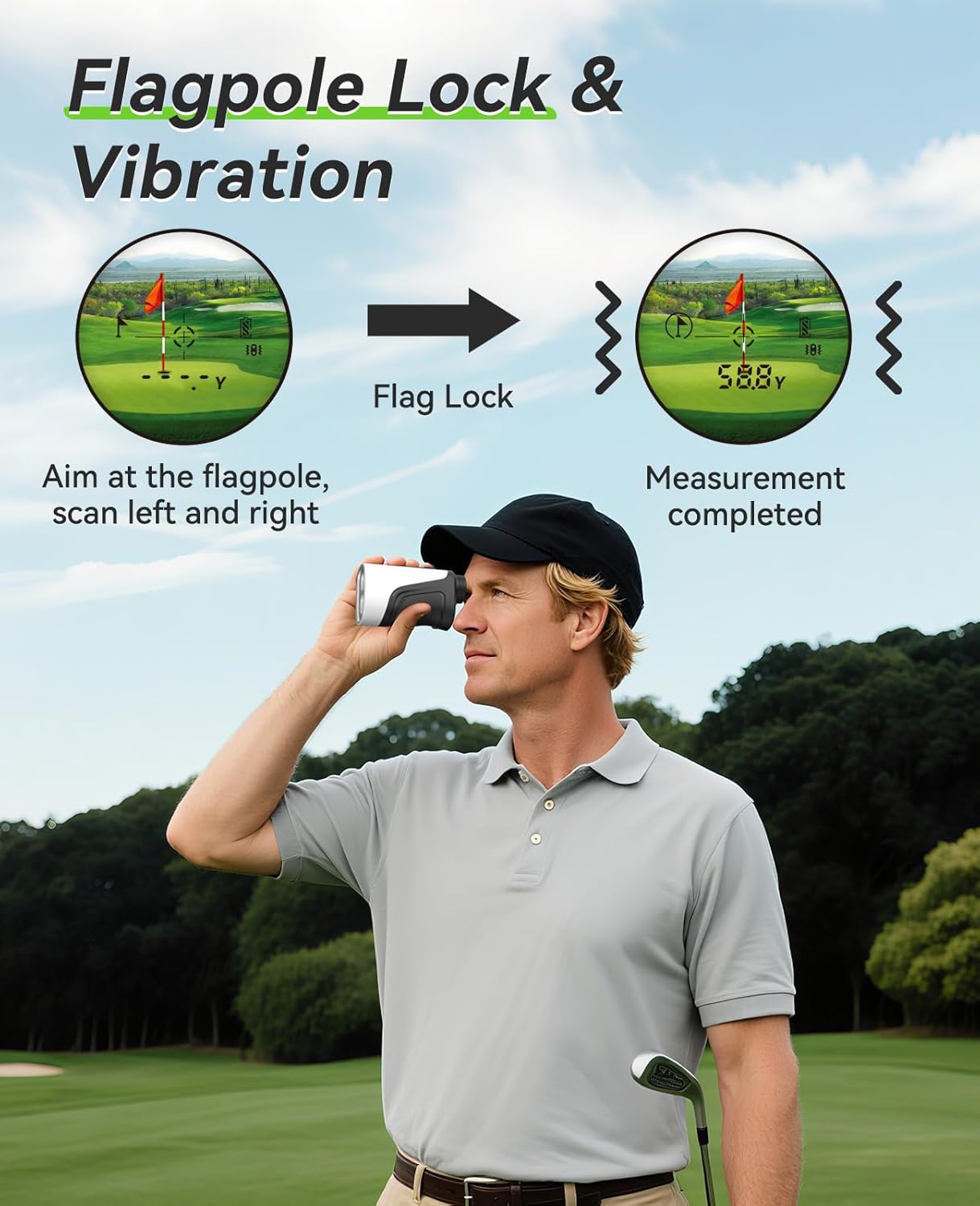
Image 5.3: Illustration of the Flag Lock feature, demonstrating how the rangefinder locks onto the flagpole and provides a vibration confirmation once the measurement is completed.
5.4 Using the Magnetic Mount
The integrated magnetic strip allows for convenient attachment to metal surfaces.
- Locate the magnetic strip on the side of the rangefinder.
- Attach the rangefinder to a golf cart frame, club, or any suitable metal surface.
- Ensure a secure attachment before releasing the device.

Image 5.4: Demonstration of the magnetic stripe feature, showing the rangefinder attached to a golf cart frame and a golf club.
6. Maintenance
6.1 Cleaning
- Use the provided cleaning cloth or a soft, lint-free cloth to gently wipe the lenses and body.
- For stubborn dirt, slightly dampen the cloth with water or a mild lens cleaning solution.
- Do not use abrasive cleaners, solvents, or harsh chemicals.
6.2 Storage
- Store the rangefinder in its carrying case when not in use to protect it from dust and impacts.
- Keep the device in a cool, dry place, away from direct sunlight and extreme temperatures.
- If storing for an extended period, ensure the battery is partially charged (around 50%) and recharge every few months to maintain battery health.
6.3 Water Resistance
The Hoorola SW-RF12 is IP54 rated for water resistance, meaning it is protected against dust ingress and splashing water from any direction. It is not designed for submersion.

Image 6.1: The Hoorola SW-RF12 rangefinder shown with water droplets, illustrating its IP54 water resistance in a golf course environment.
7. Troubleshooting
| Problem | Possible Cause | Solution |
|---|---|---|
| Device does not power on. | Low or depleted battery. | Charge the battery fully using the provided USB-C cable. |
| Inaccurate readings. | Dirty lenses; target too far or too close; unstable aiming. | Clean lenses; ensure target is within 3-1200 yard range; hold steady or use continuous scan. |
| Display is blurry. | Diopter not adjusted correctly. | Rotate the diopter adjustment ring until the display is clear. |
| Flag Lock not working. | Flagstick is too small or obscured; background too cluttered. | Ensure clear line of sight; try continuous scan mode over the flagstick. |
8. Specifications
| Feature | Detail |
|---|---|
| Model | SW-RF12 |
| Measuring Range | 3 - 1200 yards |
| Accuracy | ±0.5 yard |
| Magnification | 7x |
| Water Resistance | IP54 |
| Battery Type | Rechargeable Li-ion Polymer (750mAh) |
| Charging Time | 1.5 - 2 hours |
| Measurements per Charge | Up to 20,000 |
| Auto-Off | 15 seconds |
| Dimensions | 10.2L x 8.9W x 10.2H cm (approx. 4.1 x 3.5 x 4.1 inches) |
| Weight | 0.43 kg (approx. 15.2 oz) |
| Material | Plastic, Metal |
| UPC | 762247051558 |

Image 8.1: The Hoorola SW-RF12 rangefinder held in a hand, illustrating its compact size, alongside its carrying case attached to a golf bag.
9. Safety Information
- WARNING: Do not look directly at the sun or any bright light source through the rangefinder, as this can cause permanent eye damage.
- WARNING: This device uses an invisible laser. Avoid direct eye exposure to the laser beam.
- Keep out of reach of children.
- Do not attempt to disassemble or modify the rangefinder. This will void the warranty and could cause damage or injury.
- Avoid dropping or subjecting the device to severe impacts.
- Dispose of the battery and device according to local regulations. Do not dispose of in household waste.
10. Warranty and Support
Hoorola products are manufactured to high-quality standards. For warranty information, technical support, or service inquiries, please refer to the contact information provided with your purchase or visit the official Hoorola website. Please retain your proof of purchase for warranty claims.
Related Documents - SW-RF12
 |
REVASRI Laser Rangefinder: Multifunctional and Golf User Manual Comprehensive user manual for the REVASRI Laser Rangefinder, detailing its features, modes of operation, safety instructions, and technical specifications for hunting and golf applications. Learn how to calibrate, switch units, use various measurement modes, and maintain your device. |
 |
RedTiger Laser Rangefinder User Manual User manual for the RedTiger Laser Rangefinder, covering product introduction, functions, specifications, and customer service. Learn how to use and maintain your rangefinder for accurate golf and hunting measurements. |
 |
FOKOOS FR20 Golf Laser Rangefinder User Manual User manual for the FOKOOS FR20 Golf Laser Rangefinder, detailing technical specifications, operating modes, maintenance, safety precautions, and FCC compliance. |
 |
CaddyTalk CUBE Golf Rangefinder User Manual Comprehensive user manual for the CaddyTalk CUBE golf rangefinder, detailing features like Caddy Mode, M-Slope, E-Slope, and specifications. Learn how to use your CaddyTalk CUBE for accurate golf distance measurements. |
 |
ARTBULL LP-650 Laser Rangefinder User Manual User manual for the ARTBULL LP-650 Laser Rangefinder, detailing its features for golf and hunting, including slope adjustment, flag-lock, vibration, and rechargeable battery. Covers operation and specifications for accurate distance measurement. |
 |
Precision Pro NX10 Golf Rangefinder: Personalization, Features, and How-To Guide Explore the Precision Pro NX10 golf rangefinder, including personalization options, key features like slope adjustment, magnetic mounting, and step-by-step usage instructions. Learn about customer support and warranty. |
Ask a question about this manual
Ask about setup, troubleshooting, compatibility, parts, safety, or missing instructions. Manuals+ will review the question and use this page’s manual context to help answer it.