
Introduction
This manual provides detailed instructions for the setup, operation, and maintenance of your TANALAZ K71Pro Portable Karaoke Machine. Please read this manual thoroughly before using the product to ensure proper function and longevity. Keep this manual for future reference.
Product Overview
Components Included:
- 1 x TANALAZ K71Pro Karaoke Speaker
- 2 x Wireless Microphones
- 1 x Microphone Base/Holder
- 1 x USB-C Charging Cable
- 1 x User Manual
Key Features:
- Compact and Portable Design: Measures 3.7 x 3.14 x 3.42 inches, weighing 0.65 lbs, with a hand strap for easy transport.
- Dual Wireless Microphones: Allows for duet singing with 5 voice-changing effects (original, female, male, monster, baby voice).
- Integrated Microphone Base: Provides organized storage and prevents microphones from falling. Compatible with TANALAZ K8, K21, K32, K79 microphones.
- Bluetooth 5.3 Connectivity: Ensures stable and long-distance wireless transmission for audio streaming from smartphones, tablets, and computers.
- Multi-functional Speaker: Can be used as a standalone Bluetooth speaker.
- Vibrant LED Party Lights: Dynamic color-changing lights integrated into the speaker to enhance the user experience.
- Multiple Playback Options: Supports Bluetooth, AUX input, and TF Card (MicroSD card, not included) for versatile audio sources.
- Long Battery Life: Built-in 1200mAh battery provides 4-6 hours of continuous use.
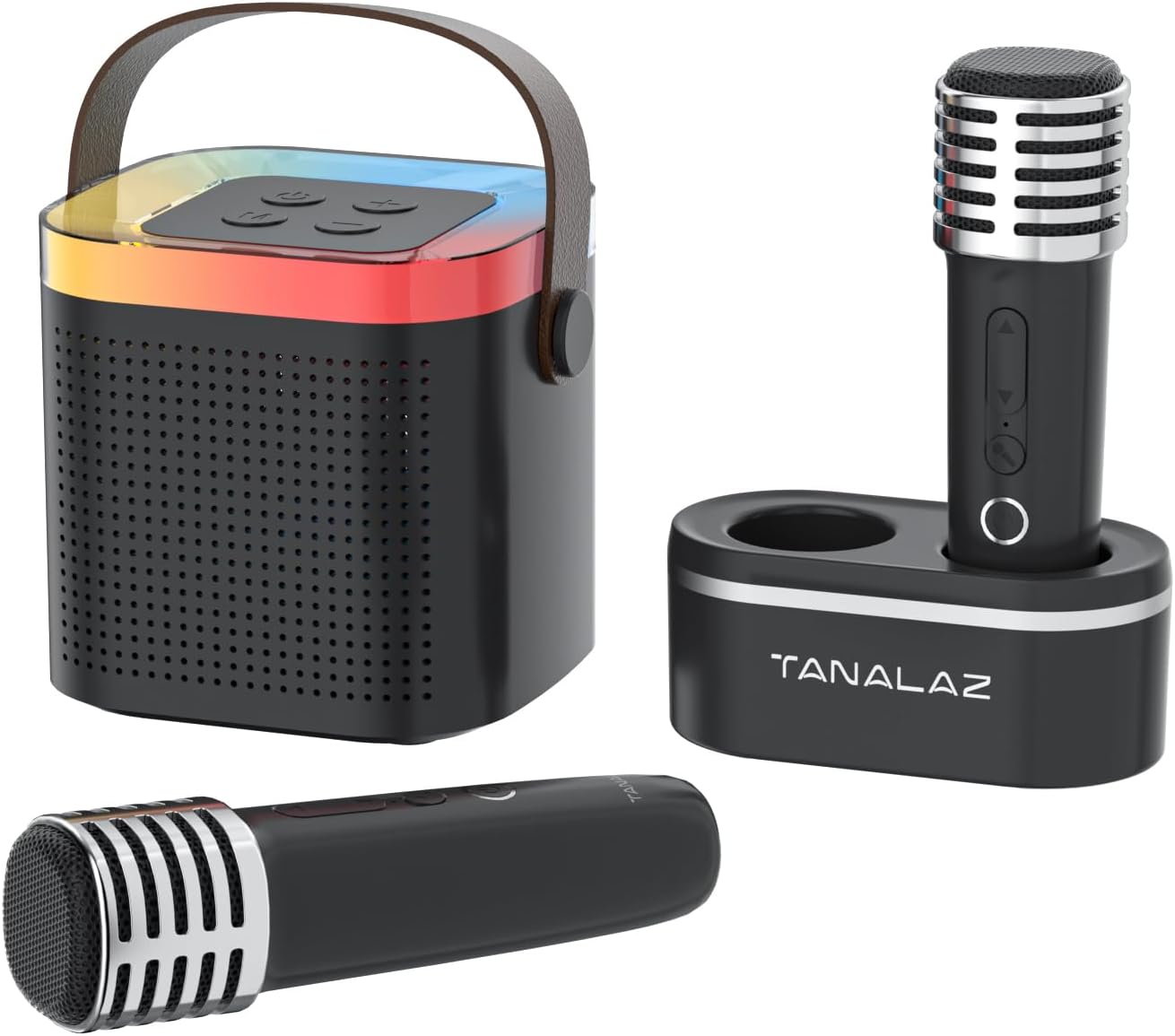
Image: The TANALAZ K71Pro karaoke machine, featuring the main speaker unit, two wireless microphones, and a dedicated microphone base for storage.

Image: An exploded view illustrating the internal speaker components of the TANALAZ K71Pro, alongside the two wireless microphones and their base.
Setup
- Charging the Devices:
- Connect the provided USB-C charging cable to the charging port on the karaoke speaker and a suitable USB power adapter (not included).
- Connect the USB-C charging cable to the charging ports on each wireless microphone and a suitable USB power adapter.
- The charging indicator lights will illuminate during charging and turn off or change color when fully charged. Allow sufficient time for a full charge before first use.
- Powering On:
- Press and hold the power button on the karaoke speaker until you hear a power-on prompt and the LED lights activate.
- Press and hold the power button on each wireless microphone until they power on.
- Bluetooth Pairing:
- Ensure the karaoke speaker is powered on and in Bluetooth pairing mode (usually indicated by a flashing LED light).
- On your smartphone, tablet, or other Bluetooth-enabled device, navigate to the Bluetooth settings.
- Search for "K71Pro" (or similar name) in the list of available devices and select it to pair.
- Once paired, you will hear a confirmation sound from the speaker.

Image: The TANALAZ K71Pro speaker demonstrating its wide compatibility and Bluetooth 5.3 connection with a laptop, tablet, and smartphone.
Operation
Speaker Controls:
- Power Button: Press and hold to turn on/off. Short press to play/pause music.
- Volume Buttons (+/-): Short press to adjust speaker volume.
- Mode Button: Press to switch between Bluetooth, AUX, and TF Card modes.
- LED Lights: The speaker features integrated LED lights that change color automatically.
Microphone Controls:
- Power Button: Press and hold to turn on/off.
- Volume/Echo Buttons: Use to adjust microphone volume and echo effect.
- Voice Changer Button: Short press to cycle through 5 voice effects:
- Original Voice
- Female Voice
- Male Voice
- Monster Voice
- Baby Voice

Image: The two wireless microphones highlighting the five available voice-changing effects for enhanced entertainment.
Connecting via AUX/TF Card:
- AUX Input: Connect an audio device using a 3.5mm AUX cable (not included) to the AUX port on the speaker. Switch the speaker to AUX mode.
- TF Card: Insert a TF (MicroSD) card (not included) with pre-loaded music into the TF card slot on the speaker. Switch the speaker to TF Card mode.
Maintenance
- Cleaning: Use a soft, dry cloth to clean the surface of the speaker and microphones. Do not use liquid cleaners or abrasive materials.
- Storage: Store the device in a cool, dry place away from direct sunlight and extreme temperatures. Use the microphone base to store microphones securely.
- Battery Care: To prolong battery life, avoid fully discharging the device frequently. Charge the device regularly, even if not in use for extended periods.
- Water Exposure: This device is not waterproof. Avoid exposure to water or high humidity.
Troubleshooting
| Problem | Possible Cause | Solution |
|---|---|---|
| No power/Device won't turn on | Low battery or device is off. | Charge the speaker and microphones fully. Press and hold the power button to turn on. |
| Cannot pair via Bluetooth | Bluetooth not enabled, device too far, or already paired to another device. | Ensure Bluetooth is enabled on your device. Move closer to the speaker. Disconnect from other devices and try pairing again. |
| No sound from speaker | Volume too low, incorrect mode, or device not connected. | Increase speaker volume. Ensure correct mode (Bluetooth, AUX, TF Card) is selected. Verify successful Bluetooth pairing or cable connection. |
| Microphone not working | Microphone off, low battery, or volume too low. | Turn on the microphone. Charge the microphone. Increase microphone volume. |
| Voice changer not working | Incorrect button press. | Ensure you are short-pressing the voice changer button to cycle through effects. |
Specifications
- Model Number: K71Pro
- Brand: TANALAZ
- Dimensions: 3.7 x 3.14 x 3.42 inches (Speaker)
- Weight: 0.65 lbs (Speaker)
- Connectivity: Bluetooth 5.3, AUX, TF Card
- Speaker Count: 1
- Battery Capacity: 1200mAh (Speaker)
- Battery Life: 4-6 hours (Speaker)
- Charging Port: USB Type C
- Compatible Devices: Smartphones, Tablets, Laptops, Televisions
- Included Components: Speaker, 2 Wireless Microphones, Microphone Base, USB-C Cable, User Manual

Image: Detailed dimensions of the TANALAZ K71Pro karaoke speaker and wireless microphone.
Warranty and Support
For warranty information and customer support, please refer to the contact details provided with your purchase or visit the official TANALAZ website. Keep your purchase receipt as proof of purchase for any warranty claims.
For further assistance, please contact TANALAZ customer service.