
Della 048-OPAC-9HB
DELLA 14,000 BTU Portable Air Conditioner User Manual
Model: 048-OPAC-9HB | Brand: Della
1. Introduction and Safety Information
Thank you for choosing the DELLA 14,000 BTU Portable Air Conditioner. This manual provides important information for the proper installation, operation, and maintenance of your unit. Please read it thoroughly before use and keep it for future reference.
Important Safety Instructions:
- Always connect the unit to a grounded 115 Volt, 60 Hz power outlet.
- Do not operate the unit with a damaged cord or plug.
- Ensure the unit is placed on a flat, stable surface to prevent tipping.
- Maintain adequate clearance around the unit for proper airflow.
- Do not block air inlets or outlets.
- Unplug the unit before cleaning or performing any maintenance.
- Keep children and pets away from the unit during operation.
2. Product Overview
The DELLA 14,000 BTU Portable Air Conditioner is a versatile 4-in-1 unit offering cooling, heating, fan, and dehumidification functions. It is designed to provide comfort in rooms up to 400 square feet.

Figure 2.1: The DELLA 14,000 BTU Portable Air Conditioner, shown with its remote control and a smartphone displaying the Della+ app interface.
Key Features:
- Cooling Capacity: 14,000 BTU ASHRAE (9,800 BTU SACC) for effective cooling.
- Heating Capacity: 11,669 BTU for supplemental heating.
- Coverage Area: Cools or heats rooms up to 400 sq.ft.
- Dehumidifier: Removes up to 68 pints of moisture per day.
- Quiet Operation: Operates at a low noise level of 49 dB(A).
- Smart Control: Compatible with Alexa and WiFi via the Della+ app for remote control and Geo Fencing.
- Fan Speeds: Three adjustable fan speeds.
- Auto Swing: Automatic air swing for even distribution.
- Portability: Equipped with casters and side handles for easy movement.
- Filter: Removable and washable double-layer filter.
3. Setup
3.1 Unpacking
Carefully remove the air conditioner from its packaging. Retain the original packaging materials for future storage or transport. Ensure all components are present: the portable air conditioner unit, remote control, and window kit.
3.2 Window Kit Installation
The adjustable 3-section sealing board adapts to both horizontal and vertical windows, ensuring a snug fit and maximum efficiency.
- Connect the exhaust hose to the back of the air conditioner unit.
- Remove the cap from the window vent kit and connect it to the exhaust hose.
- Install the sealing board into your window frame, adjusting its length to fit securely.

Figure 3.1: Damage-free installation steps for the exhaust hose and window kit. Step 1: Slide hose into the back of the AC unit. Step 2: Attach exhaust hose to sealing board port. Step 3: Install sealing board to window frame.
3.3 Unit Placement
Place the unit near a window for exhaust hose ventilation. Ensure there is at least 20 inches of space around the unit for proper air circulation. The unit's compact size (17.3 x 13.2 x 26.2 inches) and casters allow for flexible placement.
4. Operating Instructions
4.1 Control Panel
The unit features a top-mounted LED display control panel with soft-touch controls for easy operation.
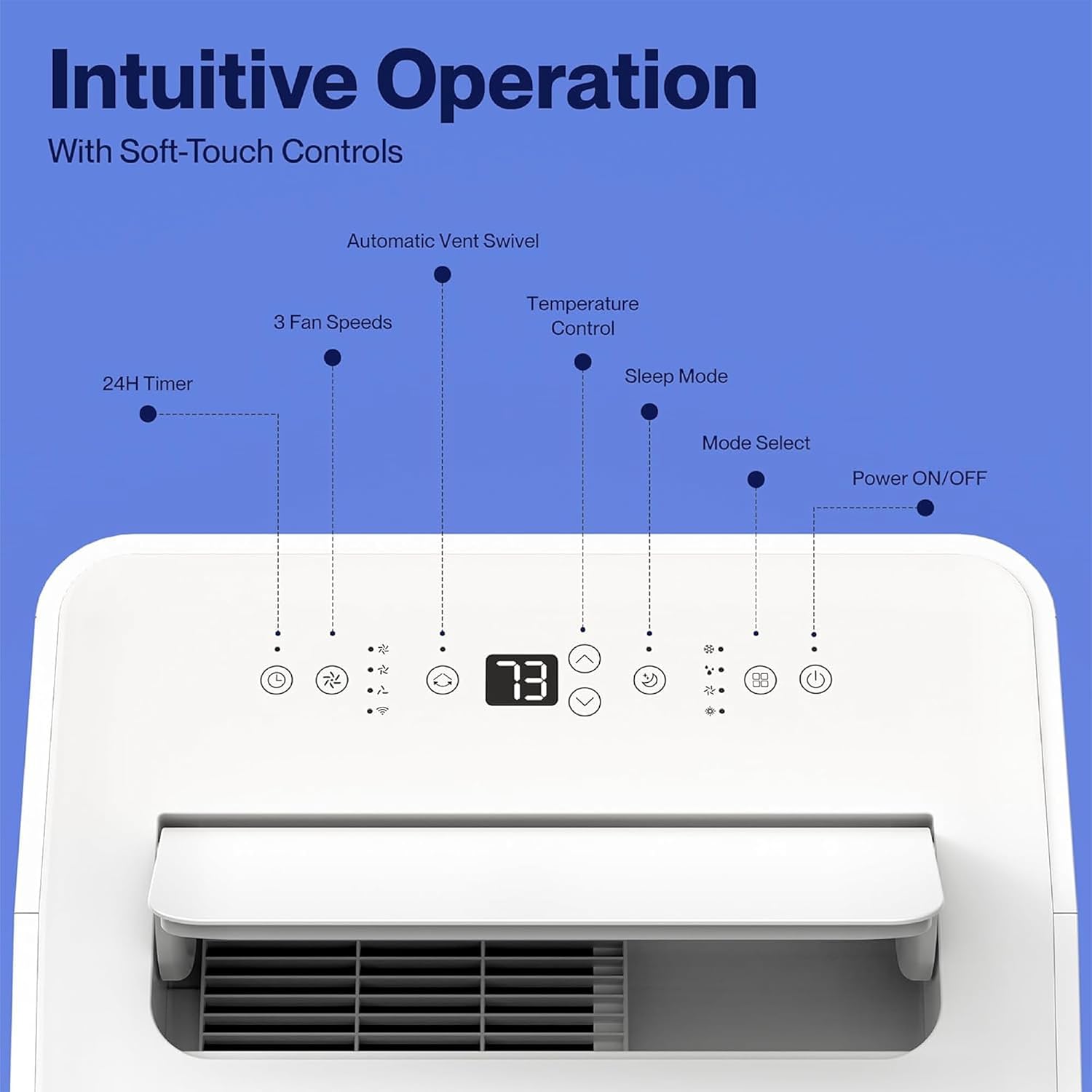
Figure 4.1: The control panel features buttons for Power ON/OFF, Mode Select, Sleep Mode, Temperature Control, 3 Fan Speeds, 24H Timer, and Automatic Vent Swivel.
4.2 Remote Control
A remote control is included for convenient operation from a distance.
4.3 Della+ App & WiFi Connectivity
Control your unit from anywhere using the free Della+ app on your smartphone. The unit is compatible with Alexa and Google Assistant.
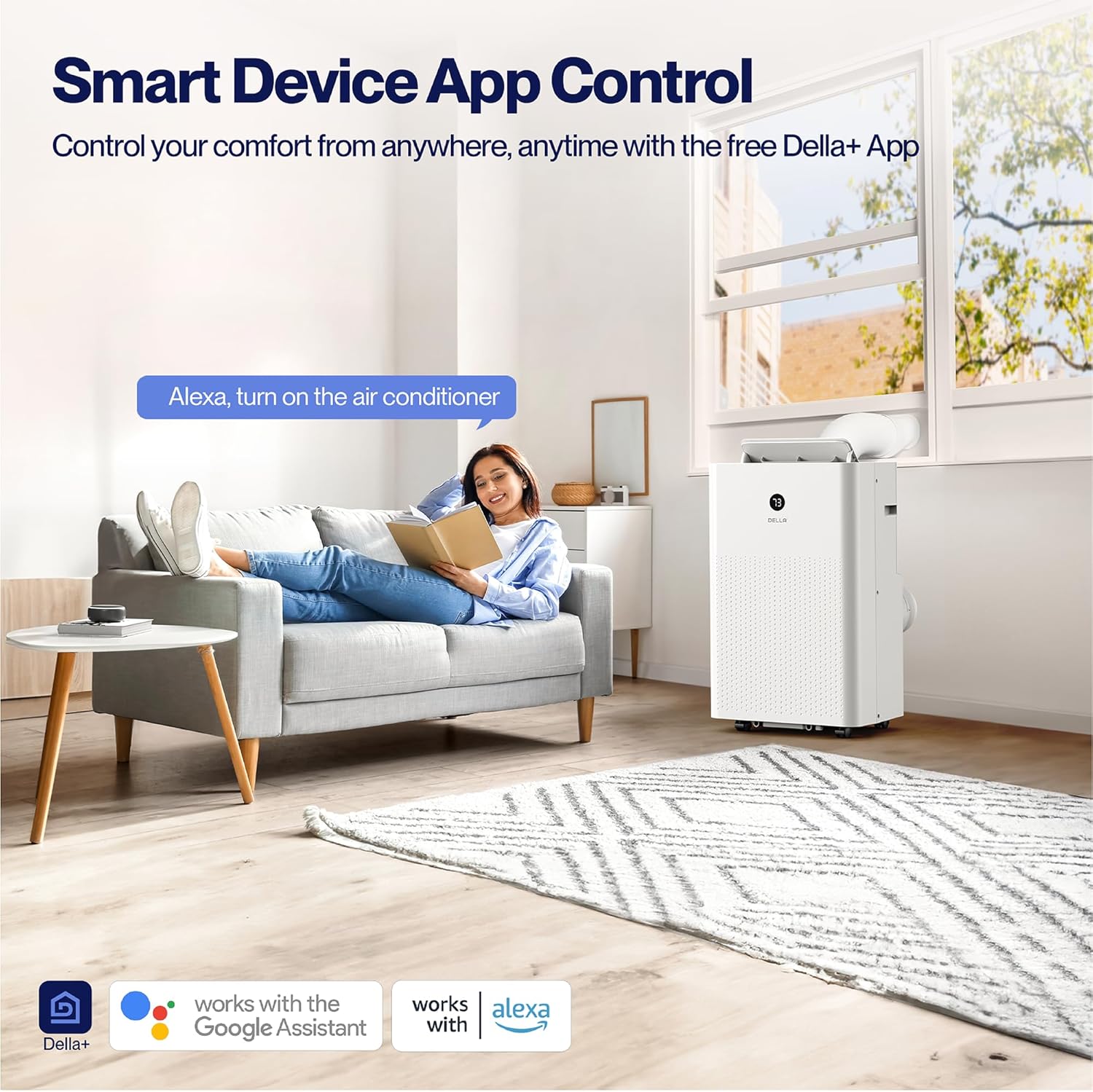
Figure 4.2: Smart Device App Control allows you to manage your unit's settings remotely.
Geo Fencing Function:
Utilize the Geo Fencing feature to automatically activate or deactivate the unit based on your mobile device's location. This allows the AC to turn on as you approach home, ensuring a comfortable environment upon arrival.
Video 4.1: This video demonstrates how to set up and customize the Geo Location function using the Della+ app, allowing the unit to activate based on your proximity to a preset location.
4.4 Operating Modes
The unit offers four primary operating modes:
- Cool Mode: Provides cooling with an adjustable temperature range of 61°F (16°C) to 90°F (32°C).
- Heat Mode: Utilizes a built-in heat pump to warm your space quickly and efficiently.
- Fan Mode: Circulates air with three adjustable fan speeds.
- Dry Mode (Dehumidifier): Removes excess moisture from the air, up to 68 pints/day.
4.5 Timer and Sleep Mode
- 24-Hour Timer: Program the unit to turn on or off automatically within a 24-hour period.
- Sleep Mode: Optimizes settings for quiet and energy-efficient operation during sleep.
5. Maintenance
5.1 Filter Cleaning
The unit features a removable and washable double-layer filter. Regular cleaning is essential for optimal performance and air quality.
- Unplug the air conditioner from the power outlet.
- Locate and remove the filter from the unit.
- Wash the filter with warm, soapy water. Rinse thoroughly.
- Allow the filter to air dry completely before reinserting it into the unit.
5.2 Water Disposal
The unit is designed with a self-evaporate system, which minimizes the need for frequent drainage. However, manual drainage may be required, especially in high humidity conditions.

Figure 5.1: Easy water disposal options include the self-evaporate system, a water full indicator, and manual drainage ports.
- When the water full indicator illuminates, the unit will stop operating.
- Locate the drainage port at the bottom of the unit.
- Place a shallow pan or connect a drain hose (not included) to the port.
- Remove the drain plug to allow water to flow out.
- Replace the drain plug securely once drainage is complete.
5.3 Storage
Before storing the unit for an extended period, ensure it is completely drained of water and the filter is clean and dry. Store in a cool, dry place, preferably in its original packaging.
6. Troubleshooting
If you encounter issues with your DELLA portable air conditioner, refer to the table below for common problems and solutions.
| Problem | Possible Cause | Solution |
|---|---|---|
| Unit does not turn on | No power supply; Power cord unplugged; Water tank full. | Check power connection; Plug in securely; Drain water tank. |
| Unit does not cool/heat effectively | Air filter dirty; Exhaust hose blocked/disconnected; Room too large; Doors/windows open. | Clean air filter; Check hose connection/clearance; Ensure room size is within capacity; Close doors/windows. |
| Unit is noisy | Unit not on a flat surface; Air filter dirty; Obstruction in fan. | Place on a level surface; Clean air filter; Check for obstructions. |
| Water leakage | Drain plug loose; Unit tilted; Drain hose not properly connected. | Secure drain plug; Ensure unit is level; Check drain hose connection. |
7. Specifications
| Attribute | Detail |
|---|---|
| Model Number | 048-OPAC-9HB |
| Cooling Capacity (ASHRAE) | 14,000 BTU |
| Cooling Capacity (SACC) | 9,800 BTU |
| Heating Capacity | 11,669 BTU |
| Coverage Area | Up to 400 sq.ft. |
| Dehumidifier Capacity | 68 pints/day |
| Noise Level | 49 dB(A) |
| Dimensions (L x W x H) | 17.3 x 13.2 x 26.2 inches |
| Weight | 63.9 pounds |
| Voltage | 115 Volts |
| Power Cord Length | 70.8 inches |
| Exhaust Hose Length | 47 inches |
8. Warranty and Support
Warranty Information:
This DELLA Portable Air Conditioner comes with a 1-Year Warranty from the date of purchase. Please retain your proof of purchase for warranty claims.
Customer Support:
For any questions, technical assistance, or warranty inquiries, please contact Della Customer Support. 24/7 Customer Support is available to assist you.
Visit the Della Store for more information and product resources.
Related documents048-OPAC-9HB


Ask a question about this manual
Ask about setup, troubleshooting, compatibility, parts, safety, or missing instructions. Manuals+ will review the question and use this page’s manual context to help answer it.