
Della TL-9K1VB-19S-I+O
DELLA Vario Series 9000 BTU Mini Split Air Conditioner User Manual
Model: TL-9K1VB-19S-I+O
1. Introduction
This user manual provides detailed instructions for the installation, operation, and maintenance of your DELLA Vario Series 9000 BTU Mini Split Air Conditioner. Please read this manual thoroughly before installation and use to ensure proper function and safety. Keep this manual for future reference.
2. Safety Information
Always adhere to local and national electrical codes. Professional installation is mandatory for this system. Do not attempt to install or service the unit yourself unless you are a qualified technician. Disconnect power before performing any maintenance or cleaning.
- Ensure proper grounding to prevent electrical shock.
- Do not block air inlets or outlets.
- Keep children and pets away from the outdoor unit.
- If unusual sounds, smells, or smoke occur, immediately turn off the unit and disconnect power. Contact qualified service personnel.
3. What's in the Box
Verify that all components are present before beginning installation:
- 1 x Mini-Split Air Conditioner (Indoor Unit)
- 1 x Mini-Split Air Conditioner (Outdoor Unit)
- Remote Control
- Installation Kit (Standard size 1/4" & 3/8" outer dimension copper pipes, drain pipe, wall sleeve, plasticine putty, screws, anchors, bracket template)
- User Manual (this document)

Image: All components included in the DELLA Vario Series Mini Split Air Conditioner package, including indoor unit, outdoor unit, remote control, and various installation accessories.
4. Setup and Installation
This DELLA Mini Split AC system requires professional installation. It is not designed for DIY installation. Line-set vacuuming is required during installation. Any alteration of line-set length requires adjusting freon levels. Consult a certified HVAC technician for proper installation to ensure optimal performance and to maintain warranty validity.
4.1 Pre-Installation Checks
- Ensure the installation area meets space and electrical requirements.
- Verify power supply (115V) and maximum fuse size (25A).
- Confirm proper drainage for the indoor unit.
4.2 Unit Dimensions

Image: Detailed dimensions for both the indoor and outdoor units of the DELLA Vario Series Mini Split Air Conditioner, including length, width, and height measurements.
5. Operating Instructions
Your DELLA Vario Series Mini Split Air Conditioner offers multiple modes and smart features for optimal comfort and energy efficiency.
5.1 Remote Control Functions
The included remote control allows full command over your unit. Familiarize yourself with its buttons and their functions:
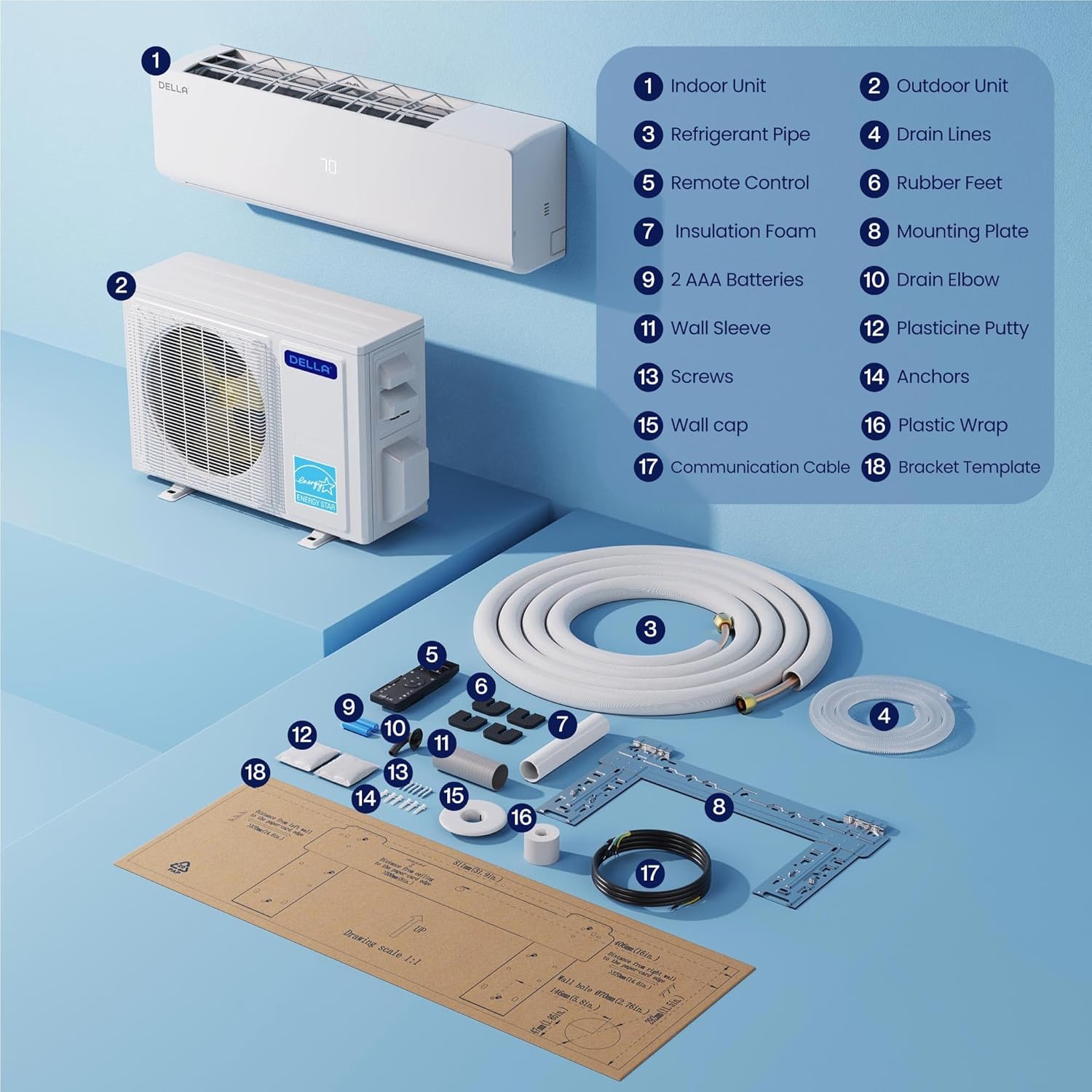
Image: A detailed diagram of the DELLA Mini Split remote control, highlighting various buttons and their corresponding functions such as mode selection, fan speed, temperature adjustment, and special features.
- On/Off: Powers the unit on or off.
- Mode: Cycles through Cool, Heat, Dry (Dehumidify), Fan Only, and Auto modes.
- Temperature Up/Down: Adjusts the desired temperature.
- Fan Speed: Selects fan speed (Quiet, Low, Mid Low, Mid, Mid High, High, Turbo).
- Airflow (Swing): Controls vertical and horizontal louver movement for optimal air distribution.
- I Feel Mode: Senses room temperature at the remote control for precise comfort.
- Sleep Mode: Adjusts temperature and fan speed for comfortable sleep and energy saving.
- Timer: Sets a specific time for the unit to turn on or off.
- ECO Mode: Optimizes operation for maximum energy efficiency.
5.2 Smart App Control (Della+ App)
Control your DELLA Mini Split from anywhere using the Della+ app, compatible with Google Assistant and Alexa. The app provides advanced features including scheduling, geo-location, and detailed control over modes and settings.
Video: Demonstration of the Della+ mobile application interface, showcasing features like mode selection, fan speed adjustment, airflow control, scheduling, and timer settings for the mini split air conditioner.
- Remote Control: Adjust settings from your smartphone.
- Scheduling: Program daily or weekly operation schedules.
- Geo-Location: Automatically adjust settings based on your proximity to home.
- Voice Control: Integrate with Alexa or Google Assistant for hands-free operation.

Image: Screenshots of the Della+ app showing various control screens, including temperature setting, mode selection, timer functions, and smart home integration options.
6. Maintenance
Regular maintenance ensures the longevity and efficient operation of your DELLA Mini Split Air Conditioner.
6.1 Filter Cleaning
Clean the air filters regularly (every 2-4 weeks, depending on usage) to maintain air quality and efficiency. Refer to the detailed instructions in the full user manual (PDF) for filter removal and cleaning procedures.
6.2 Outdoor Unit Cleaning
Keep the outdoor unit clear of debris, leaves, and other obstructions. Periodically clean the coils with a soft brush or vacuum cleaner. Ensure proper drainage from the outdoor unit.
6.3 Self-Clean Function
The unit features a PureClean tech self-clean function that stops dust buildup and defrosts the indoor unit, keeping your air fresher with advanced sterilization. Activate this function via the remote control or Della+ app as needed.
7. Troubleshooting
Before contacting customer support, review the following common issues and solutions:
| Problem | Possible Cause | Solution |
|---|---|---|
| Unit does not turn on. | No power, tripped circuit breaker, remote control batteries dead. | Check power supply, reset circuit breaker, replace remote control batteries. |
| Insufficient cooling/heating. | Dirty air filters, blocked outdoor unit, incorrect mode/temperature setting, low refrigerant. | Clean filters, clear obstructions, verify settings, contact technician for refrigerant check. |
| Unusual noise. | Loose parts, fan obstruction, normal operating sounds (e.g., refrigerant flow). | Inspect for loose parts, clear obstructions. If persistent or loud, contact technician. |
For issues not listed here or if solutions do not resolve the problem, please contact DELLA customer support.
8. Specifications
| Feature | Detail |
|---|---|
| Brand Name | Della |
| Model Number | TL-9K1VB-19S-I+O |
| Cooling Capacity | 9000 BTU/h |
| Heating Capacity | 10000 BTU/h |
| SEER2 Rating | 19 SEER2 |
| Power Supply | 115V / 60Hz / 1PH |
| Max Input Power | 750 watts |
| Item Weight | 19.8 pounds (Indoor Unit) |
| Product Dimensions (Indoor) | 31.94 x 8 x 11.5 inches |
| Coverage Area | Up to 400 Sq. Ft |
| Noise Level | Ultra silent at only 28 dBa |
| Special Features | Dehumidifier, Fast Cooling, Remote Control, WiFi Enabled, 4D Air Flow, I Feel Mode, 24 Hour Timer, Sleep Mode, ECO Energy Saving Mode, Multiple Fan Speeds, Turbo Function, PureClean Tech |
9. Warranty and Support
DELLA offers a limited lifetime warranty for this product, ensuring unmatched support and peace of mind. For any inquiries or technical assistance, please contact DELLA customer support.
- Customer Support: Available for technical assistance.
- Returns: 30-day easy returns policy.

Image: Graphic illustrating DELLA's lifetime coverage, highlighting best-in-class support and no additional costs.
For more detailed information, please refer to the official User Manual (PDF).
Related documentsTL-9K1VB-19S-I+O


Ask a question about this manual
Ask about setup, troubleshooting, compatibility, parts, safety, or missing instructions. Manuals+ will review the question and use this page’s manual context to help answer it.