
1. Product Overview
The MENERESAS 3-in-1 Mini Wireless Lavalier Microphone system provides high-quality audio recording for various devices. Designed for ease of use, it features automatic pairing, multiple audio modes, and broad compatibility.
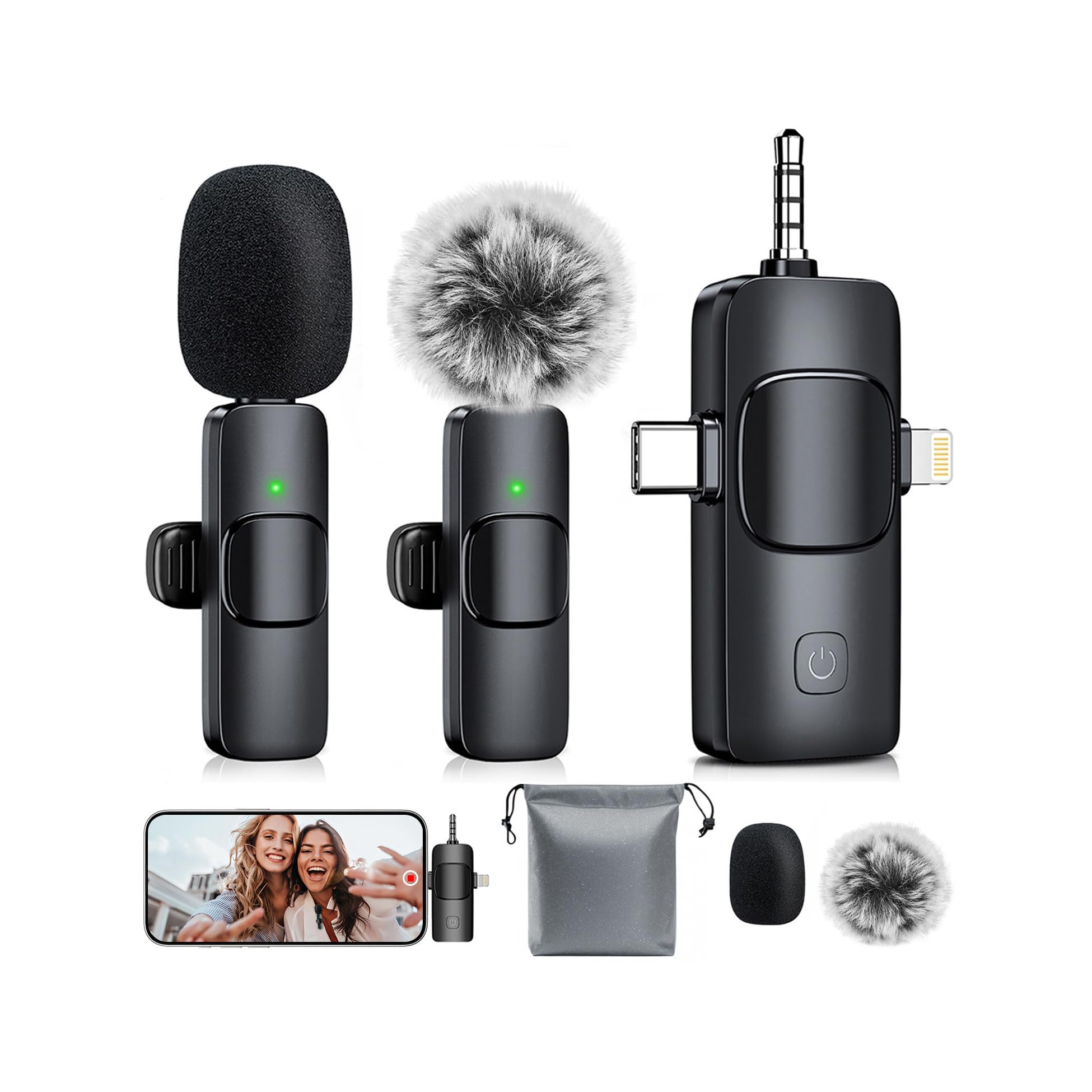
Image: The MENERESAS 3-in-1 Mini Wireless Lavalier Microphone system, showing the receiver and two microphones.
Key Features:
- Plug and Play: No application or Bluetooth pairing is required. Simply connect the receiver to your device, power on the microphones, and they will automatically pair.
- Multi-Mode Switching: Features three intelligent audio modes: default noise canceling, mute mode (double-click), and reverb mode (triple-click) for adaptable recording.
- Real-Time Audio Monitoring: Connect Type-C headphones to the receiver to monitor audio input in real-time.
- Comprehensive Accessories: Includes replaceable sponge heads, windproof fur ball covers, clips, a waterproof storage bag, and a Type-C charging cable.
- Wide Compatibility: The 3-in-1 universal receiver supports Android smartphones, iPhones (including iPhone 16), iPads, laptops, PCs, and cameras.

Image: A visual representation of the microphone's wide compatibility with phones (iOS/Android), tablets, laptops, and cameras.
2. Setup Instructions
Follow these steps to set up your MENERESAS wireless microphone system:
- Charge Devices: Ensure both the wireless microphones and the receiver are fully charged using the provided Type-C charging cable.
- Identify Receiver Connector: The universal receiver features multiple connectors. Select the appropriate connector for your device: Lightning for iOS devices, Type-C for Android/other devices, or the 3.5mm jack for cameras/PCs.
- Connect Receiver: Plug the receiver firmly into your recording device's port.
- Power On Microphones: Press and hold the power button on each microphone for approximately 3 seconds until the indicator light illuminates.
- Automatic Pairing: The microphones and receiver will automatically pair. A solid green light on the microphone typically indicates a successful connection.
- Attach Microphone: Clip the microphone securely to your clothing, ensuring it is positioned close to your mouth for optimal sound capture.
- (Optional) Add Wind Protection: For outdoor use or to reduce plosives, attach a windproof fur ball cover or a sponge head to the microphone.
- (Optional) Real-Time Monitoring: If real-time audio monitoring is desired, plug Type-C headphones into the designated port on the receiver.

Image: Step-by-step visual guide for connecting the receiver and powering on the microphones for automatic pairing.
3. Operating Instructions
Once set up, operate your microphone system as follows:
- Start Recording: Open your preferred recording application (e.g., camera app, voice recorder, streaming software) on your device and begin recording. The microphone audio will be captured automatically.
- Switch Audio Modes:
- Default Mode: Noise Canceling is active by default, reducing environmental sounds.
- Mute Mode: Double-click the power button on the microphone to mute the audio input. Double-click again to unmute.
- Reverb Mode: Triple-click the power button on the microphone to activate reverb effects. Triple-click again to deactivate.
- Real-Time Monitoring: If headphones are connected to the receiver, you will hear the audio being recorded in real-time. Adjust microphone position or speaking volume as needed based on monitoring feedback.
- Dual Microphone Use: Both included microphones can be used simultaneously for recording two separate audio sources.
- Charging During Use: The microphones and receiver can be charged while in operation, ensuring continuous recording for extended sessions.

Image: Demonstrates the three audio modes (Noise Cancellation, Reverb, Mute) and their applications.

Image: Shows two individuals using separate microphones connected to a single receiver, with one person monitoring audio via headphones.
Video: Official product video demonstrating the features and usage of the MENERESAS 3-in-1 Mini Microphone for iPhone.
Video: Official product video showcasing an updated version of the MENERESAS 3-in-1 Mini Microphone for iPhone.
4. Maintenance
Proper maintenance ensures the longevity and optimal performance of your microphone system:
- Cleaning: Use a soft, dry cloth to wipe the microphones and receiver. Avoid using liquids or abrasive cleaners.
- Storage: Store the microphone system in the provided waterproof storage bag when not in use to protect it from dust and moisture.
- Accessory Replacement: Replace the sponge heads or windproof fur ball covers if they become worn or damaged to maintain sound quality and protection.
- Battery Care: Charge the devices regularly, even if not in frequent use, to preserve battery health. Avoid fully depleting the battery for extended periods.
5. Troubleshooting
If you encounter issues, refer to the following common solutions:
| Problem | Possible Cause | Solution |
|---|---|---|
| Microphone not pairing | Microphone or receiver not powered on; low battery; connection issue. | Ensure both microphone(s) and receiver are powered on. Check battery levels and charge if necessary. Unplug and replug the receiver. |
| No sound recorded | Microphone muted; receiver not fully connected; incorrect device audio input settings. | Double-click the microphone power button to toggle mute. Ensure the receiver is fully and correctly plugged into your device. Verify your device's audio input settings. |
| Poor sound quality (e.g., muffled, static, wind noise) | Microphone too far from source; no wind protection; environmental interference; obstructions. | Position the microphone closer to the sound source. Use the windproof fur ball cover for outdoor recording. Ensure no physical obstructions between mic and receiver. Reduce environmental noise if possible. |
| Short battery life | Incomplete charging; frequent use of dual microphones; extreme temperatures. | Ensure devices are fully charged before use. Note that using two microphones simultaneously consumes more power. Avoid using or storing in extreme hot or cold conditions. |
6. Specifications
Detailed technical specifications for the MENERESAS 3-in-1 Mini Wireless Lavalier Microphone:
- Brand: MENERESAS
- Model Name: AG01
- Model Number: K15
- Connectivity Technology: Wireless (2.4 GHz transmission)
- Connector Type: 3.5 mm Jack, Lightning, Type-C (Universal 3-in-1 Receiver)
- Special Features: 1-Touch Recording, Noise Reduction, Real-time Monitoring, Multi-mode Switching (Noise Canceling, Mute, Reverb)
- Compatible Devices: Camera, Laptop, Smartphone (iOS/Android), PC, iPad
- Color: Abyssal black
- Included Components: Microphone receiver, Mini microphone (x2), Noise reduction covers (sponge heads x2), Storage bag, Windproof fur ball covers (x2), Type-C charging cable
- Polar Pattern: Omnidirectional
- Microphone Form Factor: Mini (Clip-on)
- Power Source: Battery Powered
- Number of Batteries: 3 Nonstandard Battery batteries required (typically 2 for mics, 1 for receiver)
- Hardware Platform: Camera, PC, Smartphone
- Number of Channels: 1
- Enclosure Material: Metal, Plastic
- Item Weight: 0.08 Kilograms
- Wireless Transmission Range: Up to 82 feet (25 meters)
- Battery Life: Up to 10 hours (single microphone use), up to 5 hours (dual microphone use)
- Charging Time: Less than 1.5 hours

Image: Visual details on battery life (10 hours for single mic) and charging duration (1.5 hours).

Image: Illustrates the wireless transmission range of 82 feet (25 meters).
7. Warranty & Support
Warranty Information:
This product comes with a limited warranty. For specific details regarding warranty coverage, duration, and terms, please refer to the documentation included with your purchase or contact MENERESAS customer service directly.
Customer Support:
For technical assistance, troubleshooting guidance, or any other inquiries regarding your MENERESAS 3-in-1 Mini Wireless Lavalier Microphone, please contact MENERESAS customer support. You can typically find contact information on the product packaging, the official MENERESAS website, or through your retailer.
